
1. Úvod
The Focal Theva N°3-D is a high-fidelity 3-way floorstanding loudspeaker designed for home cinema systems. It features Dolby Atmos® compatibility, achieved through a dedicated speaker driver positioned on the top of the cabinet. This driver reflects sound waves off the ceiling to create immersive 3D audio effects. This manual provides essential information for the proper setup, operation, and maintenance of your Theva N°3-D loudspeaker.
2. Bezpečnostné pokyny
Please read these safety instructions carefully before using your loudspeaker. Keep this manual for future reference.
- umiestnenie: Ensure the loudspeaker is placed on a stable, level surface to prevent tipping. Avoid placing it in direct sunlight, near heat sources, or in areas with high humidity.
- Vetranie: Do not block any ventilation openings. Allow adequate space around the loudspeaker for proper airflow.
- Výkon: Pripojte reproduktor k amplifier with appropriate power ratings. Exceeding recommended power can damage the speaker.
- Čistenie: Disconnect the loudspeaker from the ampPred čistením vysávač dôkladne očistite. Použite mäkkú, suchú handričku. Nepoužívajte tekuté čistiace prostriedky ani aerosóly.
- servis: Do not attempt to service the loudspeaker yourself. Refer all servicing to qualified service personnel.
- deti: Uchovávajte obalové materiály a malé časti mimo dosahu detí, aby ste predišli nebezpečenstvu udusenia.
3. Obsah balenia
Skontrolujte, či sú v balení všetky komponenty:
- Focal Theva N°3-D Floorstanding Loudspeaker (Model: FTHEVAN3LW-D)
- Mriežka (predinštalovaná alebo samostatná)
- Používateľská príručka (tento dokument)
Ak nejaké položky chýbajú alebo sú poškodené, kontaktujte svojho predajcu.
4. Produkt skončilview
The Theva N°3-D loudspeaker incorporates advanced technologies for superior audio performance and immersive sound.
Kľúčové vlastnosti:
- 3-way floorstanding design, Dolby Atmos® compatible.
- Full-range speaker driver with directional baffle for precise Dolby Atmos® effects.
- Slatefiber technology for immersive and dynamic home cinema sound.
- TNF Tweeter for mellow treble reproduction.
- Time Alignment design for a focused sound image.
Komponenty:
- Dolby Atmos® Driver: Located on the top, designed to reflect sound off the ceiling.
- TNF Tweeter: Aluminum/Magnesium inverted dome tweeter for high frequencies.
- Stredný ovládač: 6.5-inch (16.5cm) Slatefiber cone for balanced and precise mid-range.
- Basové reproduktory: Two 6.5-inch (16.5cm) Slatefiber cone woofers for powerful bass.
- Tilted Stand: Integrated stand for optimal Time Alignment.

Figure 1: Focal Theva N°3-D Product Sheet illustrating key components and features. This diagram shows the internal structure, driver types (TNF Tweeter, Slatefiber midrange, Slatefiber woofers), and the top-mounted Dolby Atmos driver with its directional baffle.

Obrázok 2: Detailný záber view of the top-mounted Dolby Atmos driver on the Focal Theva N°3-D loudspeaker. This driver is designed to project sound upwards for ceiling reflection, creating immersive 3D audio effects.

Obrázok 3: Detailný view of the Slatefiber cone material used in the midrange and woofer drivers of the Focal Theva N°3-D. This material contributes to dynamic and immersive sound reproduction.

Figure 4: Close-up of the TNF Tweeter, an Aluminum/Magnesium inverted dome, responsible for clear and mellow high-frequency reproduction in the Focal Theva N°3-D loudspeaker.
5. Nastavenie
5.1 Umiestnenie
Optimal placement is crucial for achieving the best sound performance from your Theva N°3-D loudspeakers, especially for Dolby Atmos effects.
- Stereo nastavenie: For a traditional stereo setup, place the loudspeakers equidistant from your primary listening position, forming an equilateral triangle.
- Home Cinema Setup: In a home cinema configuration, the Theva N°3-D speakers should be positioned as your front left and right channels. Ensure they are placed symmetrically relative to your screen and listening area.
- Dolby Atmos: The integrated upward-firing driver requires a reflective ceiling. Position the speakers so that the sound from the top driver can reflect off the ceiling and reach your listening position. Avoid placing them under sound-absorbing materials or very high ceilings that might diminish the effect.
- Vzdialenosť od stien: Experiment with the distance from the rear and side walls. Placing speakers too close to walls can overemphasize bass, while too far can reduce bass impact. A good starting point is 1-2 feet (30-60 cm) from the rear wall.

Obrázok 5: Prample of a Focal Theva home cinema setup, demonstrating typical speaker placement for optimal sound dispersion and Dolby Atmos effects. Note the symmetrical positioning relative to the viewoblasti.
5.2 Pripojenia
The Theva N°3-D loudspeakers connect to your amplifier using standard speaker cables.
- Výber kábla: Use high-quality speaker cables of appropriate gauge for the length required.
- Polarita: Ensure correct polarity (+ to + and - to -) when connecting the speaker terminals to your amplifier. Incorrect polarity will result in poor sound quality and imaging.
- Typ terminálu: The Theva N°3-D features binding posts that accept bare wire, spade connectors, or banana plugs.
- Amplifier kanály: Connect the main speaker terminals to the front left and right channels of your amplifier. For the Dolby Atmos effect, ensure your amplifier or AV receiver has dedicated height channels and connect the top-mounted driver terminals to these outputs. Consult your amplifier's manual for specific height channel connections.

Obrázok 6: Zadná časť view of the Focal Theva N°3-D loudspeaker, showing the speaker terminals for connection to an amplifier. Note the separate terminals for the main drivers and the top-mounted Dolby Atmos driver.
6. Návod na obsluhu
Once properly set up and connected, operating your Theva N°3-D loudspeakers is straightforward.
- Zapnutie: Uistite sa, že vaše ampliifier je zapnutý a nastavený na správny vstupný zdroj.
- Ovládanie hlasitosti: Upravte úroveň hlasitosti na svojom amplifier. Start at a low volume and gradually increase it to a comfortable listening level.
- Zdrojový materiál: For optimal Dolby Atmos experience, use content encoded with Dolby Atmos audio tracks.
- Doba zábehu: Loudspeakers typically require a break-in period of several hours of use to achieve their full sonic potential. During this time, the drivers will loosen up and perform optimally.
7. Údržba
Proper care will ensure the longevity and performance of your loudspeakers.
- Čistenie skrine: Use a soft, dry, lint-free cloth to wipe the cabinet surfaces. For stubborn marks, a slightly damp handričkou a potom suchou handričkou. Nepoužívajte abrazívne čistiace prostriedky ani rozpúšťadlá.
- Čistenie mriežky: The fabric grille can be gently vacuumed with a soft brush attachment to remove dust.
- Starostlivosť o vodiča: Nedotýkajte sa priamo membrán reproduktorov alebo výškových reproduktorov, pretože by to mohlo spôsobiť ich poškodenie.
- Podmienky prostredia: Chráňte reproduktory pred extrémnymi teplotami, vlhkosťou a priamym slnečným žiarením.
8. Riešenie problémov
If you encounter issues with your Theva N°3-D loudspeakers, refer to the following common problems and solutions:
| Problém | Možná príčina | Riešenie |
|---|---|---|
| Žiadny zvuk z reproduktora | Loose cable connection, incorrect input selection on ampzvlhčovač, amplifier off, speaker damaged. | Check all cable connections (speaker to amplifier, source to amplifier). Ensure ampReproduktor je zapnutý a je vybraný správny vstup. Ak je to možné, otestujte to s iným reproduktorom. |
| Skreslený zvuk | Prehnané amplifier, damaged speaker driver, incorrect cable connection (polarity). | Znížiť amplifier volume. Check speaker cable polarity. Inspect speaker drivers for visible damage. |
| Slabé alebo žiadne basy | Incorrect speaker placement, phase issue, ampnastavenia zvlhčovača. | Adjust speaker placement relative to walls. Check amplifier's bass/tone controls or room correction settings. Ensure correct polarity. |
| Poor Dolby Atmos effect | Nesprávne amplifier setup, unsuitable room acoustics, speaker placement. | Verify height channel connections on your amplifier. Ensure your AV receiver is configured for Dolby Atmos. Check ceiling height and material for proper reflection. Adjust speaker angle if possible. |
If the problem persists after attempting these solutions, please contact Focal customer support or your authorized dealer.
9. Špecifikácie
Detailed technical specifications for the Focal Theva N°3-D Floorstanding Loudspeaker.
| Funkcia | Špecifikácia |
|---|---|
| Názov modelu | FTHEVAN3LW-D |
| Typ reproduktora | 3-way Floorstanding, Dolby Atmos Compatible |
| Materiál | Drevo |
| Farba | Svetlé drevo |
| Rozmery produktu (D x Š x V) | 34"D x 116"W x 26.5"H (Note: Dimensions seem unusually large, please verify with manufacturer if critical) |
| Hmotnosť položky | 48 libier |
| Speaker Size (Woofer/Subwoofer) | 6.5 palca |
| Maximálny výstupný výkon reproduktora | 250 wattov |
| Pomer signál-šum | 91 dB |
| Režim zvukového výstupu | Stereo, Dolby Atmos |
| Typ montáže | Stojace na podlahu |
| Technológia pripojenia | Power Cord (Note: This typically refers to active speakers, but Theva N°3-D is passive. This might be a data entry error in the source.) |
| Odporúčané použitia | For DVD Players, For Gaming Consoles, For Surround Sound Systems, For Televisions, Home Cinema |
| Kompatibilné zariadenia | Laptop, Smartphone, Tablet, Television (via ampživší) |
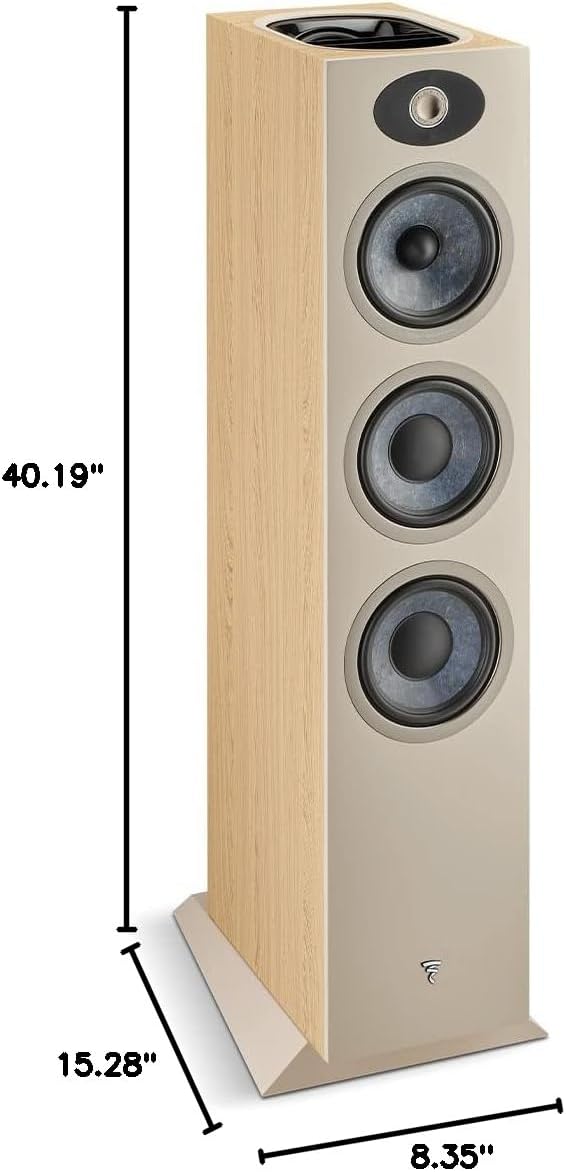
Figure 7: Dimensions diagram for the Focal Theva N°3-D loudspeaker, showing height (40.19"), depth (15.28"), and width (8.35").
10. Záruka a podpora
10.1 Informácie o záruke
The Focal Theva N°3-D loudspeaker comes with a limited warranty. Please refer to the warranty card included with your product or visit the official Focal webpodrobné zmluvné podmienky týkajúce sa krytia, trvania a postupu pri reklamácii nájdete na stránke.
10.2 Zákaznícka podpora
For technical assistance, troubleshooting beyond this manual, or warranty inquiries, please contact your authorized Focal dealer or visit the official Focal support webmiesto:
- Ohnisková Webmiesto: www.focal.com
- Informácie o predajcovi: Refer to your purchase receipt or the Focal website to locate an authorized dealer near you.