
Makeid L1
Používateľská príručka k stroju na výrobu etikiet Makeid L1
Model: L1 | Brand: Makeid
Úvod
The Makeid L1 Label Maker Machine is a portable, wireless thermal printer designed for creating custom labels for home, school, and office use. It connects wirelessly to your smartphone via Bluetooth, allowing you to design and print labels with various fonts, templates, and icons using the dedicated MakeID-Life app. This manual provides comprehensive instructions for setting up, operating, and maintaining your L1 Label Maker.

Figure 1: Makeid L1 Label Maker Machine and exampštítky.
Čo je v krabici
Upon unboxing your Makeid L1 Label Maker, please ensure all the following items are present:
- Makeid L1 Label Maker Machine (Beige, 203dpi model)
- One 4-meter roll of label tape
- USB nabíjací kábel
- Používateľská príručka (tento dokument)
Nastavenie
1. Nabíjanie zariadenia
Before first use, fully charge your Makeid L1 Label Maker. Connect the provided USB charging cable to the label maker and a compatible USB power source (e.g., computer USB port, wall adapter). The indicator light will show charging status.

Figure 2: Power on/off button and charging port location.
2. Vkladanie štítkovej pásky
The Makeid L1 supports various label tape widths and types. To load tape:
- Otvorte veko štítkovača.
- Insert the label tape roll into the designated slot, ensuring the tape feeds out correctly.
- Pevne zatvorte veko.
Figure 3: Instructions for opening the lid and replacing tape.

Obrázok 4: Pramples of compatible label tapes.
3. Stiahnutie aplikácie a pripojenie Bluetooth
The Makeid L1 operates via the "MakeID-Life" app. Follow these steps to connect:
- Download the "MakeID-Life" app from your smartphone's app store (Google Play for Android, App Store for iOS).
- Uistite sa, že je na vašom smartfóne povolená funkcia Bluetooth.
- Open the MakeID-Life app and follow the on-screen prompts to connect to your L1 Label Maker. The app will typically detect the device automatically.

Figure 5: Steps for downloading the app and connecting via Bluetooth.
The app offers free access and does not require account registration. It complies with applicable data protection laws.
Návod na obsluhu
1. Designing Your Label
The MakeID-Life app provides extensive customization options:
- Text: Enter your desired text. You can choose from multiple font styles and adjust size.
- Ikony a symboly: Access a library of over 600 icons and symbols to enhance your labels.
- Šablóny: Utilize over 400 pre-designed templates for various purposes.
- Špeciálne funkcie: Create barcodes, QR codes, tables, dates, borders, and patterns. The app also supports drawing/doodling.

Figure 6: App features for label design.

Figure 7: Customizing labels with drawings in the app.
2. Printing Your Label
Once your design is complete:
- Review predtlačová prípravaview in the app to ensure the label appears as desired.
- Select the number of copies if needed.
- Tap the "Print" button in the app. The label maker will begin printing.

Figure 8: Workflow from app download to printing.
3. Cutting the Label
The Makeid L1 features a built-in cutter for clean and precise label separation. After printing, simply press the cutter button located on the side of the device to cut the label. No scissors or external blades are required.

Figure 9: Built-in cutter for professional and safe label cutting.
4. Label Types and Applications
The L1 supports both continuous and die-cut label tapes, offering versatility for various labeling needs. Labels are waterproof, oil-proof, friction resistant, light resistant, and do not fade, ensuring durability.

Figure 10: Continuous vs. Die-Cut label printing.

Figure 11: Durable and crisp print labels.
Bežné aplikácie:
- Správa káblov: Organize charging cables, headphones, and other electronic wires.
- Organizácia kancelárie: Označenie files, folders, shelves, and office supplies.
- Úložný priestor v kuchyni: Label spice jars, food containers, and pantry items.
- Personal Items: Mark lunchboxes, water bottles, school supplies, and other personal belongings.
- Medical Reminders: Label pill organizers or medication bottles for clarity.
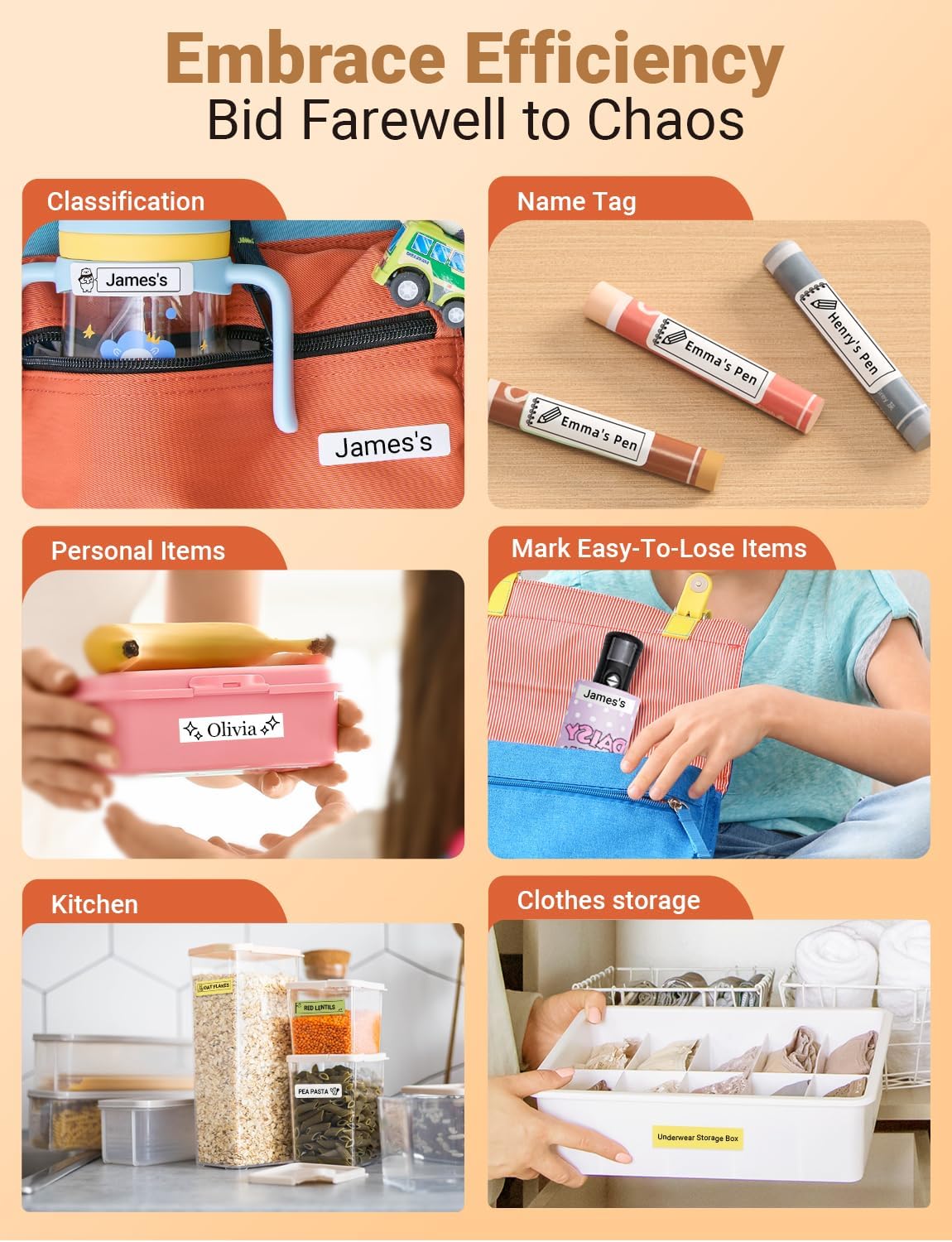
Obrázok 12: Pramples of how the label maker can be used for organization.

Figure 13: Diverse applications for the Makeid L1 label maker.
5. Oficiálne video o produkte
Video 1: Official MakeID L1 Portable Bluetooth Thermal Label Maker overview. This video demonstrates the product's features, ease of use, and various applications for organization in different settings.
Údržba
To ensure the longevity and optimal performance of your Makeid L1 Label Maker:
- Čistenie: Regularly wipe the exterior of the device with a soft, dry cloth. For the print head, refer to the app's maintenance section or contact support for specific cleaning instructions to avoid damage.
- Starostlivosť o batérie: Avoid completely draining the battery frequently. Charge the device when the battery is low. If storing for an extended period, charge it to about 50% and recharge every few months to preserve battery health.
- Ukladací priestor: Štítkovač skladujte na chladnom a suchom mieste mimo dosahu priameho slnečného žiarenia a extrémnych teplôt.
Riešenie problémov
If you encounter issues with your Makeid L1 Label Maker, try the following common troubleshooting steps:
| Problém | Možná príčina | Riešenie |
|---|---|---|
| Zariadenie sa nezapne | Slabá batéria; Tlačidlo napájania nie je správne stlačené | Zariadenie úplne nabite. Stlačte a niekoľko sekúnd podržte tlačidlo napájania. |
| Nedá sa pripojiť cez Bluetooth | Bluetooth vypnutý; Zariadenie mimo dosahu; Problém s aplikáciou | Ensure Bluetooth is on. Move device closer to phone. Restart app/phone. |
| Zlá kvalita tlače | Low battery; Dirty print head; Incorrect label type | Charge device. Clean print head (refer to manual/support). Ensure correct label tape is used. |
| Label not feeding/cutting | Tape jammed; Cutter obstructed | Open lid and check for tape jams. Clear any obstructions around the cutter. |
If these steps do not resolve the issue, please contact Makeid customer support for further assistance.
Špecifikácie
| Funkcia | Detail |
|---|---|
| Značka | Makeid |
| Názov modelu | L1 |
| Technológia tlače | Termálne |
| Rozlíšenie | 203 x 203 DPI (current model) |
| Technológia pripojenia | Bluetooth |
| Kompatibilné zariadenia | Smartfóny (iOS a Android) |
| Maximálna veľkosť média | 1.6 palca |
| Veľkosť listu | 0.63 palca |
| Rozmery produktu | 3.93 x 1.6 x 1.96 palca |
| Hmotnosť položky | 4.4 unce (126 gramov) |
| Batéria | 1 lítium-iónová batéria (súčasťou balenia) |
| Špeciálne funkcie | Continuous & Pre-cut Label Tapes, Waterproof, Oil-proof, Friction Resistant, Light Resistant, No Fading; Rich Font Icon Pattern, Portable, Inkless, Wireless, Rechargeable; Creative Print Functions: Barcode, Text, Picture, QR 2D Code, Table, Date, Border, Icon, Shape, Pattern, Template. |
Záruka a podpora
The Makeid L1 Label Maker Machine comes with a Doživotná záruka.
For technical support, warranty claims, or additional product information, please visit the official Makeid webalebo kontaktujte ich zákaznícky servis. Viac informácií a kontaktné údaje nájdete na Makeid Store on Amazon.
Ask a question about this manual
Ask about setup, troubleshooting, compatibility, parts, safety, or missing instructions. Manuals+ will review the question and use this page’s manual context to help answer it.