
1. Úvod
Ďakujem za nákupasing the Dpofirs LMD-750 Portable DVD Player. This device is designed to provide versatile entertainment on the go, at home, or in the office. Featuring a 270° rotating HD LCD screen, multi-format disc support, USB/SD card playback, analog TV function, FM radio, and game capabilities, it offers a comprehensive multimedia experience. Please read this manual carefully to ensure proper use and to maximize the performance and longevity of your device.
2. Bezpečnostné informácie
- Nevystavujte zariadenie dažďu, vlhkosti ani extrémnym teplotám.
- Neumiestňujte zariadenie do blízkosti zdrojov tepla alebo na priame slnečné svetlo.
- Use only the provided power adapter and car adapter.
- Nepokúšajte sa zariadenie rozoberať ani opravovať sami. Kontaktujte kvalifikovaný servisný personál.
- Udržujte zariadenie mimo dosahu silných magnetických polí.
- Pri prevádzke zariadenia zabezpečte dostatočné vetranie.
- Remove discs when transporting the player to prevent damage.
3. Obsah balenia
Skontrolujte, prosím, balenie, či neobsahuje nasledujúce položky:
- 1 x Dpofirs LMD-750 Portable DVD Player
- 1 x Diaľkové ovládanie
- 1 x napájací adaptér (zástrčka EÚ)
- 1 x adaptér do auta
- Kábel 1 x AV
- 1 x anténa
- 1 x Gamepad
- 1 x Game Disc
- 1 x Návod na použitie
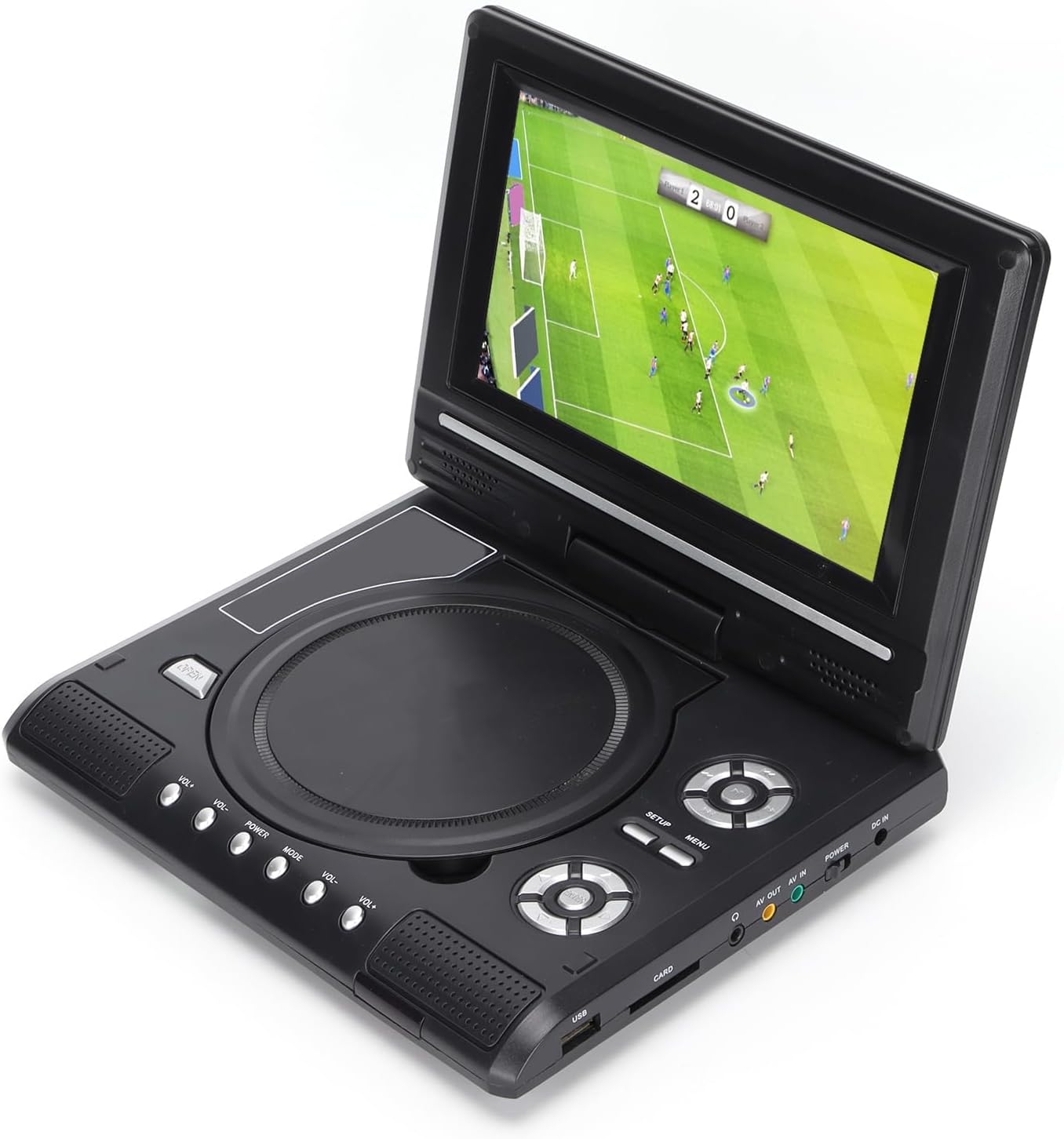
Image: All accessories included with the Dpofirs LMD-750 Portable DVD Player.
4. Produkt skončilview
The Dpofirs LMD-750 features a compact design with intuitive controls and multiple connectivity options.

Obrázok: Predná strana view of the Dpofirs LMD-750 Portable DVD Player with the screen open.

Obrázok: Bočný view detailing the input/output ports.

Obrázok: Hore view of the player when closed.
Ovládacie prvky a porty:
- Obrazovka: 6.8"/8.5" HD LCD, 270° rotatable.
- Zásobník disku: For DVD/CD media.
- Ovládacie tlačidlá: Play/Pause, Stop, Fast Forward/Rewind, Next/Previous, Setup, Menu, Volume +/-.
- USB port: Na pripojenie USB flash diskov.
- CARD Slot: For inserting memory cards (e.g., SD card).
- Jack pre slúchadlá: Na súkromné počúvanie.
- AV VÝSTUP: Audio/Video output to external display.
- AV IN: Audio/Video input from external source.
- Vypínač: To turn the device On/Off.
- DC IN: Power input for adapter.
5. Nastavenie
5.1 Nabíjanie batérie
Before first use, fully charge the built-in 1500mAh lithium battery. Connect the power adapter to the DC IN port on the player and plug it into a wall outlet (110-240V 50/60Hz). The charging indicator will illuminate. Once fully charged, the indicator may change color or turn off. A full charge provides approximately 30-60 minutes of continuous playback, depending on usage.
5.2 Pripojenie napájania
- Domáce použitie: Connect the AC power adapter to the DC IN port and a wall socket.
- Použitie auta: Connect the car adapter to the DC IN port and your vehicle's cigarette lighter socket.
5.3 Connecting to an External Display (AV OUT)
Komu view obsah na väčšej obrazovke:
- Pripojte jeden koniec AV kábla do portu AV OUT na DVD prehrávači.
- Connect the other end of the AV cable to the corresponding AV IN ports (Yellow for Video, White/Red for Audio) on your TV or monitor.
- Select the correct AV input source on your external display.
5.4 Connecting External Devices (AV IN)
To display content from an external source on the DVD player's screen:
- Connect one end of the AV cable to the AV IN port on the DVD player.
- Connect the other end of the AV cable to the AV OUT ports of your external device (e.g., another DVD player, game console).
- Switch the DVD player to AV IN mode (refer to Operating Instructions).
6. Návod na obsluhu
6.1 Zapnutie/vypnutie
Posuňte POWER switch to the "ON" position to turn on the player. Slide it to "OFF" to power down.
6.2 Otáčanie obrazovky
The LCD screen can rotate up to 270 degrees. Gently adjust the screen to your desired viewing angle. This allows for flexible viewpôsobenia v rôznych prostrediach.
6.3 Ovládanie hlasitosti
Použite VOL+ a VOL- buttons on the player or remote control to adjust the audio volume.
6.4 Navigácia v ponuke
Stlačte tlačidlo MENU button to access the main menu. Use the directional buttons (up, down, left, right) to navigate and the OK tlačidlo na potvrdenie výberu. Stlačte NASTAVENIE pre prístup k nastaveniam systému.
7. Prehrávanie médií
7.1 Prehrávanie diskov (DVD/CD)
- Otvorte kryt disku.
- Carefully place a compatible disc (DVD, DVD±R, DVD±RW, VCD, CD, CD±R, CD±RW) onto the spindle with the label side facing up.
- Bezpečne zatvorte kryt disku.
- The player will automatically detect and begin playback. If not, press the HRAŤ tlačidlo.

Image: Player displaying video content.

Image: Player displaying a sports event.
7.2 Prehrávanie z USB/SD karty
- Vložte USB flash disk do USB port or a memory card into the KARTA slot.
- The player will automatically switch to USB/Card mode or prompt you to select the source.
- Prechádzajte si svojím files using the directional buttons and press OK hrať.
Podporované formáty: DIVX, AV/VOB, MPG, MP3, MP4, WMA, JPEG, TXT, RMVB.
The player features an intelligent power-off memory function, resuming playback from where it stopped after a power interruption.
8. TV Function
The Dpofirs LMD-750 includes an analog TV tuner.
- Connect the included antenna to the antenna port on the player.
- Switch the player to TV mode (usually via the MODE button or menu selection).
- Perform an automatic channel scan in the TV settings menu to find available analog channels.
- Channel reception quality depends on local signal strength.
Supported TV Standards: PAL, NTSC, SECAM (optional).
9. Game Function
Enjoy gaming with the included gamepad and game disc.
- Connect the gamepad to the designated game port on the player.
- Insert the game disc into the disc tray.
- Select the game function from the main menu.
- Choose from the available games on the disc (up to 300 games).
10. Údržba
10.1 Čistenie zariadenia
- Vonkajší povrch prehrávača utrite mäkkou, suchou handričkou.
- Nepoužívajte tekuté čistiace prostriedky ani abrazívne materiály.
- For the screen, use a soft, lint-free cloth specifically designed for LCD screens.
10.2 Starostlivosť o disky
- Disky držte za okraje, aby ste predišli odtlačkom prstov.
- Disky čistite mäkkou handričkou, ktorá nepúšťa vlákna, a utierajte ich od stredu smerom von.
- Store discs in their cases to prevent scratches.

Image: Internal disc mechanism.
11. Riešenie problémov
| Problém | Možná príčina | Riešenie |
|---|---|---|
| Žiadna sila | Battery drained; Power adapter not connected; Power switch OFF. | Charge the battery; Connect power adapter; Slide POWER switch to ON. |
| Žiadne prehrávanie disku | Disc inserted incorrectly; Disc dirty or scratched; Incompatible disc format. | Insert disc correctly (label up); Clean or replace disc; Use supported disc format. |
| Žiadny zvuk | Volume too low; Mute function active; Headphone connected. | Increase volume; Deactivate mute; Disconnect headphones if using speakers. |
| Slabý príjem televízie | Weak signal; Antenna not positioned correctly. | Adjust antenna position; Rescan channels; Check local signal strength. |
| Diaľkové ovládanie nefunguje | Batteries drained or inserted incorrectly; Obstruction between remote and player. | Replace batteries (2x AAA); Ensure correct polarity; Remove obstructions. |
12. Špecifikácie
| Číslo modelu | LMD-750 (Dpofirsrgi5bmonx0-13) |
| Materiál | ABS |
| Farba | Čierna |
| Veľkosť obrazovky | 6.8" / 8.5" (diagonal, depending on variant) |
| Typ zobrazenia | LCD |
| Rozlíšenie displeja | 234 x 480 x RGB (native), supports up to 1280 x 720, 1366 x 768 |
| Vstupné objtage | 110-240V 50/60Hz |
| Výstupný objemtage | 12 V |
| Kapacita batérie | 1500 mAh lítiová batéria (vstavaná) |
| Batéria diaľkového ovládania | 2 x AAA batérie (nie sú súčasťou balenia) |
| Podporované formáty diskov | DVD, DVD±R, DVD±RW, VCD, MP3, MP4, CD±R, CD±RW |
| Supported Media Formats (USB/Card) | DIVX, AV/VOB, MPG, MP3, MP4, WMA, JPEG, TXT, RMVB |
| TV systém | PAL, NTSC, SECAM (full system) |
| Prijímanie kanálov | LHF1-5, VHF6-12, UHF13-69, ATV |
| Technológia kódovania zvuku | 96kHz/24bit |
| Dynamický rozsah | ≥ 80 dB |
| Pomer signál-šum | ≥ 70 dB |
| Izolácia kanálov | ≥ 70 dB |
| Technológia pripojenia | USB, Composite Video |
| Výrobca | Dpofirs |
| Krajina pôvodu | Čína |
13. Záruka a podpora
Informácie o záruke a zákazníckej podpore nájdete v dokumentácii dodanej s vaším nákupom alebo sa obráťte na svojho predajcu. Uschovajte si doklad o kúpe pre prípadné reklamácie.