
1. Úvod
This manual provides detailed instructions for the proper use and maintenance of your Arlec Remote SS3136. This remote control is specifically designed to operate the Arlec Wall Fan AWDC001HA, offering convenient and effortless control over your fan's functions. Please read this manual thoroughly before first use to ensure optimal performance and longevity of your device.
2. Vlastnosti produktu
- Jednoduché ovládanie: Utilizes Infrared technology for seamless communication with your Arlec Wall Fan AWDC001HA from up to 10 meters away.
- Dlhotrvajúca sila: Requires 3 alkaline batteries for extended use.
- Elegantný dizajn: Finished in a sophisticated black color.
- Všestranná kompatibilita: Designed to control Arlec Wall Fans, specifically model AWDC001HA.
- Jednoduchá obsluha: Features 3 intuitive buttons for easy fan control.
3. Obsah balenia
Overte, či sú v balení všetky položky:
- 1 x Arlec Remote SS3136
- 1 x Wall Mount Holder
- 2 x montážne skrutky
- 2 x nástenné zástrčky
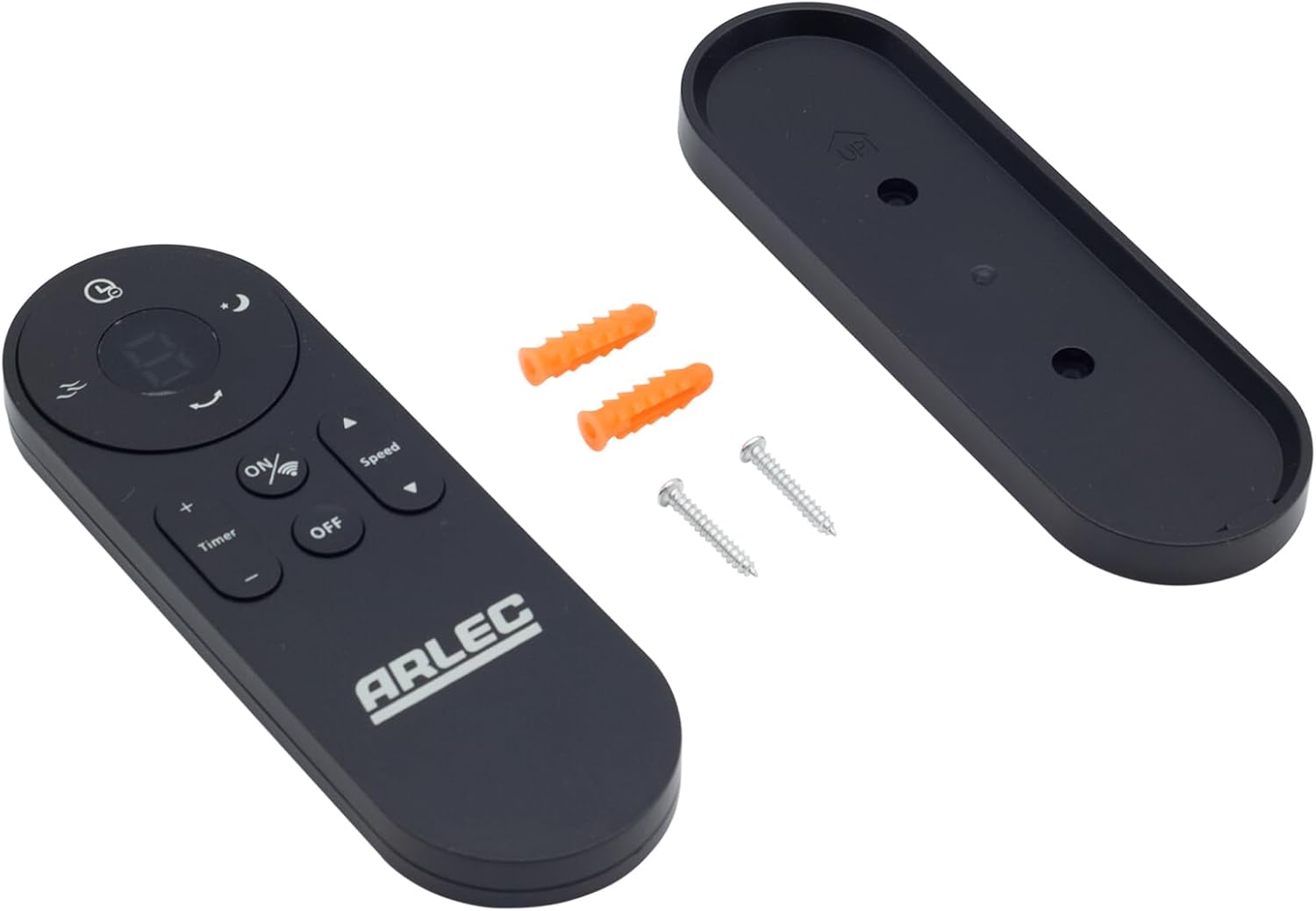
Image: Arlec Remote SS3136 shown with its included wall mount holder, two mounting screws, and two wall plugs, indicating the complete package contents.
4. Nastavenie
4.1 Inštalácia batérie
- Nájdite priehradku na batérie na zadnej strane diaľkového ovládača.
- Otvorte kryt priehradky na batérie.
- Insert 3 Alkaline batteries (not included) into the compartment, ensuring the correct polarity (+ and -) as indicated inside the compartment. The remote requires 3 Volts (DC).
- Bezpečne zatvorte kryt priestoru pre batérie.
4.2 Inštalácia na stenu (voliteľné)
- Choose a suitable location on a wall for the remote holder.
- Mark the positions for the two mounting screws using the holder as a template.
- Drill pilot holes at the marked positions. Insert the wall plugs if drilling into drywall or masonry.
- Secure the wall mount holder to the wall using the provided screws.
- Place the remote control into the installed holder for convenient storage.
5. Návod na obsluhu
The Arlec Remote SS3136 features a simple 3-button layout for controlling your Arlec Wall Fan AWDC001HA. Ensure there is a clear line of sight between the remote and the fan's infrared receiver for optimal performance.

Obrázok: Detailný záber view of the Arlec Remote SS3136, highlighting its three main control buttons: ON/OFF, Speed, and Timer.
- Tlačidlo ON/OFF: Stlačením tohto tlačidla zapnete alebo vypnete ventilátor.
- Tlačidlo rýchlosti: Use this button to cycle through the available fan speed settings (e.g., Low, Medium, High).
- Tlačidlo časovača: Press this button to set or adjust the fan's timer function. Refer to your Arlec Wall Fan AWDC001HA manual for specific timer intervals.
The remote operates using Infrared (IR) technology. Point the remote directly towards the fan's IR receiver. The effective operating range is up to 10 meters (approximately 33 feet).
6. Údržba
- Čistenie: Diaľkový ovládač utrite mäkkou, suchou handričkou. Nepoužívajte abrazívne čistiace prostriedky ani rozpúšťadlá.
- Výmena batérie: Replace batteries when the remote's performance degrades or it stops responding. Always replace all 3 batteries at the same time with new alkaline batteries.
- Ukladací priestor: Ak diaľkový ovládač nebudete dlhší čas používať, vyberte z neho batérie, aby ste predišli ich vytečeniu. Skladujte ho na chladnom a suchom mieste.
7. Riešenie problémov
| Problém | Možná príčina | Riešenie |
|---|---|---|
| Remote not responding to fan. |
|
|
| Tlačidlá sú zaseknuté alebo nereagujú. | Nečistoty alebo nečistoty pod tlačidlami. | Povrch diaľkového ovládača čistite mäkkou, suchou handričkou. Vyhnite sa tekutinám. |
8. Špecifikácie
| Atribút | Detail |
|---|---|
| Model | SS3136 |
| Výrobca | Arlec |
| Kompatibilné zariadenia | Arlec Wall Fan AWDC001HA |
| Technológia pripojenia | Infračervený (IR) |
| Počet tlačidiel | 3 |
| Typ ovládača | Ovládanie tlačidlom |
| Typ batérie | Alkaline (3 required) |
| Voltage | 3 volty (DC) |
| Prevádzkový rozsah | Do 10 metrov |
9. Záruka a podpora
For warranty information and technical support, please refer to the documentation provided with your Arlec Wall Fan AWDC001HA or contact Arlec customer service directly. Keep your purchase receipt as proof of purchase.
Pre ďalšiu pomoc navštívte oficiálne stránky výrobcu webstránku alebo kontaktujte ich linku zákazníckej podpory.