
Thomson 24HA2S13C
Používateľská príručka k 24-palcovému 12V HD inteligentnému televízoru so systémom Android THOMSON 24HA2S13C
Model: 24HA2S13C
Dôležité bezpečnostné informácie
Read all instructions before operating the TV. Keep this manual for future reference. Follow all warnings and instructions marked on the product.
- Neblokujte vetracie otvory.
- Neinštalujte v blízkosti zdrojov tepla.
- Chráňte napájací kábel, aby sa po ňom nešliapalo alebo aby ho nezovrel.
- Používajte iba doplnky/príslušenstvo určené výrobcom.
- Počas búrok s bleskami alebo pri dlhšom nepoužívaní odpojte.
- Všetok servis prenechajte kvalifikovanému servisnému personálu.
Koniec produktuview
The THOMSON 24HA2S13C is a 24-inch HD Smart Android TV designed for versatile use, including camping with its 12V power supply. It features Google Assistant, Wi-Fi, Bluetooth, Dolby Digital audio, and a triple-tuner for various signal reception.

Obrázok: Predná strana view of the THOMSON 24HA2S13C 24-inch Smart Android TV, showing the screen displaying streaming service logos and a family enjoying the TV in a campnastavenie.
Obsah balenia
Overte si, či sú v balení všetky položky:
- THOMSON 24HA2S13C Smart Android TV
- Diaľkové ovládanie
- Napájací adaptér (kompatibilný so 12 V)
- TV stojany (2)
- Skrutky do televíznych stojanov
- Používateľská príručka (tento dokument)
- Sprievodca rýchlym spustením
Nastavenie
1. Pripevnenie stojanov na televízor
- Opatrne položte televízor obrazovkou nadol na mäkký, rovný povrch, aby ste predišli poškodeniu obrazovky.
- Align the TV stands with the mounting holes on the bottom of the TV.
- Stojany upevnite pomocou dodaných skrutiek. Uistite sa, že sú pevne utiahnuté.

Image: The THOMSON 24HA2S13C TV showing two possible stand positions for different furniture widths. The image highlights the flexibility in stand placement.
2. Pripojenie napájania
Connect the 12V power adapter to the TV's power input and then to a suitable power source. For camping or mobile use, connect to a 12V DC power outlet.

Image: The THOMSON 24HA2S13C TV mounted in a caravan, with a 12V power adapter shown, illustrating its suitability for mobile use.
3. Pripojenie externých zariadení
Televízor ponúka rôzne porty na pripojenie externých zariadení:
- HDMI: For high-definition audio and video devices (e.g., game consoles, Blu-ray players).
- USB: Na pripojenie úložných zariadení USB na prehrávanie médií.
- LAN: Pre káblové pripojenie na internet.
- Anténa/Satelit: Na príjem vysielacích signálov.
- AV IN: Pre staršie analógové zariadenia.
- Zvukový výstup (optický): Na pripojenie k externým zvukovým systémom.
- CI+: Pre moduly podmieneného prístupu.

Obrázok: Zadná strana view of the THOMSON 24HA2S13C TV, detailing the various input and output ports available for connectivity.
Obsluha TV
1. Sprievodca úvodným nastavením
Po prvom zapnutí vás televízor prevedie procesom úvodného nastavenia. Ten zahŕňa:
- Výber jazyka.
- Sieťové pripojenie (Wi-Fi alebo Ethernet).
- Prihlásenie do účtu Google (voliteľné, ale odporúčané pre všetky funkcie Smart TV).
- Channel scanning (for DVB-T2/C/S2).
2. Funkcie diaľkového ovládania
The included remote control provides access to all TV functions. It features backlit buttons for use in low light and a dedicated "Favorite" button for quick access to your preferred app.

Image: The remote control for the THOMSON 24HA2S13C TV, highlighting its ergonomic design, backlit buttons, and voice control capabilities.
3. Funkcie inteligentného televízora (Android TV)
This TV runs on Android TV, providing access to a wide range of applications and services:
- Streamovacie služby: Access Netflix, Prime Video, YouTube, Disney+, and more.
- Asistent Google: Use voice commands to search for content, control playback, and get information. Activate by pressing the Google Assistant button on the remote.
- Vstavaný Chromecast: Cast content from compatible smartphones, tablets, or computers directly to your TV.
- Obchod Google Play: Stiahnite si ďalšie aplikácie a hry.

Image: The THOMSON 24HA2S13C TV screen showing the Android TV home interface with popular streaming applications and content recommendations.
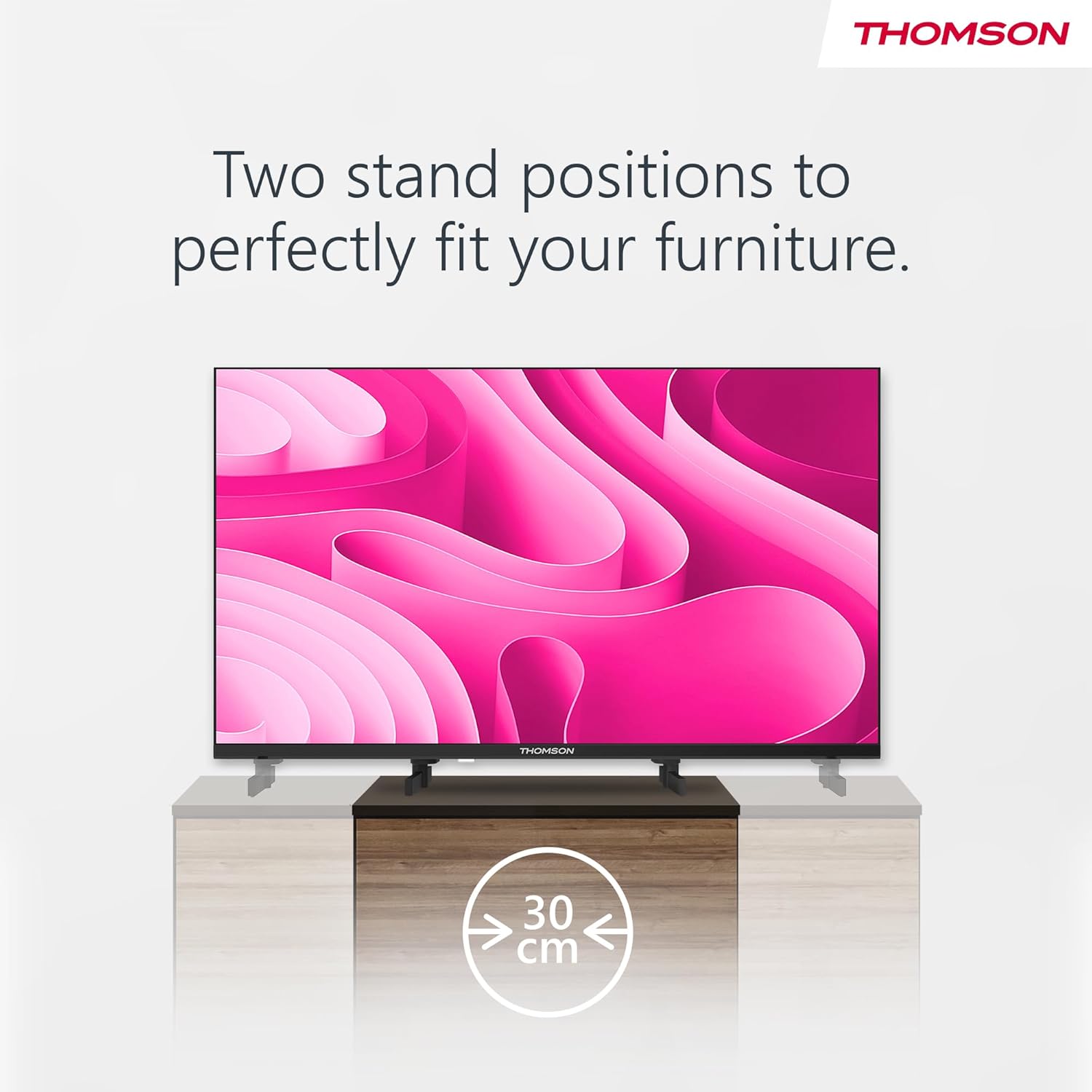
Image: A person using the voice control feature of the THOMSON TV remote, demonstrating interaction with Google Assistant.
Údržba
Čistenie televízora
- Pred čistením vždy odpojte televízor zo siete.
- Use a soft, dry cloth to wipe the screen and cabinet. Do not use liquid cleaners or aerosol sprays.
- Na odolné škvrny jemneampen a microfiber cloth with water and gently wipe. Avoid excessive moisture.
Aktualizácie softvéru
Televízor môže dostávať aktualizácie softvéru na zlepšenie výkonu a pridanie nových funkcií. Ak chcete tieto aktualizácie dostávať, uistite sa, že je váš televízor pripojený k internetu. Aktualizácie si zvyčajne môžete skontrolovať v ponuke nastavení televízora.
Riešenie problémov
| Problém | Možná príčina | Riešenie |
|---|---|---|
| Žiadna sila | Napájací kábel nie je pripojený; elektrická zásuvka nie je aktívna. | Skontrolujte pripojenie napájacieho kábla. Otestujte zásuvku s iným zariadením. |
| Žiadny obraz, ale zvuk je prítomný | Vybraný nesprávny vstupný zdroj; problém s podsvietením. | Press the "Input" button on the remote to select the correct source. Contact support if issue persists. |
| Žiadny zvuk, ale obraz je prítomný | Volume too low or muted; audio cables loose. | Increase volume. Check mute status. Ensure audio cables are securely connected. |
| Diaľkové ovládanie nefunguje | Vybité batérie; prekážka medzi diaľkovým ovládačom a televízorom. | Vymeňte batérie. Odstráňte všetky prekážky. Uistite sa, že diaľkový ovládač je nasmerovaný na infračervený senzor televízora. |
| Nedá sa pripojiť k sieti Wi-Fi | Nesprávne heslo; problémy s routerom; televízor príliš ďaleko od routera. | Overte heslo Wi-Fi. Reštartujte smerovač. Presuňte televízor bližšie k smerovaču alebo použite káblové pripojenie. |
Špecifikácie
| Funkcia | Detail |
|---|---|
| Značka | Thomson |
| Model | 24HA2S13C |
| Veľkosť obrazovky | 24 palca (60 cm) |
| Technológia displeja | LED |
| Rozlíšenie | 1366 768 x XNUMX (HD) |
| Operačný systém | Android TV |
| Špeciálne funkcie | Google Assistant, Chromecast Built-in, 12V Power Supply, Dolby Audio, Triple Tuner (DVB-T2/C/S2) |
| Konektivita | Wi-Fi, Bluetooth, HDMI (x3), USB (x2), LAN, Optical Audio Out, AV In, CI+ |
| Voltage | 12 volty (DC) |
| Rozmery produktu (Š x H x V) | 53.5 x 15.1 x 35.3 cm (so stojanom) |
| Hmotnosť | 3.5 kg |
For detailed energy efficiency information, please refer to the EU EPREL database: https://eprel.ec.europa.eu/qr/1456673

Image: The EU Energy Label for the THOMSON 24HA2S13C TV, showing an energy efficiency rating of E and power consumption of 18 kWh/1000h.
Záruka a podpora
This Thomson TV comes with a 3-year guarantee. For technical support, warranty claims, or service inquiries, please contact your local Thomson service provider or refer to the manufacturer's webstránky.
Manufacturer: STREAMVIEW GMBH
Webmiesto: www.streamview.com
Email: kontakt@streamview.com
Oficiálne video o produkte
Pozrite si toto video pre vizuálnu predstavuview of the Thomson 24-inch Easy TV.
Video: Stručný prehľadview of the Thomson 24-inch Easy TV, showcasing its design and features. This video is provided by the vendor Streamview GmbH.
Ask a question about this manual
Ask about setup, troubleshooting, compatibility, parts, safety, or missing instructions. Manuals+ will review the question and use this page’s manual context to help answer it.