
1. Produkt skončilview
The AUVON TENS Electrostimulation Device is a professional, rechargeable unit designed to stimulate sensory nerves and muscles. It utilizes a special pain gate mechanism to help relax your body and provide pain relief. Featuring 24 easy-to-use pre-programmed massage modes and an adjustable timer, this multi-mode electrotherapy device offers a convenient solution for pain management.

Obrázok 1: The AUVON TENS device provides targeted pain relief for various body areas.
2. Dôležité bezpečnostné varovania
Read all warnings and instructions before use. Failure to do so may result in serious injury.
- Nepoužívať this product if you have an implanted defibrillator, pacemaker, or any other implanted metallic or electronic device.
- Nepoužívať this product if you have heart rhythm problems, seizures, cerebral diseases, or neurological disorders.
- Nepoužívať this product if you have undiagnosed chronic pain.
- Nepoužívať this product if you are pregnant or in labor.
- Nepoužívať this product if you have cancer.
- Nepoužívať this product if you are sensitive to electrotherapy.
- Nepoužívať this product excessively.
- Nepoužívať this product above the neck, especially on the head or throat.
- Nepoužívať this product if you are under 22 years old.
- Consult your doctor before use if you have any medical condition.
- Individual symptoms, situations, circumstances, and results may vary. The information provided is not intended for medical diagnosis or treatment, nor is it a substitute for professional medical advice.
3. Obsah balenia
Pri prevzatí skontrolujte obsah balenia, aby ste sa uistili, že sú v ňom všetky položky:
- 1 x AUVON TENS Electrostimulator Device
- 10 x 5 cm x 5 cm Electrode Pads
- 2 x Connection Wires (1/2 wire)
- 1 x Pad Holder
- 1 x USB nabíjací kábel
- 1 x úložný vak
- 1 x Viacjazyčná používateľská príručka

Obrázok 2: All items included in your AUVON TENS device package.
4. Inštalačná príručka
- Nabite zariadenie: Before first use, ensure the device is fully charged. Connect the provided USB cable to the device and a suitable USB power source. The power indicator will show the charging status. A full charge provides up to 10 hours of continuous use.
- Connect Lead Wires: Insert the 2mm pin connectors of the lead wires into the electrode pads. Ensure a secure connection.
- Pripravte si pokožku: Clean and dry the skin area where you intend to place the electrodes. Avoid applying on broken or irritated skin.
- Aplikujte elektródy: Remove the transparent film from the electrode pads and firmly press them onto your skin. Ensure the entire surface of the pad is in contact with the skin for optimal conductivity.
- Pripojiť k zariadeniu: Plug the other end of the lead wires into the output ports on the AUVON TENS device.

Obrázok 3: Visual guide for connecting electrodes and operating the device.
5. Návod na obsluhu
- Zapnutie: Press and hold the Power button (usually the 'M' button) to turn on the device.
- Vyberte režim: Press the 'M' button to cycle through the 6 main massage modes. The device offers 24 pre-programmed sub-modes, which are accessible within these 6 main modes.
- Select Sub-Mode: Once a main mode is selected, use the '+' or '-' buttons to navigate through the available sub-modes if applicable.
- Upravte intenzitu: Use the '+' button to increase the intensity and the '-' button to decrease it. Start with a low intensity and gradually increase until you feel a comfortable, yet effective, sensation.
- Nastaviť časovač: Press the 'T' button to select your preferred massage duration. The timer is adjustable.
- Začať liečbu: The device will start the treatment according to your selected settings.
- Vypnúť: After your session, press and hold the Power button to turn off the device. Remove the electrodes from your skin.

Obrázok 4: The device offers 24 mode choices and adjustable intensity for personalized treatment.
6. Údržba
6.1 Starostlivosť o elektródovú podložku
The electrode pads feature an advanced American adhesive gel designed for durability and reusability. To maximize their lifespan:
- Čistenie: After each use, gently clean the adhesive side of the pads with a small amount of water. Do not use soap or harsh chemicals. Allow them to air dry completely before storing.
- Ukladací priestor: Always place the pads back onto the provided pad holder or their original protective film after use. This prevents them from drying out and losing their adhesive quality. Store them in a cool, dry place.
- Náhrada: Replace electrode pads when they lose their stickiness or if you notice reduced conductivity. The pads are designed for approximately 45 uses with proper care.
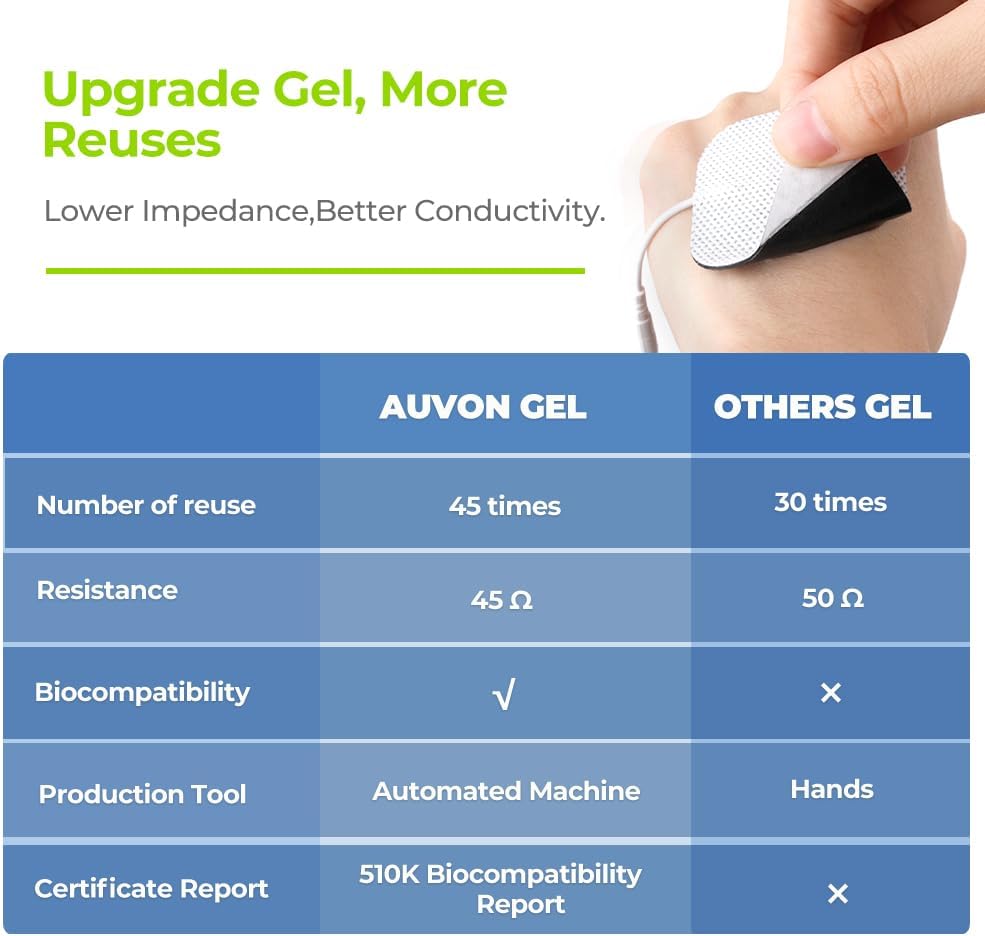
Obrázok 5: AUVON electrode pads offer enhanced reusability and conductivity.
6.2 Starostlivosť o zariadenie
- Čistenie: Zariadenie utrite mäkkou, suchou handričkou. Nepoužívajte abrazívne čistiace prostriedky ani zariadenie neponárajte do vody.
- Ukladací priestor: Zariadenie skladujte v priloženom úložnom vrecku na chladnom a suchom mieste, mimo dosahu priameho slnečného žiarenia a extrémnych teplôt.
- Batéria: The device contains a rechargeable Lithium-ion battery. Charge it regularly to maintain battery health, even if not used frequently.
7. Riešenie problémov
| Problém | Možná príčina | Riešenie |
|---|---|---|
| Zariadenie sa nezapne. | Slabá alebo vybitá batéria. | Nabite zariadenie pomocou dodaného USB kábla. |
| Žiadny pocit alebo slabý pocit. |
|
|
| Pads are not sticking. |
|
|
8. Špecifikácie produktu
| Značka | AUVON |
| Číslo modelu | AS1080 |
| Typ zariadenia | TENS Electrostimulation Device |
| Kanály | 2 nezávislé kanály |
| programy | 24 Pre-programmed Modes |
| Elektródy | 10 x 5cm x 5cm Electrode Pads (pin-style) |
| Typ batérie | Rechargeable Lithium-ion (included) |
| Doba používania | Až 10 hodín (pri plnom nabití) |
| Rozmery balenia | 14.6 x 9.2 x 7.7 cm |
| Hmotnosť | 320 gramov |
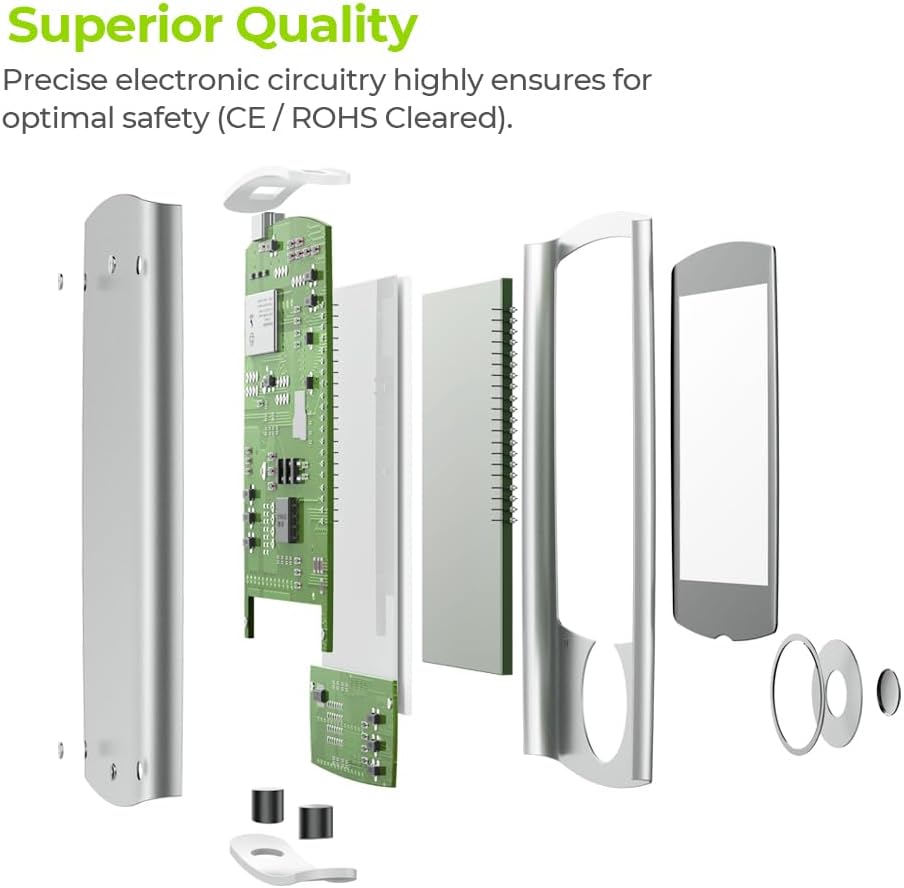
Obrázok 6: Internal components demonstrating the superior quality and precise electronic circuitry.
9. Záruka a zákaznícka podpora
The AUVON TENS Electrostimulation Device AS1080 comes with a 24-mesačná záruka od dátumu nákupu.
For any questions, concerns, or technical support, please contact AUVON customer service. You can also find additional resources, including a downloadable version of this manual, on the product details page where you purchased the device.
We are committed to providing friendly and helpful customer support.