
Úvod
This manual provides instructions for the safe and effective use of your REPTITRIP Reptile Heating Pad with PID Thermostat. This device is designed to provide a controlled heat source for reptile terrariums, helping to maintain a stable and appropriate temperature for your pets. Please read all instructions carefully before installation and operation.
Dôležité bezpečnostné informácie
Nedodržanie týchto bezpečnostných pokynov môže mať za následok požiar, úraz elektrickým prúdom, zranenie alebo poškodenie produktu či majetku.
- This product is intended for household use only, specifically for heating reptile terrariums.
- Do not immerse the heating pad or thermostat controller in water. The heating pad is waterproof (IP67 rated) but not designed for submersion.
- Do not use the heating pad if it is folded or creased. Ensure it lies flat.
- Do not use the heating pad directly on a metal tank, as this can lead to inefficient heating or damage.
- Prolonged application at high temperature settings can cause skin burns to animals. Always monitor the temperature carefully.
- Discontinue use immediately if the heating pad shows any signs of deterioration, such as cracking, blistering, or melting.
- The heating pad features a built-in temperature sensor that will stop heating if the internal temperature reaches 122°F (50°C) to prevent overheating.
- Keep out of reach of children and pets not intended for its use.
Koniec produktuview
The REPTITRIP Reptile Heating Pad system includes a heating mat and an intelligent PID thermostat controller. It is designed to provide precise and stable temperature control for reptile habitats.
Kľúčové vlastnosti:
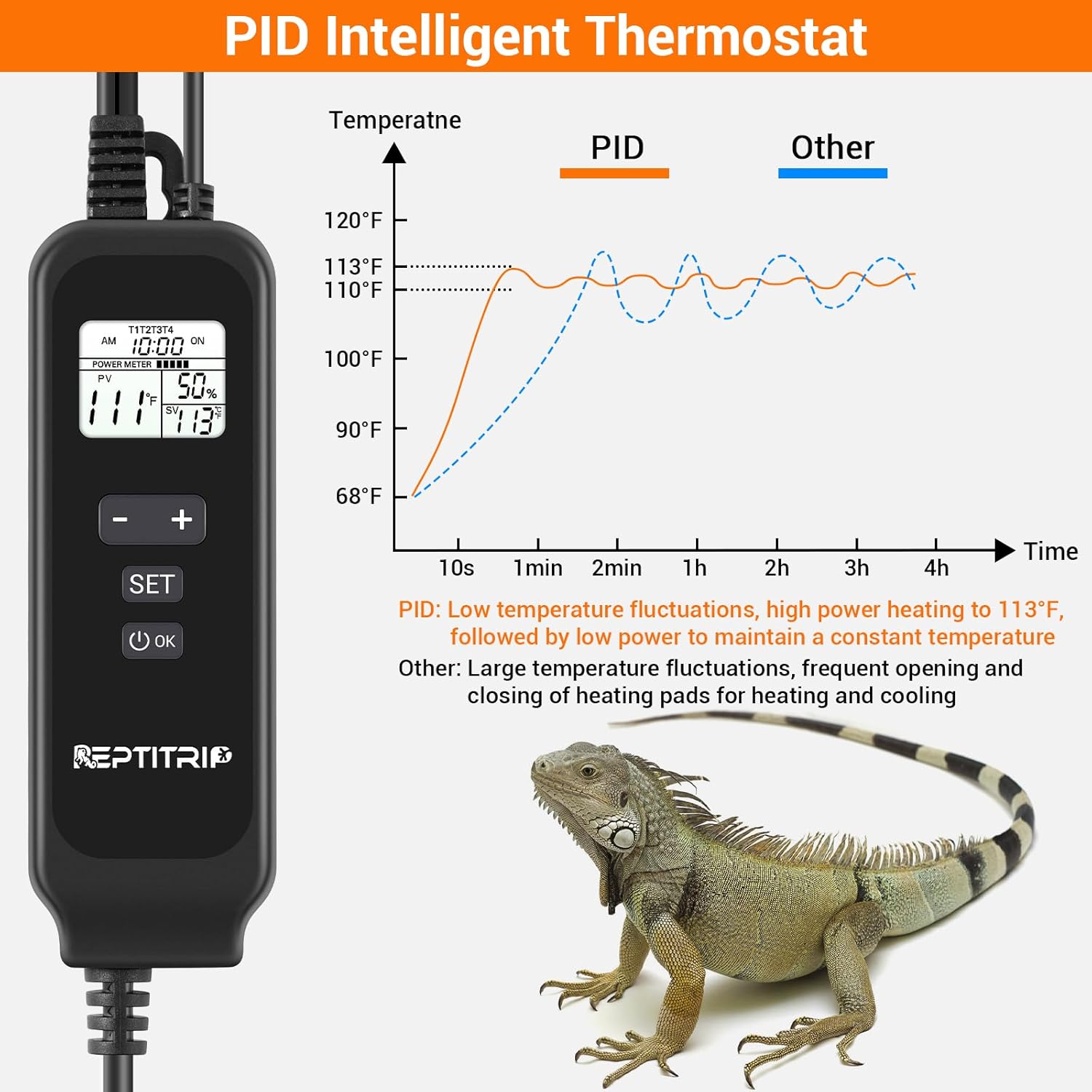
- PID Intelligent Thermostat: Accurately controls heating temperature for efficiency and stability.
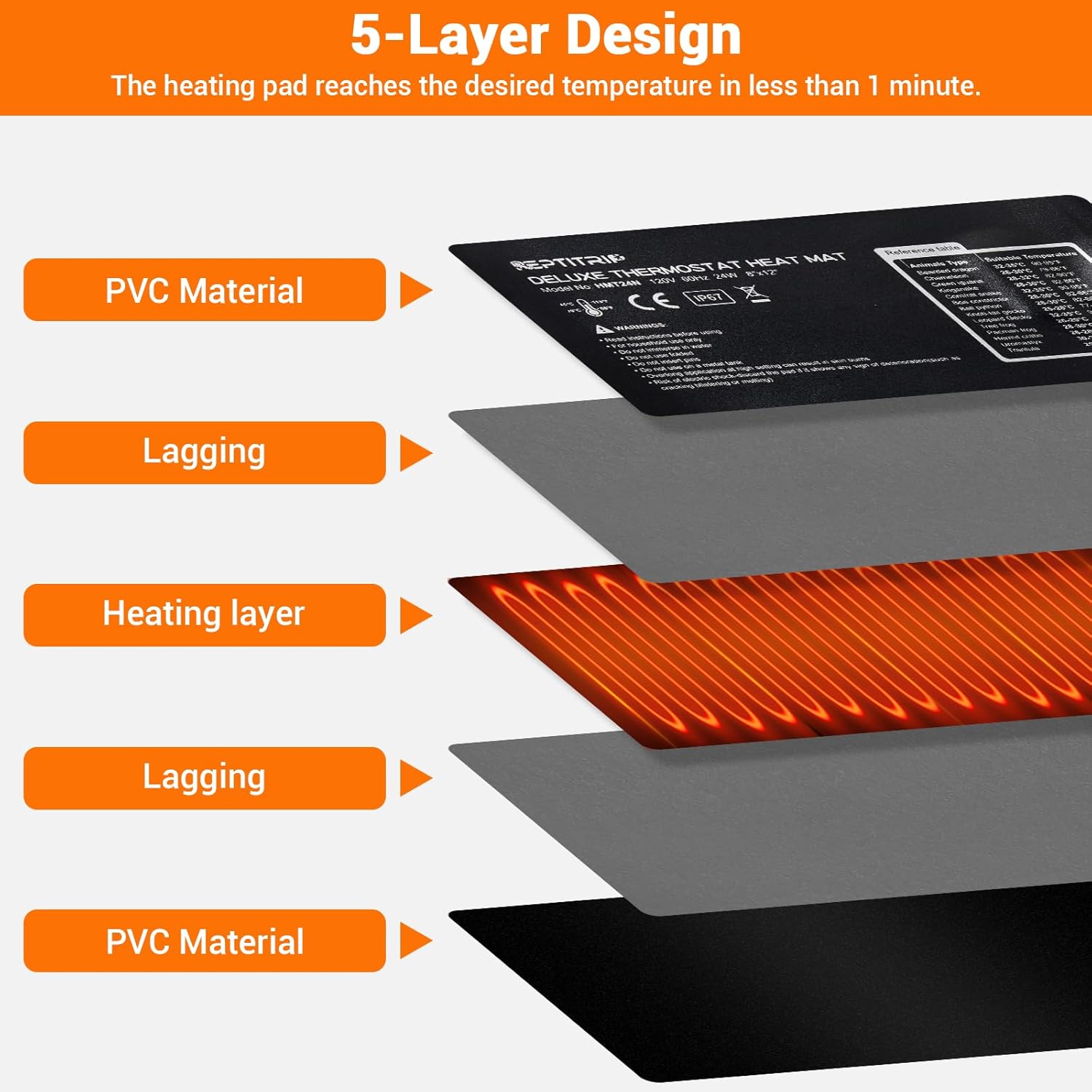
- Rýchle zahrievanie: 24W power heats to 113°F (45°C) in approximately 1 minute.
- Ochrana proti vysokej teplote: Automatically stops heating at 122°F (50°C).
- Detekcia teploty: Built-in sensor and external probe for real-time temperature monitoring.
- Odolná konštrukcia: 5-layer design including PVC material, lagging, and heating layer.
- Vodotesný dizajn: IP67 rated heating pad (do not immerse).
- Lepiaca podložka: Equipped with 3M adhesive for secure mounting.

Pokyny na nastavenie
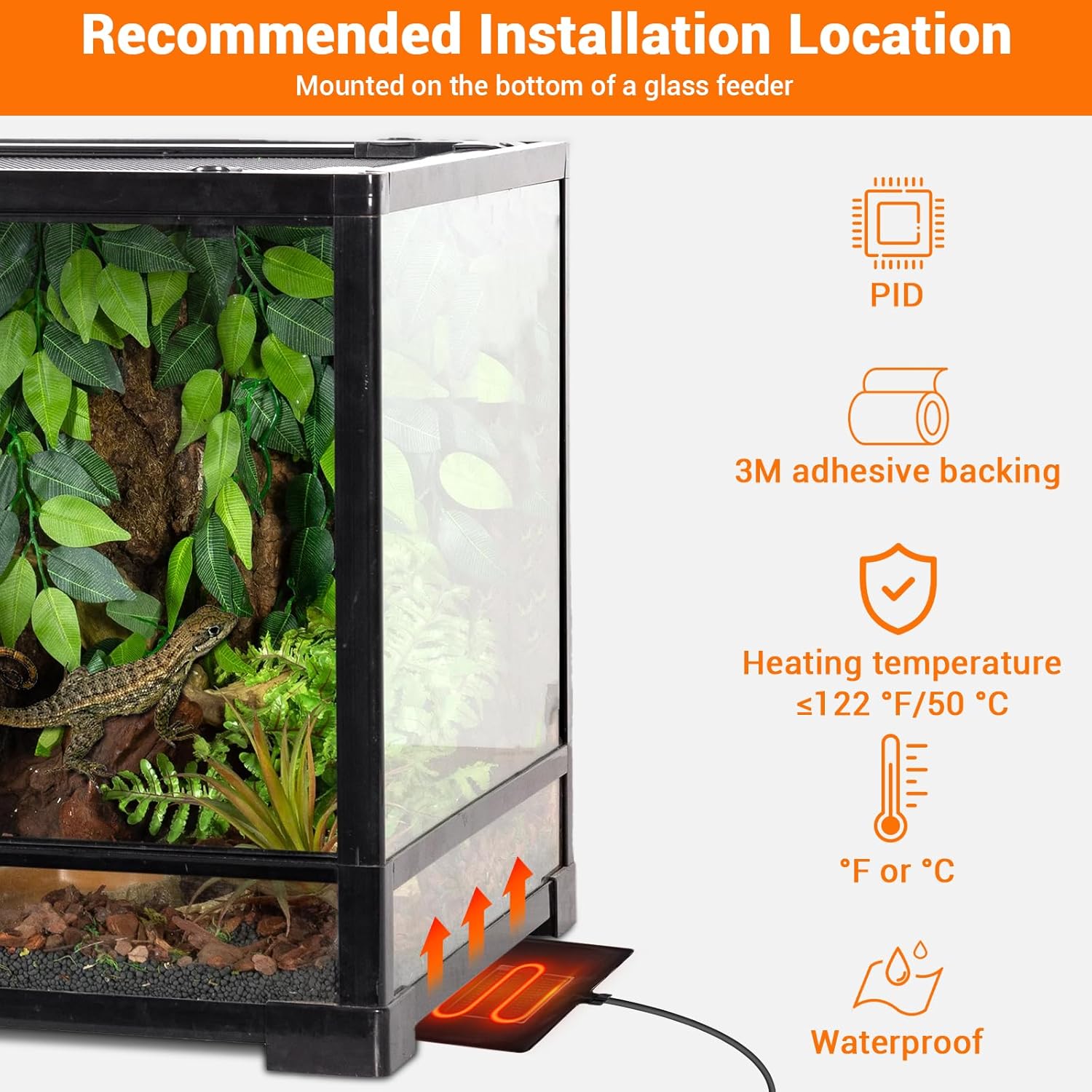
- Vyberte umiestnenie: Select a suitable location for the heating pad, typically on the bottom or side of a glass terrarium. Ensure the surface is clean and dry.
- Použite vyhrievaciu podložku: Remove the protective film from the 3M adhesive backing on the heating pad. Carefully press the pad firmly onto the chosen surface of the terrarium. Ensure there are no air bubbles or wrinkles.
- Poloha teplotnej sondy: Place the external temperature probe inside the terrarium, near the area where the heat is needed most, but away from direct contact with the heating pad to ensure accurate ambient temperature readings. Secure it to prevent movement.
- Pripojenie termostatu: Plug the heating pad into the thermostat controller. Then, plug the thermostat controller into a standard electrical outlet.


Návod na obsluhu
The PID thermostat controller allows for precise temperature management. The controllable temperature range is 68°F to 113°F (20°C to 45°C).
Funkcie ovládača:

- LCD displej: Shows current time, sensor temperature, set temperature, and power percentage.
- Tlačidlo ON/OFF: Stlačením a podržaním zapnete alebo vypnete zariadenie.
- Tlačidlo SET: Press to enter temperature setting mode.
- Tlačidlo „+“: Increases the set temperature or navigates menu options.
- Tlačidlo „-“: Decreases the set temperature or navigates menu options.
- Tlačidlo OK: Potvrdzuje výber.
Nastavenie teploty:
- Stlačte tlačidlo SET button. The set temperature display will begin to flash.
- Použite + or - tlačidlá na nastavenie požadovanej teploty.
- Stlačte tlačidlo OK button to confirm your setting. The display will stop flashing.
Prepínanie medzi °F a °C:
To switch the temperature display between Fahrenheit (°F) and Celsius (°C), long press the SET tlačidlo a + tlačidlo súčasne.
Údržba
- Čistenie: Disconnect the power before cleaning. Wipe the heating pad and controller with a damp plátno. Nepoužívajte abrazívne čistiace prostriedky ani ich neponárajte do vody.
- Kontrola: Regularly inspect the heating pad and power cords for any signs of damage, wear, or deterioration. If any damage is observed, discontinue use and replace the unit.
- Ukladací priestor: When not in use, store the heating pad and controller in a dry, cool place, away from direct sunlight and extreme temperatures.
Riešenie problémov
- No Power/Heating:
- Uistite sa, že napájací kábel je bezpečne zapojený do funkčnej elektrickej zásuvky.
- Check if the thermostat controller is powered on (press and hold the ON/OFF button).
- Verify that the heating pad is correctly plugged into the thermostat controller.
- Nesprávny údaj o teplote:
- Ensure the external temperature probe is properly positioned within the terrarium and not directly touching the heating pad or other heat sources.
- Check for any obstructions around the probe that might affect its reading.
- Kolísanie teploty:
- The PID system is designed for stable control, but significant external temperature changes or drafts can affect stability.
- Ensure the terrarium is adequately insulated and placed in a stable environment.
- Heating Pad Overheating (reaching 122°F/50°C):
- The built-in protection will temporarily stop heating. This is a safety feature.
- Check if the set temperature is too high for the environment or if the pad is covered by insulating material that traps excessive heat.
Špecifikácie
| Funkcia | Detail |
|---|---|
| Číslo modelu | HMT24N |
| Rozmery vyhrievacej podložky | 8 x 12 palca (20.3 x 30.5 cm) |
| Výstupný výkon | 24 wattov |
| Voltage | 120V, 60Hz |
| Rozsah regulácie teploty | 68 °F až 113 °F (20 °C až 45 °C) |
| Ochrana proti vysokej teplote | 122 °F (50 °C) |
| Hodnotenie vodotesnosti | IP67 (Heating Pad) |
| Dĺžka napájacieho kábla | 70 palca (približne 178 cm) |
| Dĺžka kábla sondy | 60 palca (približne 152 cm) |
| Odporúčaná veľkosť nádrže | 30-40 galónov |
| Výrobca | REPTITRIP |
Záruka a zákaznícka podpora
For warranty information, technical assistance, or customer support, please refer to the contact information provided with your purchase or visit the official REPTITRIP webstránky. Uschovajte si doklad o kúpe ako dôkaz o kúpe.