
1. Úvod
This manual provides essential information for the setup, operation, maintenance, and troubleshooting of your DELTACO GAMING WM87 Gaming Mouse. Please read these instructions carefully to ensure proper use and to maximize your gaming experience.
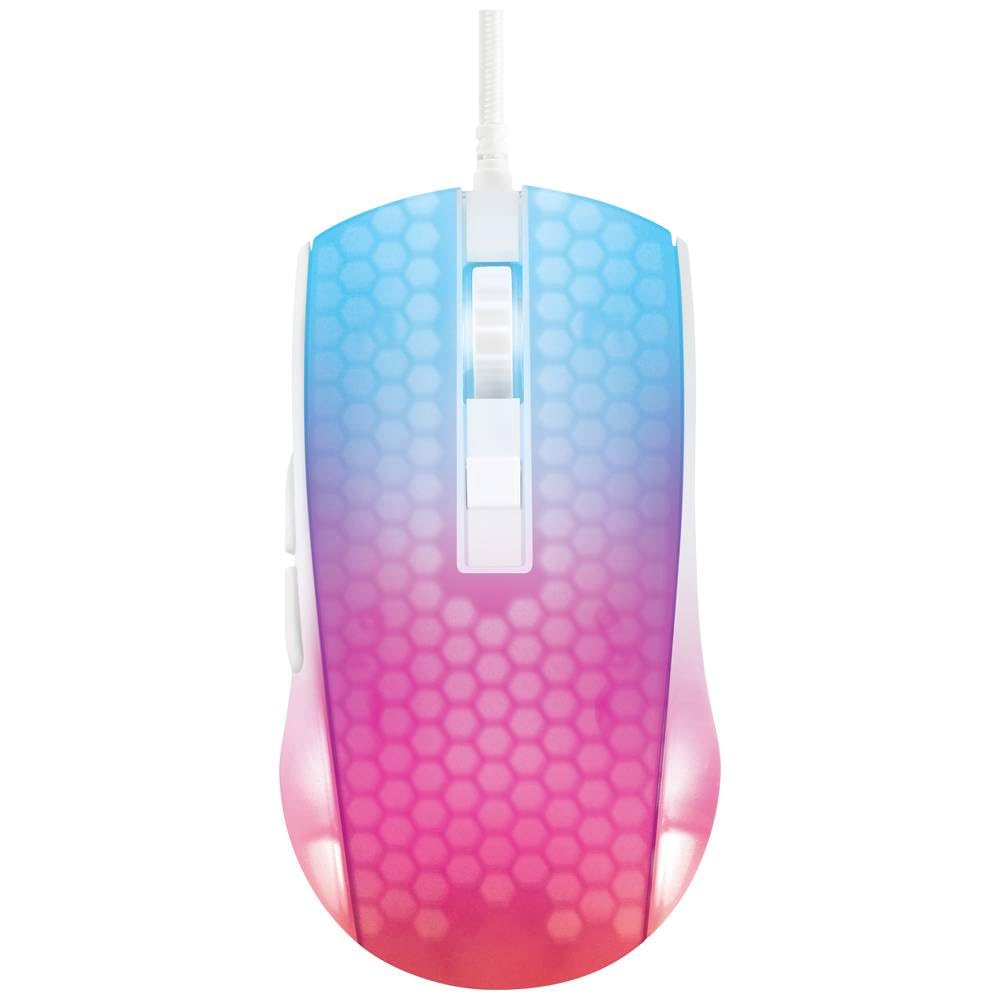
Réžia view of the DELTACO GAMING WM87 Gaming Mouse. The mouse features a translucent white body with an illuminated honeycomb pattern that transitions from blue at the front to pink and red at the rear. It has a scroll wheel and two main buttons, along with two side buttons visible on the left.
2. Produkt skončilview
The DELTACO GAMING WM87 is a high-performance gaming mouse designed for precision and comfort. It features a transparent design with integrated illumination, a high-accuracy optical sensor, and six programmable buttons.
Kľúčové vlastnosti:
- Pripojenie: Káblové USB
- Senzor: Optické, až 30 000 DPI
- Tlačidlá: 6 (Left, Right, Scroll Click, DPI Cycle, Forward, Back)
- Dizajn: Transparent shell with illuminated honeycomb pattern
- Kompatibilita: Osobný počítač, notebook
3. Pokyny na nastavenie
- Rozbaľte myš: Carefully remove the DELTACO GAMING WM87 mouse from its packaging.
- Pripojiť k počítaču: Locate an available USB port on your personal computer or laptop. Insert the USB connector of the mouse firmly into the USB port.
- Inštalácia ovládača: The mouse is plug-and-play. Your operating system should automatically detect and install the necessary drivers. No additional software installation is typically required for basic functionality.
- Overte funkčnosť: Once connected, move the mouse and click the buttons to ensure it is working correctly. The integrated illumination should light up.
4. Návod na obsluhu
Základné funkcie:
- Ľavý klik: Primárna akcia, výber.
- Kliknite pravým tlačidlom myši: Kontextové menu, sekundárna akcia.
- Rolovacie koliesko: Scroll up/down pages. Pressing the scroll wheel typically acts as a middle click.
- Tlačidlá Dopredu/Späť: Located on the left side of the mouse, these buttons are commonly used for navigation in web prehliadačov resp file prieskumníkov.
Úprava DPI:
The DELTACO GAMING WM87 mouse features adjustable DPI (Dots Per Inch) settings, allowing you to change the cursor sensitivity on the fly. A dedicated DPI button (often located behind the scroll wheel) cycles through preset DPI levels up to 6200 DPI. Press this button to adjust the sensitivity to your preference.
Osvetlenie:
The mouse features integrated illumination. The lighting pattern and colors are typically pre-programmed and may change based on DPI settings or automatically cycle through colors. Refer to any potential software for advanced customization, if available.
5. Údržba
- Čistenie: Use a soft, dry, lint-free cloth to clean the exterior of the mouse. For stubborn dirt, slightly damphandričku vodou. Nepoužívajte agresívne chemikálie, rozpúšťadlá ani abrazívne materiály.
- Čistenie senzora: Občas sa okolo optického senzora na spodnej strane myši môže nahromadiť prach alebo nečistoty. Na jemné vyčistenie oblasti senzora použite vatový tampón alebo stlačený vzduch.
- Ukladací priestor: Keď myš nepoužívate, skladujte ju v čistom a suchom prostredí mimo dosahu extrémnych teplôt a priameho slnečného žiarenia.
- Starostlivosť o káble: Aby ste predišli poškodeniu, vyhnite sa nadmernému ohýbaniu alebo krúteniu kábla USB.
6. Riešenie problémov
- Myš nereaguje:
- Uistite sa, že kábel USB je bezpečne zapojený do funkčného portu USB.
- Skúste zapojiť myš do iného USB portu na počítači.
- Reštartujte počítač.
- Nepravidelný pohyb kurzora:
- Vyčistite optický senzor na spodnej strane myši.
- Uistite sa, že myš používate na vhodnom povrchu (napr. podložka pod myš). Vyhnite sa vysoko reflexným alebo priehľadným povrchom.
- Osvetlenie nefunguje:
- Skontrolujte pripojenie USB.
- If the mouse has a dedicated lighting control button or software, ensure it is enabled.
7. Špecifikácie
| Funkcia | Detail |
|---|---|
| Značka | DELTACO GAMING |
| Číslo modelu | GAM-144-W (WM87) |
| Technológia pripojenia | USB |
| Technológia detekcie pohybu | Optické |
| Počet tlačidiel | 6 |
| DPI | Až 6200 |
| Orientácia rúk | Správne |
| Odporúčané použitie produktu | Hranie |
| Kompatibilné zariadenia | Prenosný počítač, osobný počítač |
| Rozmery produktu | 180 x 0.07 x 0.12 cm (Note: These dimensions appear to be for the cable or packaging, not the mouse itself. Please refer to product packaging for accurate mouse dimensions.) |
| Hmotnosť | Approximately 65 Grams (Lithium battery weight, likely referring to overall mouse weight if no battery is present) |
| Prvý dostupný dátum | 16. septembra 2023 |
8. Záruka a podpora
For warranty information, technical support, or service inquiries regarding your DELTACO GAMING WM87 Gaming Mouse, please refer to the warranty card included with your product or visit the official DELTACO GAMING webstránky. Uschovajte si doklad o kúpe pre prípad reklamácie.

