
Úvod
The FEYA Y10 Motorcycle Helmet Speakers are designed to enhance your riding experience with advanced audio and communication features. This manual provides essential information for setup, operation, and maintenance of your new helmet speakers.
Experience seamless connectivity and superior sound quality with Wireless 5.3 technology, allowing simultaneous connection to two mobile phones for music streaming and GPS voice guidance. The intelligent noise reduction ensures crystal clear calls by minimizing engine, wind, and traffic noise.
Equipped with a 1000 mAh large rechargeable battery, the Y10 offers up to 20 hours of working time and an impressive 18 months of standby time on a 2-hour charge. Its IPX6 waterproof rating ensures durability in various weather conditions, making it a reliable companion for all your rides.
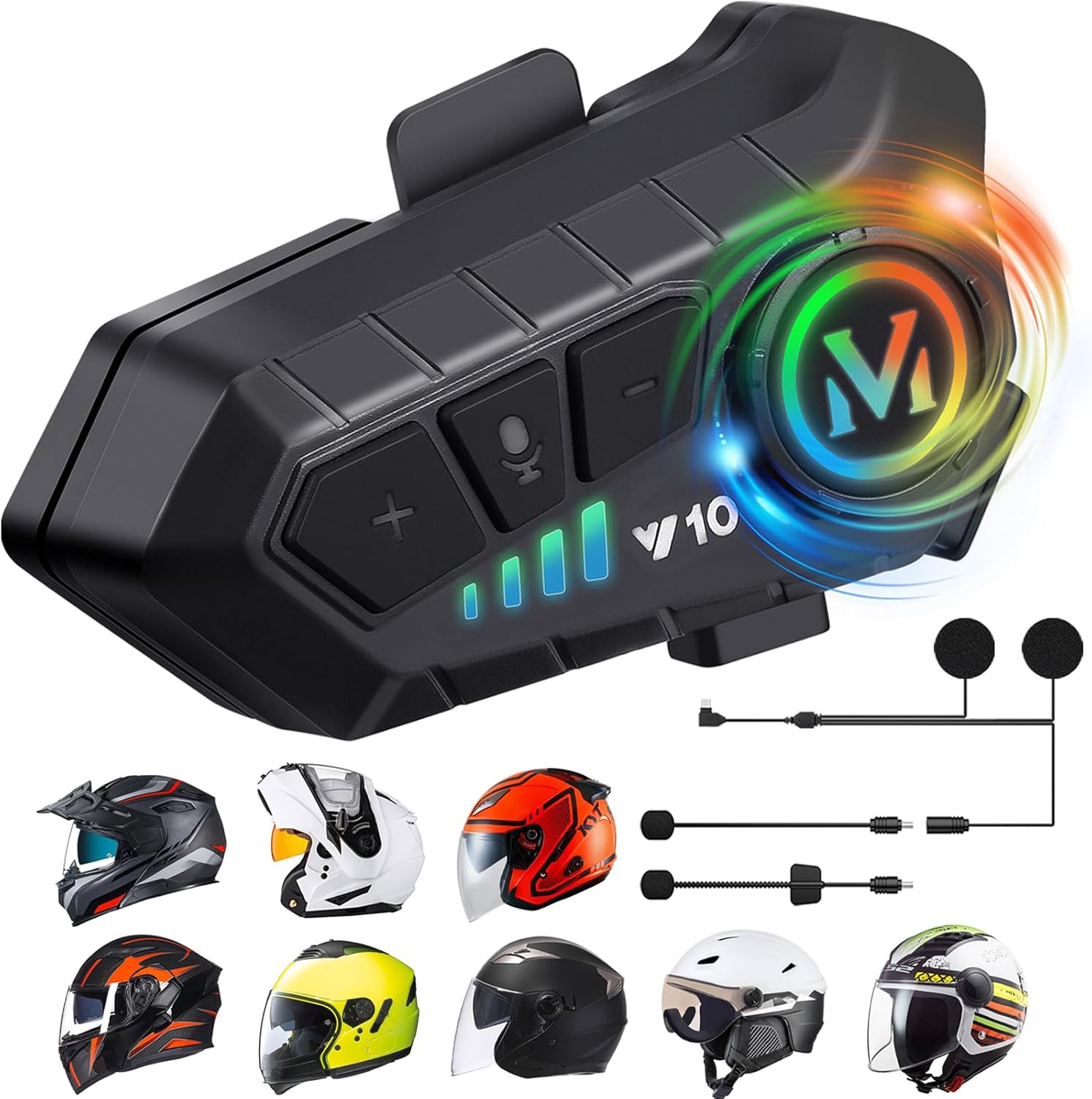
Main unit of the FEYA Y10 Motorcycle Helmet Speakers with various compatible helmet types.

The FEYA Y10 offers wireless high compatibility, connecting to two mobile phones simultaneously for music and GPS.

The FEYA Y10 features fast charging and a super large 1000mAh battery capacity, providing extended usage times.

Activate voice assistant with a single button press for automatic hands-free calls and convenient control while riding.

Intelligent noise reduction technology ensures clear communication, and IPX6 waterproofing protects against various weather conditions.

The FEYA Y10 is versatile and can be used in various situations and with different helmet types, including for motorcyclists, cyclists, and skiers.
Oficiálne video s produktmiasing the FEYA Y10 Motorcycle Helmet Speakers and their features.
Official product video highlighting the intelligent noise cancellation feature of the FEYA Helmet Speakers.
Official product video providing a detailed overview of the FEYA Y10 Motorcycle Helmet Speakers.
Official product video demonstrating the features of the FEYA Y10 Motorcycle Headset.
Oficiálne video s produktmiasing the FEYA Y10 Motorcycle Headphones.
Čo je v krabici
Your FEYA Y10 Motorcycle Helmet Speakers package includes the following components:
- Wireless Unit (x1)
- Headset & Microphone (x2)
- Single/Double Sided Speak Adhesive (x2)
- Round Speaker Adhesive (x2)
- Square Microphone Adhesive (x1)
- Clip-on Base (x1)
- Nabíjací kábel (x1)
- Instruction Manuals (x1)
- Darčeková krabička (x1)

All components included in the FEYA Y10 Motorcycle Helmet Speakers package.
Nastavenie a inštalácia
The FEYA Y10 helmet speakers are designed for easy installation and compatibility with all helmet types. Please ensure your helmet can accommodate the speakers (thickness: 0.6 inches, width: 1.77 inches) before proceeding.
- Vyberte typ mikrofónu: The package includes two types of microphones: a soft microphone for rally and full-face helmets, and a hard microphone for lift-up, half, and ski helmets. Select the one best suited for your helmet type.
- Umiestnenie reproduktorov: Identify the speaker groove section inside your helmet. Use the provided speaker adhesives to secure the speakers in place, ensuring they are positioned close to your ears for optimal sound.
- Umiestnenie mikrofónu: Attach the chosen microphone to the appropriate location inside your helmet, ensuring it is positioned to capture your voice clearly without obstruction.
- Mount Wireless Unit: Use the clip-on base to securely attach the wireless unit to the exterior of your helmet. Alternatively, use the provided Velcro pads to stick the device on the side of your helmet.
- Pripojovacie káble: Plug the speaker and microphone cables into the corresponding ports on the wireless unit. Route the cables neatly under your helmet lining and cheek pads to avoid discomfort.
- Nabíjacie zariadenie: Before first use, fully charge the device using the provided Type-C charging cable. A full charge takes approximately 2 hours.

The FEYA Y10 is designed to fit all types of helmets, offering flexibility for various riding styles.

Detailed diagram showing the button layout and interfaces for the FEYA Y10, including the charging port and speaker/microphone interface.
Návod na obsluhu
Familiarize yourself with the controls for optimal use of your FEYA Y10 helmet speakers.
- Zapnutie/vypnutie: Long press the 'M' button (main button) to power the device on or off.
- Spárovanie Bluetooth: Once powered on, the device will automatically enter pairing mode. Connect to 'QINLIFE Y10' on your mobile phone's Bluetooth settings.
- Prehrať/pozastaviť hudbu: Short press the 'M' button to play or pause music.
- Nasledujúca/predchádzajúca skladba: Krátkym stlačením tlačidla „+“ prejdete na ďalšiu skladbu a stlačením tlačidla „-“ prejdete na predchádzajúcu skladbu.
- Ovládanie hlasitosti: Long press the '+' button to increase volume, and the '-' button to decrease volume.
- Automatic Answer/Refuse Call: The headset will automatically answer incoming calls after 10 seconds. To manually answer, short press the 'M' button. To refuse a call, long press the 'M' button for 2 seconds.
- Ukončiť hovor: Short press the 'M' button while on a call to end it.
- Hlasový asistent (Siri/Google Assistant): Short press the microphone button to activate your phone's voice assistant.
- Ovládanie svetelných efektov: Long press the AI voice key (microphone button) to turn the RGB light effect on or off.
- Zmeniť jazyk: While the headset is powered on and disconnected from your phone, double-press the 'M' button to switch the language.
Utilize the voice assistant feature for hands-free control and communication while riding.
Instructions on how to change the language setting of the FEYA Y10 headset.
Údržba
To ensure the longevity and optimal performance of your FEYA Y10 Motorcycle Helmet Speakers, follow these maintenance guidelines:
- Čistenie: Hlavnú jednotku a reproduktory utrite mäkkou handričkou.amp plátno. Vyhnite sa používaniu drsných chemikálií alebo abrazívnych čistiacich prostriedkov.
- Vystavenie vode: While IPX6 waterproof, avoid prolonged submersion in water. Ensure the charging port cover is securely closed when not charging to prevent water ingress.
- Ukladací priestor: Zariadenie skladujte na chladnom a suchom mieste mimo dosahu priameho slnečného žiarenia a extrémnych teplôt.
- Starostlivosť o batérie: To preserve battery life, charge the device regularly, even if not in frequent use. Avoid fully depleting the battery for extended periods.
Riešenie problémov
If you encounter any issues with your FEYA Y10 Motorcycle Helmet Speakers, please refer to the following common troubleshooting steps:
- Bez napájania: Ensure the device is fully charged. If it doesn't turn on, try charging it for at least 30 minutes.
- Nedá sa spárovať: Make sure Bluetooth is enabled on your phone and the headset is in pairing mode (blinking indicator light). If already paired, try unpairing and re-pairing the device. Ensure no other devices are connected to the headset.
- Žiadny zvuk/nízka hlasitosť: Check the volume levels on both the headset and your connected phone. Ensure speakers are correctly positioned over your ears inside the helmet.
- Nízka kvalita hovoru: Ensure the microphone is positioned correctly and not obstructed. Check for excessive wind noise; the intelligent noise reduction should mitigate this, but extreme conditions may affect clarity.
- Prerušované pripojenie: Ensure your phone is within the Bluetooth range (up to 10 meters). Avoid obstacles between the headset and your phone that might interfere with the signal.
- Hlasový asistent nereaguje: Ensure your phone's voice assistant feature is enabled and properly configured. Confirm the headset is connected to your phone.
If the issue persists after trying these steps, please contact FEYA customer support for further assistance.
Špecifikácie
| Funkcia | Detail |
|---|---|
| Názov modelu | Y10 |
| Technológia pripojenia | Bezdrôtové pripojenie (Bluetooth 5.3) |
| Kontrola hluku | Aktívne potlačenie hluku |
| Úroveň odolnosti voči vode | IPX6 (vodotesný) |
| Životnosť batérie | 80 Hours (Music Playback) |
| Doba nabíjania | 2 hodín |
| Jack pre slúchadlá | Typ-C |
| Veľkosť ovládača zvuku | 40 milimetra |
| Hmotnosť položky | 2.12 unce (60 gramov) |
| Rozmery produktu | 3.5 x 0.5 x 0.7 palca |
| Typ ovládania | Voice Control, Call Control, Volume Control, Siri, Google Assistant |
Záruka a podpora
For warranty information and customer support, please refer to the documentation provided in your product package or visit the official FEYA webstránky. Uschovajte si doklad o kúpe ako doklad o kúpe pre prípadné reklamácie.