
SPI 31-040-9
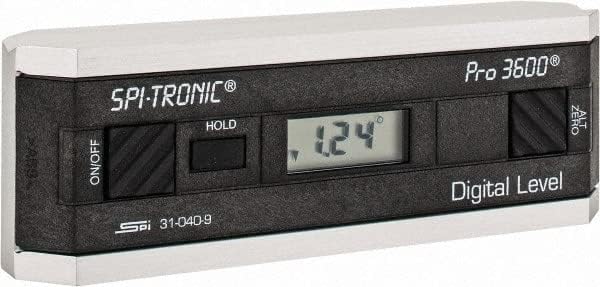
Používateľská príručka k digitálnemu uhlomeru SPI 31-040-9 PRO3600
Model: 31-040-9 | Brand: SPI
1. Úvod
The SPI 31-040-9 Digital Protractor PRO3600 is a revolutionary tool designed to provide immediate digital indications of level, plumb, and angles. It features a light, rigid, and ultra-precise platform, utilizing a state-of-the-art sensor and microprocessor circuit for accurate readings. This instrument is built for durability, precision, and reliability, making it an essential tool for various metalworking and laboratory applications.
Kľúčové vlastnosti:
- Floating zero provides zero selection anywhere within its 360° range.
- PRO 3600 features SPC output and excellent accuracy.
- Instant LCD Display with resolution of 0.1° up to +/-10°.
- Deviation from the true plane is measurable through full 360° (4x90°).
- Supplied in a protective plastic case.
- Top plate has a V-groove for accurate registration on curved or cylindrical surfaces.

2. Produkt skončilview
Familiarize yourself with the main components and controls of your SPI PRO3600 Digital Protractor.


3. Nastavenie
3.1 Inštalácia batérie
The SPI PRO3600 is battery powered. To install or replace batteries:
- Locate the battery compartment cover, typically on the underside or side of the unit.
- Open the cover using a small screwdriver or coin if necessary.
- Insert the required batteries (refer to the battery type indicated inside the compartment, usually AAA or button cell) ensuring correct polarity (+/-).
- Bezpečne zatvorte kryt priestoru pre batérie.
3.2 Počiatočné zapnutie
Po vložení batérie stlačte tlačidlo ON/OFF button to power on the device. The LCD display should illuminate and show a reading.
4. Návod na obsluhu
4.1 Zapnutie/vypnutie
- Na otočenie jednotky ON, stlačte tlačidlo ON/OFF tlačidlo.
- Na otočenie jednotky VYPNUTÉ, stlačte tlačidlo ON/OFF znova tlačidlo.
- The unit will automatically shut off after 6 minutes of non-use to conserve battery life.
4.2 Zeroing (ALT ZERO)
The floating zero feature allows you to set a reference point anywhere within the 360° range.
- Place the unit on your chosen reference surface.
- Wait approximately 5 seconds for the reading to stabilize.
- Stlačte tlačidlo ALT ZERO button. The display will reset to 0.0°, establishing this as your new reference.
- To return to the original absolute reference (factory zero), press the ALT ZERO znova tlačidlo.
4.3 Holding a Reading
Ak chcete zmraziť aktuálnu hodnotu na displeji:
- Stlačte tlačidlo PODRŽAŤ button. The displayed reading will be frozen.
- To unfreeze the display and resume live readings, press the PODRŽAŤ znova tlačidlo.
4.4 SPC Output
The PRO3600 features an SPC (Statistical Process Control) output port. This allows for data transfer to external devices for analysis. Refer to the manual for your specific SPC data collection system for connection and usage instructions.
4.5 Measuring Angles
Place the base of the protractor firmly on the surface you wish to measure. The digital display will show the angle relative to the last set zero point. For absolute measurements, ensure the unit is zeroed on a true horizontal surface.
4.6 Using the V-Groove
The top plate of the protractor features a V-groove. This design allows for accurate registration and measurement on curved or cylindrical surfaces, such as pipes or shafts. Simply align the V-groove with the cylindrical object to obtain a stable and accurate reading.
5. Údržba
5.1 Čistenie
- Jednotku utrite mäkkou, suchou handričkou.
- Na odolnú špinu mierneamp Môžete použiť handričku s jemným mydlom a potom ihneď osušiť.
- Nepoužívajte abrazívne čistiace prostriedky, rozpúšťadlá ani neponárajte jednotku do vody.
5.2 Skladovanie
- Store the protractor in its supplied plastic case when not in use to protect it from dust, dirt, and physical damage.
- Skladujte v suchom prostredí, mimo dosahu extrémnych teplôt a priameho slnečného žiarenia.
- Ak skladujete dlhší čas, vyberte batérie, aby ste predišli ich vytečeniu.
6. Riešenie problémov
- Jednotka sa nezapne: Skontrolujte inštaláciu batérií a uistite sa, že batérie nie sú vybité. V prípade potreby ich vymeňte.
- Nepresné údaje: Ensure the measurement surface is clean and stable. Perform an ALT ZERO calibration on a known true reference surface.
- Jednotka sa neočakávane vypne: The unit has an automatic shut-off feature after 6 minutes of non-use. This is normal operation. If it shuts off during active use, check battery levels.
- Displej je slabý alebo bliká: Batérie môžu byť slabé. Vymeňte ich.
7. Špecifikácie
| Atribút | Hodnota |
|---|---|
| Výrobca | MSC Industrial |
| Číslo dielu | 03883782 |
| Hmotnosť položky | 6.5 libry |
| Rozmery produktu | 6 x 1.2 x 2.3 palca |
| Číslo modelu položky | 31-040-9 |
| Veľkosť | Jedna veľkosť |
| Farba | Čierna |
| Materiál | Kompozitný |
| Zdroj napájania | Napájanie z batérie |
| Položka Množstvo v balení | 1 |
| Zahrnuté komponenty | Fitted Case |
8. Záruka a podpora
8.1 Informácie o záruke
SPI measuring instruments are backed by an industry-leading 2-Year warranty, ensuring their durability, precision, and reliability. Please retain your proof of purchase for warranty claims.
8.2 Zákaznícka podpora
For technical assistance, warranty service, or inquiries regarding your SPI PRO3600 Digital Protractor, please contact SPI customer support through their official webstránku alebo predajcu, od ktorého ste produkt zakúpili.
Ask a question about this manual
Ask about setup, troubleshooting, compatibility, parts, safety, or missing instructions. Manuals+ will review the question and use this page’s manual context to help answer it.