
1. Úvod a koniecview
This manual provides essential instructions for the safe and efficient use of your Maxcom MM135L Basic Mobile Phone. The MM135L is designed for straightforward communication, featuring a user-friendly interface, large keys, and a 1.77-inch screen. It supports 2G networks and includes dual SIM capability, an SOS button for emergencies, and convenient USB-C charging. Please read this manual thoroughly before operating the device.
2. Obsah balenia
Overte, či sú v balení všetky položky:
- Maxcom MM135L Mobile Phone
- Battery (Lithium-Ion, 600 mAh)
- USB kábel
- Vysúvač zásobníka SIM
- Používateľská príručka (tento dokument)
3. Rozloženie zariadenia
Familiarize yourself with the physical components of your Maxcom MM135L phone.
Obrázok 3.1: Zadná časť view of the Maxcom MM135L phone, showing the blue textured back cover, Maxcom logo, and speaker grille at the top.

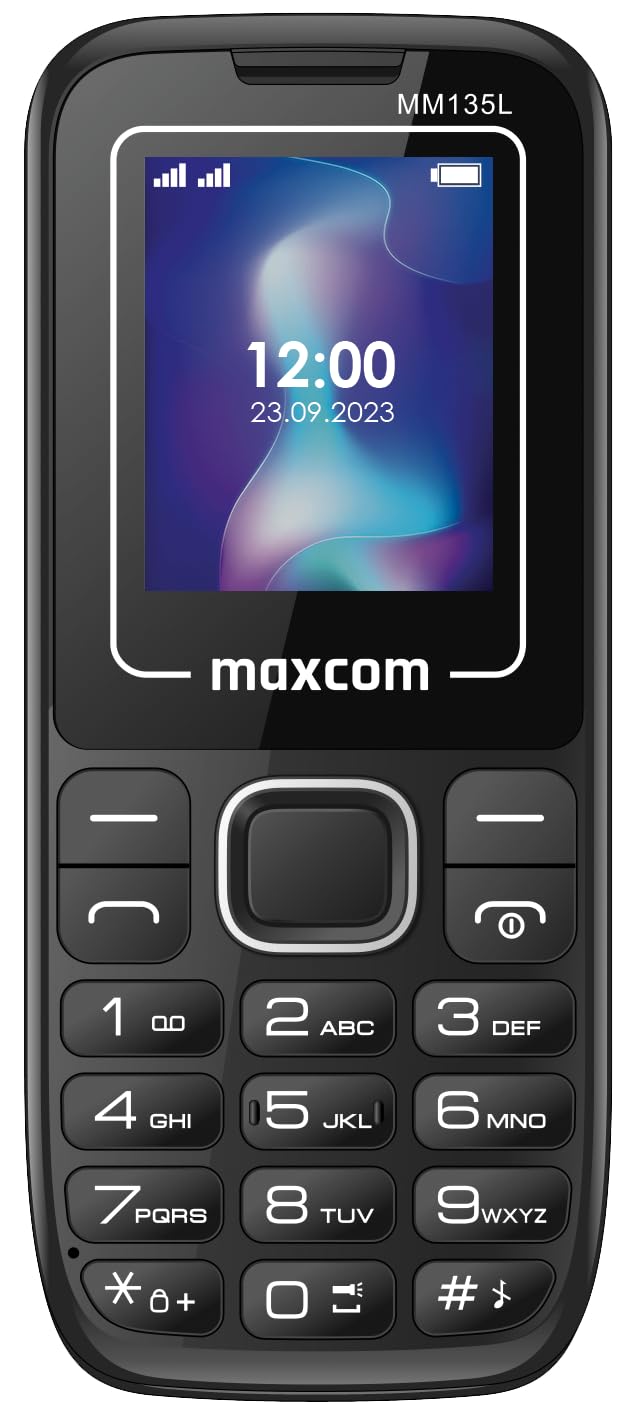
Obrázok 3.2: Predná strana view of the Maxcom MM135L phone, displaying the screen, large numeric keypad, and call/end buttons.

Figure 3.3: Bottom edge of the phone, featuring the USB-C charging port and a 3.5mm headphone jack.

Figure 3.4: Top edge of the phone, highlighting the integrated flashlight.
Kľúčové komponenty:
- Displej: 1.77-inch LCD for clear text and call information.
- Numerická klávesnica: Large, tactile buttons for easy dialing and texting.
- Tlačidlá hovoru/ukončenia: Dedicated buttons for managing calls.
- Navigačné klávesy: Pre navigáciu v menu.
- SOS tlačidlo: Located on the rear for emergency calls (refer to Figure 3.1).
- baterka: Integrated at the top of the device (refer to Figure 3.4).
- Port USB-C: For charging the device (refer to Figure 3.3).
- Jack pre slúchadlá: 3.5mm port for audio accessories (refer to Figure 3.3).
4. Nastavenie
4.1 Inštalácia batérie
- Opatrne odstráňte zadný kryt telefónu.
- Zarovnajte kontakty batérie s svorkami vo vnútri priehradky na batériu.
- Jemne zatlačte batériu na miesto.
- Nasaďte späť zadný kryt a uistite sa, že bezpečne zacvakne.
4.2 Inštalácia karty SIM
The Maxcom MM135L supports dual SIM cards.
- With the phone powered off and the back cover removed, locate the SIM card slots.
- Insert your SIM card(s) into the designated slot(s) with the gold contacts facing down, following the orientation indicated on the phone.
- Uistite sa, že SIM karta(y) sú úplne zasunuté.
- Replace the back cover and battery.
4.3 Nabíjanie telefónu
The phone uses a USB-C port for charging.
- Connect the USB-C cable to the charging port at the bottom of the phone (refer to Figure 3.3).
- Pripojte druhý koniec USB kábla ku kompatibilnému napájaciemu adaptéru USB alebo k USB portu počítača.
- Indikátor batérie na obrazovke bude zobrazovať stav nabíjania.
- Po úplnom nabití batérie odpojte nabíjačku.
Poznámka: For optimal battery life, fully charge the phone before first use.
5. Návod na obsluhu
5.1 Zapnutie/vypnutie
- Zapnutie: Stlačte a podržte Call/Power tlačidlo, kým sa nerozsvieti obrazovka.
- Vypnutie: Stlačte a podržte Koniec/Napájanie button until the power off options appear, then confirm.
5.2 Uskutočňovanie a prijímanie hovorov
- Ak chcete uskutočniť hovor: Zadajte telefónne číslo pomocou klávesnice a stlačte Zavolajte tlačidlo.
- Ak chcete prijať hovor: Stlačte tlačidlo Zavolajte tlačidlo, keď telefón zvoní.
- Ak chcete ukončiť hovor: Stlačte tlačidlo Koniec tlačidlo.
5.3 Odosielanie a prijímanie správ
- Navigate to the "Messages" menu using the navigation keys.
- Select "Create New Message" to compose an SMS.
- Enter the recipient's number and your message, then send.
- Prijaté správy sa zobrazia v priečinku „Doručená pošta“.
5.4 Používanie tlačidla SOS
The SOS button is located on the rear of the phone. It is designed for emergency situations.
- Aktivácia: Press and hold the SOS button for several seconds.
- The phone will automatically sound an alarm and send emergency SMS messages to pre-set contacts.
- It will then automatically call the saved emergency contacts in a loop until a call is answered.
- Uistite sa, že sú v nastaveniach telefónu správne nakonfigurované núdzové kontakty.
5.5 Funkcia baterky
The built-in flashlight can be activated for convenience.
- Refer to the phone's specific settings or a dedicated side button for flashlight activation. Typically, a long press on a designated key or a side switch controls it.
6. Údržba
- Čistenie: Na čistenie povrchu telefónu používajte mäkkú, suchú handričku. Vyhnite sa tekutým čistiacim prostriedkom.
- Starostlivosť o batérie: Nevystavujte batériu extrémnym teplotám. Vyhnite sa častému úplnému vybíjaniu batérie.
- Ukladací priestor: Ak telefón dlhší čas nepoužívate, skladujte ho na chladnom a suchom mieste.
- Odolnosť voči vode: Tento telefón nie je vodeodolný. Zabráňte kontaktu s tekutinami.
7. Riešenie problémov
| Problém | Možné riešenie |
|---|---|
| Telefón sa nezapne. | Uistite sa, že batéria je správne nainštalovaná a nabitá. Pripojte nabíjačku a skúste to znova. |
| Nemožno uskutočňovať ani prijímať hovory. | Check if the SIM card is properly inserted and activated. Verify network signal strength. Contact your service provider if issues persist. |
| Batéria sa nenabíja. | Ensure the USB-C cable and charger are securely connected and functional. Try a different charging cable or adapter. |
| Tlačidlo SOS nefunguje. | Verify that emergency contacts are saved in the phone's settings. Ensure the phone has network coverage. |
| Slabá kvalita hovoru. | Move to an area with better network reception. Check the speaker and microphone for obstructions. |
8. Špecifikácie
| Funkcia | Detail |
|---|---|
| Názov modelu | MM135L |
| Veľkosť obrazovky | 1.77 palca |
| Typ zobrazenia | LCD |
| Rozlíšenie | 128 x 160 |
| Bunková technológia | 2G |
| Podpora SIM | Dual SIM |
| Typ batérie | Lítium-iónové |
| Kapacita batérie | 600 XNUMX mAh |
| Nabíjací port | USB-C |
| Rozmery (D x Š x V) | 7 x 14 x 3.5 cm |
| Hmotnosť | 60 g |
| Špeciálne funkcie | SOS Button, Flashlight, Expandable Memory, Fast Charging Support |
9. Záruka a podpora
For warranty information, technical support, or service inquiries, please refer to the warranty card included with your product or contact Maxcom customer service directly. Keep your proof of purchase for warranty claims.