
1. Produkt skončilview
The POLONO P31S is a compact and portable thermal label printer designed for various labeling needs in home, office, and school environments. It connects wirelessly via Bluetooth to your smartphone or tablet, allowing you to design and print labels using the dedicated mobile application. This device features a built-in cutter and operates without ink, utilizing thermal printing technology for clear, durable labels.
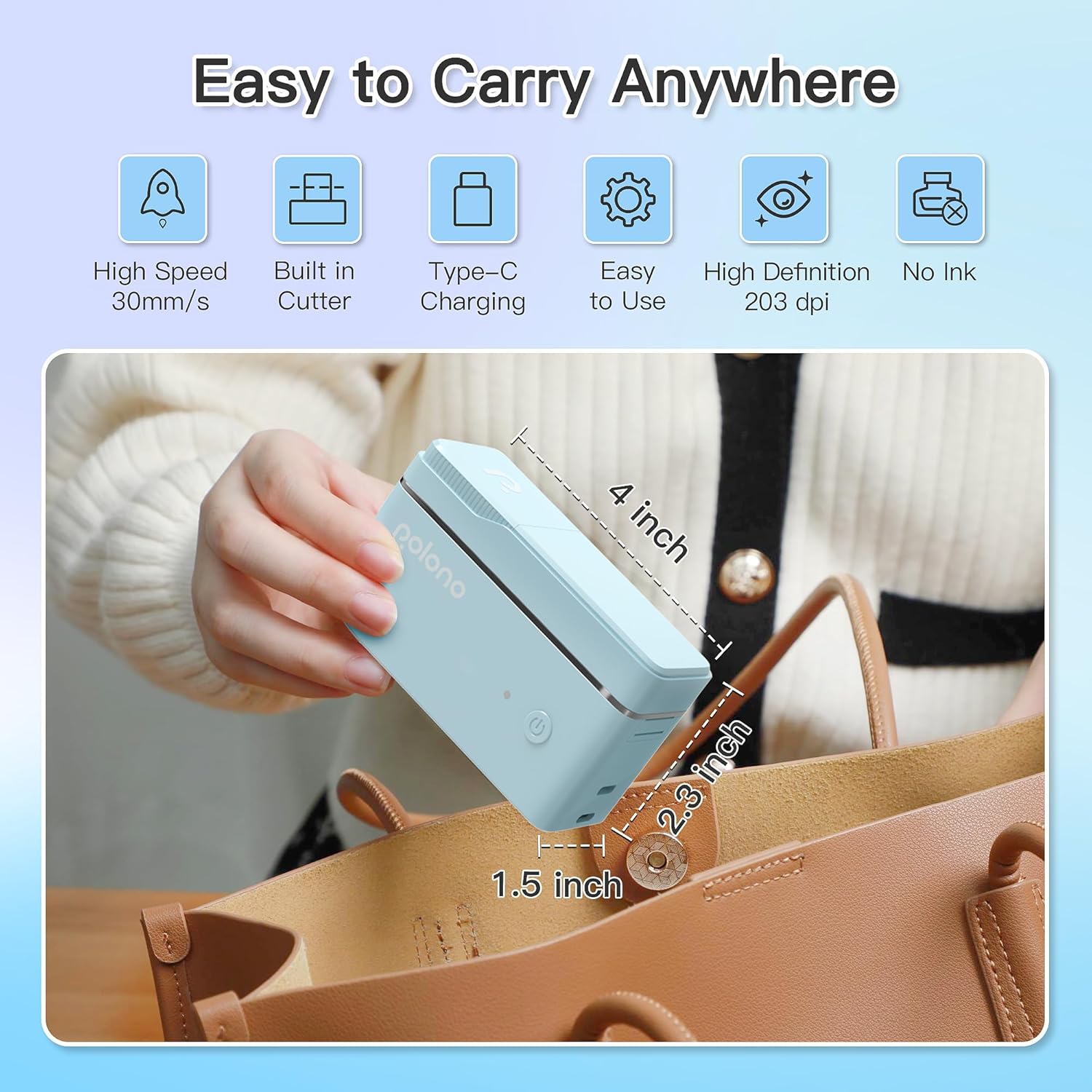
Obrázok 1: POLONO P31S Label Printer highlighting its compact design and dimensions (approximately 4 inches long, 2.3 inches high, 1.5 inches wide).
Kľúčové vlastnosti:
- Prenosný a ľahký dizajn.
- Bluetooth connectivity for wireless printing.
- Thermal printing technology (no ink required).
- Built-in label cutter.
- Supports various label types including text, QR codes, barcodes, and images.
- Nabíjateľná batéria.
2. Bezpečnostné informácie
Please read and understand all safety instructions before using the POLONO P31S label printer to prevent injury or damage to the device.
- Zariadenie nerozoberajte, neopravujte ani neupravujte.
- Chráňte zariadenie pred vodou, vlhkosťou a extrémnymi teplotami.
- Use only POLONO-approved label tapes to ensure optimal performance and prevent damage.
- Bezprostredne po tlači sa nedotýkajte tlačovej hlavy, pretože môže byť horúca.
- Uchovávajte mimo dosahu detí.
- Use the provided charging cable or a certified equivalent.
3. Obsah balenia
Overte, či sú v balení všetky položky:
- POLONO P31S Label Printer
- Label Tape Roll (starter roll)
- USB nabíjací kábel
- Používateľská príručka (tento dokument)
4. Nastavenie
4.1 Nabíjanie zariadenia
Before first use, fully charge the label printer. Connect the provided USB charging cable to the printer's charging port and to a USB power adapter (not included) or a computer's USB port. The indicator light will show charging status.
4.2 Installing Label Tape
- Otvorte kryt priehradky na štítky.
- Insert the label tape roll with the printing surface facing up, ensuring it is properly seated.
- Pull a small portion of the label tape out, extending it past the cutter blade.
- Bezpečne zatvorte kryt priehradky na štítky.

Obrázok 2: Proper installation of POLONO P31S label tape. Ensure the green sticker on the tape is not removed or damaged, as it contains chip technology for optimal performance. Do not pull the label out directly; use the cutting blade.
4.3 Stiahnutie aplikácie a pripojenie Bluetooth
- Download the "Labelnize" app from the Apple App Store or Google Play Store.
- Turn on the POLONO P31S label printer by pressing and holding the power button.
- Povoľte Bluetooth na svojom smartfóne alebo tablete.
- Open the "Labelnize" app. The app will prompt you to allow Bluetooth access. Grant permission.
- Within the app, search for available devices and select "P31S" to connect.
- Once connected, the app will indicate a successful connection, and you are ready to create labels.
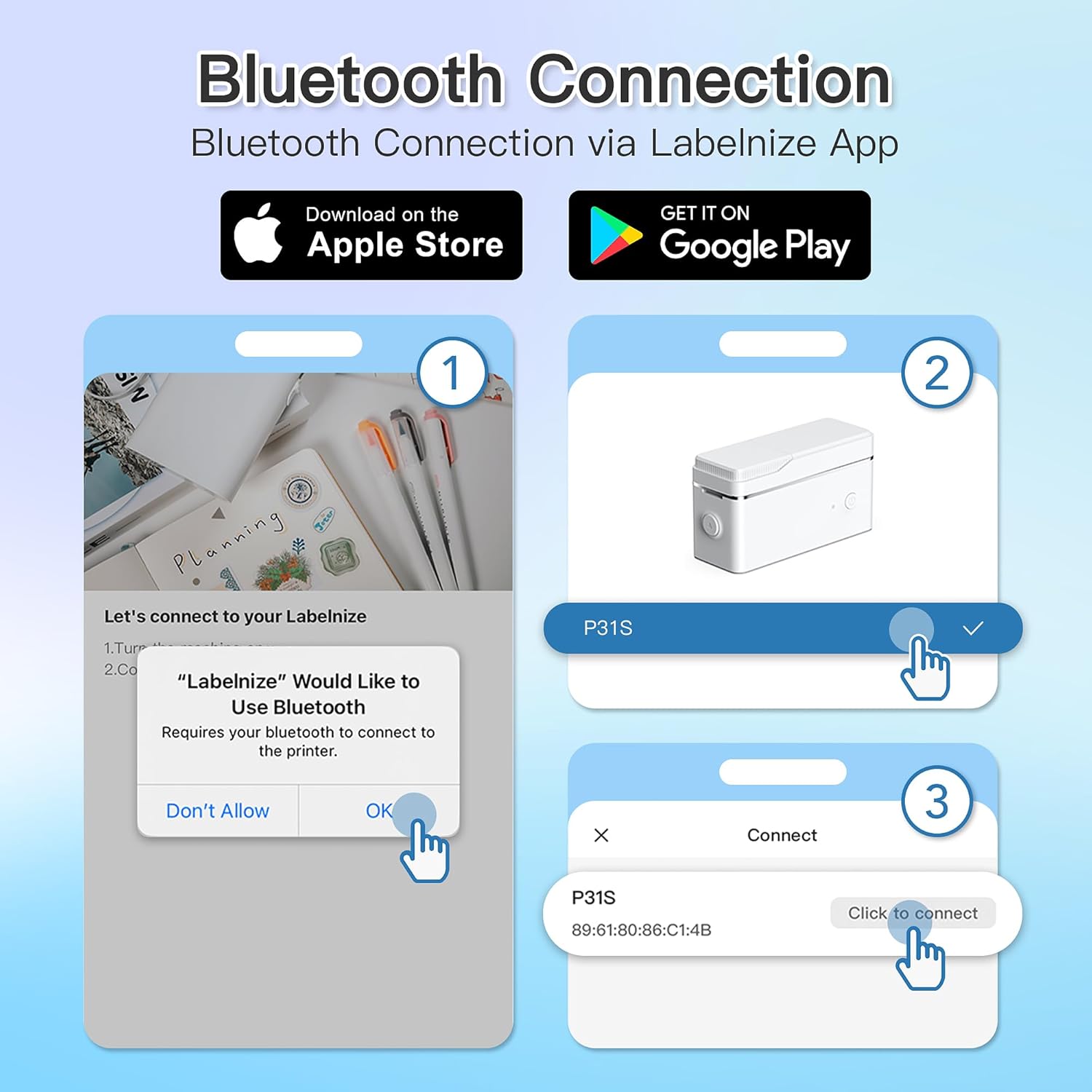
Obrázok 3: Steps for Bluetooth connection via the Labelnize App. Download the app, allow Bluetooth access, select "P31S" from the device list, and click "Connect".
5. Návod na obsluhu
5.1 Creating Labels with the Labelnize App
The Labelnize app offers a variety of tools to design your labels:
- Text: Enter custom text, choose from over 90 fonts, adjust size, style (bold, italic), and alignment.
- Hranice: Select from over 95 border designs to frame your labels.
- Icons/Graphics: Access a library of over 670 tab icons and other graphics to enhance your labels.
- QR Code/Barcode: Generate QR codes or barcodes for various applications.
- obrázky: Vložte obrázky z galérie vášho zariadenia.
- Šablóny: Utilize pre-designed templates for common labeling tasks.

Obrázok 4: The Labelnize app interface for creating labels, offering extensive customization options including borders, fonts, and icons. The app supports multiple languages.
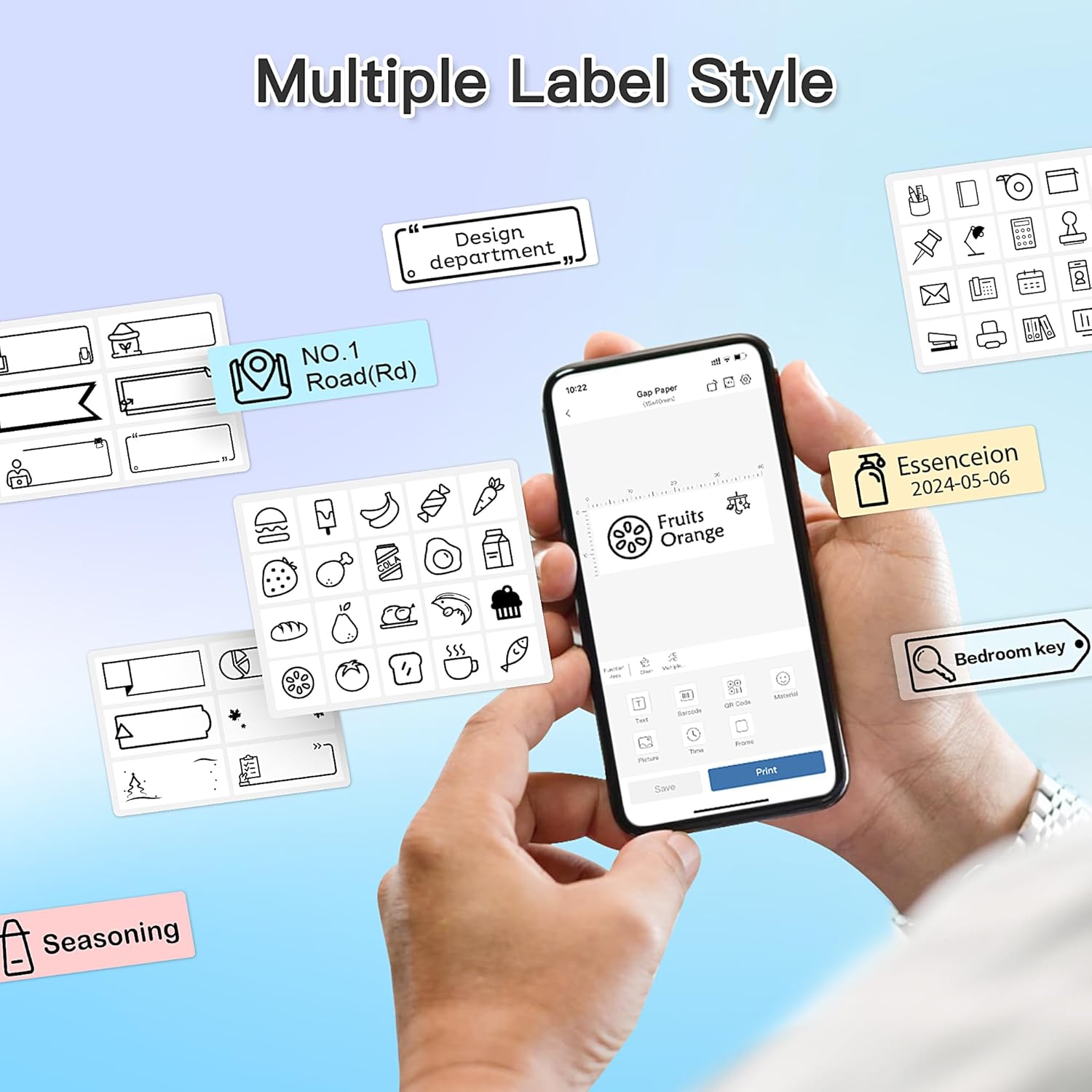
Obrázok 5: Examples of diverse label styles achievable with the POLONO P31S, demonstrating the flexibility in design for different organizational needs.
5.2 Tlač štítkov
After designing your label in the Labelnize app:
- Review návrh štítku na obrazovke aplikácie.
- V aplikácii klepnite na tlačidlo „Tlačiť“.
- Confirm print settings (e.g., number of copies) if prompted.
- The printer will automatically feed and print the label.
5.3 Používanie vstavanej rezačky
The POLONO P31S features a built-in cutter for clean and precise label separation. After printing, gently press the cutter button or lever (depending on model variation) to cut the label. Do not pull the label manually to tear it, as this may damage the printer or result in uneven cuts.
6. Údržba
6.1 Čistenie tlačovej hlavy
Pre zachovanie kvality tlače pravidelne čistite tlačovú hlavu:
- Vypnite tlačiareň a odpojte napájací kábel.
- Otvorte kryt priehradky na štítky.
- Jemne utrite tlačovú hlavu vatovým tampónom, jemneampzakončené izopropylalkoholom.
- Pred zatvorením krytu a zapnutím tlačiarne nechajte tlačovú hlavu úplne vyschnúť.
6.2 Starostlivosť o batérie
- Charge the battery regularly, even if the printer is not used frequently, to prolong its lifespan.
- Vyhnite sa dlhému úplnému vybitiu batérie.
- Keď tlačiareň nepoužívate, skladujte ju na chladnom a suchom mieste.
7. Riešenie problémov
| Problém | Možná príčina | Riešenie |
|---|---|---|
| Tlačiareň sa nezapne. | Slabá batéria alebo žiadna energia. | Nabite tlačiareň pomocou dodaného kábla USB. |
| Nedá sa pripojiť cez Bluetooth. | Bluetooth is off, printer is off, or app issue. | Ensure printer is on, Bluetooth is enabled on your device, and restart the Labelnize app. Try re-pairing. |
| Zlá kvalita tlače. | Dirty print head, incorrect label tape, or low battery. | Clean the print head (Section 6.1). Ensure you are using POLONO P31S compatible label tape. Charge the printer. |
| Zaseknutý štítok. | Improper tape installation or foreign object. | Turn off the printer, open the cover, carefully remove any jammed tape. Reinstall tape correctly. |
| Tlačiareň nereaguje. | Dočasná chyba softvéru. | Restart the printer and the Labelnize app. |
8. Špecifikácie
| Funkcia | Detail |
|---|---|
| Model | P31S |
| Technológia tlače | Termálne |
| Konektivita | Bluetooth |
| Rozlíšenie tlače | 203 x 203 DPI |
| Maximálna rýchlosť tlače (monochromatická) | 15 ppm |
| Maximálna veľkosť média | Label rolls (2 inches / 24 millimeters) |
| Farba atramentu | Čierna (termotlač) |
| Zdroj napájania | 1 lítium-polymérová batéria (súčasťou balenia) |
| Rozmery produktu | 7.2 x 7.4 x 12.7 cm; 260 g |
| Zahrnuté komponenty | Štítky |
9. Záruka a podpora
For warranty information and technical support, please refer to the official POLONO webalebo kontaktujte ich zákaznícky servis. Uschovajte si doklad o kúpe ako doklad o kúpe pre prípad reklamácie.
Oficiálne Webmiesto: www.polono.com (Poznámka: Toto je zástupný symbol URL, overte si, prosím, skutočného oficiálneho website for POLONO products.)