
1. Úvod
This manual provides detailed instructions for the installation, operation, and maintenance of your SEHMUA 4G LTE Cellular Security Camera (Model ZC-YT05). This camera is designed for outdoor surveillance in locations without Wi-Fi access, utilizing 4G LTE cellular networks. It features solar power, pan and tilt capabilities, 2K resolution, color night vision with spotlight, two-way audio, and PIR motion detection.
2. Komponenty produktu
Carefully unpack the box and ensure all components are present and in good condition. If any items are missing or damaged, please contact customer support.
- SEHMUA 4G LTE Cellular Security Camera (ZC-YT05)
- Solar Panel with mounting bracket
- Montážne skrutky a kotvy do steny
- USB nabíjací kábel
- Nano SIM Card (pre-installed or included separately)
- Používateľská príručka

Figure 2.1: SEHMUA 4G LTE Cellular Security Camera and Solar Panel mounted on a barn.
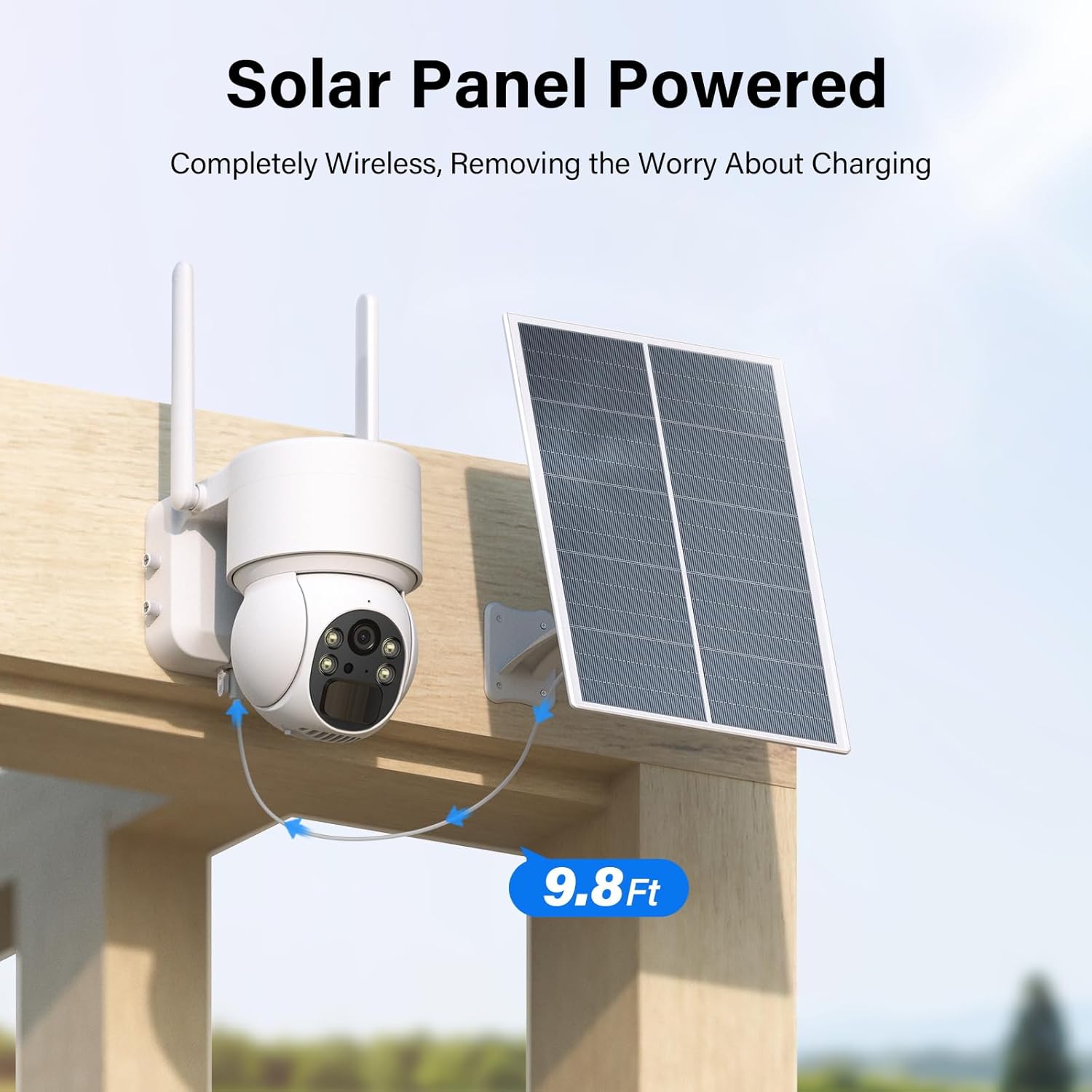
Figure 2.2: SEHMUA security camera connected to its solar panel with a 9.8ft cable, mounted on a wooden structure.
3. Nastavenie
3.1 Inštalácia karty SIM
- Locate the SIM card slot on the camera body. This is typically protected by a rubber plug or cover.
- Opatrne otvorte kryt.
- Insert the provided Nano SIM card into the slot with the gold contacts facing down and the notched corner aligned correctly. Push until it clicks into place.
- Close the cover securely to ensure waterproof sealing.

Figure 3.1: SIM Card Installation.
3.2 Nabíjanie fotoaparátu
Before initial use, fully charge the camera's internal battery using the provided USB cable. Connect the USB cable to the camera's charging port and a standard 5V USB power adapter (not included). The indicator light will show charging status.
3.3 Stiahnutie a párovanie aplikácie
- Download the 'UBox' app from your smartphone's app store (iOS App Store or Google Play Store).
- Zaregistrujte sa a prihláste sa.
- Follow the in-app instructions to add your camera. This typically involves scanning a QR code on the camera or its packaging.
- Ensure your phone has a stable internet connection during the pairing process.
3.4 Montáž kamery a solárneho panela
Vyberte si miesto montáže, ktoré poskytuje jasný výhľad view oblasti, ktorú chcete monitorovať a prijímať ample direct sunlight for the solar panel. The camera is IP65 weatherproof, suitable for outdoor conditions.
- Na bezpečné pripevnenie kamery k stene alebo stĺpu použite dodaný montážny držiak a skrutky.
- Mount the solar panel in a location that maximizes sun exposure throughout the day. Ensure the panel is angled correctly for optimal charging.
- Connect the solar panel cable to the camera's charging port. The cable length is approximately 9.8 feet (3 meters).

Figure 3.2: Weatherproof design for outdoor installation.
4. Prevádzka
4.1 Naživo View a ovládanie otáčania/nakláňania
Open the UBox app on your smartphone to access the live video feed from your camera. Use the on-screen controls to remotely pan the camera 355 degrees horizontally and tilt it 120 degrees vertically to adjust your viewing uhol.
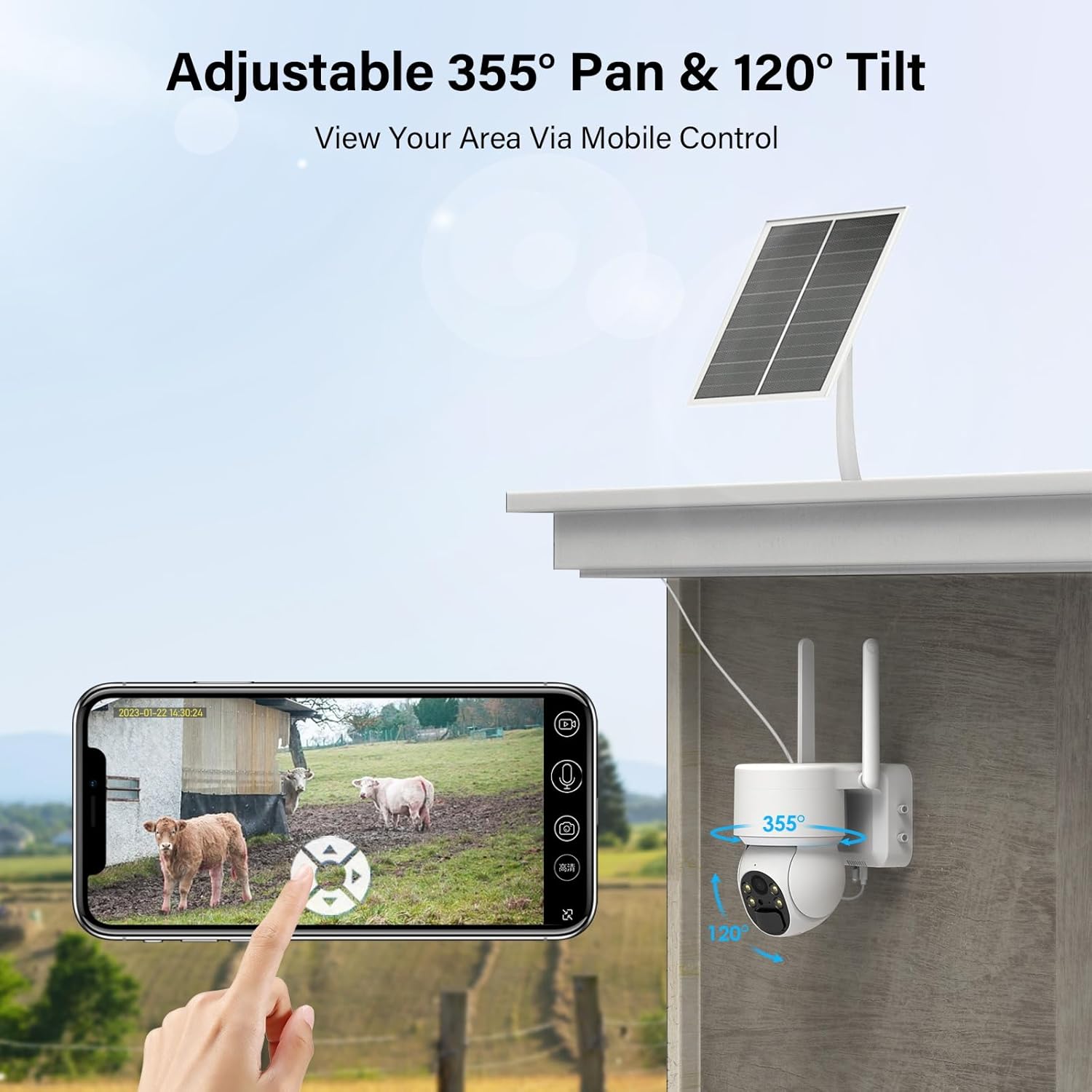
Obrázok 4.1: Naživo view and pan/tilt control via smartphone app.
4.2 Detekcia pohybu a upozornenia
The camera features PIR (Passive Infrared) motion detection. When motion is detected, the camera will automatically record video and send an alert notification to your smartphone via the UBox app. You can adjust the sensitivity of motion detection in the app settings.

Figure 4.2: Motion detection alert on smartphone.
4.3 Obojsmerný zvuk
Utilize the two-way audio feature to communicate with individuals near the camera. Press the microphone icon in the UBox app to speak, and release to listen. The camera has a built-in speaker and microphone.

Obrázok 4.3: Obojsmerná zvuková komunikácia.
4.4 Nočné videnie a reflektor
The camera is equipped with infrared LEDs for black and white night vision and a built-in spotlight for color night vision. The spotlight can be configured to activate automatically upon motion detection, providing enhanced visibility and acting as a deterrent.

Figure 4.4: Spotlight color night vision in action.
4.5 Nahrávanie a ukladanie videa
Recorded videos can be stored locally on a Micro SD card (up to 128GB, not included) or via cloud storage. A free trial for cloud storage may be available. Manage storage options and review recordings through the UBox app.

Figure 4.5: Cloud and SD card storage options.
5. Údržba
5.1 Čistenie solárnych panelov
To ensure optimal charging efficiency, regularly clean the surface of the solar panel. Dust, dirt, and debris can reduce its ability to convert sunlight into energy. Use a soft, damp cloth to gently wipe the panel. Avoid abrasive cleaners or harsh scrubbing.
5.2 Správa batérie
The camera is powered by a rechargeable Lithium Ion battery, continuously charged by the solar panel. In periods of low sunlight or high usage, the battery level may decrease. Monitor the battery status via the UBox app. If the battery level becomes critically low, consider temporarily charging the camera via USB or repositioning the solar panel for better sun exposure.
5.3 aktualizácií firmvéru
Periodically check the UBox app for available firmware updates. Keeping your camera's firmware up-to-date ensures optimal performance, security, and access to new features. Follow the in-app instructions for any updates.
6. Riešenie problémov
- Camera Not Connecting to 4G LTE:
Ensure the Nano SIM card is correctly inserted and has an active data plan. Check cellular signal strength in the camera's location via the app. Restart the camera and try again. Contact your cellular provider to confirm network coverage. - Žiadne upozornenia na detekciu pohybu:
Verify that motion detection is enabled in the UBox app settings. Adjust PIR sensitivity if necessary. Ensure the camera's view nie je bránené. - Nízka kvalita videa:
Check the cellular signal strength. A weak signal can affect streaming quality. Ensure the camera lens is clean and free from dirt or condensation. - Batéria sa nenabíja:
Ensure the solar panel is clean and receiving direct sunlight for several hours daily. Check the connection between the solar panel and the camera. If the issue persists, try charging the camera directly via USB. - Problémy s obojsmerným zvukom:
Ensure your phone's microphone and speaker are enabled for the UBox app. Check the camera's microphone and speaker for any obstructions.
7. Špecifikácie
| Funkcia | Detail |
|---|---|
| Model | ZC-YT05 |
| Form Factor | Dome |
| Rozlíšenie snímania videa | 2K |
| Bezdrôtová komunikačná technológia | 4G LTE (mobilné) |
| Zdroj napájania | Solar Powered (with Lithium Ion Battery) |
| Wattage | 6 wattov |
| Rozsah Pan/Tilt | Panoráma 355°, naklonenie 120° |
| Hodnotenie medzinárodnej ochrany | IP65 (odolné voči poveternostným vplyvom) |
| Typ upozornenia | Motion Only (PIR Motion Detection) |
| Možnosti úložiska | Karta Micro SD (až 128 GB), cloudové úložisko |
| Rozmery položky D x Š x V | 5.94 x 7.05 x 10.39 palca |
| Hmotnosť položky | 3.19 libry |
8. Záruka a podpora
Your SEHMUA 4G LTE Cellular Security Camera is covered by a standard manufacturer's warranty. Please refer to the product packaging or contact your retailer for specific warranty terms and conditions.
For technical support, troubleshooting assistance, or warranty claims, please contact SEHMUA customer service through the contact information provided on the product packaging or the official SEHMUA website. When contacting support, please have your product model number (ZC-YT05) and purchase details ready.