
Rollerhouse PDM25-1.5/25-ET-W
Rollerhouse Tuya WiFi Smart Roller Shade Motor
Model: PDM25-1.5/25-ET-W
Návod na použitie
1. Produkt skončilview
The Rollerhouse Tuya WiFi Smart Roller Shade Motor is designed to automate roller blinds and shades with 1.5-inch (38mm) tubes. This motor integrates with smart home ecosystems like Alexa and Google Home, offering convenient app and timer control without requiring an additional hub.
Medzi kľúčové vlastnosti patrí:
- WiFi connectivity (2.4Ghz required) for smart home integration.
- Compatibility with Alexa Echo and Google Assistant for voice control.
- Remote and timing control via a mobile application.
- Ability to set up timing schedules, groups, routines, and percentage ovládanie.
- Hardwired AC 110V operation, always plugged in.
2. Obsah balenia
Overte si, či sú v balení všetky komponenty:
- 1x Blinds Motor (suitable for 36-38mm / 1-1/2 inch tubes)
- 1x Diaľkové ovládanie
- 1x Koncová krytka
- 2x Mounting Hardware (brackets)
- 1x Návod na použitie
- Rubber fittings

This image displays the complete package contents of the Rollerhouse Tuya WiFi Smart Roller Shade Motor, including the motor unit, remote control, end cap, and mounting brackets.
Toto video poskytuje vizuálny prehľadview of the items included in the Rollerhouse Smart Roller Shade Motor package, showing the motor, remote, power adapter, and mounting hardware.
3. Technické špecifikácie
| Model | PDM25-1.5/25-ET-W |
| Menovitý výkon | 15 W |
| Výstup | 1.3A |
| Vstup | AC 100-240V |
| Rýchlosť otáčania | 25 ot./min |
| Priemer motora | 25 mm |
| Frekvencia príjmu | 50/60 Hz |
| Dĺžka kábla | 113cm (approx. 44.5 inches) |
| Rozmery motora | 452mm (approx. 17.8 inches) length |
| Pripojenie WiFi | 2.4 GHz (5 GHz nie je podporované) |
| Kompatibilita | Alexa, Google Assistant, Tuya SmartLife App |

This image provides technical specifications such as cable length, motor diameter, rated power, output, input, rotate speed, receive frequency, and lists included accessories like the remote control and metal brackets.
4. Inštalačná príručka
Follow these steps for proper installation of your smart roller shade motor:
- Measure Tube Dimensions: Accurately measure the Inner Diameter (ID) and Outer Diameter (OD) of your existing roller shade tube. A digital ruler is recommended for precision. The motor is designed for 1.5-inch (38mm) tubes.
- Fit Crown and Drive Adapters: Select and fit the appropriate crown and drive adapters onto the motor shaft. These adapters ensure a secure fit within your shade tube.
- Install End Plug Side Bracket: Securely install the end plug side bracket to your mounting surface.
- Insert Motor into Tube: Carefully insert the motor with its adapters into the roller shade tube.
- Mount the Shade: Mount the entire roller shade assembly, with the motor inside, onto the installed brackets.

This diagram illustrates the initial steps for motor installation, including measuring the inner and outer diameter of the shade tube, fitting the crown and drive adapters, installing the end plug side bracket, and pairing the remote with the motor.

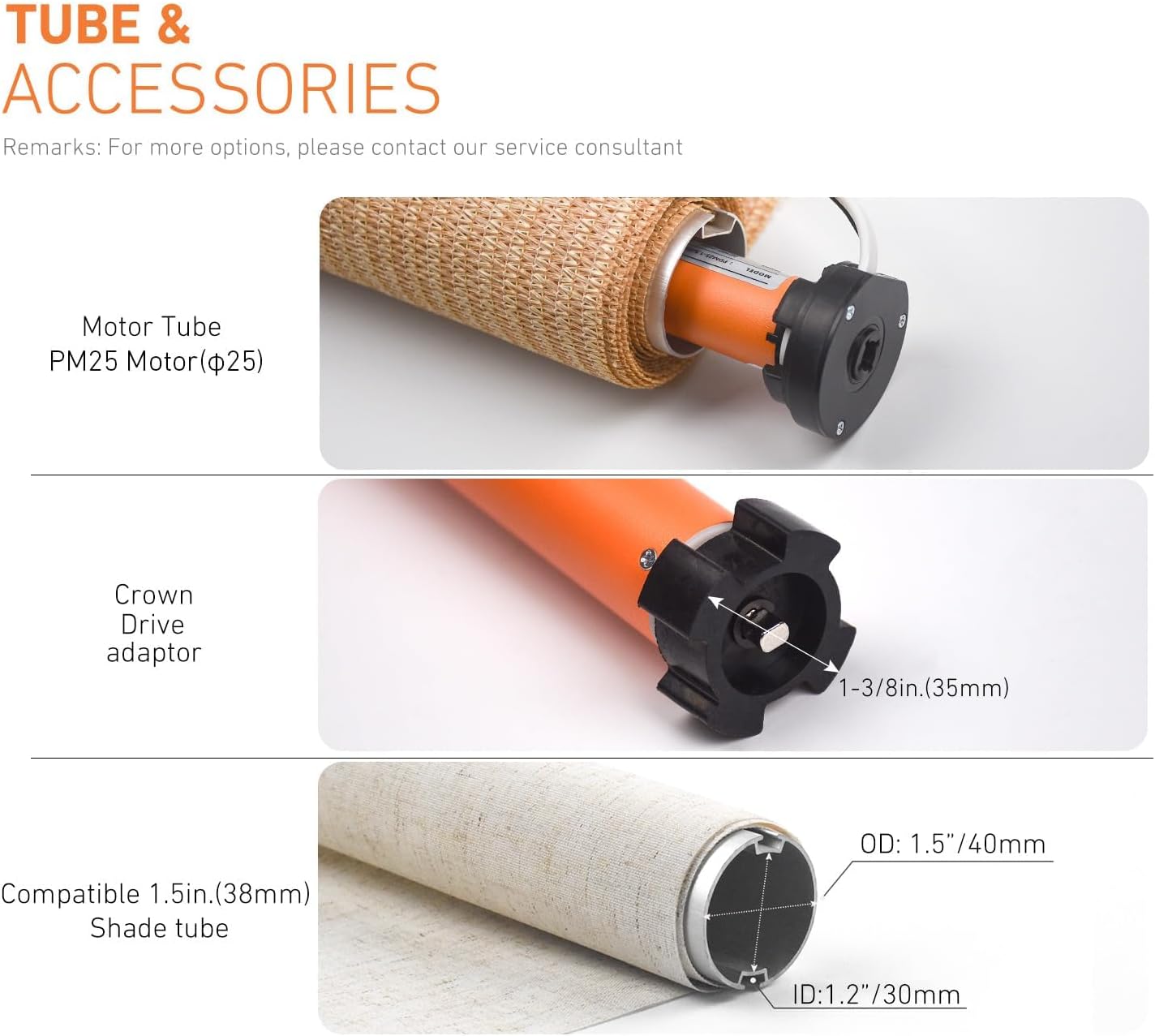
This image illustrates the various tube and accessory components, detailing the motor tube, crown drive adaptor, and the compatible 1.5-inch (38mm) shade tube with its outer and inner diameter measurements.

Tento detailný záber view highlights key features of the motor, including the power supply connection point, the setting button for configuration, and the motor hole designed for bracket installation.
5. Nastavenie a párovanie
5.1. Pripojenie diaľkového ovládača
- Press the motor setting button for 1 second. The motor will jog once.
- Press the pairing button on the remote control.
- The motor will jog once again, indicating successful pairing.
5.2. Connecting to the App (Tuya Smart / Smart Life)
- Download the Smart Life or Tuya Smart app from your app store. You can scan the QR codes below for direct access:
Aplikácia Smart Life | Inteligentná aplikácia Tuya - Otvorte aplikáciu a vytvorte si účet alebo sa prihláste.
- Press the motor setting button one time (motor jogs once). Then press the motor setting button 3 times. The motor will enter network configuration state.
- Follow the in-app instructions to add the device. Ensure your phone is connected to a 2.4GHz WiFi network.

This visual guide details the steps for pairing the remote control with the motor and connecting the motor to the Smart Life or Tuya Smart application, including QR codes for app downloads.
This video illustrates the process of connecting the power supply to the motor and performing a basic test of the remote control to ensure functionality.
6. Prevádzka
Once installed and paired, you can operate your smart roller shade motor using the remote control, the mobile app, or voice commands via Alexa or Google Home.
6.1. Prevádzka diaľkového ovládania
Use the dedicated buttons on the remote to raise, lower, or stop the blinds. Refer to the remote's specific instructions for setting upper and lower limits, and intermediate stopping positions.

This image demonstrates the convenience of remote control, allowing users to adjust their blinds from any location using the provided remote or a smartphone application.
6.2. Ovládanie a plánovanie aplikácií
The Tuya Smart or Smart Life app allows for advanced control:
- Otvoriť zatvoriť: Manually control the blinds from anywhere.
- Percenttage Ovládanie: Adjust blinds to a specific percentage open or closed.
- Časové harmonogramy: Set daily or weekly schedules for automatic opening and closing.
- Intermediate Limits: Program multiple stopping positions for customized light control.
- Ovládanie skupiny: Control multiple motors simultaneously by creating groups in the app.
This visual explains the customizable timer and scheduling features, enabling users to set automatic opening and closing times for their blinds, including intermediate stopping positions.
6.3. Ovládanie hlasom
Integrate the Tuya Smart or Smart Life app with Alexa or Google Home to enable voice commands for your blinds. Follow the instructions within your smart assistant's app to link the Tuya skill/service.
7. Riešenie problémov
If you encounter issues with your Rollerhouse Smart Roller Shade Motor, consider the following:
- Motor nereaguje:
- Skontrolujte, či je motor správne zapojený do zdroja napájania.
- Uistite sa, že batéria diaľkového ovládača nie je vybitá.
- Verify that the remote is correctly paired with the motor.
- Problémy s pripojením aplikácie:
- Confirm your WiFi network is 2.4GHz. 5GHz networks are not supported.
- Ensure your mobile device is connected to the same 2.4GHz WiFi network during setup.
- Restart your WiFi router and the motor.
- Attempt to re-pair the motor with the app.
- Nesprávne cestovné limity:
- Refer to the detailed instructions in the included user manual for setting and adjusting upper, lower, and intermediate travel limits.
- A factory reset may be necessary if limits are severely misconfigured, followed by re-pairing and limit setting.
- Hluk motora:
- Some motor noise during operation is normal. Excessive or unusual noise may indicate an issue with installation or internal components.
- Ensure the motor is securely seated within the tube and brackets.
For further assistance, please contact Rollerhouse customer support.
8. Záruka a podpora
Tento produkt sa dodáva so štandardnou zárukou výrobcu. Konkrétne podmienky nájdete v záručnej karte, ktorá je súčasťou balenia.
For technical support, troubleshooting, or warranty claims, please contact Rollerhouse customer service. We offer 24-hour service to assist you with any inquiries.
Ask a question about this manual
Ask about setup, troubleshooting, compatibility, parts, safety, or missing instructions. Manuals+ will review the question and use this page’s manual context to help answer it.