
1. Úvod
This manual provides detailed instructions for setting up, operating, and maintaining your BoyKeep 2K Wi-Fi Indoor Camera. Designed for indoor surveillance, this camera offers high-resolution video, two-way audio, motion detection, and versatile storage options, making it ideal for monitoring pets, babies, or general home security.

Figure 1: BoyKeep 2K Wi-Fi Indoor Camera (White model).
2. Obsah balenia
- BoyKeep 2K Wi-Fi Indoor Camera (Model K30)
- Napájací adaptér
- Napájací kábel USB
- Montážne príslušenstvo
- Používateľská príručka (tento dokument)
3. Inštalačná príručka
3.1 Počiatočné zapnutie
- Rozbaľte fotoaparát a všetko príslušenstvo.
- Connect the USB power cable to the camera's power port and the power adapter.
- Zapojte napájací adaptér do štandardnej elektrickej zásuvky. Kamera sa zapne a spustí sa autotest.
- Wait for the camera's indicator light to flash, indicating it is ready for connection.
3.2 Inštalácia aplikácie a vytvorenie účtu
- Download the "BoyKeep" app from your smartphone's app store (available for Android and iOS).
- Otvorte aplikáciu a postupujte podľa pokynov na obrazovke a vytvorte si nový účet alebo sa prihláste, ak ho už máte.
3.3 Pripojenie k sieti Wi-Fi
- In the BoyKeep app, tap the "+" icon to add a new device.
- Vyberte model fotoaparátu zo zoznamu.
- Follow the app's instructions to connect the camera to your Wi-Fi network. The camera supports both 2.4 GHz and 5 GHz Wi-Fi bands.
- Ensure your smartphone is connected to the same Wi-Fi network you intend to connect the camera to.
- Scan the QR code displayed on your phone screen with the camera lens when prompted. Hold the phone approximately 15-20 cm (6-8 inches) from the camera.
- Once connected, the camera's indicator light will turn solid, and you will hear a confirmation sound.

Figure 2: Illustrates the camera's 355° horizontal pan and 95° vertical tilt capabilities, along with key features like motion tracking, two-way audio, 2K video, and night vision.
4. Návod na obsluhu
4.1 Naživo View a ovládanie otáčania/nakláňania
- Open the BoyKeep app and select your camera from the device list to access the live view.
- Pomocou smerových ovládacích prvkov v aplikácii môžete kameru posúvať horizontálne (355°) a nakláňať vertikálne (95°) na nastavenie... viewing uhol.

Figure 3: The camera offers a wide 360-degree coverage, allowing comprehensive monitoring of your space.
4.2 Obojsmerný zvuk
- Zo živého view, klepnite na ikonu mikrofónu a hovorte cez reproduktor fotoaparátu.
- Klepnutím na ikonu reproduktora si vypočujete zvuk z okolia kamery.

Figure 4: The camera supports two-way audio, enabling communication with individuals near the camera.
4.3 Detekcia pohybu a upozornenia
- Enable motion detection in the app settings to receive real-time alerts on your smartphone when motion is detected.
- Adjust sensitivity levels and set specific monitoring zones to minimize false alarms.
- The camera can automatically track detected motion and record video clips.
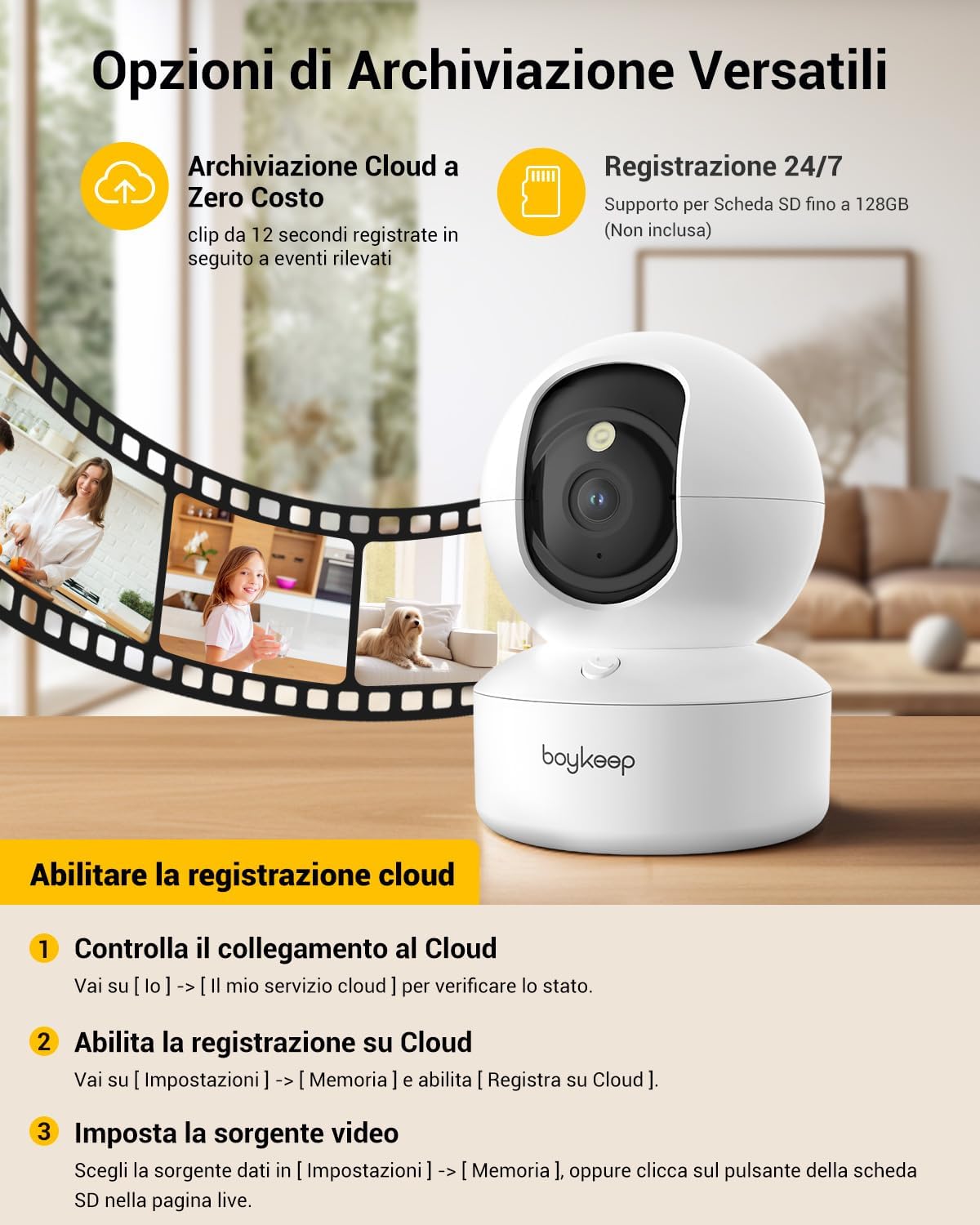
Figure 5: The camera features intelligent AI detection and tracking for people and pets, capturing key moments.
4.4 Nočné videnie
- The camera automatically switches to night vision mode in low-light conditions using its infrared LEDs.
- This provides clear black-and-white video footagaž 10 metrov v úplnej tme.

Figure 6: The camera provides clear 24-hour crystal-clear vision, including effective night vision.
4.5 Možnosti nahrávania a ukladania
- Cloudové úložisko: The camera offers free cloud storage for 12-second event clips over the last 24 hours (requires activation in the app). This provides a secure backup.
- Pamäťová karta Micro SD: Insert a Micro SD card (up to 128 GB, not included) into the camera's slot for continuous recording or event-triggered recording.

Obrázok 7: Koniecview of versatile storage options, including free cloud storage for 12-second event clips and 24/7 recording support via Micro SD card (up to 128GB, not included).
4.6 Enabling Cloud Recording (App Instructions)
- Open the BoyKeep app and select your camera.
- Prejsť na [ja] → [My Cloud Service] aby ste skontrolovali stav.
- Prejdite na [Nastavenia] → [Pamäť] a povoliť [Record to Cloud].
- Choose your video source from [Nastavenia] → [Pamäť], or click the SD card button on the live page.
Video 1: Demonstrates the process of enabling cloud recording within the BoyKeep app settings.
Video 2: Shows the BoyKeep indoor camera in action, highlighting its features and functionality.
5. Údržba
- Čistenie: Objektív a telo fotoaparátu jemne utrite mäkkou, suchou handričkou. Nepoužívajte tekuté čistiace prostriedky ani abrazívne materiály.
- Aktualizácie softvéru: Regularly check the BoyKeep app for firmware updates to ensure optimal performance and security.
- umiestnenie: Ensure the camera is placed on a stable surface or securely mounted to prevent accidental falls. Avoid placing it in direct sunlight or near heat sources.
6. Riešenie problémov
| Vydanie | Možná príčina/Riešenie |
|---|---|
| Fotoaparát je offline | Skontrolujte pripojenie Wi-Fi, uistite sa, že je kamera zapnutá, reštartujte kameru a router. |
| Nedá sa pripojiť k sieti Wi-Fi | Ensure correct Wi-Fi password, camera is within router range, and you are connecting to a supported 2.4GHz or 5GHz network. Try resetting the camera. |
| Nízka kvalita videa | Check network speed, ensure lens is clean, adjust camera placement for better lighting. |
| Upozornenia na pohyb neboli prijaté | Verify motion detection is enabled in app settings, check notification settings on your phone, ensure app is running in the background. |
| Nefunguje obojsmerný zvuk | Check microphone and speaker settings in the app, ensure volume is up on your phone and camera. |
7. Špecifikácie
| Funkcia | Detail |
|---|---|
| Číslo modelu | K30 |
| Rozlíšenie | 2K (1296p) |
| Pan Angle | 355° |
| Uhol sklonu | 95° |
| Konektivita | Wi-Fi (2.4 GHz a 5 GHz) |
| Rozsah nočného videnia | Do 10 metrov |
| Možnosti úložiska | Cloudové úložisko, karta Micro SD (až 128 GB) |
| Zdroj napájania | Wired Electric (5V, 3W) |
| Rozmery (DxŠxV) | 8.38 x 8.38 x 16.26 cm |
| Hmotnosť | 310 g |
| Použitie | Vnútorný |
8. Záruka a podpora
BoyKeep provides a 24-month warranty for this product. For any issues, questions, or suggestions, please contact BoyKeep customer support. They aim to provide 100% satisfactory solutions within 3 working days.
You can typically find support contact information within the BoyKeep app or on the official BoyKeep webstránky.