
1. Úvod
Thank you for choosing the TONGVEO PTZ HDMI Camera. This manual provides essential information for the proper installation, operation, and maintenance of your camera. Please read this manual thoroughly before using the product to ensure optimal performance and to prevent damage. This camera is designed for high-quality video capture in various settings, including live streaming, video conferencing, education, and worship services.
2. Produkt skončilview
2.1 Kľúčové vlastnosti
- Video vo vysokom rozlíšení: 1080p resolution at 60 frames per second (fps) for clear and smooth video.
- Optický zoom: 3x optical zoom lens with a 55.8° field of view, allowing for detailed close-ups without loss of quality.
- Pan/Tilt/Zoom (PTZ) Functionality: Silent movement with 350° pan and 180° tilt capabilities, controllable remotely.
- Viaceré výstupy: HDMI and USB 3.0 for versatile connectivity.
- Jednoduché nastavenie: Plug and Play functionality, automatically recognized by computers without driver installation.
- Široká kompatibilita: Compatible with Windows, Mac, and popular conferencing software like Zoom, Skype, OBS, Google Hangouts, Cisco WebEx, and Microsoft Teams.
- Pokročilé spracovanie obrazu: Superior white balance and exposure modes, supporting YUV, MJPG, and H.264 video compression formats.
- Diaľkové ovládanie: Includes an infrared (IR) remote control with 10 presets for quick camera positioning.
- Ovládanie joystickom: Supports external joystick control via RS485 or RS232 interfaces.
2.2 Obsah balenia
Overte, či sú v balení všetky položky:
- TONGVEO USB PTZ Camera
- 9.8ft kábel USB 3.0
- DC 12V napájací adaptér
- IR diaľkové ovládanie
- Montáž na stenu pomocou skrutiek
- Používateľská príručka (tento dokument)

Image: Package contents including the camera, USB cable, power adapter, remote, wall mount, and user manual.
3. Nastavenie
3.1 Fyzická inštalácia
The TONGVEO PTZ camera offers flexible mounting options to suit various environments:
- Umiestnenie na pracovnej ploche: Umiestnite kameru na stabilný, rovný povrch.
- Montáž monitora: Securely attach to the top of a monitor.
- Montáž na stenu: Use the provided wall mount and screws to fix the camera to a wall.
- Montáž na statív: Attach the camera to a standard tripod using the tripod screw hole at the base.
- Montáž na strop: Install the camera upside down on the ceiling using a compatible mount (sold separately or included if specified).
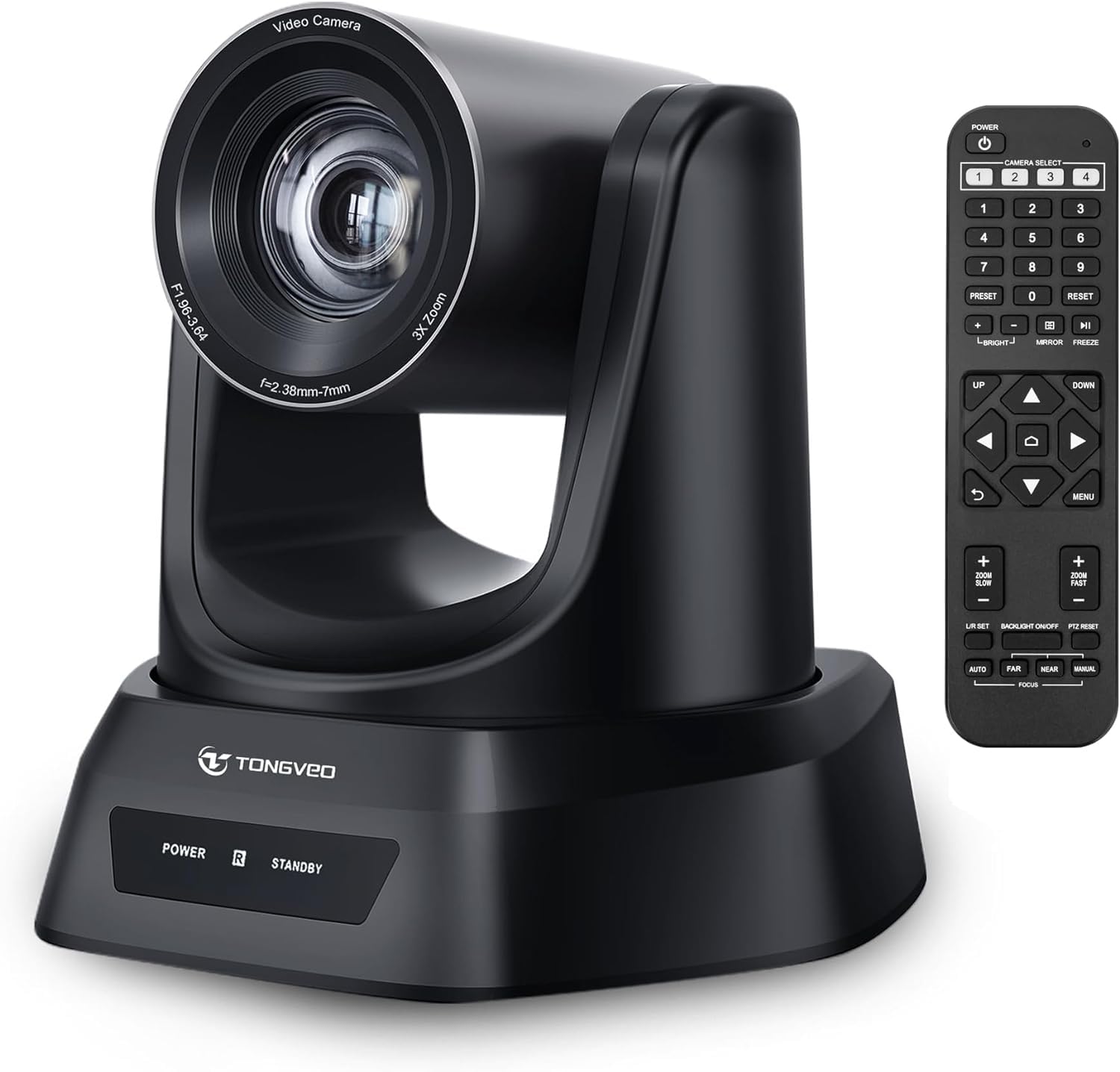
Obrázok: Cezview of the TONGVEO PTZ camera highlighting 3x optical zoom, 1080p 60fps, and pan/tilt capabilities.
3.2 Pripojenia
Connect the camera to your devices using the ports on the rear panel:
- Napájanie jednosmerným prúdom 12 V: Connect the included power adapter to the DC 12V port and then to a power outlet.
- USB 3.0: Connect the USB 3.0 cable from the camera to your computer (PC/Mac) for video and control.
- HDMI: Connect an HDMI cable from the camera to a display (TV/Monitor) or a video switcher (e.g., Blackmagic ATEM) for video output.
- RS232/RS485: These ports are for connecting an external joystick controller for advanced PTZ control. RS485 supports daisy-chaining multiple cameras.

Image: Rear panel of the TONGVEO PTZ camera showing DC 12V, RS485, RS232, USB, and HDMI ports.
3.3 Inštalácia softvéru
The TONGVEO PTZ camera is a Plug and Play device. No specific drivers are required for most operating systems. Your computer should automatically recognize the camera when connected via USB. It supports the UVC1.1 standard.
4. Prevádzka
4.1 Diaľkové ovládanie
Use the included IR remote control to manage camera functions:
- PTZ Movement: Use the directional buttons to pan (left/right) and tilt (up/down) the camera.
- Lupa: Adjust the optical zoom in and out. The remote typically offers fast and slow zoom options.
- predvoľby: The remote allows you to save and recall up to 10 preset positions. To save a preset, move the camera to the desired position, then press the 'SET' button followed by a number (1-10). To recall a preset, press the corresponding number button.
- Camera Select: If multiple TONGVEO cameras are connected, use the camera select buttons to control a specific unit.
4.2 Nastavenia obrazu
Access the On-Screen Display (OSD) menu via the remote control to adjust image parameters:
- Zameranie: The camera features auto-focus by default. Manual focus adjustment is available through the OSD menu.
- Vyváženie bielej: Adjust for accurate color reproduction under different lighting conditions.
- Vystavenie: Control brightness and contrast to optimize image visibility.
4.3 Kompatibilita softvéru
The camera is compatible with a wide range of operating systems and video conferencing applications:
- Operačné systémy: Windows XP, Vista, 7, 8, 8.1, 10, 11; Mac 10.4 or higher.
- Aplikácie: Zoom, Skype, Google Hangouts, Cisco WebEx, Microsoft Teams, GoToMeeting, BlueJeans, OBS, and other UVC-compliant software.

Image: Diagram illustrating the TONGVEO PTZ camera's compatibility with various devices and software platforms.
5. Údržba
To ensure the longevity and optimal performance of your TONGVEO PTZ camera, follow these maintenance guidelines:
- Čistenie: Na čistenie tela fotoaparátu použite mäkkú, suchú handričku. Na objektív použite špeciálnu handričku a roztok na čistenie objektívov. Nepoužívajte abrazívne čistiace prostriedky ani rozpúšťadlá.
- Ukladací priestor: Ak fotoaparát dlhší čas nepoužívate, skladujte ho na chladnom a suchom mieste mimo dosahu priameho slnečného žiarenia a extrémnych teplôt.
- Manipulácia: S fotoaparátom manipulujte opatrne. Nespúšťajte ho ani ho nevystavujte silným vibráciám.
- Výkon: Disconnect the power adapter when the camera is not in use or during electrical storms.
6. Riešenie problémov
If you encounter issues with your TONGVEO PTZ camera, refer to the following common problems and solutions:
- Bez napájania:
- Uistite sa, že napájací adaptér je bezpečne pripojený k fotoaparátu a k funkčnej elektrickej zásuvke.
- Skontrolujte, či je elektrická zásuvka funkčná.
- Žiadny video výstup:
- Check all cable connections (USB, HDMI) are secure.
- Ensure the correct input source is selected on your display or video switcher.
- Verify the camera is selected as the video input device in your software (e.g., Zoom, OBS).
- Obrázok je rozmazaný/neostrý:
- Allow the camera's auto-focus to adjust.
- Access the OSD menu to manually adjust the focus if needed.
- Uistite sa, že šošovka je čistá a bez šmúh.
- Nefunguje diaľkové ovládanie:
- Skontrolujte batérie v diaľkovom ovládači a v prípade potreby ich vymeňte.
- Uistite sa, že medzi diaľkovým ovládačom a infračerveným prijímačom kamery nie sú žiadne prekážky.
- PTZ Movement is Unresponsive:
- Verify the camera is powered on and the remote control is functioning.
- If using a joystick, ensure it is correctly connected via RS232/RS485.
7. Špecifikácie
Detailed technical specifications for the TONGVEO PTZ HDMI Camera (Model TV-NV3H-UK):
| Funkcia | Špecifikácia |
|---|---|
| Číslo modelu | TV-NV3H-UK (819988df-b012-4f6a-b3ce-5c96af8001c3) |
| Značka | TONGVEO |
| Optický zoom | 3x |
| Efektívne rozlíšenie videa | 1080 Pixels (1080p 60fps) |
| Technológia fotografického snímača | CMOS |
| Veľkosť optického senzora | 1/2.7 palca |
| Maximálna ohnisková vzdialenosť | 10 milimetra |
| Minimálna ohnisková vzdialenosť | 5 milimetra |
| Formát snímania videa | MP4 (Supports YUV, MJPG, H.264) |
| Pan Movement | 350° |
| Pohyb naklonenia | 180° |
| Konektivita | HDMI, USB 3.0, RS232, RS485 |
| Zdroj napájania | DC 12V |
| Stabilizácia obrazu | Nie |
| Pracovná teplota | -10 °C až +50 °C |
| Rozmery balenia | 28 x 21 x 19 cm |
| Hmotnosť | 2 kilogramov |

Obrázok: Spodná časť view of the TONGVEO PTZ camera showing model number (TV-V3H) and other regulatory information.
8. Záruka a podpora
The TONGVEO PTZ HDMI Camera comes with a 3-ročná záruka. For any questions, technical assistance, or warranty claims, please contact TONGVEO customer service. Our support team is available to respond to your inquiries within 24 hours.
Please refer to the contact information provided on the TONGVEO official webNajaktuálnejšie kanály podpory nájdete na webovej stránke alebo v dokumentácii k nákupu.