
Úvod
This manual provides detailed instructions for the AULCMEET RC80B replacement remote control, designed for use with Edifier R1280DBs active speakers. Please read this manual carefully to ensure proper operation and to maximize your experience with the product.
Koniec produktuview
The AULCMEET RC80B remote control offers a comprehensive set of functions for your Edifier R1280DBs speakers. Its ergonomic design ensures comfortable handling and intuitive button placement.
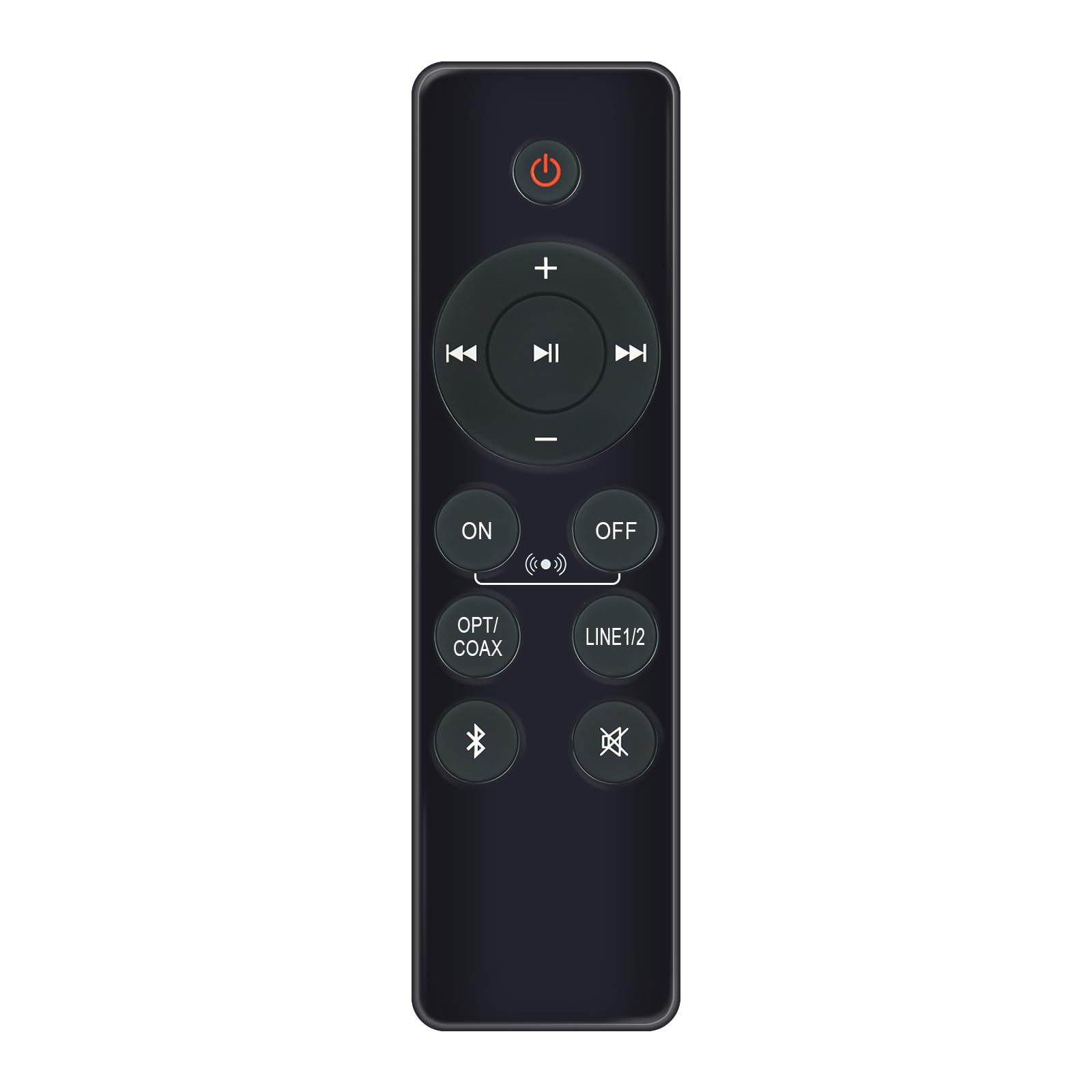
Image: AULCMEET RC80B Replacement Remote Control. The remote measures approximately 13.8 cm (5.43 inches) in length and 3.8 cm (1.5 inches) in width.
Funkcie tlačidiel:
- Vypínač (⏻): Turns the speakers ON or OFF.
- Zvýšenie hlasitosti (+) / Zníženie hlasitosti (-): Adjusts the speaker volume.
- Predchádzajúca skladba (⏮) / Next Track (⏭): Skips to the previous or next audio track.
- Prehrať/Pozastaviť (⏯): Plays or pauses audio playback.
- ON / OFF (Input Selection): Toggles between different input modes.
- OPT/COAX: Selects Optical or Coaxial input.
- LINE1/2: Selects Line In 1 or Line In 2 input.
- Bluetooth (☋): Activates or selects Bluetooth input.
- Stlmiť (🛇): Mutes or unmutes the speaker audio.
Nastavenie
The AULCMEET RC80B remote control is designed for immediate use without complex setup procedures. Simply install the batteries, and it is ready to operate your compatible Edifier R1280DBs speakers.
Inštalácia batérie:
- Nájdite priehradku na batérie na zadnej strane diaľkového ovládača.
- Otvorte kryt priehradky na batérie.
- Vložte dve alkalické batérie typu AAA a dbajte na správnu polaritu (+ a -) podľa vyznačenia vo vnútri priehradky.
- Bezpečne zatvorte kryt priestoru pre batérie.
Poznámka: No programming or pairing is required for this replacement remote control. It functions directly with the specified Edifier R1280DBs active speakers.
Návod na obsluhu
To operate your Edifier R1280DBs speakers using the AULCMEET RC80B remote control, point the remote directly towards the speakers' infrared receiver. Ensure there are no obstructions between the remote and the speakers.
- Zapnutie/vypnutie: Stlačte tlačidlo ⏻ button to turn the speakers on or off.
- Nastavenie hlasitosti: Použite + a - tlačidlá na zvýšenie alebo zníženie hlasitosti.
- Výber vstupu: Stlačte tlačidlo ON/OFF, OPT/COAX, LINE1/2, alebo Bluetooth buttons to switch between the available audio input sources.
- Ovládanie prehrávania: When using Bluetooth or other compatible sources, use the ⏮ (Predchádzajúce), ⏭ (Next), and ⏯ (Play/Pause) buttons to control media playback.
- Funkcia stlmenia zvuku: Stlačte tlačidlo 🛇 button to temporarily silence the audio. Press it again to restore the sound.
Špecifikácie
| Značka | AULCMEET |
| Model | RC80B |
| Kompatibilné zariadenia | Edifier R1280DBs Active Speakers |
| Farba | Čierna |
| Vlastnosti | Ergonomický dizajn |
| Komunikačné rozhranie | Infračervený (IR) |
| Počet tlačidiel | 30 |
| Maximálny rozsah | Približne 33 stôp (10 metra) |
| Typ batérie | 2 x alkalické batérie AAA (nie sú súčasťou balenia) |
| Rozmery (D x Š) | 13.8 cm x 3.8 cm (5.43 palca x 1.5 palca) |
Riešenie problémov
If you encounter issues with your AULCMEET RC80B remote control, please refer to the following common solutions:
- Diaľkové ovládanie nereaguje: Ensure the batteries are correctly installed and are not depleted. Replace batteries if necessary.
- Krátky prevádzkový dosah: Check for any obstructions between the remote and the speaker's IR receiver. Ensure the remote is pointed directly at the speakers. Low battery power can also reduce range.
- Konkrétne tlačidlo nefunguje: Clean the remote control surface and buttons. If the issue persists, the button may be faulty, or the remote may require battery replacement.
- Speakers not responding to any remote: Ensure the speakers are powered on and functioning correctly. Try using the manual controls on the speaker unit if available.
Údržba
Proper care and maintenance will extend the lifespan of your remote control:
- UpratovanieDiaľkový ovládač utrite mäkkou, suchou handričkou. Nepoužívajte abrazívne čistiace prostriedky ani rozpúšťadlá.
- Starostlivosť o batérie: Remove batteries if the remote control will not be used for an extended period to prevent leakage.
- Skladovanie: Store the remote control in a cool, dry place, away from direct sunlight and extreme temperatures.
- Vyhnite sa kvapkámChráňte diaľkový ovládač pred fyzickými nárazmi, pretože pády môžu poškodiť vnútorné komponenty.
Záruka a podpora
Specific warranty information for this AULCMEET RC80B replacement remote control is not provided in the product details. For warranty claims, technical support, or further assistance, please contact the seller or manufacturer directly through your purchase platform. Keep your purchase receipt or order number handy for faster service.