
Úvod
This manual provides detailed instructions for the safe and efficient operation of your Longer Ray5 20000mW Laser Engraver with Air Assist Kit. Please read this manual thoroughly before using the device to ensure proper setup, operation, and maintenance. Retain this manual for future reference.
Bezpečnostné informácie
POZOR: Laser engravers are powerful tools that can cause serious injury if not used correctly. Always follow these safety guidelines:
- Always wear appropriate laser safety goggles when operating the machine.
- Nikdy sa nepozerajte priamo do laserového lúča alebo na jeho odraz.
- Zabezpečte, aby bol pracovný priestor dobre vetraný, aby sa rozptýlili výpary a dym.
- Horľavé materiály udržiavajte mimo dosahu laserového lúča.
- Počas prevádzky nenechávajte stroj bez dozoru.
- Uistite sa, že je stroj umiestnený na stabilnom, rovnom povrchu.
- Udržujte deti a domáce zvieratá mimo prevádzkovej oblasti.
- Pred vykonaním akejkoľvek údržby alebo úprav odpojte napájanie.
- Oboznámte sa s postupmi núdzového vypnutia.
Obsah balenia
Skontrolujte, či sú v balení všetky komponenty:
- Longer Ray5 20000mW Laser Engraver Unit
- Air Assist Pump
- Tryska a hadička pre pomocný vzduch
- Napájací adaptér
- USB kábel
- Ochranné okuliare
- Používateľská príručka (tento dokument)
- Material Samples (may vary)

Image: Air assist kit components including the pump, nozzle, and tubing.
Nastavenie
- Rozbalenie: Opatrne vyberte všetky komponenty z obalu.
- Montáž: Follow the included quick start guide for assembling the main laser engraver frame and attaching the laser module.
- Air Assist Installation:
- Connect the air assist pump to the designated port on the laser module using the provided tubing.
- Ensure the air assist nozzle is securely attached to direct airflow to the engraving/cutting point.
- Napájanie: Pripojte napájací adaptér k gravírovaču a potom k vhodnej elektrickej zásuvke.
- Pripojenie k počítaču: Connect the engraver to your computer via USB, or prepare for Wi-Fi/TF card connection.

Image: The Longer Ray5 laser engraver with the air assist pump connected and ready for operation.
Návod na obsluhu
1. Softvér a pripojenie
The Longer Ray5 supports various software and connection methods:
- Kompatibilný softvér: LaserGRBL and LightBurn.
- Operačné systémy: Supports Windows 7+, MacOS, and Linux.
- Spôsoby pripojenia: Wi-Fi, USB, App, and TF card.
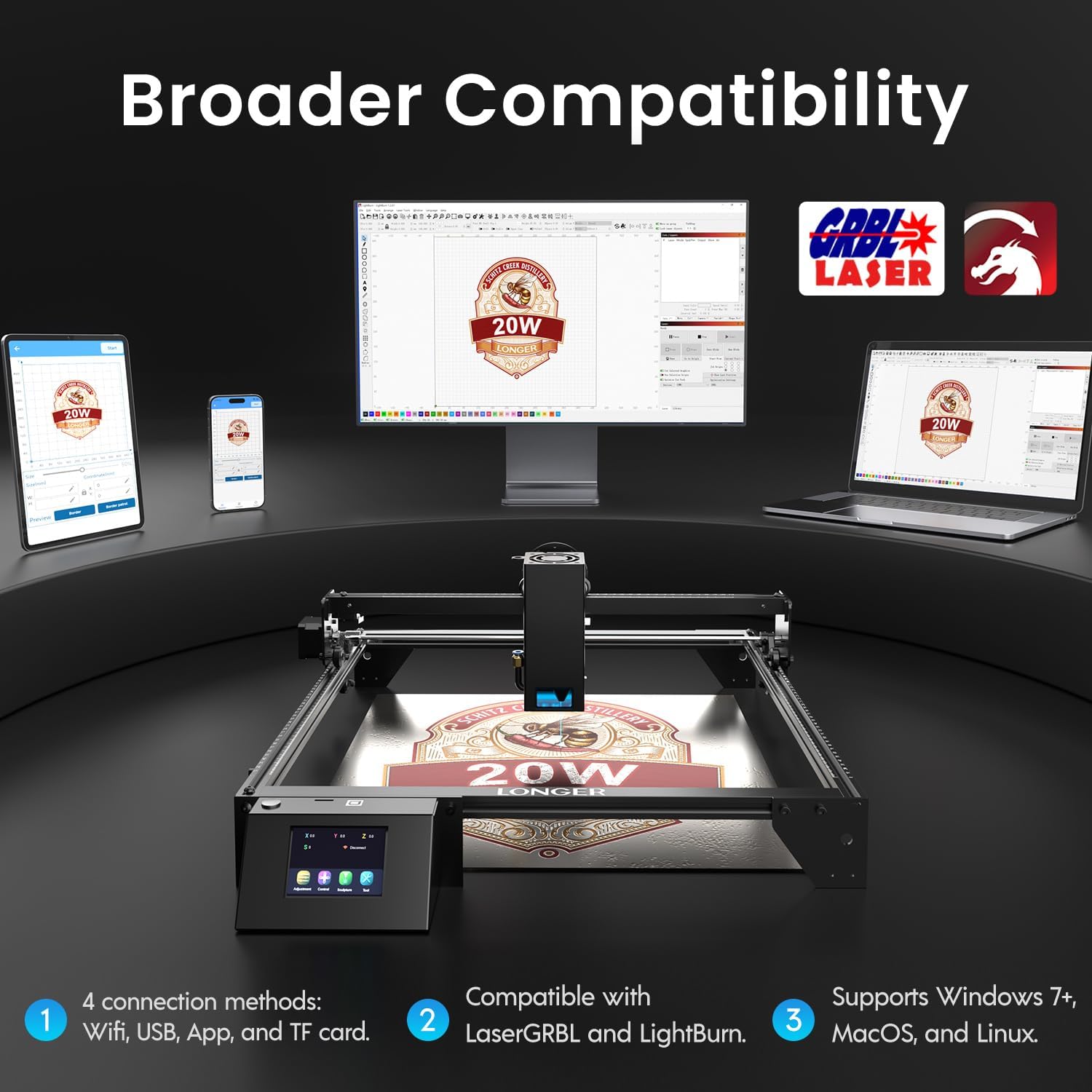
Image: Display showing the Longer Ray5's compatibility with LaserGRBL and LightBurn software, and various connection options including Wi-Fi, USB, App, and TF card across Windows, MacOS, and Linux operating systems.
2. Možnosti gravírovania a rezania
The 20W diode laser offers high-efficiency performance for various materials.
- Rezanie: Capable of cutting up to 25mm of wood and 35mm of acrylic. It can also cut 0.05mm metal.
- Gravírovanie: Engrave hundreds of colors on metallic steel and a wide range of other materials.
- Materiály: Acrylic, metal, wood, stainless steel, and more.
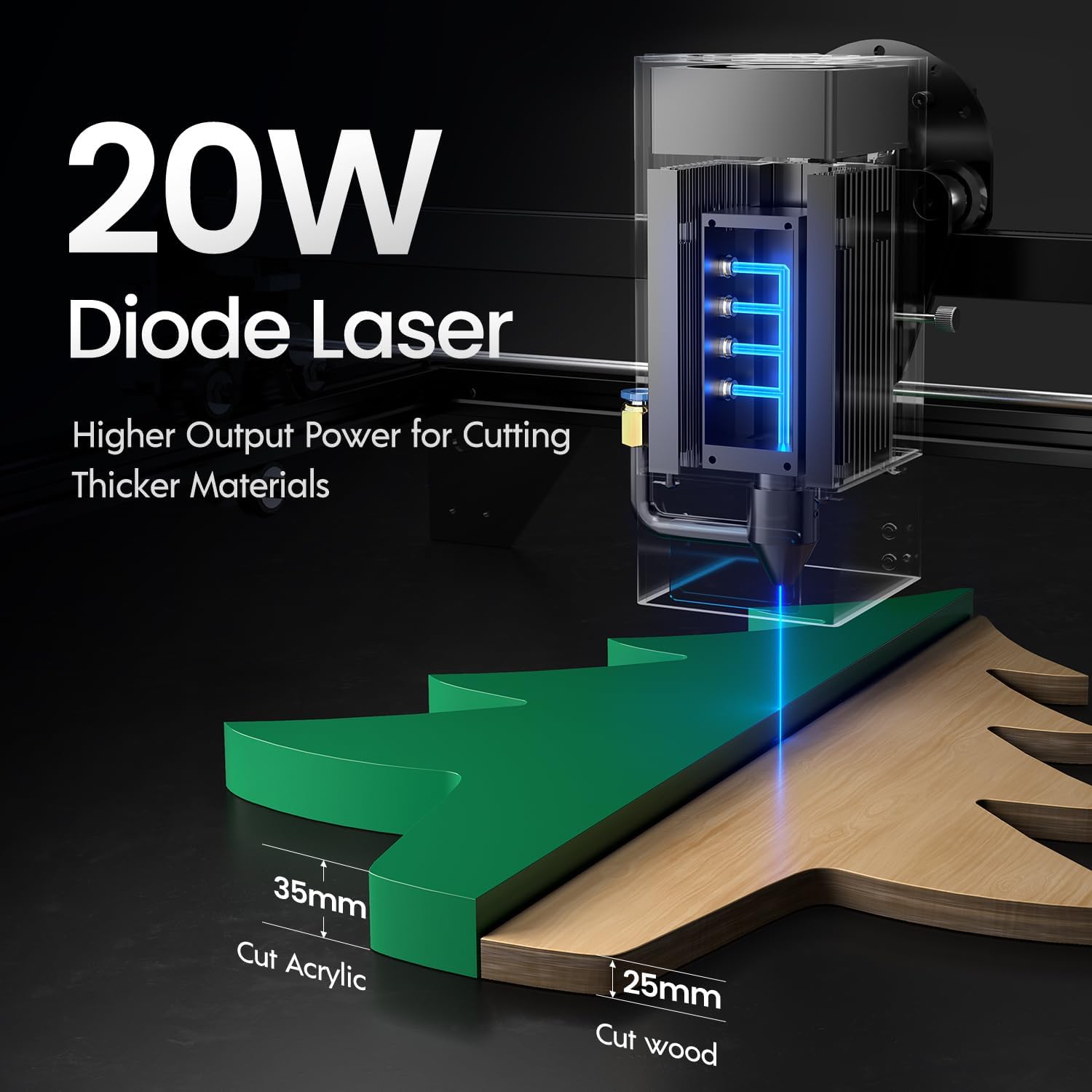
Image: Illustration demonstrating the 20W diode laser's capability to cut 25mm wood and 35mm acrylic.

Obrázok: Napramples of engraving capabilities, showcasing over 380 colors on metallic surfaces and other DIY artworks.

Image: A collection of various items demonstrating the versatile material selection for engraving and cutting, including wood, metal, and acrylic.
3. Funkcia vzduchovej asistencie
The integrated air assist kit significantly improves cutting and engraving quality.
- Enhanced Cutting: The adjustable airflow (10-30L/min) suppresses smoke and dust, preventing laser energy attenuation and ensuring cleaner, smoother edges.
- Reduced Yellowing: Air assist helps prevent charring and yellowing on materials during laser processing, especially for wood and acrylic.

Image: A visual comparison showing the benefits of air assist, resulting in cleaner cuts and reduced processing time (e.g., 12 minutes with air assist vs. 20 minutes without).
4. Nepretržitá prevádzka
The Longer Ray5 is designed for powerful continuous working capacity, supporting 24/7 continuous engraving. A single computer can control multiple machines.

Image: Depiction of multiple Longer Ray5 machines working simultaneously, illustrating continuous operation and the ability for one computer to control several units.
Údržba
Pravidelná údržba zaisťuje optimálny výkon a predlžuje životnosť vášho laserového gravírovacieho stroja.
- Vyčistite laserovú šošovku: Pravidelne čistite laserovú šošovku mäkkou handričkou, ktorá nepúšťa vlákna, a roztokom na čistenie šošoviek, aby ste zachovali kvalitu lúča.
- Vyčistite trosky: Remove any accumulated dust or debris from the work area and machine components.
- Check Belts and Rails: Inspect drive belts for tension and wear. Keep linear rails clean and lubricated as per manufacturer recommendations.
- Vzduchový pomocný filter: If your air assist pump has a filter, clean or replace it regularly to ensure efficient airflow.
- Aktualizácie firmvéru: Skontrolujte údaje výrobcu webstránku, kde nájdete všetky dostupné aktualizácie firmvéru na zlepšenie výkonu alebo pridanie funkcií.
Riešenie problémov
Táto časť sa zaoberá bežnými problémami, s ktorými sa môžete stretnúť.
| Problém | Možná príčina | Riešenie |
|---|---|---|
| Laser sa nespúšťa | Power not connected, software error, laser module fault. | Check power connections. Verify software settings. Contact support if laser module is suspected faulty. |
| Slabá kvalita gravírovania/rezania | Incorrect focus, dirty lens, wrong power/speed settings, material issues, no air assist. | Adjust laser focus. Clean the laser lens. Optimize power/speed settings for the material. Ensure air assist is active. |
| Stroj sa nepripája k počítaču | USB cable issue, driver not installed, Wi-Fi configuration error. | Try a different USB port/cable. Install necessary drivers. Reconfigure Wi-Fi connection. |
| Nadmerné množstvo dymu/výparov | Insufficient ventilation, air assist not active or weak. | Ensure proper ventilation. Check air assist pump and tubing for blockages. Increase air assist flow. |
Špecifikácie
| Funkcia | Detail |
|---|---|
| Číslo modelu | RAY5 |
| Výstupný výkon lasera | 20 000 mW (10 W) |
| Typ lasera | Diódový laser |
| Hĺbka rezu (drevo) | Až do 25 mm |
| Cutting Depth (Acrylic) | Až do 35 mm |
| Metal Cutting Capability | 0.05 mm |
| Air Assist Flow | 10 – 30 l/min (nastaviteľné) |
| Dotyková obrazovka | 3.5 palca |
| Konektivita | Wi-Fi, USB, App, TF Card |
| Kompatibilný softvér | LaserGRBL, LightBurn |
| Podporovaný OS | Windows 7+, MacOS, Linux |
| Výrobca | Dlhšie |
| Dátum prvej dostupnosti | 1. augusta 2024 |
Záruka a podpora
Informácie o záruke a technickú podporu získate od oficiálneho poskytovateľa Longer webalebo sa priamo obráťte na ich zákaznícky servis. Uschovajte si doklad o kúpe ako doklad o kúpe pre prípad reklamácie.
Online zdroje: Navštívte Dlhšie uchovávanie na Amazone pre ďalšie informácie o produkte a podporu.