
1. Úvod
Welcome to the user manual for your Orbic JOURNEY Pro 4G flip phone. This device is designed for essential communication with the added benefits of 4G connectivity and smart features powered by KaiOS 3.1. This manual will guide you through the setup, operation, maintenance, and troubleshooting of your new phone, ensuring you can utilize all its functionalities effectively.
2. Obsah balenia
Skontrolujte, či sú v balení vášho produktu všetky nasledujúce položky:
- Orbic JOURNEY Pro 4G Main Unit
- AC adaptér
- USB kábel (typ C)
- Batéria
- Sprievodca rýchlym spustením
3. Zariadenie sa skončiloview
The Orbic JOURNEY Pro 4G features a classic flip phone design with a physical keypad and two displays for convenience.


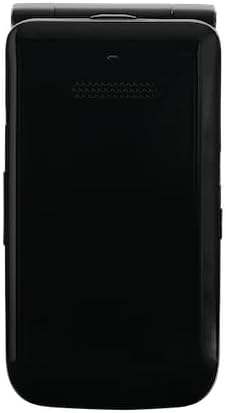
Kľúčové komponenty:
- Hlavný displej: The internal 3.2-inch TFT LCD screen for primary interaction.
- Externý displej: A 1.77-inch external display for time, notifications, and caller ID when the phone is closed.
- klávesnica: Alphanumeric keys and navigation buttons for easy input and menu navigation.
- Fotoaparát: A 5-megapixel rear camera with flash for capturing photos.
- Port USB Type-C: Na nabíjanie a prenos dát.
- 3.5 mm konektor pre slúchadlá: Na pripojenie káblových slúchadiel.
4. Úvodné nastavenie
4.1. Vloženie batérie a SIM karty
- Odstráňte zadný kryt telefónu.
- Insert the nanoSIM card into the designated SIM slot. Ensure the gold contacts face downwards and the card is correctly oriented.
- Insert the 1850mAh removable battery into its compartment, aligning the contacts.
- Nasaďte späť zadný kryt a uistite sa, že bezpečne zacvakne na svoje miesto.
4.2. Nabíjanie zariadenia
- Pripojte kábel USB typu C k nabíjaciemu portu telefónu.
- Connect the other end of the USB cable to the provided AC adapter.
- Zapojte AC adaptér do elektrickej zásuvky.
- The phone will indicate that it is charging. Allow the battery to fully charge before initial use.
4.3. Zapnutie/vypnutie
- Zapnutie: Stlačte a podržte tlačidlo napájania/ukončenia hovoru, kým sa nerozsvieti obrazovka.
- Vypnutie: Stlačte a podržte tlačidlo Napájanie/Ukončenie hovoru a potom z možností na obrazovke vyberte možnosť „Vypnúť“.
5. Základná prevádzka
5.1. Uskutočňovanie a prijímanie hovorov
- Ak chcete uskutočniť hovor: Open the phone, enter the phone number using the keypad, and press the Green Call button.
- Ak chcete prijať hovor: When the phone rings, press the Green Call button. You can answer with the phone closed by pressing the Green Call button, or open the phone to answer.
- Ak chcete ukončiť hovor: Stlačte červené tlačidlo ukončenia hovoru.
5.2. Odosielanie a prijímanie správ
- V hlavnej ponuke prejdite do aplikácie „Správy“.
- Select 'New Message' to compose a new text message.
- Enter the recipient's number or select from contacts, then type your message using the keypad.
- Stlačením tlačidla „Odoslať“ odošlete správu.
5.3. Navigation and Smart Features
The Orbic JOURNEY Pro 4G runs on KaiOS 3.1, offering access to various smart applications:
- Web Prehliadač: Access the internet to browse webstránky.
- Google Maps: Use for navigation and location services.
- YouTube: Watch videos directly on your device.
- Wi-Fi Hotspot (Tethering): Share your phone's 4G internet connection with up to 8 other devices simultaneously. Access this feature through the phone's settings menu.
6. Údržba a starostlivosť
- Čistenie: Na čistenie exteriéru telefónu používajte mäkkú, suchú handričku. Nepoužívajte agresívne chemikálie ani abrazívne materiály.
- Starostlivosť o batérie: Pre predĺženie výdrže batérie nevystavujte telefón extrémnym teplotám. Nenechávajte batériu dlhodobo úplne vybitú.
- Voda a prach: This device is not rated for water or dust resistance. Avoid exposure to liquids and dusty environments.
- Manipulácia: Handle the phone with care. Avoid dropping it or subjecting it to strong impacts.
7. Riešenie problémov
If you encounter issues with your Orbic JOURNEY Pro 4G, please refer to the following common solutions:
| Problém | Riešenie |
|---|---|
| Telefón sa nezapne | Uistite sa, že batéria je správne nainštalovaná a nabitá. Pripojte nabíjačku a skúste to znova. |
| Nemožno uskutočňovať ani prijímať hovory | Check if the SIM card is properly inserted and activated. Verify network signal strength. Contact your service provider if the issue persists. |
| Žiadne internetové pripojenie | Ensure mobile data is enabled in settings. Check Wi-Fi connection if using Wi-Fi. Verify your data plan with your service provider. |
| Batéria sa rýchlo vybíja | Reduce screen brightness, close unused applications, and disable Wi-Fi/Bluetooth when not in use. Avoid extreme temperatures. |
| Telefón nereaguje | Vyberte a znova vložte batériu, aby ste vykonali mäkký reset. |
8. Špecifikácie
| Funkcia | Špecifikácia |
|---|---|
| Názov produktu | Orbic JOURNEY Pro 4G |
| Číslo modelu | O4F231JP |
| Farba | Jet Black |
| Operačný systém | KaiOS® 3.1 |
| Procesor | Qualcomm® QM215 Quad-Core (4x 1.3 GHz-ARM Cortex A53) |
| RAM | 1 GB |
| Interné úložisko | 8 GB |
| Rozšíriteľné úložisko | Supports up to 128GB Micro SD |
| Senzory | Magnetic Sensor, Barometric Sensor |
| Autentifikácia odtlačkom prsta | Nie je podporované |
| Kapacita batérie | 1,850 mAh (vyberateľná) |
| Nabíjačka | 5W (Type C 2.0) Charger |
| Rýchle nabíjanie | Nie je podporované |
| Bezdrôtové nabíjanie | Nie je podporované |
| Nepretržitý čas hovoru | Max. 5.6 hodín |
| Nepretržitý pohotovostný čas | Max. 150 hodín |
| Veľkosť hlavného displeja | 3.2 palcový TFT LCD |
| Rozlíšenie hlavného displeja | 240 x 320 (125 ppi) |
| Veľkosť externého displeja | 1.77 palcový TFT LCD |
| Rozlíšenie externého displeja | 128 x 160 (116 ppi) |
| Rozmery (V x Š x H) | Pribl. 115.3 x 60.9 x 19.8 mm |
| Hmotnosť | Pribl. 148 g |
| Materiál tela | Živica |
| Konektor | USB Type-C 2.0 |
| Odolnosť voči vode / prachu | Neaplikovateľné |
| Trvanlivosť | Neaplikovateľné |
| Reproduktory | 2 |
| Mikrofóny | 2 |
| 3.5 mm jack pre slúchadlá | áno |
| Zadná kamera | 5 Megapixels (f/2.2) with Flash |
| Predná kamera | Nie je podporované |
| 2G pásma | GSM: 850/900/1800/1900 MHz |
| 3G pásma | UMTS: B1/B5/B6/B8/B19 |
| 4G pásma | LTE: B1/B3/B5/B7/B8/B18/B19/B20/B26/B28/B38/B40/B41 |
| 5G pásma | Nie je podporované |
| Typ SIM karty | nanoSIM/4EF |
| Pripojenie Wi-Fi® | 802.11 b/g/n 2.4 GHz |
| Tethering | Supported (up to 8 devices simultaneously) |
| Bluetooth® | 4.2 |
| NFC | Nie je podporované |
| Felice | Nie je podporované |
| Lokalizačný systém | GPS/AGPS/GLONASS |
9. Záruka a podpora
9.1. Informácie o záruke
The Orbic JOURNEY Pro 4G comes with a 1-ročná obmedzená záruka od dátumu nákupu. Táto záruka sa vzťahuje na výrobné chyby pri bežnom používaní. Pre prípad reklamácie si uschovajte doklad o kúpe.
Výnimky zo záruky:
- Damage caused by misuse, alteration, or unauthorized repair.
- Damage due to fire, earthquake, water damage, lightning, or other natural disasters.
- Damage or injury resulting from operations or usage methods contrary to the warnings and instructions in this manual.
- Loss of personal data or property damage incurred from the use or malfunction of this product.
- Products imported privately or parallel imports from overseas businesses are not covered by the product warranty.
9.2. Zákaznícka podpora
For further assistance, technical support, or warranty inquiries, please refer to the contact information provided in your Quick Start Guide or visit the official Orbic webstránky pre váš región.