
1. Úvod
This manual provides detailed instructions for the safe installation, operation, and maintenance of your PHORUS 48-inch Modern White Ceiling Fan with Lights and Remote/APP Control. Please read all instructions carefully before beginning installation and retain this manual for future reference.
2. Bezpečnostné informácie
- Ensure the power is disconnected at the circuit breaker before installation or servicing.
- Všetky káble musia byť v súlade s národnými a miestnymi elektrotechnickými predpismi. Ak nie ste oboznámení s elektroinštaláciou, poraďte sa s kvalifikovaným elektrikárom.
- Ventilátor musí byť namontovaný s minimálnou vzdialenosťou 7 stôp (2.1 metra) od podlahy k zadnej hrane lopatiek.
- Montážna konštrukcia musí byť schopná uniesť hmotnosť ventilátora (približne 13.4 libier).
- Počas inštalácie alebo čistenia neohýbajte držiaky čepelí.
- Tento ventilátor je určený na vnútorné použitie.
3. Obsah balenia
Pred začatím inštalácie skontrolujte, či sú všetky komponenty prítomné:
- Zostava motora ventilátora
- Závesná doska
- 5 ventilátory
- LED Ľamptieň
- Diaľkové ovládanie (s 2 batériami AAA)
- Screws and Mounting Hardware
- Návod na použitie

4. Špecifikácie
| Funkcia | Špecifikácia |
|---|---|
| Značka | FÓRUS |
| Názov modelu | #8907 |
| Veľkosť | 48 palce |
| Farba | Biela |
| Materiál | Akryl, plast |
| Typ motora | DC Motor (30W) |
| Svetelný zdroj | LED (28W) |
| Svetlé farby | 3 (White, Warm, Neutral) |
| Rozsah stmievania | Plynulé (10 % – 100 %) |
| Rýchlosti vetra | 6 |
| Metóda kontroly | Diaľkové ovládanie, ovládanie cez aplikáciu |
| Špeciálne funkcie | Reversible Function, 2-Hour Timer, Memory Function |
| Úroveň zvuku | Pod 35 dB |
| Rozmery produktu | 48 cm D x 48 cm Š x 10.83 cm V |
| Hmotnosť položky | 13.4 libry |
5. Nastavenie a inštalácia
5.1 Kontrolný zoznam pred inštaláciou
- Uistite sa, že je napájanie vypnuté hlavným ističom.
- Confirm you have all necessary tools (screwdriver, drill, wire strippers, etc.).
- Verify that the ceiling junction box is securely mounted and capable of supporting the fan.
5.2 Postupná inštalácia
- Attach Blades to Motor Assembly: Secure each of the five fan blades to the motor assembly using the provided screws. Ensure the 'THIS SIDE UP' marking on the blade attachment is facing upwards.
- Install LED Light Board: Carefully place the LED light board into the designated area on the motor assembly and secure it with screws. Connect the LED wires.
- Pripojte LED Lampodtieň: Umiestnite LED lampshade over the light board and twist it clockwise until it is securely fastened.
- Mount Hanging Board: Secure the hanging board to your ceiling junction box using appropriate screws. Ensure it is firmly attached.
- Pripojiť vedenie: Connect the fan's electrical wires to your household wiring. The typical connections are: Black (Live) to Black (Live), White (Neutral) to White (Neutral), and Yellow/Green (Ground) to Green (Ground). Use the provided wire connectors.
- Secure Fan to Hanging Board: Lift the fan assembly and attach it to the hanging board, ensuring all wires are tucked safely inside the canopy. Secure the fan with the provided screws.
6. Návod na obsluhu
6.1 Funkcie diaľkového ovládača
The included remote control allows for convenient operation of your ceiling fan:
- Zapnutie/vypnutie: Stlačením tlačidla napájania zapnete alebo vypnete ventilátor a svetlo.
- Rýchlosť ventilátora: Select from 6 wind speeds (1-6) to adjust airflow.
- Svetlo zapnuté/vypnuté: Control the light independently from the fan.
- Teplota farby: Cycle through 3 light colors: White (6000K), Neutral (4500K), and Warm (3000K).
- stmievanie: Nastavte jas svetla od 10 % do 100 %.
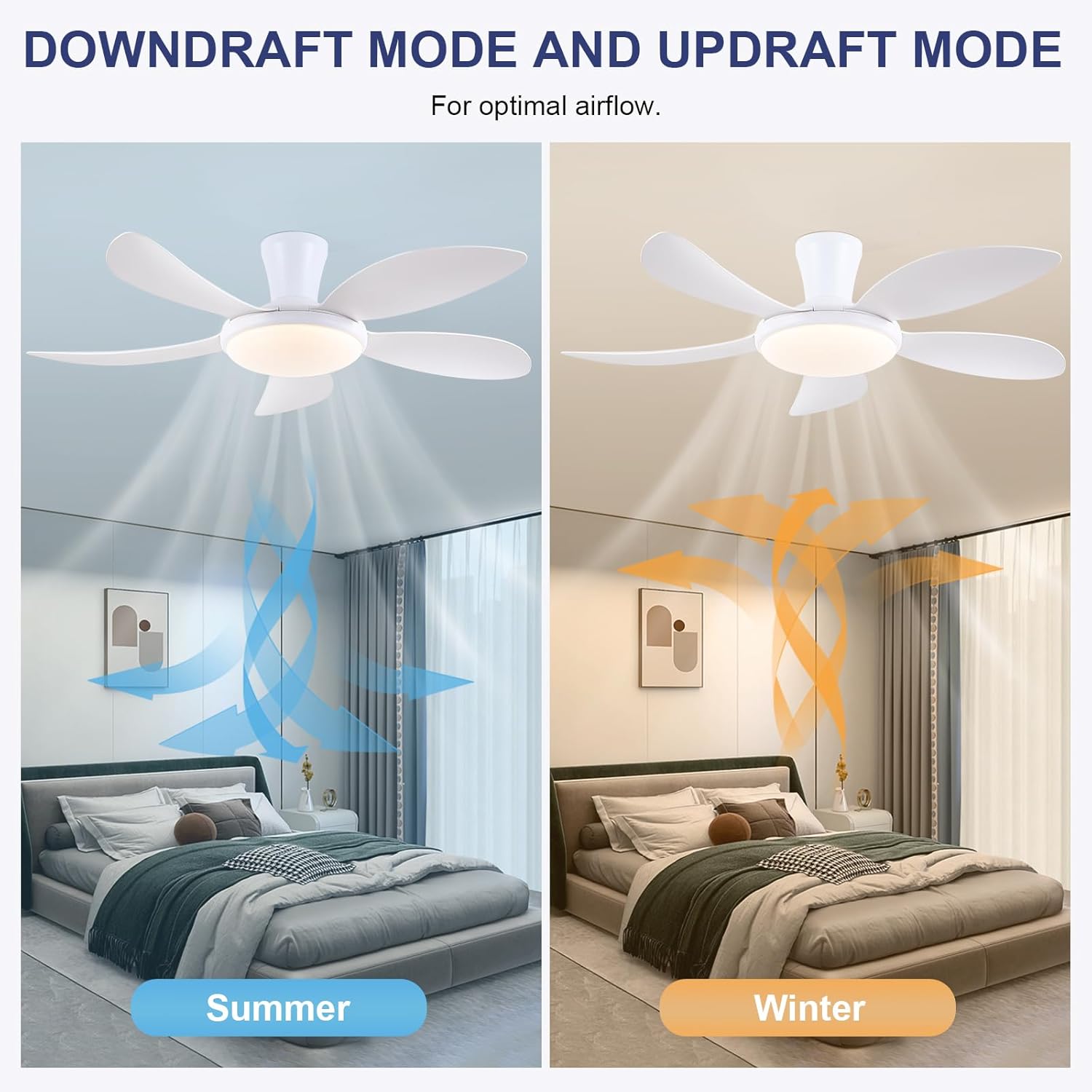
- Reverzibilná funkcia: Press the F/R key to change the blade rotation direction for summer (downdraft) or winter (updraft) modes. The fan will stop briefly before reversing.
- Časovač: Set a 2-hour timer for automatic shutdown.
- Nočný režim: Activates a low-speed fan and dim light setting.

6.2 Remote Code Pairing
If the remote control is not responding, it may need to be paired:
- Turn off the main power supply to the fan for one minute.
- Turn on the main power supply and simultaneously long-press the 'Code Key' button on the remote control for 3-5 seconds.
- The fan light will blink 2-3 times, indicating successful code matching. The remote can now be operated normally.
6.3 Ovládanie APP
Control your fan using the 'Fan Lamp Pro' mobile application:
- Stiahnite si APP: Scan the QR code provided in the product images or search for "Fan Lamp Pro" in your app store.
- Pripojenie cez Bluetooth: Uistite sa, že máte v telefóne zapnuté rozhranie Bluetooth.
- Spárovať zariadenie: Open the app, add a new device, and follow the on-screen instructions to connect to your fan. The fan light will blink twice upon successful connection.
- Funkcie: The app allows control over fan speeds, light colors, dimming, reverse function, and timer settings, similar to the remote control.
6.4 Rýchlosť ventilátora a prietok vzduchu
- Úrovne 1-2: Low Comfortable Wind, suitable for sleep.
- Úrovne 3-4: Medium Natural Wind, suitable for daily life.
- Úrovne 5-6: High Cooling Wind, suitable for hot weather.

6.5 Nastavenia osvetlenia
- The LED light source supports stepless dimming and memory function, retaining your last brightness and color temperature setting.
- Choose from 3 color temperatures: 3000K (Warm Light), 4500K (Natural Light), and 6000K (White Light).

6.6 Reverzibilná funkcia
The reversible DC motor allows you to change the direction of the fan seasonally:
- Letný režim (smerom klesajúcom vzduchu): Blades rotate counter-clockwise, pushing cool air downwards.
- Zimný režim (vzostupný prúd vzduchu): Blades rotate clockwise, drawing cool air up and circulating warm air downwards.
7. Údržba
- Čistenie: Na čistenie ventilátora ho utrite mäkkou handričkouamp plátno. Nepoužívajte abrazívne čistiace prostriedky ani rozpúšťadlá.
- Starostlivosť o čepele: The ABS blades are designed to be easy to clean and resistant to deformation.
- Pravidelné kontroly: Pravidelne kontrolujte všetky spoje a skrutky, aby ste sa uistili, že sú bezpečne utiahnuté.
8. Riešenie problémov
Ak sa vyskytnú problémy s ventilátorom, pozrite si nasledujúce bežné problémy a riešenia:
- Ventilátor nefunguje: Check power supply, ensure all wiring connections are secure, and verify remote control pairing.
- Svetlo nefunguje: Check power supply, ensure light wires are connected, and verify remote control pairing.
- Ventilátor je hlučný: Ensure all screws are tightened, especially on the blades and mounting bracket. Check for any obstructions.
- Nefunguje diaľkové ovládanie: Replace batteries, ensure line of sight to the fan, and re-pair the remote control as per section 6.2.
- Problémy s pripojením aplikácie: Ensure Bluetooth is on, the app is updated, and try re-pairing the device.
9. Záruka a podpora
PHORUS provides a one-year quality warranty for this product. For any damage or quality problems, free replacement service is offered. If you have any questions or require assistance, please contact PHORUS customer service. You will receive a satisfactory answer within 24 hours.
For additional support and resources, please visit the official PHORUS webstránku alebo sa pozrite na kontaktné informácie uvedené pri nákupe.