
Úvod
Welcome to the user manual for your new Generic M59 Pro Max Smartwatch. This guide provides essential information on setting up, operating, maintaining, and troubleshooting your device. The M59 Pro Max Smartwatch is designed to enhance your daily life with features like advanced activity tracking, call support, smart notifications, and various sport modes.
Obsah balenia
Prosím, overte si, či sú vo vašom balení všetky nasledujúce položky:
- M59 Pro Max Smartwatch
- 7 Random Straps (Silicone, Rubber, Nylon)
- Kábel na bezdrôtové nabíjanie
- Používateľská príručka

Image: The M59 Pro Max Smartwatch and its accessories, including a variety of interchangeable straps, neatly arranged in its packaging.
Nastavenie
1. Nabíjanie inteligentných hodiniek
Before first use, fully charge your smartwatch. Place the smartwatch on the wireless charging cable. The screen will indicate charging status. A full charge typically takes 2-3 hours.
2. Zapnutie/vypnutie
- Zapnutie: Stlačte a podržte bočné tlačidlo, kým sa obrazovka nerozsvieti.
- Vypnutie: Stlačte a podržte bočné tlačidlo a potom na obrazovke vyberte možnosť „Vypnúť“.
3. Inštalácia a párovanie aplikácie
To unlock the full potential of your smartwatch, download the companion fitness tracker application on your smartphone or tablet. Refer to the Quick Start Guide for the specific app name or QR code.
- Download and install the app from your device's app store.
- Povoľte na svojom smartfóne Bluetooth.
- Open the app and follow the on-screen instructions to pair your M59 Pro Max Smartwatch. Ensure the smartwatch is powered on and near your phone during pairing.
Návod na obsluhu
Základná navigácia
The M59 Pro Max features a 2-inch HD touchscreen display for intuitive interaction. Swipe left, right, up, or down to navigate through menus and access different functions. Tap to select items.
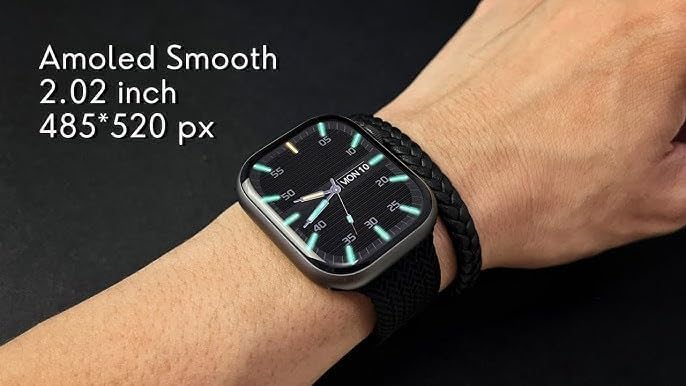
Image: The M59 Pro Max Smartwatch worn on a wrist, showcasing its vibrant 2.02-inch AMOLED display with a resolution of 485x520 pixels.
Hovory a upozornenia
Once paired via Bluetooth, you can manage calls and receive notifications directly on your smartwatch.
- Uskutočňovanie hovorov: Use the dialer on the watch or access your phone's contacts through the watch interface.
- Prijímanie hovorov: Prijímajte alebo odmietajte prichádzajúce hovory priamo zo zápästia.
- Upozornenia: View messages, app alerts, and other notifications.
Fitness Tracking and Sport Modes
The smartwatch offers comprehensive fitness tracking and multiple sport modes.
- Sledovanie aktivity: Monitoruje kroky, vzdialenosť a spálené kalórie.
- Monitor srdcového tepu: Poskytuje údaje o srdcovej frekvencii v reálnom čase.
- Sledovanie spánku: Analyzes sleep patterns and duration.
- Športové režimy: Select from various activities like running, cycling, and more to track specific workout data.
NFC and GPT Features
The M59 Pro Max supports NFC for convenient transactions and GPT for enhanced interaction. Refer to the companion app for specific setup and usage instructions for these advanced features.
Údržba
Upratovanie
Wipe the smartwatch and straps regularly with a soft, dry cloth. For stubborn dirt, a slightly damp Môže sa použiť handrička. Vyhnite sa agresívnym chemikáliám alebo abrazívnym materiálom.
Odolnosť voči vode
The M59 Pro Max is water repellent. This means it can withstand splashes, sweat, and light rain. It is not suitable for swimming, showering, or diving. Avoid prolonged exposure to water.
Starostlivosť o popruh
The included straps are made of silicone, rubber, and nylon. Clean them according to their material type. Ensure straps are dry before reattaching to the watch.
Riešenie problémov
Ak máte problémy s inteligentnými hodinkami, vyskúšajte nasledujúce riešenia:
- Smartwatch not powering on: Uistite sa, že je zariadenie úplne nabité.
- Nedá sa spárovať so smartfónom: Make sure Bluetooth is enabled on your phone and the smartwatch is within range. Try restarting both devices.
- Nepresné údaje o fyzickej zdatnosti: Ensure the watch is worn snugly on your wrist. Calibrate the app if available.
- Nezobrazujú sa upozornenia: Check app permissions on your smartphone and ensure notifications are enabled for the companion app.
- Obrazovka nereaguje: Skúste reštartovať inteligentné hodinky.
For further assistance, please refer to the support section of the companion application or contact your retailer.
Špecifikácie
| Názov modelu | M59 Pro Max |
| Názov značky | Generic |
| Operačný systém | Proprietárny operačný systém |
| Veľkosť obrazovky | 2 palca |
| Typ zobrazenia | OLED |
| Rozlíšenie | 240 x 280 |
| Technológia pripojenia | Bluetooth, mobilné pripojenie (LTE) |
| Štandard bezdrôtovej komunikácie | Bluetooth |
| Funkcie pripojenia | NFC, Bluetooth, Cellular |
| Špeciálne funkcie | Advanced Activity Tracking, Call and Chat Support |
| Zloženie článkov batérie | Lítium-ión |
| GPS | Bez GPS |
| Tvar položky | Okrúhle |
| Typ materiálu pásu | Silicone, Rubber, Nylon |
| Úroveň odolnosti voči vode | Vodoodpudivý |
| Športový typ | Viaceré športy |
| Vstup ľudského rozhrania | Dotykový displej |
| Podporovaná aplikácia | Fitness Tracker |
| Typ ovládača | Ovládanie hlasom |
| Typ merača | Heart Rate Monitor, Sleep Duration, Step Count |
| Typ uzáveru | Spona |
| Farba | Čierna |
| Farba pásu | Čierna |
| Kompatibilné zariadenia | Smartfón, Tablet |
| Kompatibilné modely telefónov | Všetky aktuálne modely smartfónov |
Záruka a podpora
Informácie o záruke
This product is provided without an explicit warranty. Please check with your retailer regarding their return and exchange policies.
Zákaznícka podpora
For any questions or issues not covered in this manual, please contact the retailer where you purchased the product or refer to the support section within the companion application.