
1. Úvod
Welcome to the user manual for your Emerson CKSS7071 Sunrise Smartset Alarm Clock Radio. This device is designed to enhance your daily routine with its unique features, including a sunrise simulation, soothing sound options, Bluetooth connectivity, and an 8-color dimmable LED display. Please read this manual thoroughly to understand the full functionality and ensure proper use and care of your new alarm clock radio.
Klip 1: Koniecview of the Emerson CKSS7071 Sunrise Smartset Alarm Clock Radio. This video demonstrates the key features and design of the product.
2. Dôležité bezpečnostné informácie
- Pred použitím spotrebiča si prečítajte všetky pokyny.
- Uschovajte si tieto pokyny pre budúce použitie.
- Toto zariadenie nepoužívajte v blízkosti vody.
- Čistite iba suchou handričkou.
- Neblokujte žiadne vetracie otvory. Inštalujte podľa pokynov výrobcu.
- Neinštalujte v blízkosti zdrojov tepla, ako sú radiátory, ohrievače, kachle alebo iné zariadenia (vrátane amplifikátory), ktoré produkujú teplo.
- Chráňte napájací kábel, aby sa po ňom nešliapalo alebo aby nebol priškripnutý, najmä pri zástrčkách, zásuvkách a v mieste, kde vychádza zo zariadenia.
- Používajte iba doplnky/príslušenstvo určené výrobcom.
- Odpojte toto zariadenie počas búrok s bleskami alebo keď sa dlhší čas nepoužíva.
- Všetok servis prenechajte kvalifikovanému servisnému personálu. Servis je potrebný, ak bolo zariadenie akýmkoľvek spôsobom poškodené, napríklad ak je poškodený napájací kábel alebo zástrčka, ak sa do zariadenia vyliala kvapalina alebo do neho spadli predmety, zariadenie bolo vystavené dažďu alebo vlhkosti, nefunguje normálne , alebo bola vypustená.
3. Obsah balenia
Po otvorení balenia skontrolujte, či sú všetky položky prítomné:
- Emerson CKSS7071 Sunrise Smartset Alarm Clock Radio
- Sieťový adaptér
- Používateľská príručka
4. Produkt skončilview
4.1 Predné View

Obrázok 1: Predné view of the alarm clock, featuring the digital time display and the sunrise simulation light panel.
The front of the unit features the main 1.2-inch LED time display and the large circular light panel for sunrise simulation and ambient lighting. Indicators for AM/PM, Alarm 1/2, and Bluetooth status are also visible.
4.2 Strana View (Ovládacie prvky)
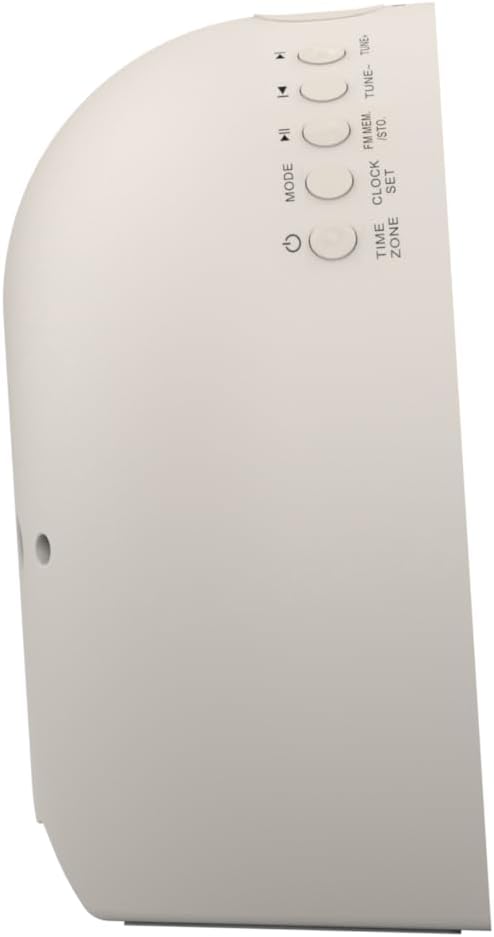
Obrázok 2: Side view of the alarm clock, highlighting the control buttons for various functions.
The side panel houses the primary control buttons, including Power, Mode, Clock Set, Time Zone, Tune/Skip, and Volume controls. These buttons are used for setting time, alarms, and navigating audio functions.
4.3 Vzadu View

Obrázok 3: Zadné view of the alarm clock, showing the speaker grille and power connection port.
The rear of the unit features the main speaker grille and the power input port for connecting the AC adapter.
5. Nastavenie
5.1 Pripojenie napájania
- Plug the AC power adapter into the DC IN jack located on the back of the unit.
- Plug the other end of the adapter into a standard wall outlet (AC 100-240V, 50/60Hz).
- Jednotka sa automaticky zapne.
5.2 SmartSet Automatic Time Setting
The SmartSet system automatically sets the correct time and date as soon as you plug in the unit. It also maintains time and alarm settings during power disruptions or outages, provided the button cell battery is installed.
5.3 Inštalácia záložnej batérie
A button cell battery (CR2032, included) is required for battery backup. This ensures that time and alarm settings are retained during a power outage.
- Nájdite priehradku na batérie na spodnej strane zariadenia.
- Otvorte kryt priehradky na batérie.
- Insert one CR2032 button cell battery, ensuring the correct polarity (+/-).
- Bezpečne zatvorte kryt priestoru pre batérie.
6. Návod na obsluhu
6.1 Setting the Clock Manually
- Stlačte a podržte SADA HODÍN tlačidlo. Číslice hodín budú blikať.
- Použite LADENIE -/+ nastavte hodinu. Stlačte SADA HODÍN potvrdiť.
- Číslice minút budú blikať. Použite LADENIE -/+ nastavte minúty. Stlačte SADA HODÍN potvrdiť.
- Continue this process to set the year, month, and day.
- Stlačte tlačidlo SADA HODÍN znova pre ukončenie režimu nastavenia času.
6.2 Nastavenie alarmov (Alarm 1 a Alarm 2)
The unit features dual alarms. Follow these steps for each alarm:
- Stlačte a podržte ALARM 1 or ALARM 2 tlačidlo. Číslice hodín budíka budú blikať.
- Použite LADENIE -/+ buttons to adjust the alarm hour. Press the respective ALARM tlačidlo na potvrdenie.
- Číslice minút budíka budú blikať. Použite LADENIE -/+ buttons to adjust the alarm minutes. Press the respective ALARM tlačidlo na potvrdenie.
- Select the alarm source (Buzzer, FM Radio, or Soothing Sound). Press the respective ALARM tlačidlo na potvrdenie.
- Adjust the alarm volume using the VOL -/+ buttons. Press the respective ALARM tlačidlo na potvrdenie.
- The alarm is now set. The alarm indicator (AL1 or AL2) will appear on the display.
6.3 Simulácia východu slnka
The sunrise simulation feature gradually brightens the light panel before your set alarm time, mimicking a natural sunrise to gently wake you.
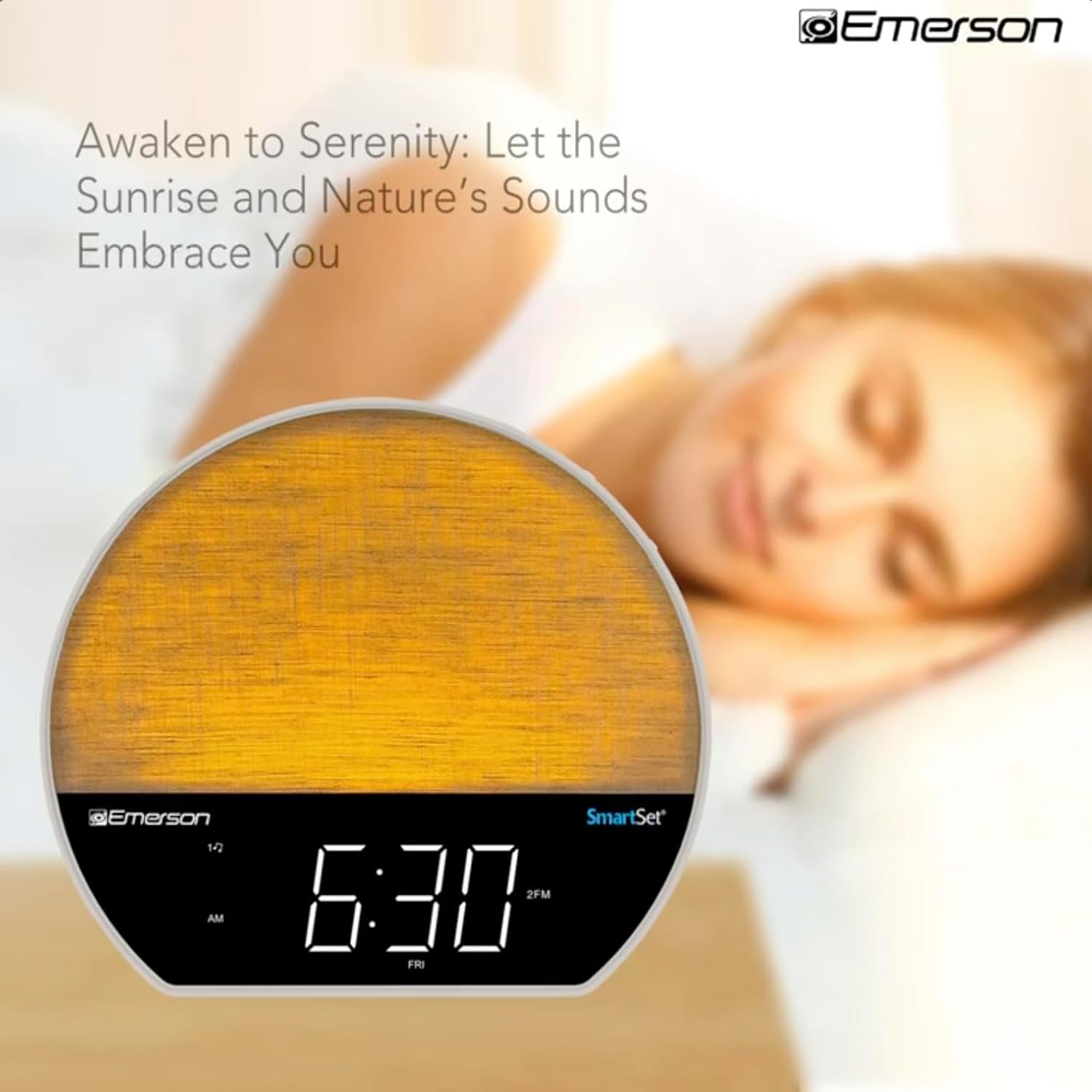
Obrázok 4: The alarm clock simulating a sunrise with a warm, increasinintenzita svetla g.
To activate, ensure the sunrise option is selected during alarm setup. The light will begin to brighten 30 minutes before the alarm sounds.
6.4 Soothing Sounds and White Noise
The unit includes 6 soothing sounds and white noise to help with relaxation or waking up.
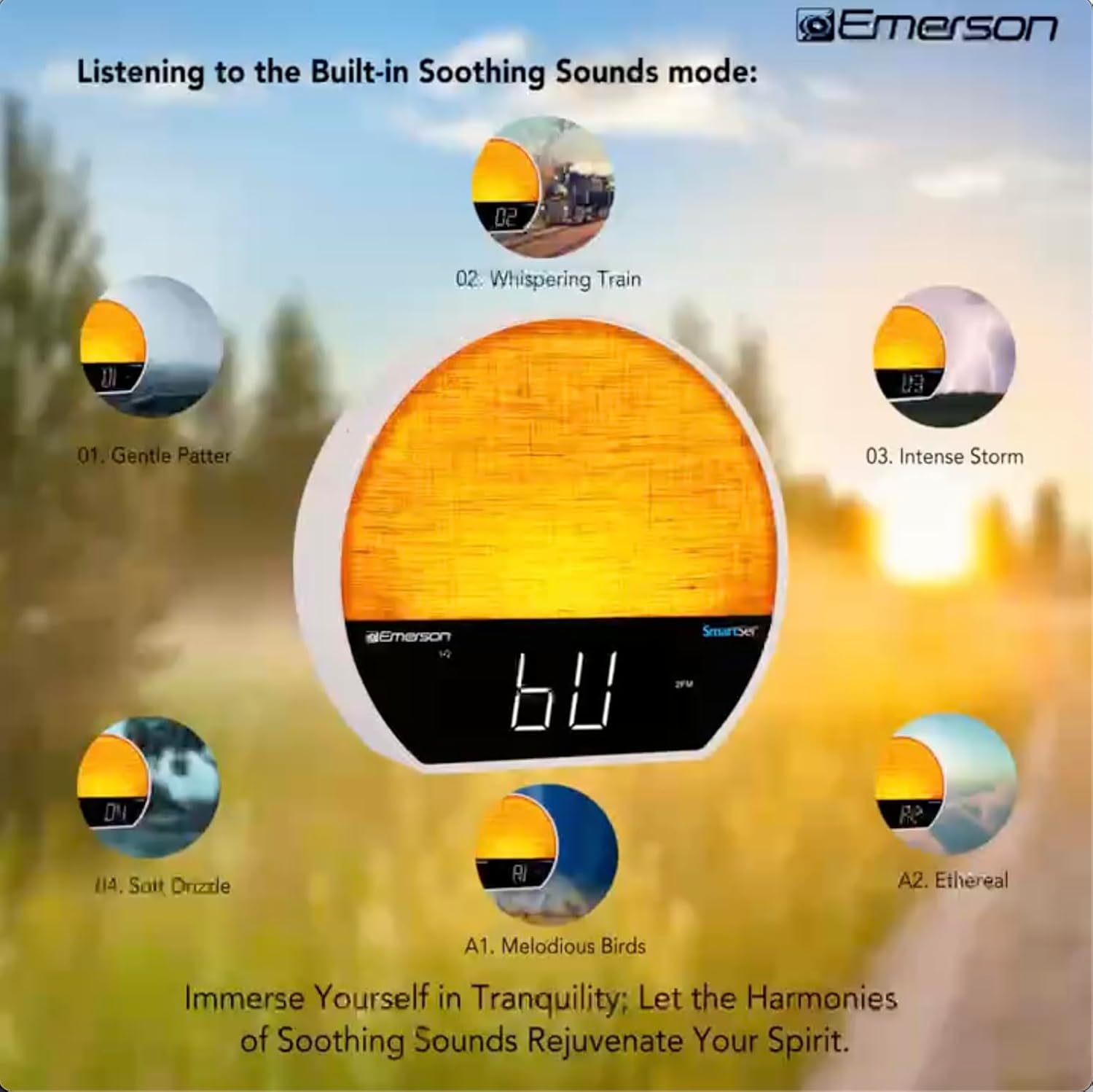
Obrázok 5: Visual representation of the six soothing sound modes available on the alarm clock.
- Stlačte tlačidlo MODE button repeatedly until the Soothing Sound mode is selected.
- Použite LADENIE -/+ buttons to cycle through the available sounds (e.g., Gentle Patter, Whispering Train, Intense Storm, Soft Drizzle, Melodious Birds, Ethereal, White Noise).
- Hlasitosť upravte pomocou tlačidla VOL -/+ tlačidlá.
6.5 Funkcia Bluetooth reproduktora
Pripojte svoj smartfón alebo iné zariadenie s podporou Bluetooth a bezdrôtovo streamujte zvuk.

Obrázok 6: The alarm clock in Bluetooth mode, paired with a mobile device for audio streaming.
- Stlačte tlačidlo MODE button until 'BT' appears on the display, indicating Bluetooth mode.
- On your device, enable Bluetooth and search for 'Emerson CKSS7071'.
- Select the device to pair. A confirmation tone will sound upon successful pairing.
- Teraz môžete prehrávať zvuk zo zariadenia cez reproduktor budíka.
6.6 Obsluha FM rádia
Nalaďte si svoje obľúbené FM rozhlasové stanice.
- Stlačte tlačidlo MODE kým sa na displeji nezobrazí „FM“.
- Stlačte tlačidlo LADENIE -/+ buttons briefly to manually tune to a station.
- Stlačte a podržte LADENIE -/+ tlačidlá pre automatické vyhľadanie ďalšej dostupnej stanice.
- Ak chcete uložiť stanicu, stlačte a podržte tlačidlo FM MEM kým nezačne blikať číslo predvoľby. Použite tlačidlo LADENIE -/+ vyberte číslo predvoľby a potom stlačte FM MEM znova uložiť.
6.7 LED Decor and Dimmer Control
Customize the ambient light with 8 different colors and adjust the brightness.

Obrázok 7: The alarm clock demonstrating its 8-color dimmable LED decor options.
- Stlačte tlačidlo SVETLO button to cycle through the 8 available colors or turn the light off.
- To adjust the brightness of the LED decor light, press and hold the SVETLO button. The brightness will cycle through 5 levels. Release the button at your desired brightness.
6.8 Ovládanie stmievania displeja
Adjust the brightness of the 1.2-inch LED time display.

Obrázok 8: The alarm clock illustrating the five distinct levels of display luminescence.
Stlačte tlačidlo STMIEVAČ button (often combined with another function, refer to button labels) to cycle through 4 levels of display brightness (Bright, Moderate, Dim, Faint).
6.9 Časovač vypnutia
Set a timer for the audio to automatically turn off after a specified duration.

Obrázok 9: The alarm clock set for a sunset sleep timer, providing a harmonious end to the day.
- While audio is playing (FM or Soothing Sound), press the SPAŤ tlačidlo.
- Opakovane stlačte tlačidlo SPAŤ button to cycle through available sleep timer durations (e.g., 15, 30, 60, 90 minutes, or OFF).
- The audio will automatically turn off after the selected time.
6.10 Funkcia odloženia budíka
Keď zaznie budík, stlačte tlačidlo SNOOZE tlačidlo (zvyčajne veľké tlačidlo navrchu) na dočasné stlmenie budíka na niekoľko minút. Budík sa znova spustí po uplynutí doby odloženia.
7. Údržba
7.1 Čistenie
- Pred čistením jednotku vždy odpojte od elektrickej zásuvky.
- Na čistenie vonkajších povrchov použite mäkkú, suchú handričku.
- Nepoužívajte tekuté čistiace prostriedky, abrazívne čistiace prostriedky ani chemické spreje, pretože by mohli poškodiť povrchovú úpravu.
7.2 Výmena batérie
Ak sa nastavenia času a budíka nezachovajú počas výpadku napájaniatage, the button cell backup battery may need to be replaced. Follow the instructions in section 5.3 to replace the CR2032 battery.
8. Riešenie problémov
| Problém | Možná príčina | Riešenie |
|---|---|---|
| Jednotka sa nezapne. | Napájací adaptér nie je pripojený alebo je chybný. | Uistite sa, že sieťový adaptér je bezpečne zapojený do zariadenia a do funkčnej zásuvky. |
| Nastavenia času/budíka sa stratili po výpadku napájaniatage. | Backup battery is dead or not installed. | Install or replace the CR2032 button cell battery (see section 5.3). |
| Budík neznie. | Budík nie je aktivovaný alebo je hlasitosť príliš nízka. | Ensure the alarm is set and activated (AL1/AL2 indicator on). Increase alarm volume. |
| Zariadenie Bluetooth sa nedá spárovať. | Unit not in Bluetooth mode or device too far. | Ensure the unit is in Bluetooth mode ('BT' displayed). Move your device closer to the unit. Try unpairing and re-pairing. |
| Slabý príjem FM rádia. | Anténa nie je vysunutá alebo je rušená. | Extend the FM wire antenna fully and reposition it for better reception. Avoid placing near other electronic devices. |
| Displej je príliš jasný/tmavý. | Display dimmer setting needs adjustment. | Stlačte tlačidlo STMIEVAČ button to cycle through brightness levels (see section 6.8). |
9. Špecifikácie
| Funkcia | Detail |
|---|---|
| Číslo modelu | CKSS7071 |
| Zdroj napájania | AC 100-240V, 50/60Hz (via AC adapter) |
| Zálohovanie batérie | 1 x CR2032 Button Cell Battery (included) |
| Typ zobrazenia | 1.2-inch LED Display |
| Verzia Bluetooth | V5.4 |
| Upokojujúce zvuky | 6 Nature Sounds + White Noise |
| LED Decor Colors | 8 Dimmable Colors |
| Rozmery produktu (Š x H x V) | 7.09 cm x 3.15 cm x 6.37 cm |
| Hmotnosť | Neuvedené |
10. Informácie o záruke
Emerson products are manufactured to the highest quality standards. This product is covered by a limited warranty against defects in materials and workmanship for a period of one (1) year from the original date of purchase. This warranty does not cover damage caused by misuse, accident, unauthorized modification, or normal wear and tear. Proof of purchase is required for all warranty claims. Please retain your receipt.
11. Zákaznícka podpora
If you have any questions, require assistance, or experience issues with your Emerson CKSS7071 Sunrise Smartset Alarm Clock Radio, please contact our customer support team.
- Webmiesto: Visit the official Emerson webstránka s najčastejšími otázkami a zdrojmi podpory.
- Email: Pozrite si obal produktu alebo oficiálne webstránka pre e-mailový kontakt so zákazníckym servisom.
- Telefón: Pozrite si obal produktu alebo oficiálne webstránka s telefónnymi číslami zákazníckeho servisu.
Please have your model number (CKSS7071) and proof of purchase ready when contacting support.