
1. Úvod
This manual provides detailed instructions for the installation, operation, and maintenance of your Walfront 50A Shunt Battery Monitor. This device is designed to accurately measure and display various battery parameters, including voltage, current, capacity, and power, for a wide range of battery types in applications such as RVs, boats, cars, motorcycles, and golf carts.

Figure 1: Complete Walfront 50A Shunt Battery Monitor Kit, including the display unit, sampler, and connecting cables.
2. Produkt skončilview
2.1 Kľúčové vlastnosti
- Užívateľsky prívetivé rozhranie: Features a clear 1.8-inch display with larger text and responsive silicone keys for easy operation.
- Jednoduchá inštalácia: Designed for versatile embedding with multiple bracket options, including a handlebar bracket, ensuring stable mounting.
- Multifunkčný displej: Provides real-time data on power, voltage, current, remaining capacity, discharge status, estimated time, and capacity percentage.
- Bluetooth pripojenie: Allows remote monitoring and settings adjustment via a mobile app within a 10-meter unobstructed range.
- Široká kompatibilita batérií: Suitable for various battery types including lead-acid, LiFePO4, lithium-ion, and Ni-MH batteries.
2.2 Komponenty
The Walfront 50A Shunt Battery Monitor package includes the following components:
- Display Unit (1.8-inch screen)
- Sampler (50A Shunt)
- 3-Meter Communication Cable
- 1-Meter Positive Pole Cable
- Držiak na riadidlá
- Používateľská príručka
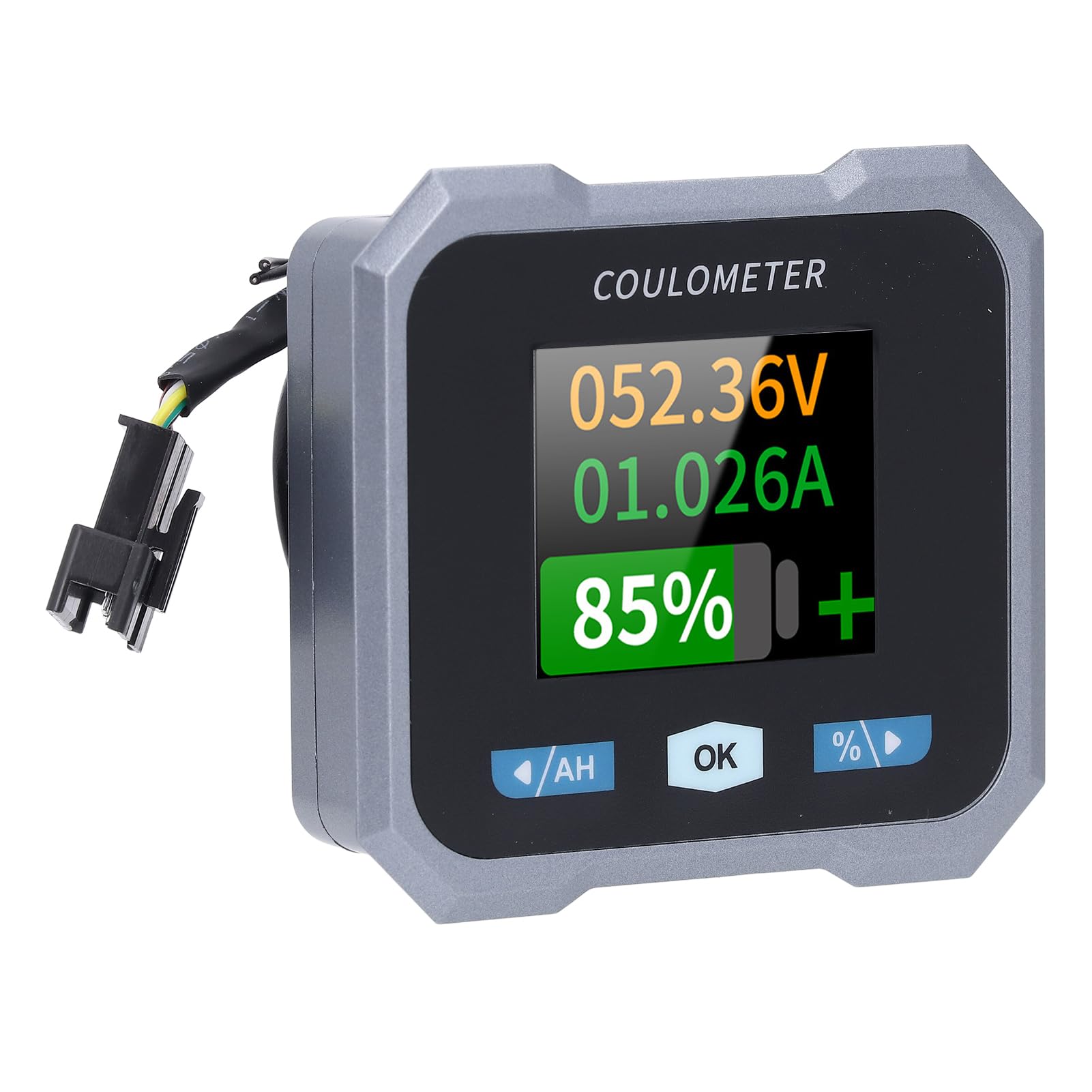
Figure 2: Individual components of the Walfront 50A Shunt Battery Monitor kit.
3. Nastavenie a inštalácia
3.1 Bezpečnostné opatrenia
- Ensure the power is disconnected from the battery before installation.
- Noste vhodné bezpečnostné vybavenie vrátane ochrany očí.
- Verify correct polarity when connecting wires to prevent damage to the device or battery.
3.2 Montáž zobrazovacej jednotky
The display unit can be embedded or mounted using the provided handlebar bracket.
- Montáž na riadidlá: Attach the handlebar bracket to your desired location. Secure the display unit into the bracket. The bracket features mechanical locking knobs and thickened anti-slip washers for a secure, non-destructive installation.
- Embedded Mounting: For custom installations, ensure the cutout dimensions match the display unit's specifications (refer to Section 6. Specifications for dimensions).

Figure 3: Display unit mounted on a handlebar, showing clear visibility.

Figure 4: Illustration of the handlebar bracket installation process, highlighting locking knobs and anti-slip washers.
3.3 Wiring the Sampler and Display
Sampler is the current sensing component and must be installed in series with the negative terminal of the battery. The display unit connects to the sampler via the provided communication cable.
- Pripojte Sampčítať: Connect the negative terminal of your battery to the 'B-' terminal on the sampler. Connect the load's negative terminal to the 'P-' terminal on the sampler.
- Connect Positive Power: Use the 1-meter positive pole cable to connect the 'V+' terminal on the sampler to the positive terminal of your battery. This provides power to the sampler and display.
- Pripojte komunikačný kábel: Plug one end of the 3-meter communication cable into the sampler and the other end into the display unit.
- Overiť pripojenia: Double-check all connections for tightness and correct polarity before restoring power to the battery.

Figure 5: The compact size of the sampler, designed for easy installation even in small battery compartments.
4. Návod na obsluhu
4.1 Rozhranie displeja
The 1.8-inch display provides a clear view of various battery parameters. The interface can be viewed manually or set to auto-rotate.
- Manuálna stránka View: Press the left and right arrow keys (labeled '/AH' and '%/>') to manually switch between different display interfaces and view content such as voltage, current, remaining capacity, power, and estimated time.
- Auto Page Rotation: Access the settings interface to enable the auto-rotate function. When active, the monitor will sequentially switch and display different interfaces in a cycle.
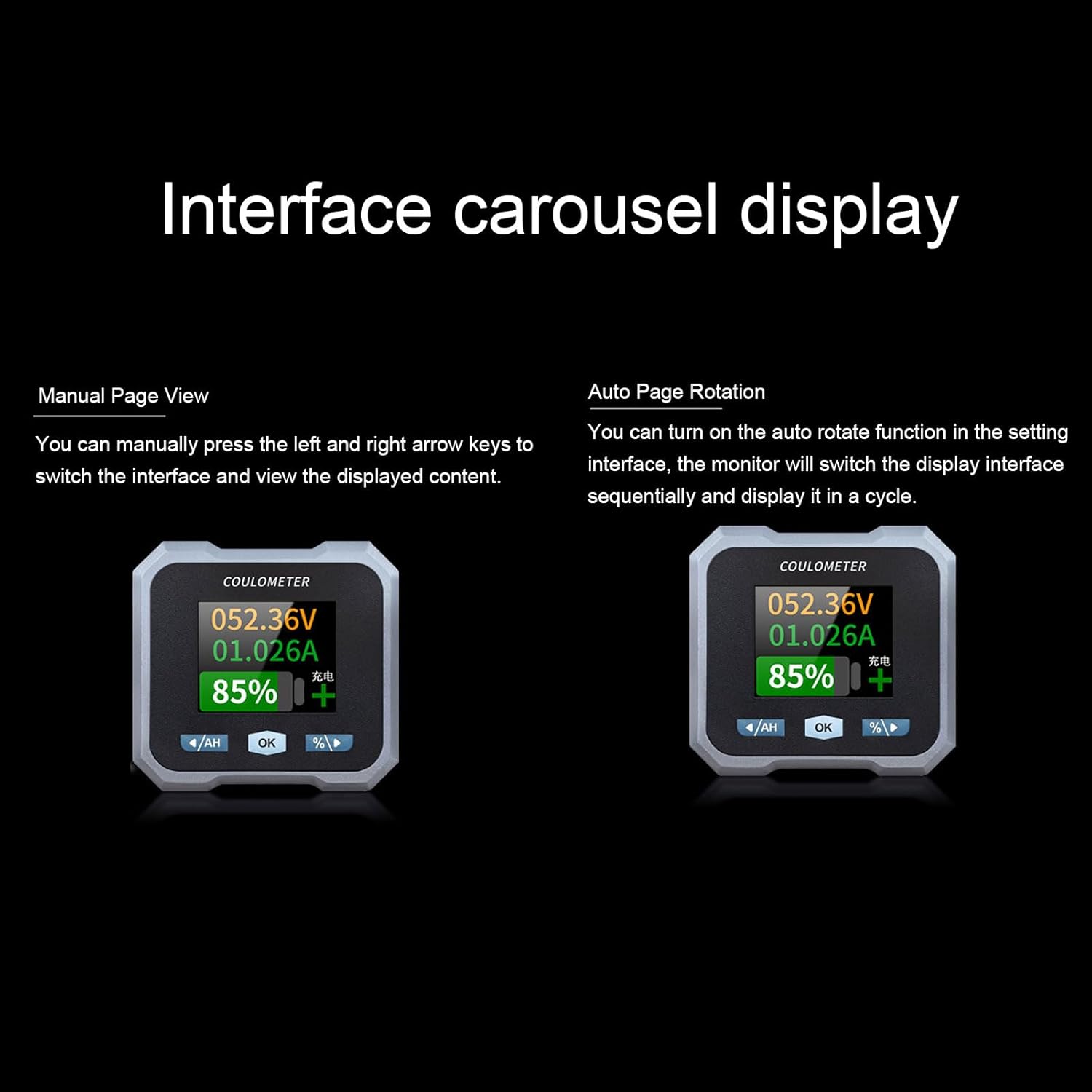
Figure 6: Interface carousel display options, showing manual page view and auto page rotation.

Figure 7: The multifunctional display showing voltage, current, estimated charge/discharge time, percentage of capacity, remaining capacity, and power.
4.2 Funkcie tlačidiel
- '/AH' Button (Left Arrow): Navigates left through display screens or decreases values in settings.
- 'OK' Button: Potvrdzuje výbery alebo vstupuje do menu nastavení.
- '%/>' Button (Right Arrow): Navigates right through display screens or increases values in settings.
4.3 Pripojenie Bluetooth
The monitor supports Bluetooth connectivity for remote monitoring and control via a mobile application.
- Stiahnutie aplikácie: Hľadať the official Walfront battery monitor app on your smartphone's app store.
- Spárovať zariadenie: Enable Bluetooth on your smartphone and open the app. Follow the in-app instructions to search for and pair with your battery monitor.
- Diaľkové monitorovanie: Po pripojení môžete view real-time data, adjust settings, and monitor functions remotely within a 10-meter unobstructed range.
4.4 Konfigurácia typu batérie
The monitor is compatible with various battery types. Ensure the correct battery type is configured in the settings for accurate readings.
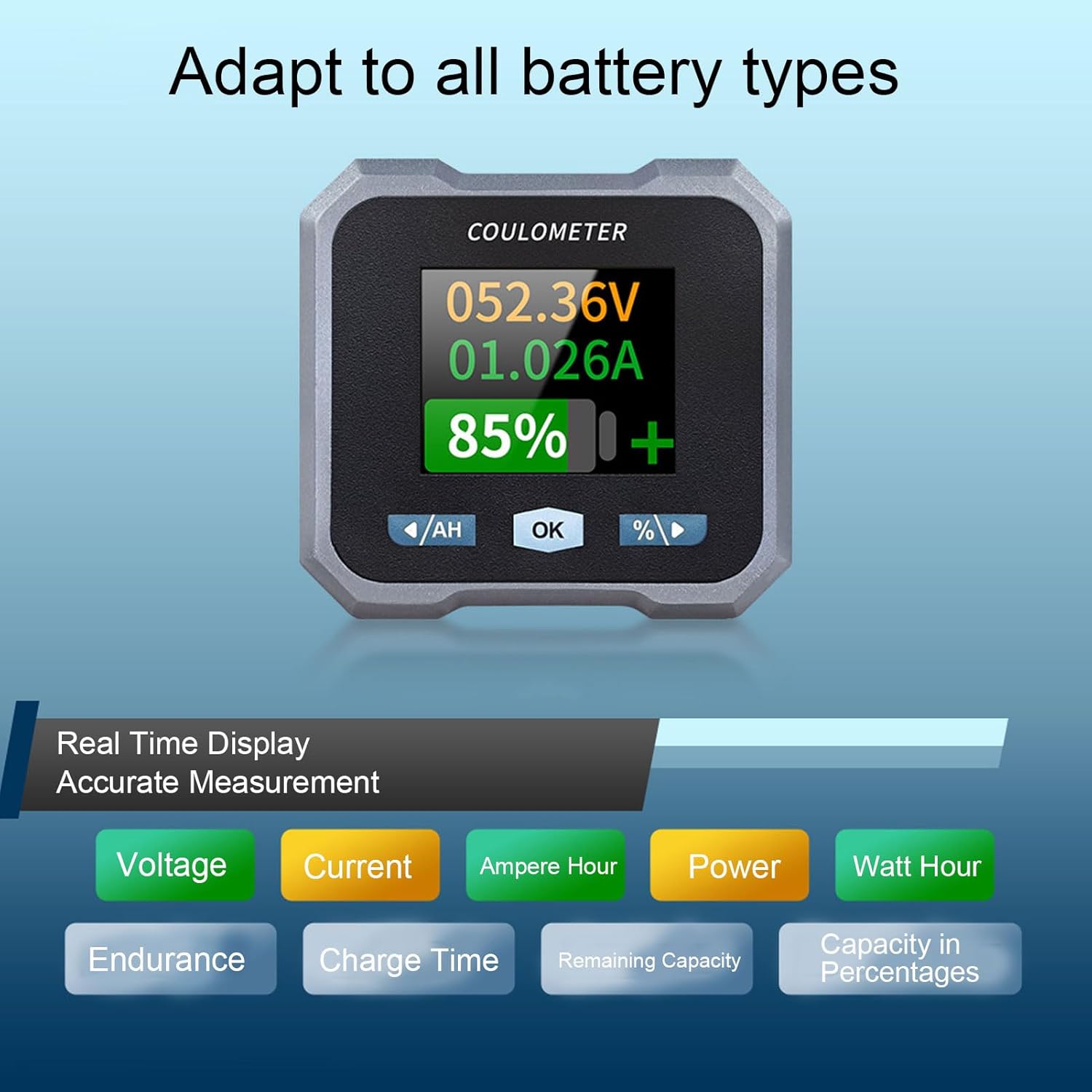
Figure 8: Display indicating real-time measurements and highlighting compatibility with various battery types.
5. Údržba
To ensure the longevity and accurate performance of your Walfront 50A Shunt Battery Monitor, follow these general maintenance guidelines:
- Čistenie: Gently wipe the display screen and unit housing with a soft, dry cloth. Avoid using abrasive cleaners or solvents.
- Spojenia: Pravidelne kontrolujte všetky káblové pripojenia, aby ste sa uistili, že sú bezpečné a bez korózie.
- Ochrana životného prostredia: While designed for various environments, avoid prolonged exposure to extreme temperatures, direct sunlight, or excessive moisture.
- Aktualizácie firmvéru: Check the Walfront official webalebo aplikáciu, kde nájdete všetky dostupné aktualizácie firmvéru, aby ste zabezpečili optimálny výkon a nové funkcie.
6. Riešenie problémov
If you encounter issues with your battery monitor, refer to the following common troubleshooting steps:
- Bez displeja/napájania:
- Check all power connections, especially the positive pole cable to the battery and the communication cable to the sampler.
- Uistite sa, že objem batérietage je v prevádzkovom rozsahu (10 – 100 V).
- Nepresné hodnoty:
- Overte, či sampler is correctly installed in series with the negative battery terminal.
- Confirm that the battery type and capacity settings in the monitor match your actual battery.
- Ensure all connections are tight and free of corrosion, which can affect current sensing.
- Problémy s pripojením Bluetooth:
- Ensure the monitor is powered on and within the 10-meter unobstructed range of your smartphone.
- Restart the mobile app and your smartphone's Bluetooth.
- If pairing fails, try unpairing and re-pairing the device in your phone's Bluetooth settings.
- Screen Auto-Off During Use:
- The screen automatically turns off after 20 seconds during charging. During discharge, it turns off if the current is below 15mA for 20 seconds. This is normal behavior to conserve power.
- Stlačením ľubovoľného tlačidla obrazovku znova aktivujete.
If problems persist, contact Walfront customer support for further assistance.
7. Špecifikácie
| Parameter | Hodnota |
|---|---|
| Model | WALFRONTpo13qkgbfh |
| Materiál | ABS, Stainless Steel, Silicone |
| Veľkosť obrazovky | Približne 1.8 palca / 4.57 cm |
| Sampling metóda | derivačný |
| Voltage Testing Range | Approx. 10-100V |
| Voltage Rozlíšenie | Približne. 0.01V |
| Aktuálny rozsah merania | Approx. 0-50A |
| Aktuálne rozlíšenie | Približne. 0.001A |
| Rozsah zobrazenia kapacity | Approx. 0%-100% |
| Rozsah merania výkonu | Approx. 0-5KW |
| Rozlíšenie napájania | Približne. 0.01 W. |
| Ah Measurement Range | Approx. 0-9999AH |
| Rozlíšenie kapacity | Approx. 0.1AH |
| Komunikačná vzdialenosť Bluetooth | Approx. 10m / 32.81ft (unobstructed) |
| Voltage Presnosť | ±1 % + 2 číslic |
| Aktuálna presnosť | ±2 % + 0.002 A |
| Spotreba energie displeja | Približne. 0.75 W. |
| Čas vypnutia obrazovky | 20 seconds auto off during charging; screen on when I≥15mA, off when I<15mA for 20s |
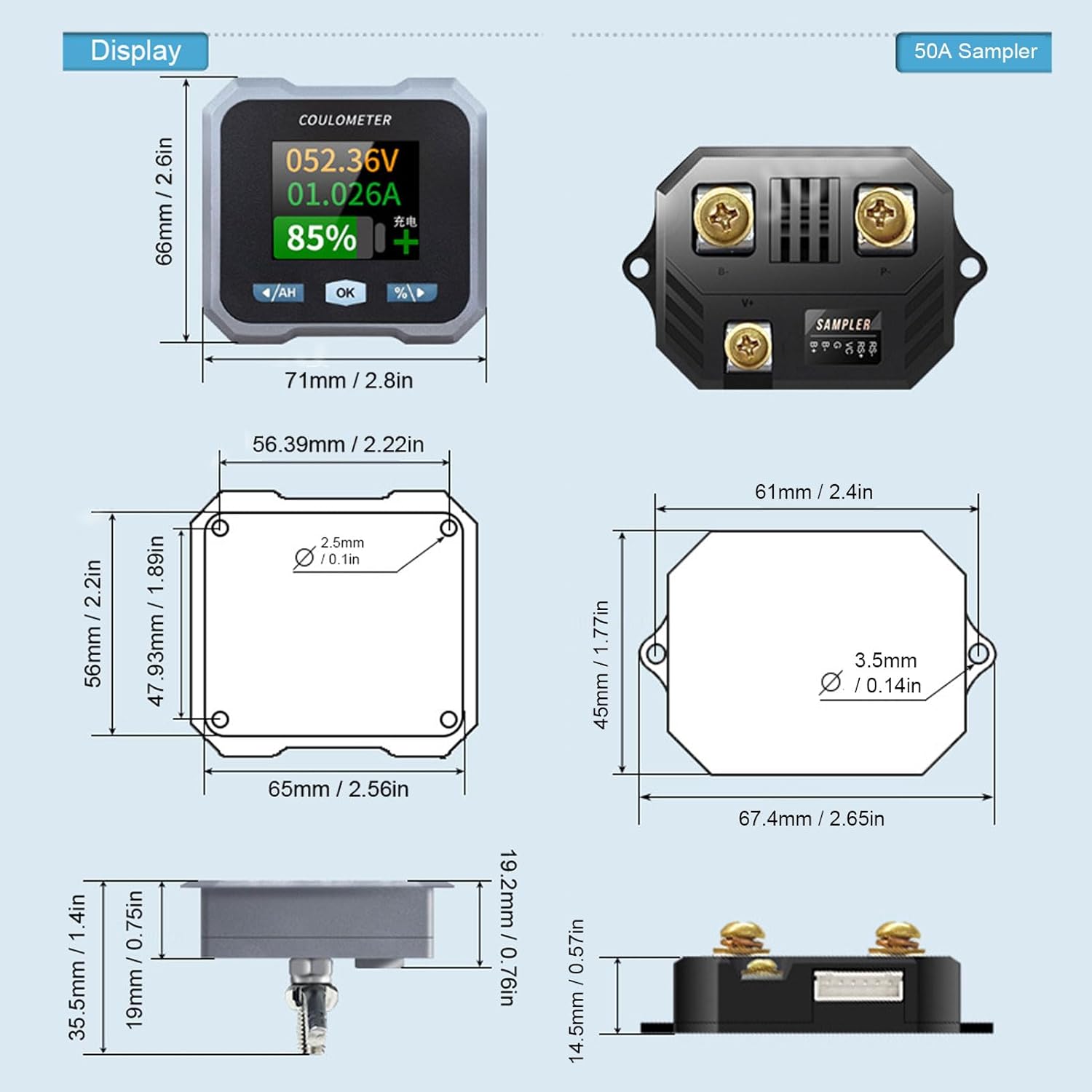
Figure 9: Detailed dimensions for both the display unit and the 50A sampler.
8. Záruka a podpora
Informácie o záruke a technickej podpore nájdete v dokumentácii dodanej s vaším nákupom alebo navštívte oficiálnu stránku Walfront. webstránky. Uschovajte si doklad o kúpe ako doklad o kúpe pre prípadné reklamácie.