
Úvod
Táto príručka poskytuje dôležité informácie pre bezpečné a efektívne používanie vášho zariadenia Blackview BV7300 Rugged Smartphone. Please read this guide thoroughly before operating the device to ensure proper functionality and to understand its features.
The Blackview BV7300 is designed for durability and performance, featuring a robust construction, a large battery, and advanced camera capabilities, including night vision and powerful camping svetla.
Koniec produktuview
The Blackview BV7300 is a rugged smartphone built to withstand challenging environments. It features a 6.67-inch HD+ IPS display, a powerful processor, and a triple camera system.

Obrázok 1: Predná a zadná časť view Čiernehoview BV7300 Rugged Smartphone, highlighting its robust design and camera module.
Fyzické komponenty
- Displej: 6.67-inch HD+ IPS screen with 90Hz refresh rate.
- Fotoaparáty: 50MP main rear camera, 20MP night vision camera, 32MP front camera.
- Camping Lights: Two 800 lumen LED camping lights located on the rear.
- Porty: Port USB typu C na nabíjanie a prenos dát.
- Tlačidlá: Power button, volume buttons, customizable function button.
- Slot na SIM kartu: Podpora dvoch SIM kariet.
- Rečníci: Dual box speakers.
Nastavenie
1. Vloženie SIM kariet a karty MicroSD
- Nájdite zásuvku na SIM kartu na boku zariadenia.
- Na otvorenie zásuvky použite dodaný nástroj na vysunutie SIM karty.
- Carefully place your Nano-SIM cards and/or a MicroSD card (up to 2TB) into the designated slots. Ensure correct orientation.
- Jemne zatlačte zásobník späť do zariadenia, kým nebude v jednej rovine.
2. Počiatočné zapnutie a nastavenie
- Stlačte a podržte tlačidlo napájania, kým sa nerozsvieti čiernaview zobrazí sa logo.
- Postupujte podľa pokynov na obrazovke a vyberte jazyk, pripojte sa k sieti Wi-Fi a nastavte si účet Google.
- Configure security settings, including facial recognition or a PIN/pattern/password.
3. Nabíjanie zariadenia
Connect the USB Type-C cable to the phone's charging port and the other end to a compatible power adapter. The device supports fast charging. A full charge of the 15000mAh battery provides extended usage.
Návod na obsluhu
Displej a navigácia

Figure 2: Details of the 6.67-inch HD+ IPS display, showing resolution, brightness, screen-to-body ratio, panel type, and dynamic refresh rate.
The 6.67-inch HD+ IPS display offers a resolution of 1280x720 pixels and a 90Hz dynamic refresh rate for smooth visuals. Navigate the Android 14 operating system using touch gestures.
Funkcie fotoaparátu
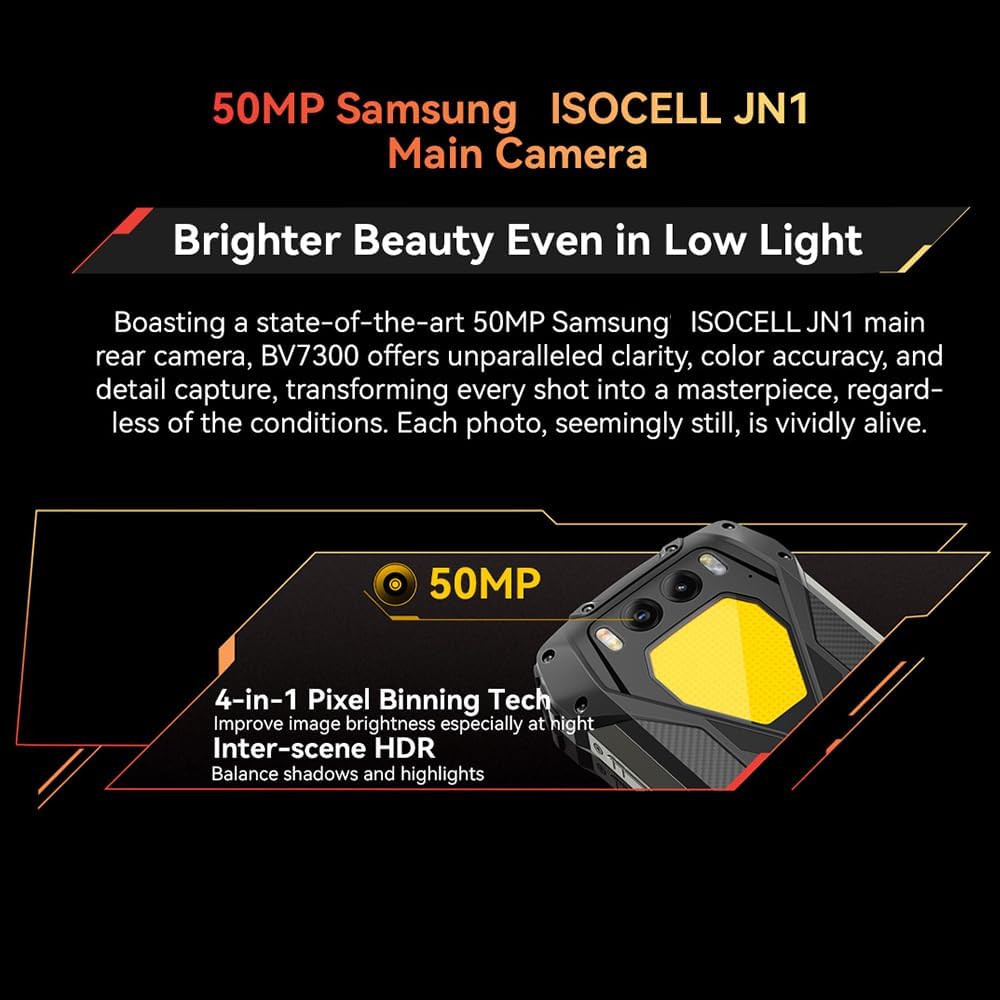
Figure 3: Close-up of the Blackview BV7300's rear camera module, featuring the 50MP main camera.

Figure 4: Diagram illustrating the Blackview BV7300's triple camera setup, including 32MP front, 50MP main, and 20MP night vision cameras.
- Hlavný fotoaparát (50 MP): For high-resolution photos and 1080p video recording. Features 4-in-1 Pixel Binning and Inter-scene HDR for improved image quality in various lighting conditions.
- Nočná kamera (20MP): Activates in low-light or complete darkness to capture clear images. Access this mode through the camera application.
- Predný fotoaparát (32MP): For selfies and video calls, includes beauty mode features.
- To switch between camera modes, open the Camera app and select the desired option (Photo, Video, Night Vision, Portrait, etc.).
Duálne Camping Lights
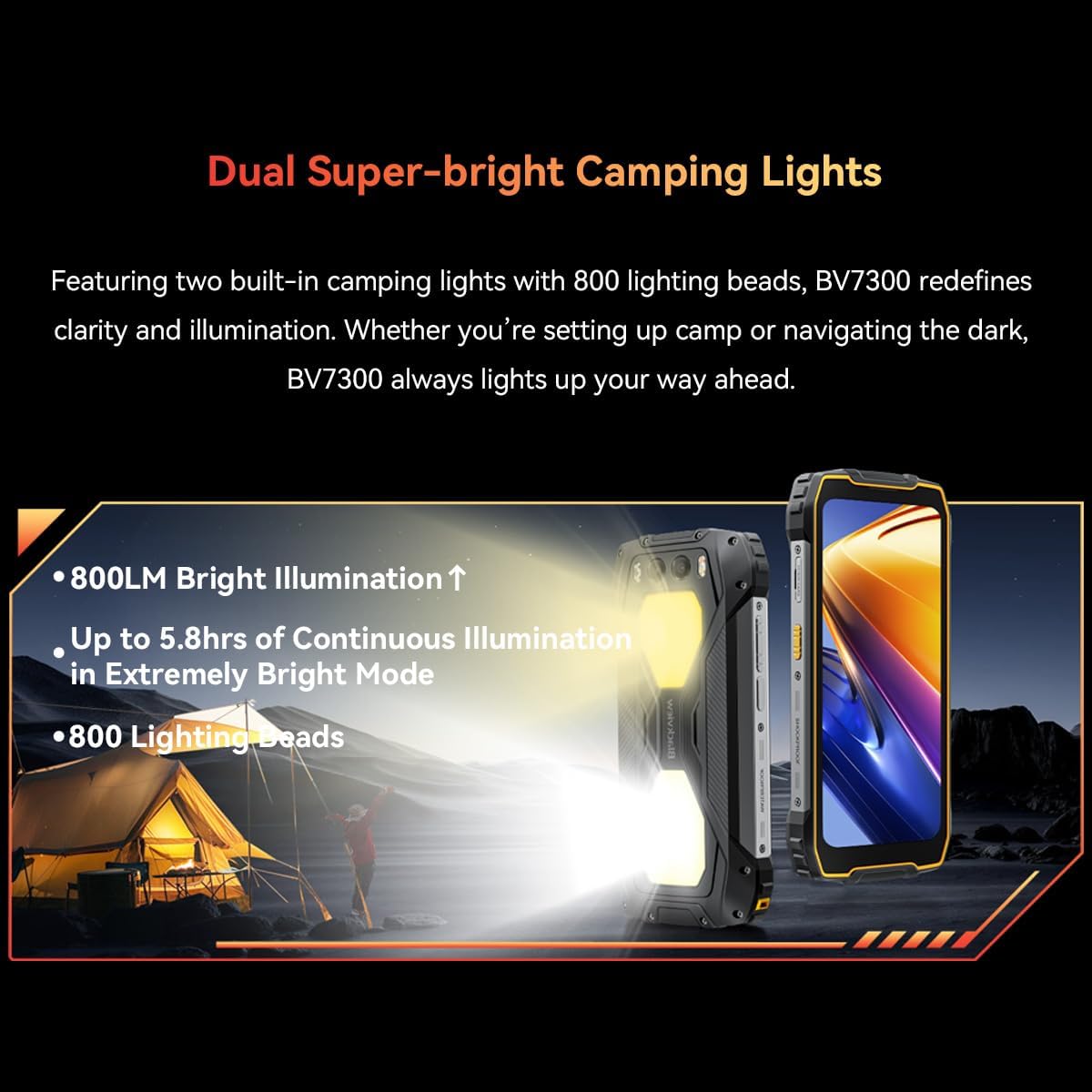
Obrázok 5: Čiernaview BV7300 with its dual 800 lumen camping lights activated, providing strong illumination.

Figure 6: Illustration detailing the dual super-bright camping lights, highlighting 800LM brightness, up to 5.8 hours of continuous illumination in extremely bright mode, and 800 lighting beads.
The BV7300 features two powerful 800 lumen LED camping lights on its rear. These lights offer three lighting modes and three brightness levels. To activate and adjust the lights, use the dedicated function button or access the quick settings panel.
Správa batérie

Obrázok 7: Interný view Čiernehoview BV7300 highlighting its 15000mAh battery and charging port.

Figure 8: Graphic showing estimated usage times for the 15000mAh battery: 18 hrs game, 16.5 hrs video, 28 hrs website, 56.5 hrs calling, 32.5 hrs music, 1368 hrs standby.
The BV7300 is equipped with a 15000mAh battery. For optimal battery life, use the provided charger and cable. The device supports OTG (On-The-Go) functionality, allowing it to act as a power bank to charge other devices.
Zvuk

Figure 9: Image depicting the Blackview BV7300 with sound waves emanating from its dual box speakers, illustrating its audio capabilities.
The device features dual box speakers for enhanced audio output. Adjust volume using the dedicated volume buttons on the side of the phone.
Údržba
- Čistenie: Na čistenie obrazovky a tela používajte mäkkú handričku, ktorá nepúšťa vlákna. Vyhnite sa agresívnym chemikáliám.
- Odolnosť voči vode: The BV7300 is waterproof. Ensure all port covers are securely closed before exposing the device to water. Do not intentionally submerge the device beyond its rated depth and time limits.
- Aktualizácie softvéru: Pravidelne kontrolujte a inštalujte aktualizácie systému, aby ste zabezpečili optimálny výkon a bezpečnosť.
- Správa úložiska: Pravidelne odstraňujte nepotrebné files and applications to maintain sufficient storage space. The device supports up to 2TB TF expansion.
Riešenie problémov
| Problém | Riešenie |
|---|---|
| Zariadenie sa nezapne. | Ensure the battery is charged. Connect the device to a charger for at least 30 minutes. If it still doesn't power on, perform a forced restart by holding the Power button for 10-15 seconds. |
| Slabý signál siete. | Check if SIM cards are correctly inserted. Ensure you are in an area with network coverage. Restart the device. |
| Aplikácie sú pomalé alebo padajú. | Zatvorte aplikácie na pozadí. Vymažte vyrovnávaciu pamäť aplikácií. Uistite sa, že je k dispozícii dostatok úložného priestoru. Reštartujte zariadenie. |
| Batéria sa rýchlo vybíja. | Reduce screen brightness. Disable unused features like Wi-Fi, Bluetooth, GPS. Close power-intensive applications. Check for background app activity. |
| Camping lights not working. | Ensure the battery has sufficient charge. Check settings or dedicated button for activation. |
Špecifikácie
| Funkcia | Detail |
|---|---|
| Názov modelu | BV7300 |
| Operačný systém | Android 14 |
| Procesor | MediaTek Kompanio 800T Octa Core, 2 GHz |
| RAM | 18 GB (6GB fixed + 12GB virtual expansion) |
| Interné úložisko | 256 GB |
| Rozšíriteľné úložisko | Až 2 TB cez kartu MicroSD |
| Veľkosť displeja | 6.67 palca |
| Rozlíšenie displeja | 1280x720 (HD+), 263 PPI |
| Obnovovacia frekvencia | 90 Hz Dynamic |
| Zadná kamera | 50 MP (Samsung ISOCELL JN1) |
| Kamera pre nočné videnie | 20 MP (Sony IMX376) |
| Predná kamera | 32 MP |
| Kapacita batérie | 15000 XNUMX mAh |
| Nabíjanie | Type-C, Fast Charging, OTG support |
| Konektivita | 4G, Dual SIM, GPS, NFC, USB |
| Špeciálne funkcie | Duálny 800LM Camping Lights, Stereo Speakers, Rugged Construction, Waterproof, Facial Recognition |
| Rozmery | 186 x 85 x 24 mm |
| Hmotnosť | 528 g |
Záruka a podpora
The Blackview BV7300 comes with a 24-month warranty in Europe. For warranty claims or technical support, please contact Blackview customer service or the retailer from whom you purchased the device. Keep your proof of purchase for warranty validation.
For further assistance, visit the official Blackview webstránku alebo sa pozrite na kontaktné informácie uvedené pri nákupe.