
1. Úvod
Thank you for choosing the Oumefar M50 Digital Metronome. This compact and versatile device is designed to assist musicians of all levels in maintaining precise tempo and rhythm during practice. It features an adjustable tempo range, various beat values, volume control, a tap function, and a convenient clip and lanyard hole for portability. Please read this manual carefully to ensure proper use and optimal performance of your metronome.
2. Produkt skončilview
2.1 Vlastnosti
- Adjustable Tempo: Set your desired tempo from 30 to 280 beats per minute (BPM).
- Multiple Beat Values: Choose from 0 to 9 beats per measure.
- Ovládanie hlasitosti: Adjust the metronome's volume or mute it entirely.
- Funkcia klepnutia: Determine the tempo of a song or set your ideal practice tempo.
- Výstup pre slúchadlá: Practice silently with the double channel headphone jack.
- Prenosný dizajn: Equipped with a clip and lanyard hole for easy carrying and attachment.
2.2 Obsah balenia
- 1 x Oumefar M50 Digital Metronome
- 1 x 3V Cell Battery
- 1 x Používateľská príručka (Tento dokument)
3. Nastavenie
3.1 Inštalácia batérie
The Oumefar M50 Digital Metronome operates on one 3V cell battery (included).
- Locate the battery compartment on the back of the metronome.
- Otvorte kryt priehradky na batérie.
- Insert the 3V cell battery, ensuring the correct polarity (+ and -) as indicated inside the compartment.
- Bezpečne zatvorte kryt priestoru pre batérie.
Poznámka: If the metronome does not power on, check the battery orientation or replace the battery.
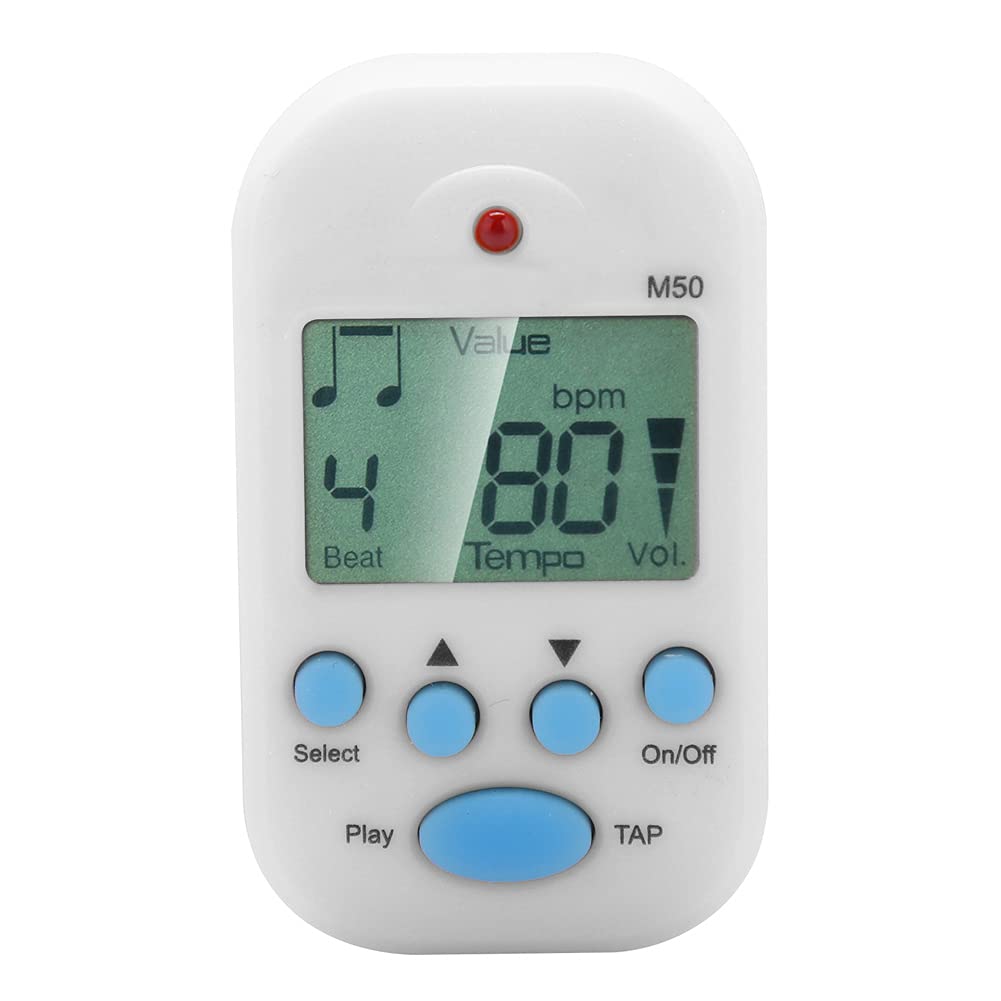
Predné view of the Oumefar M50 Digital Metronome, showing the LCD screen displaying beat and tempo, along with the 'Select', 'Play', 'On/Off', and 'TAP' buttons.
4. Návod na obsluhu
4.1 Zapnutie/vypnutie
- Ak chcete zapnúť, stlačte tlačidlo Zap./Vyp tlačidlo.
- Ak chcete vypnúť, stlačte tlačidlo Zap./Vyp znova tlačidlo.
4.2 Setting Tempo (BPM)
- With the metronome on, press the Vyberte button until 'Tempo' is highlighted or flashing on the LCD screen.
- Použite Hore (▲) a Dole (▼) arrow buttons to adjust the BPM. The tempo can be set from 30 to 280 BPM.
4.3 Setting Beat Value
- Stlačte tlačidlo Vyberte button until 'Beat' is highlighted or flashing on the LCD screen.
- Použite Hore (▲) a Dole (▼) arrow buttons to select the desired beat value (0-9). '0' indicates no accent, while 1-9 indicates the number of beats per measure with an accent on the first beat.
4.4 Nastavenie hlasitosti
- Stlačte tlačidlo Vyberte button until 'Vol.' (Volume) is highlighted or flashing on the LCD screen.
- Použite Hore (▲) a Dole (▼) arrow buttons to cycle through volume levels: Maximum, Medium, Minimum, and Mute.
4.5 Tap Function
The Tap function allows you to quickly find the BPM of a piece of music or set a desired tempo by tapping.
- Stlačte tlačidlo TAP button repeatedly in time with the desired rhythm.
- The metronome will calculate and display the average BPM based on your taps.
4.6 Starting and Stopping the Metronome
- To start the metronome click, press the Hrať tlačidlo.
- To stop the metronome click, press the Hrať znova tlačidlo.
4.7 Používanie slúchadiel
Insert standard 3.5mm headphones into the headphone jack located on the side of the metronome for private practice.

Detailný záber view of the Oumefar M50 Digital Metronome highlighting the double channel headphone output jack on the side, allowing for private practice.

Image showing the rear clip and the integrated lanyard hole on the Oumefar M50 Digital Metronome, designed for easy portability and attachment.
5. Špecifikácie
| Funkcia | Popis |
|---|---|
| Model | M50 |
| Značka | Oumefar |
| Materiál | Kov + plast |
| Hmotnosť | Približne. 34 g (1.2 oz) |
| Veľkosť | Approx. 6 x 3.5 cm (2.4 x 1.4 in) |
| Rozsah tempa | 30 až 280 BPM |
| Beat Value | 0, 1, 2, 3, 4, 5, 6, 7, 8, 9 |
| Nastavenie hlasitosti | Maximum, Medium, Minimum, Mute |
| Presnosť | ±1/1000 |
| Napájanie | 1 x 3V Cell Battery (Included) |

Image illustrating the compact size of the Oumefar M50 Digital Metronome, measuring approximately 6 cm (2.4 inches) in length and 3.5 cm (1.4 inches) in width.
6. Údržba
- Čistenie: Wipe the metronome with a soft, dry cloth. Do not use abrasive cleaners or solvents.
- Ukladací priestor: Metronóm skladujte na chladnom a suchom mieste mimo dosahu priameho slnečného žiarenia a extrémnych teplôt.
- Batéria: If the metronome will not be used for an extended period, remove the battery to prevent leakage.
- Vyhnite sa vplyvu: Chráňte zariadenie pred pádmi a silnými nárazmi, ktoré môžu poškodiť vnútorné komponenty.
7. Riešenie problémov
| Problém | Možná príčina | Riešenie |
|---|---|---|
| Metronóm sa nezapne. | Batéria je vybitá alebo nesprávne vložená. | Check battery polarity. Replace with a new 3V cell battery. |
| Z reproduktora/slúchadiel nepočujete žiadny zvuk. | Volume is muted or set too low. Headphones are not properly connected. | Adjust volume settings. Ensure headphones are fully plugged in. Test with another pair of headphones if available. |
| Tempo/Beat settings are not changing. | Not in the correct setting mode. | Stlačte tlačidlo Vyberte button to cycle through modes until the desired setting (Tempo or Beat) is highlighted. |
8. Záruka a podpora
Oumefar products are manufactured with quality and performance in mind. For warranty information or technical support, please refer to the contact details provided at the point of purchase or visit the official Oumefar webstránky. Uschovajte si doklad o kúpe ako doklad o kúpe pre prípadné reklamácie.