
1. Úvod
Ďakujem za nákupasing the MLWSHR Digital LED Alarm Clock Model 8808. This device combines a digital alarm clock with a thermo-hygrometer, offering dual alarms, snooze function, date and year display, 12/24 hour switch, weekday settings, Daylight Saving Time (DST) functionality, auto-dimmable display with three brightness levels, and a convenient 5V1A USB output for charging other devices. Please read this manual carefully to ensure proper use and maintenance of your new alarm clock.
2. Bezpečnostné informácie
- Uchovávajte zariadenie mimo dosahu vody a prostredia s vysokou vlhkosťou.
- Nevystavujte zariadenie extrémnym teplotám ani priamemu slnečnému žiareniu po dlhšiu dobu.
- Use only the provided USB Type-C cable for power.
- Nepokúšajte sa zariadenie rozoberať ani opravovať sami. V prípade problémov kontaktujte zákaznícku podporu.
- Ensure proper ventilation when using the USB output to charge other devices.
3. Obsah balenia
- MLWSHR Digital LED Alarm Clock Model 8808
- Napájací kábel USB Type-C
- Používateľská príručka
4. Produkt skončilview
Oboznámte sa s hlavnými komponentmi a ovládacími prvkami budíka.
This image displays the front of the MLWSHR Digital LED Alarm Clock, highlighting the time display, weekday indicators, temperature in Celsius, humidity percentage, and dual alarm icons. It also points to the Daylight Saving Time (DST) indicator.

This image illustrates the side and back of the alarm clock, detailing the USB Type-C input for primary power, the battery compartment for 3x AAA backup batteries (not included), and the USB-A output (5V1A) for charging other devices. It also shows the control buttons located on the top edge.
Ovládanie:
- Tlačidlo SET: Vstup do režimu nastavenia času, dátumu a budíkov.
- UP (+) Button: Increases values during setting, adjusts brightness.
- DOWN (-) Button: Decreases values during setting, adjusts brightness.
- Tlačidlo ODLOŽENIE/OSVIETENIE: Activates snooze, adjusts display brightness.
- Tlačidlo ALARM 1: Activates/deactivates Alarm 1, enters Alarm 1 setting.
- Tlačidlo ALARM 2: Activates/deactivates Alarm 2, enters Alarm 2 setting.
- 12/24HR Button: Prepína medzi 12-hodinovým a 24-hodinovým formátom času.
- Tlačidlo °C/°F: Prepína medzi zobrazením teploty v stupňoch Celzia a Fahrenheita.
5. Nastavenie
5.1 Napájanie
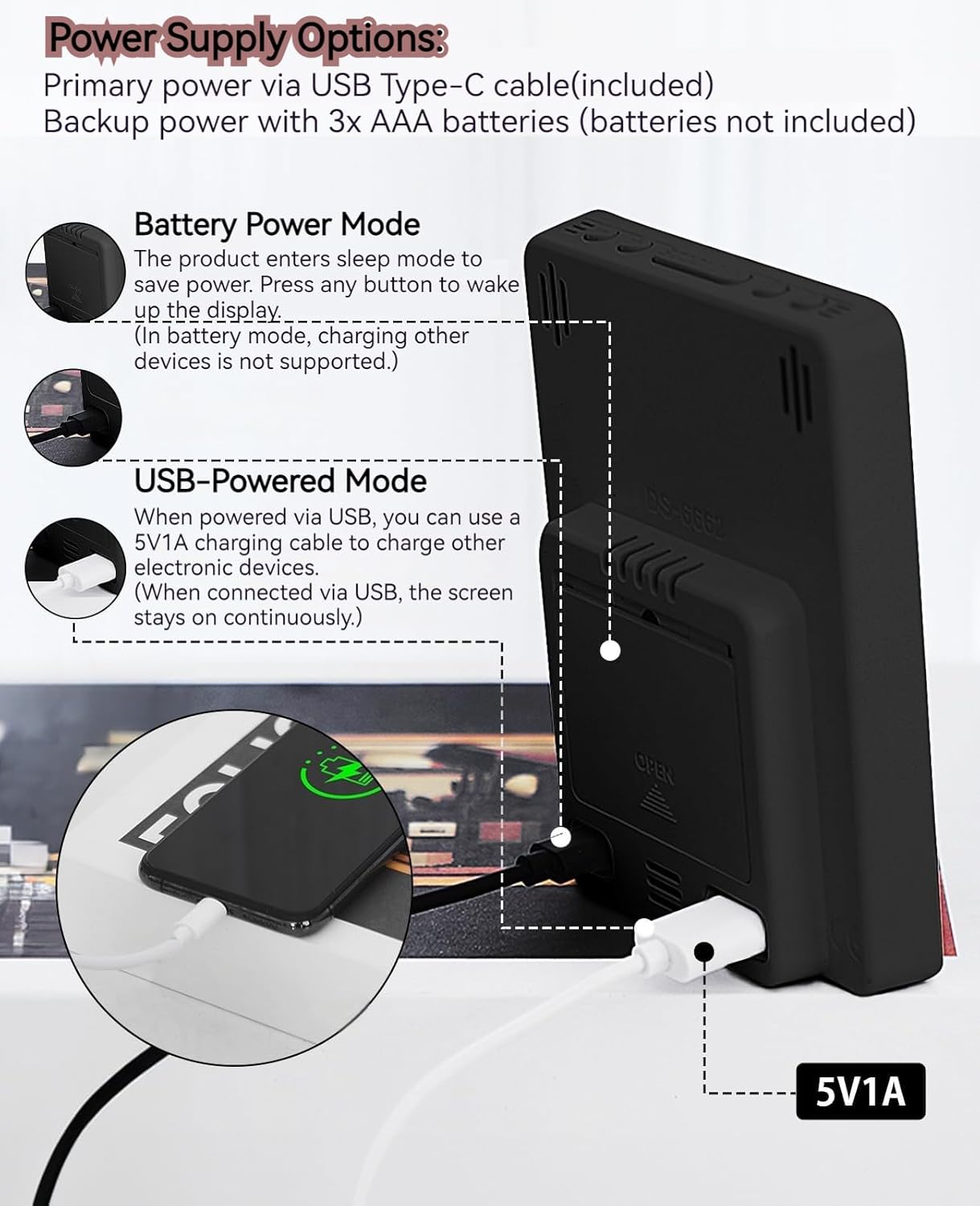
The MLWSHR Digital LED Alarm Clock can be powered in two ways:
- Primary Power (USB Type-C): Connect the provided USB Type-C cable to the clock's input port and plug the other end into a 5V1A USB power adapter (not included). When powered via USB, the display will remain continuously on.
- Backup Power (3x AAA Batteries): Insert 3 AAA batteries (not included) into the battery compartment on the back of the clock. In battery-only mode, the display will enter sleep mode to conserve power. Press any button to temporarily activate the display. Note that the USB output for charging other devices is not supported when operating on battery power alone.
5.2 Počiatočné nastavenie času a dátumu
After connecting power, the clock will typically display a default time. To set the correct time and date:
- Stlačte a podržte SET Stlačte tlačidlo na 3 sekundy, čím vstúpite do režimu nastavenia času. Číslice hodín budú blikať.
- Použite HORE (+) or NADOL (-) tlačidlá na nastavenie hodiny.
- Stlačte tlačidlo SET znova potvrďte hodinu a prejdite na nastavenie minút. Číslice minút budú blikať.
- Použite HORE (+) or NADOL (-) tlačidlá na nastavenie minút.
- Pokračujte v stláčaní SET to cycle through and set the Year, Month, and Day using the HORE (+) or NADOL (-) buttons for adjustment.
- After setting the Day, press SET poslednýkrát ukončíte režim nastavenia.
6. Návod na obsluhu
6.1 Prepínač 12/24-hodinového formátu
Stlačte tlačidlo 12/24 hod button to toggle between 12-hour (with AM/PM indicator) and 24-hour time formats.
This video demonstrates various features of the MLWSHR Digital LED Alarm Clock, including the time, temperature, humidity, weekday display, auto/manual brightness adjustment, 12/24 hour switch, and the easy-to-use buttons and USB-C input/USB-A output.
6.2 Nastavenie alarmov (Alarm 1 a Alarm 2)
The clock features two independent alarms. Each alarm can be set for specific days of the week (Monday-Friday, Monday-Saturday, or Monday-Sunday).

This image illustrates the dual alarm functionality, showing how each alarm can be customized to ring on specific days of the week: Monday to Friday, Monday to Saturday, or every day. It highlights the alarm icons and weekday indicators on the display.
- Stlačte tlačidlo ALARM 1 or ALARM 2 button to select the desired alarm. The alarm icon will appear on the display.
- Press and hold the selected ALARM button for 3 seconds to enter alarm setting mode. The hour digits will flash.
- Použite HORE (+) or NADOL (-) tlačidlá na nastavenie hodiny budíka.
- Stlačte tlačidlo ALARM znova stlačte tlačidlo pre potvrdenie hodín a prechod na nastavenie minút.
- Použite HORE (+) or NADOL (-) tlačidlá na nastavenie minút budíka.
- Stlačte tlačidlo ALARM button again to set the alarm frequency (e.g., Mon-Fri, Mon-Sat, Mon-Sun). Use HORE (+) or NADOL (-) vybrať.
- Stlačte tlačidlo ALARM button one last time to exit alarm setting mode.
- To turn an alarm ON or OFF, simply press the corresponding ALARM 1 or ALARM 2 button briefly. The alarm icon will appear (ON) or disappear (OFF) from the display.
6.3 Funkcia odloženia budíka
When an alarm sounds, you can activate the snooze function for a temporary delay.

This image shows the clock's snooze button and how it functions. When the alarm rings, a brief press of the snooze button will delay the alarm for 5 minutes. Holding the button for more than two seconds will turn off the alarm for that day.
- Keď zazvoní budík, stlačte tlačidlo SNOOZE / SVETLO button briefly. The alarm will pause and ring again after 5 minutes.
- To turn off the alarm for the current day, press and hold the SNOOZE / SVETLO button for more than 2 seconds, or press any other button (except SNOOZE / SVETLO).
6.4 Nastavenie jasu
The clock features an auto-dimmable display and three manual brightness levels.
- Automaticky stmievateľné: The built-in light sensor automatically adjusts the display brightness based on ambient light conditions. This is the default setting.
- Manuálny jas: Krátko stlačte SNOOZE / SVETLO button to cycle through 3 manual brightness levels (L-01, L-02, L-03).
- To return to auto-dimmable mode, continue pressing the SNOOZE / SVETLO button until 'L-AU' appears on the display.
6.5 Thermometer & Hygrometer
The clock displays indoor temperature and humidity levels.

This image highlights the temperature and humidity readings on the clock's display. It also provides guidance on ideal humidity levels and suggests actions (humidifier/dehumidifier) if levels are too low or too high. The temperature detection range is 23°F to 122°F (-5°C to 50°C) with an error margin of ±2°F.
- Prepínač teplotnej jednotky: Stlačte tlačidlo ° C/° F button to switch between Celsius and Fahrenheit temperature display.
- The temperature range is 23°F to 122°F (-5°C to 50°C) with an error margin of ±2°F.
- The humidity measurement error is within ±5%.
6.6 USB Power Output (5V1A)
The clock features a USB-A output port (5V1A) that can be used to charge other electronic devices.

This image demonstrates the use of the clock's USB-A output port to charge a smartphone. The clock provides a 5V1A output, making it a convenient charging station. This feature is only available when the clock is powered via its USB Type-C input.
- Connect your device's charging cable to the USB-A output port on the back of the alarm clock.
- Ensure the alarm clock is powered via its USB Type-C input for this feature to function. The USB output is not active when the clock is running on battery power alone.
6.7 Letný čas (DST)
The clock supports Daylight Saving Time adjustment.
- Ak chcete aktivovať alebo deaktivovať letný čas, stlačte a podržte tlačidlo DST button (if available, or refer to the SET button sequence for DST in specific models). The DST indicator will appear or disappear.
7. Údržba
- Hodiny čistite mäkkou, suchou handričkou. Nepoužívajte abrazívne čistiace prostriedky ani rozpúšťadlá.
- If the clock will not be used for an extended period, remove the AAA batteries to prevent leakage.
- Keep the USB ports free from dust and debris.
8. Riešenie problémov
| Problém | Možná príčina | Riešenie |
|---|---|---|
| Display is off or intermittent. | Running on battery power in sleep mode, or no power. | Press any button to activate display in battery mode. Connect USB Type-C cable for continuous display. Check USB power source. |
| USB output not charging devices. | Clock is running on battery power, or USB cable is faulty. | Ensure the clock is connected to primary USB Type-C power. Try a different USB cable. |
| Budík neznie. | Budík nie je aktivovaný alebo je nesprávne nastavený. | Check if the alarm icon is displayed. Re-set the alarm time and frequency. |
| Odčítanie teploty je nepresné. | Environmental factors or sensor error. | Allow time for the sensor to stabilize. Ensure the clock is not near heat sources or vents. Note the ±2°F error margin. |
| Nie je možné nastaviť čas/dátum. | Not in setting mode, or buttons are unresponsive. | Press and hold the SET button for 3 seconds. Ensure the clock has stable power. |
9. Špecifikácie
- Značka: MLWSHR
- Číslo modelu: 8808
- Typ zobrazenia: LED
- Zdroj napájania: USB Type-C (5V1A) / 3x AAA Batteries (backup)
- Rozmery produktu: 3.54"Š x 4.72"V
- Vlastnosti: Dual Alarms, Snooze, Thermo-Hygrometer, Date & Year Display, 12/24 Hour Switch, Weekdays, DST, Auto Dimmable (3 levels), USB Output (5V1A)
- Materiál: Eco-friendly Plastic
- Použitie v interiéri/vonkajšom prostredí: Vnútorný
10. Záruka a podpora
The MLWSHR Digital LED Alarm Clock Model 8808 comes with a 2-ročná záruka od dátumu nákupu. Táto záruka sa vzťahuje na výrobné chyby a poruchy pri bežnom používaní.
For technical support, warranty claims, or any questions regarding your product, please contact MLWSHR customer service through the retailer's platform or visit our official webkontaktné informácie nájdete na stránke. Pred kontaktovaním podpory si, prosím, pripravte doklad o kúpe a číslo modelu.