
1. Úvod
This manual provides essential information for the proper setup, operation, maintenance, and troubleshooting of your Meizu mblu 21 4G LTE smartphone. Please read this manual thoroughly before using your device to ensure optimal performance and longevity.
The Meizu mblu 21 features a 6.79-inch HD display, a 13MP dual camera system, and runs on Android 14. It is designed for efficient performance and reliable connectivity.
2. Nastavenie
2.1 Obsah balenia
Skontrolujte, či váš balík obsahuje nasledujúce položky:
- Meizu mblu 21 Smartphone
- Napájací adaptér
- Stručná úvodná príručka (ak je súčasťou balenia)
2.2 Inštalácia SIM karty a karty MicroSD
The Meizu mblu 21 supports Dual Nano SIM cards and a MicroSD card for expandable storage.
- Nájdite zásuvku na SIM kartu na boku zariadenia.
- Insert the SIM ejector tool (not included, use a thin pin if necessary) into the small hole on the SIM tray to eject it.
- Place your Nano SIM card(s) and/or MicroSD card into the designated slots on the tray, ensuring proper orientation.
- Opatrne vložte zásuvku na SIM kartu späť do telefónu, kým nezacvakne na miesto.
2.3 Počiatočné zapnutie a konfigurácia siete
- Press and hold the power button until the Meizu logo appears.
- Postupujte podľa pokynov na obrazovke a dokončite úvodné nastavenie vrátane výberu jazyka, pripojenia Wi-Fi a nastavenia účtu Google.
- For cellular connectivity, ensure your SIM card is active. This device is an international version and in the USA market, it operates exclusively on T-Mobile's 4G LTE network. Outside the USA, it is compatible with various carriers worldwide.
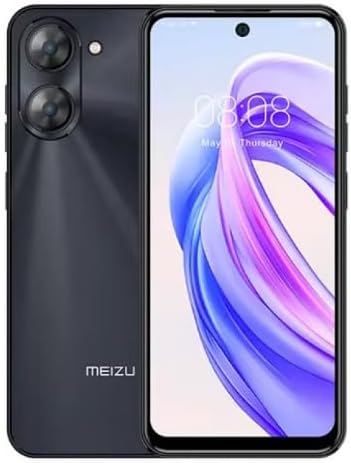
Obrázok 2.3.1: Predné a zadné view of the Meizu mblu 21 smartphone. The front displays the screen with a punch-hole camera, while the rear shows the dual camera module and the Meizu branding.
3. Návod na obsluhu
3.1 Základná navigácia (Android 14)
Your Meizu mblu 21 runs on Android 14, offering an intuitive user experience. Use gestures or on-screen navigation buttons to move between apps, access settings, and manage notifications.
3.2 Používanie fotoaparátu
The device features a 13MP Smart Camera on the rear and an 8MP front camera. Open the Camera app to capture photos and videos. Utilize various modes and settings for optimal results.
3.3 Funkcie zabezpečenia
Unlock your device using the side-mounted fingerprint sensor for instant access or the 8MP front camera for Smart Face Unlock.
3.4 Pripojenie
- Wi-Fi: Supports Dual-Band Wi-Fi (2.4GHz and 5GHz) for stable internet access.
- Bluetooth: Bluetooth 5.0 na pripojenie k bezdrôtovému príslušenstvu.
- VoLTE: Enjoy clearer voice calls with VoLTE HD Calls.

Obrázok 3.4.1: Visual representation of key connectivity and operating system features, including Android 14, Dual-Band Wi-Fi, Bluetooth 5.0, and VoLTE HD Calls.
4. Údržba
4.1 Všeobecná starostlivosť
- Udržujte svoje zariadenie v suchu a chránené pred extrémnymi teplotami.
- Obrazovku a telo čistite mäkkou handričkou, ktorá nepúšťa vlákna. Vyhnite sa agresívnym chemikáliám.
- Chráňte obrazovku ochrannou fóliou a telo ochranným puzdrom, aby ste predišli poškriabaniu a poškodeniu.
4.2 Správa batérie
The 4900mAh battery is designed for all-day performance. To prolong battery life:
- Vyhnite sa častému úplnému vybíjaniu batérie.
- Na nabíjanie použite dodaný napájací adaptér.
- Optimize background app usage and screen brightness in settings.

Obrázok 4.2.1: Vnútorné view of the Meizu mblu 21 smartphone highlighting the 4900mAh battery, emphasizing its capacity for extended use.
5. Riešenie problémov
5.1 Bežné problémy a riešenia
- Zariadenie sa nezapne: Uistite sa, že je batéria nabitá. Pripojte napájací adaptér a skúste to znova.
- Problémy so sieťovým pripojením: Check if your SIM card is properly inserted and active. Verify network settings and ensure you are within T-Mobile's coverage area in the USA.
- Pomalý výkon: Zatvorte nepotrebné aplikácie na pozadí. Vymažte vyrovnávaciu pamäť a dočasné files. Restart the device.
- Rýchle vybíjanie batérie: Reduce screen brightness, disable unused features like Bluetooth or GPS, and check for power-intensive apps.
Ak problémy pretrvávajú, zvážte obnovenie továrenských nastavení (najprv si zálohujte údaje) alebo kontaktujte zákaznícku podporu.
6. Špecifikácie
| Číslo modelu | M416L |
| Operačný systém | Android 14 |
| Displej | 6.79 Inches HD, 2340 x 1080 Resolution, 90Hz Adaptive Refresh Rate |
| Procesor | Octa Core 1.6GHz ARM Mali-G57 |
| pamäť | 64 GB Internal Storage, 4 GB RAM |
| Batéria | 4900 mAh (4.9E + 3 miliamp Hours) Lithium Polymer |
| Zadná kamera | 13MP Smart Camera, 5P Precision Lens |
| Predná kamera | 8 MP |
| Bunková technológia | 4G LTE FDD: 2,3,4,5,7,8,12,17,26,28,66; 3G WCDMA: 2/4/5/8; 2G Quad Band |
| Typ SIM karty | Dual Nano SIM + MicroSD |
| Wi-Fi | Dvojpásmové (2.4 GHz a 5 GHz) |
| Bluetooth | 5.0 |
| Audio Jack | USB typu C |
| Hmotnosť položky | 14 uncí |
| FCC ID | 2ANQ6-M416L |

Obrázok 6.1: The Meizu mblu 21 smartphone presented in its Titan Black color variant, showcasinjeho dizajn.
7. Záruka a podpora
For warranty information, please refer to the warranty card included with your product or consult the retailer where the device was purchased. Meizu provides support for its products. For further assistance, please visit the official Meizu webalebo kontaktujte ich zákaznícky servis.