
1. Úvod
This manual provides detailed instructions for setting up and operating your AIfasterfly MC200 Wireless Mobile Gaming Controller. Designed for both iPhone and Android devices, this controller enhances your mobile gaming experience with advanced features and ergonomic design. Please read this manual thoroughly before use to ensure optimal performance and longevity of your device.
2. Produkt skončilview
2.1 Obsah balenia
- AIfasterfly MC200 Wireless Mobile Gaming Controller
- USB nabíjací kábel
- Používateľská príručka
2.2 Kľúčové vlastnosti
- Bezdrôtové pripojenie Bluetooth: Seamless connection with zero latency for iPhone and Android.
- Široká kompatibilita: Supports Xbox Cloud, Steam Link, GeForce Now, and MFi Apple Arcade.
- Výsuvný dizajn: Fits phones from 4" to 7.3" (10cm-18.5cm) securely.
- Joysticky a spúšte s Hallovým efektom: Eliminates drift, dead zones, and physical wear for precise control.
- Funkcia Turbo: Customizable rapid-fire with 3 speeds (5/12/20 shots/sec).
- Programovateľné tlačidlá späť: Map up to 21 commands per button (ML/MR) for macro programming.
- Nastaviteľné osvetlenie: 6 lighting modes with adjustable brightness.
- Dlhá výdrž batérie: 800mAh battery provides 6+ hours of playtime with dynamic lights.
- Dvojité vibrácie: Immersive, non-adjustable vibration feedback.
- Ergonomický dizajn: Textured grips reduce fatigue for extended gaming sessions.
- Keylinker App Optimization: Fine-tune settings via the Keylinker App (search "MC200").

Image: The AIfasterfly MC200 Wireless Mobile Gaming Controller, showcasinjeho ergonomický dizajn a rozloženie tlačidiel.
3. Nastavenie
3.1 Phone Installation
- Gently pull the left and right sides of the controller outwards to extend the retractable phone holder.
- Carefully place your smartphone into the holder. The controller is designed to fit phones ranging from 4 inches to 7.3 inches (10cm-18.5cm).
- Ensure your phone is securely seated within the rubber padding and anti-slip textured grips to prevent accidental drops.

Image: A smartphone being securely placed into the retractable holder of the AIfasterfly MC200 controller.

Image: The AIfasterfly MC200 controller extended, illustrating the minimum and maximum phone sizes it can accommodate (100mm-185mm).
3.2 Párovanie Bluetooth
- Stlačte a podržte DOMOV button on the controller for 3 seconds until the indicator light begins to flash. This indicates the controller is in pairing mode.
- On your smartphone (iPhone or Android), navigate to the Bluetooth settings.
- Locate and select "Xbox Wireless Controller" from the list of available devices.
- Po pripojení bude kontrolka na ovládači svietiť nepretržite.
- To reconnect after initial pairing, simply press the DOMOV button. The controller will automatically connect to the last paired device.
- The controller will auto-shutdown if Bluetooth is disabled or if the DOMOV button is held for 5 seconds.
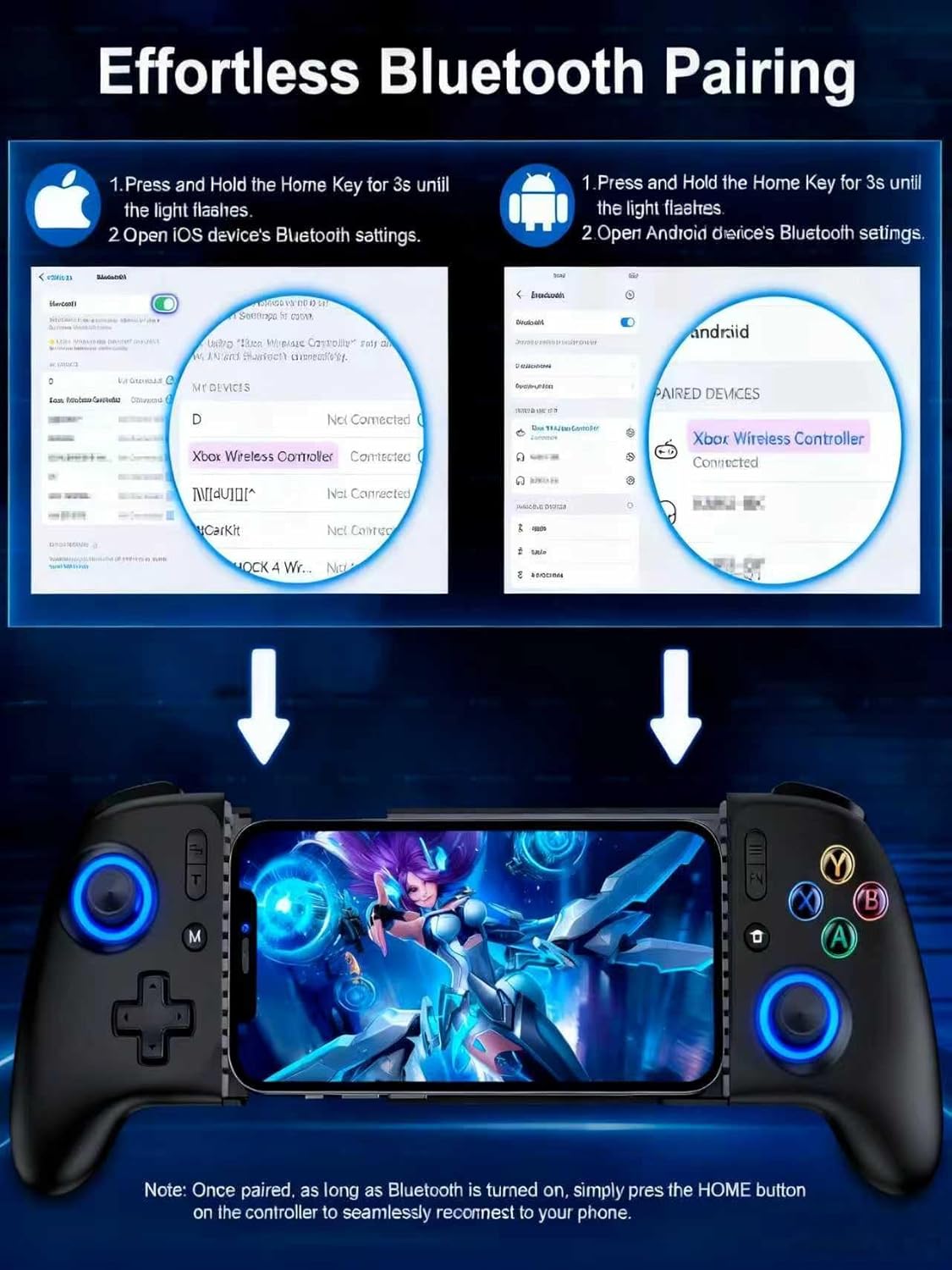
Image: Visual guide demonstrating the Bluetooth pairing process for both iOS and Android devices with the AIfasterfly MC200 controller.
4. Návod na obsluhu
4.1 Joysticky a spúšťače s Hallovým efektom
The MC200 controller features Hall Effect joysticks and triggers, which utilize magnetic induction principles. This technology prevents common issues such as stick drift, dead zones, and wear-and-tear, providing precise and responsive control for an extended lifespan. You can toggle zero-deadzone mode via M+L3/R3.

Image: Diagram illustrating the Hall Effect joystick technology, highlighting its precision and lack of dead zones.
4.2 Funkcia Turbo
Activate the Turbo function for rapid-fire actions in games. The controller offers 3 adjustable Turbo speeds:
- 5 shots/second
- 12 shots/second
- 20 shots/second
Refer to the quick start guide for specific button combinations to activate and adjust Turbo speeds.

Image: The AIfasterfly MC200 controller with an overlay indicating the Turbo button and its three adjustable speeds.
4.3 Programmable Back Buttons (ML/MR)
The MC200 features two programmable back buttons (ML and MR) that allow for macro programming. You can map up to 21 commands per button, including A/B/X/Y, triggers, and D-pad inputs, to create custom game-winning combos. To enter programming mode, hold M + ML/MR.

Image: A diagram highlighting the ML and MR programmable back buttons on the AIfasterfly MC200 controller and the programming function.
4.4 Light Customization
Personalize your gaming experience with 6 lighting modes and adjustable brightness. Cycle through different lighting modes by pressing the FN button. Adjust brightness by pressing FN + L3 (zvýšenie) alebo FN + R3 (zníženie).

Image: The AIfasterfly MC200 controller showcasing its adjustable LED lighting with various modes and brightness levels.
4.5 Výdrž batérie a nabíjanie
The controller is equipped with an 800mAh battery, providing over 6 hours of continuous playtime even with dynamic lights activated. Use the provided USB charging cable to recharge the controller. The charging indicator light will show the charging status.

Image: A user enjoying an extended gaming session with the AIfasterfly MC200 controller, highlighting its long battery life.
4.6 Dual Vibration
Dual motors provide immersive vibration feedback for a more realistic gaming experience in compatible games. Please note that the vibration intensity is non-adjustable.
4.7 Keylinker App Optimization
For advanced customization, download the Keylinker App (search "MC200") on your smartphone. The app allows you to fine-tune button layouts, adjust sensitivity, and manage macros for a personalized gaming setup.
5. Kompatibilita
The AIfasterfly MC200 Wireless Mobile Gaming Controller is compatible with a wide range of iPhone and Android devices. It supports iOS System Version 13.0 and above.
5.1 Supported Devices (Examples)
- iPhone: iPhone 6 to iPhone 15 Pro Max (and newer models with iOS 13.0+)
- Samsung Galaxy: S24, S23, S22, S21, S20, S10, S9, S8 Series, Note 20 Ultra 5G/10, Z Flip 4/3
- OnePlus: 9 Pro, 10 Pro
- Redmi: K90 Pro
- Realme: X2 Pro, 7 Pro
- LG: G7 ThinQ
- Nothing: 1
- Oppo: Nájdite X5 Pro
- Naživo: Pro+, iQOO 3
- Xiaomi: 12 Pro, MIX4, POCO X3 Pro
- Smartisan: Pro 3
- Black Shark: 2
- Moto: S50
6. Špecifikácie
| Model | MC200 |
| Konektivita | Bluetooth |
| Kapacita batérie | 800 mAh |
| Hrací čas | 6+ hours (with dynamic lights) |
| Phone Size Compatibility | 100 mm – 185 mm (4" – 7.3") |
| Joysticky/Spúšte | Hallov efekt |
| Programovateľné tlačidlá | ML/MR (up to 21 commands) |
| Osvetlenie | 6 modes, adjustable brightness |
| Vibrácie | Dual motors (non-adjustable) |
| Rozmery | 9.65 x 4.57 x 2.4 palca (balenie) |
| Hmotnosť položky | 13.4 uncí |
7. Riešenie problémov
7.1 Ovládač sa nespáruje
- Uistite sa, že ovládač je dostatočne nabitý.
- Overte, či je na vašom smartfóne povolené rozhranie Bluetooth.
- Make sure the controller is in pairing mode (indicator light flashing after holding DOMOV na 3 sekúnd).
- Try restarting both your smartphone and the controller.
- If previously paired, ensure the controller is not connected to another device.
7.2 Input Lag or Unresponsive Controls
- Uistite sa, že operačný systém vášho telefónu je aktuálny.
- Zatvorte všetky nepotrebné aplikácie na pozadí v telefóne, aby ste uvoľnili zdroje.
- Move closer to your phone to ensure a strong Bluetooth connection.
- Check if the game you are playing fully supports external controllers.
7.3 Stick Drift or Dead Zones
- The MC200 features Hall Effect joysticks designed to prevent drift. If you experience issues, ensure the controller firmware is up to date via the Keylinker App.
- Try toggling the zero-deadzone mode (M+L3/R3) as described in section 4.1.
7.4 Phone Not Fitting in Holder
- Verify your phone's dimensions are within the supported range of 4" to 7.3" (10cm-18.5cm).
- Remove any bulky phone cases that might prevent a proper fit.
8. Záruka a podpora
The AIfasterfly MC200 Wireless Mobile Gaming Controller comes with a manufacturer's warranty. Please refer to the warranty card included in your package for specific terms, conditions, and duration. For technical support, troubleshooting assistance, or warranty claims, please contact AIfasterfly customer service through the contact information provided on the warranty card or the official AIfasterfly webstránky.
Uschovajte si doklad o kúpe pre účely záruky.