
1. Úvod
This manual provides detailed instructions for the installation, operation, and maintenance of your Montech AX 120 ARGB Fans. These 120mm fans are designed to provide efficient cooling and customizable lighting for your computer system. Please read this manual thoroughly before installation to ensure proper function and safety.
2. Bezpečnostné informácie
- Pred inštaláciou alebo manipuláciou s vnútornými komponentmi vždy odpojte počítač od napájania.
- Handle fans by their frames, avoiding contact with the blades.
- Zabezpečte správne uzemnenie, aby ste predišli poškodeniu elektrostatickým výbojom (ESD).
- Uchovávajte malé časti a obalové materiály mimo dosahu detí.
- Do not attempt to modify the fan or its cables. Unauthorized modifications may void your warranty and pose safety risks.
3. Obsah balenia
Overte si, či sú v balení všetky položky:
- Montech AX 120 ARGB Fan (x4)
- Upevňovacie skrutky (x16)
- Fan Hub (if included in your specific pack)

Figure 3.1: Montech AX 120 ARGB Fan (Pack of 4)
4. Nastavenie a inštalácia
Follow these steps to install your Montech AX 120 ARGB Fans:
- Pripravte si systém: Power off your computer and disconnect it from the power outlet. Open your computer case.
- Identify Fan Mounting Locations: Determine where you want to install the fans (e.g., front, top, rear, bottom of the case).
- Namontujte ventilátory: Position each fan in the desired location. The AX series fans are designed to blow air from the RGB-lit side towards the non-RGB side. Consider this for optimal airflow (e.g., intake or exhaust). Secure each fan using four mounting screws. The integrated anti-vibration pads help reduce noise from resonance.

Obrázok 4.1: Predná strana view of the Montech AX 120 ARGB Fan

Obrázok 4.2: Späť view of the Montech AX 120 ARGB Fan, indicating airflow direction from front to back.
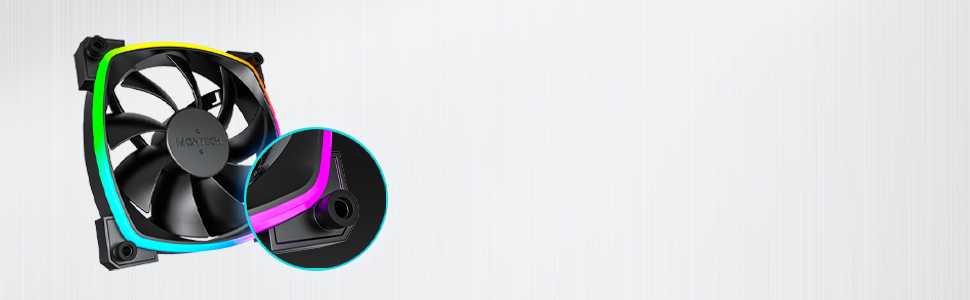
Figure 4.3: Integrated anti-vibration pads for reduced noise.
- Connect Power and ARGB Cables: Each fan has two cables: a 4-pin PWM cable for fan speed control and a 3-pin ARGB cable for lighting control.
- Connect the 4-pin PWM cable to an available 4-pin fan header on your motherboard or to a fan hub.
- Connect the 3-pin ARGB cable to an available 5V 3-pin ARGB header on your motherboard or to a compatible ARGB controller/hub. Poznámka: Nepripájajte k 12V RGB konektoru, pretože by to poškodilo LED diódy.
- Správa káblov: Route cables neatly to avoid interference with other components and to improve airflow.
- Zatvorenie puzdra a zapnutie: Once all connections are secure, close your computer case, reconnect power, and power on your system.
5. Návod na obsluhu
The Montech AX 120 ARGB Fans offer both speed and lighting control:
5.1 Riadenie otáčok ventilátora (PWM)
The 4-pin PWM connection allows for precise fan speed control based on system temperature. The fan speed can be adjusted from 600 RPM to 1600 RPM.
- BIOS/UEFI: Access your motherboard's BIOS/UEFI settings to configure fan curves. This allows the fan speed to automatically adjust based on CPU or system temperatures.
- softvér: Use your motherboard's fan control software (e.g., ASUS Fan Xpert, MSI Dragon Center, Gigabyte SIV) to create custom fan profiles within your operating system.

Figure 5.1: PWM fan speed adjustment from 600 RPM to 1600 RPM.
5.2 Ovládanie ARGB osvetlenia
The Addressable RGB (ARGB) lighting can be synchronized and customized through your motherboard's software or a dedicated ARGB controller.
- Softvér základnej dosky: If connected to a 5V 3-pin ARGB header, use your motherboard's RGB software (e.g., ASUS Aura Sync, MSI Mystic Light Sync, Gigabyte RGB Fusion, ASRock Polychrome Sync) to control lighting effects, colors, and synchronization with other ARGB components.
- ARGB Controller: If using a standalone ARGB controller, refer to the controller's manual for specific instructions on changing lighting modes.
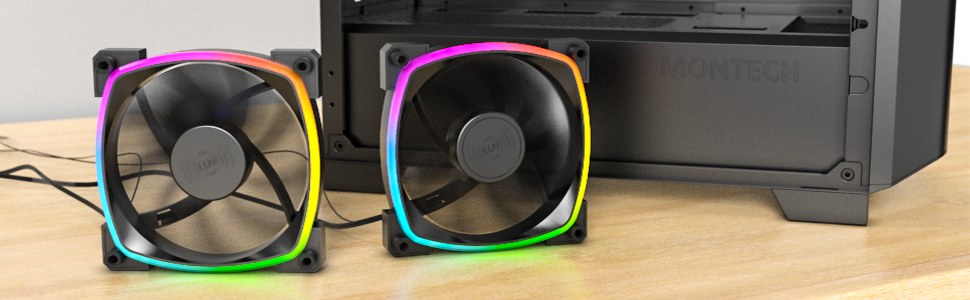
Figure 5.2: Customizable hexagonal ARGB lighting.
6. Údržba
Regular maintenance ensures optimal performance and longevity of your fans:
- Čistenie: Pravidelne čistite prach z lopatiek ventilátora a rámu pomocou stlačeného vzduchu alebo mäkkej kefky. Pred čistením sa uistite, že je počítač vypnutý a odpojený od siete.
- Kontrola: Check cables for any signs of wear or damage. Ensure mounting screws are secure.
- Životnosť ložiska: The fans feature an HDB (Hydro Dynamic Bearing) designed for high-end durability and a lifespan of 40,000 hours. No user maintenance is required for the bearing.
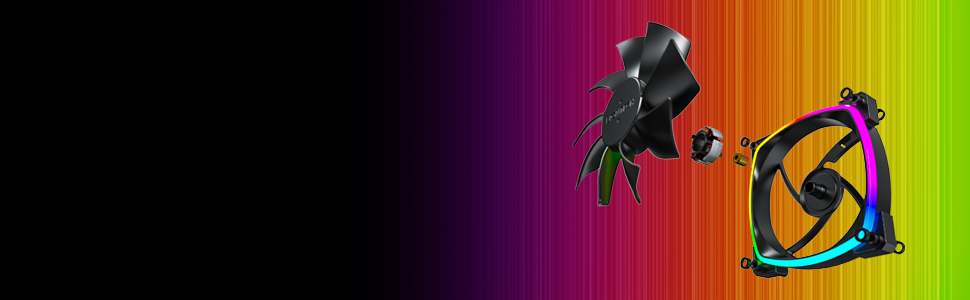
Figure 6.1: Hydro Dynamic Bearing (HDB) for extended lifespan.
7. Riešenie problémov
Ak narazíte na problémy, pozrite si nasledujúceho sprievodcu riešením problémov:
| Problém | Možná príčina | Riešenie |
|---|---|---|
| Ventilátor sa neotáča | Loose 4-pin PWM cable connection Insufficient power from motherboard header Fan curve set too low in BIOS/software | Ensure 4-pin PWM cable is securely connected. Try connecting to a different fan header. Adjust fan curve settings in BIOS/software to ensure fans spin at low temperatures. |
| ARGB osvetlenie nefunguje | Loose 3-pin ARGB cable connection Connected to incorrect 12V RGB header ARGB software not configured or running | Ensure 3-pin ARGB cable is securely connected to a 5V ARGB header. Verify connection is to a 5V 3-pin ARGB header, not a 12V 4-pin RGB header. Install and configure your motherboard's ARGB software or check your ARGB controller settings. |
| Nadmerný hluk | Vysoká rýchlosť ventilátora Vibrácie Obštrukcia | Adjust fan speed in BIOS/software to a lower RPM. Ensure all mounting screws are tight. The fans have anti-vibration pads to minimize this. Check for any cables or objects interfering with fan blades. |
8. Špecifikácie
Key technical specifications for the Montech AX 120 ARGB Fan:
- Model: AX120 PWM BLACK
- Rozmery ventilátora: 120 mm x 120 mm x 25 mm (4.72 x 4.72 x 0.98 palce)
- Typ ložiska: Hydro Dynamic Bearing (HDB)
- Rýchlosť otáčania: 1 200 – 2 100 ot./min. (riadené PWM)
- Úroveň hluku: Pod 27.9 dB(A)
- Napájací konektor: 4-Pin PWM
- ARGB konektor: 3-pinový 5V ARGB
- Menovitý objemtage: 12V DC (Fan), 5V DC (LED)
- Wattage: 2 wattov
- Materiál: Kov, plast, guma
- Životnosť: 40,000 hodín
9. Záruka a podpora
Montech products are manufactured to the highest quality standards. For warranty information, technical support, or customer service inquiries, please visit the official Montech webalebo kontaktujte miestneho predajcu. Uschovajte si doklad o kúpe pre prípad reklamácie.