
IKIER IKIER X5 Pro
Používateľská príručka k laserovému gravírovaču IKIER X5 Pro
Model: IKIER X5 Pro
1. Dôležité bezpečnostné informácie
Operating a laser engraver involves inherent risks. Adhere strictly to all safety guidelines to prevent injury and damage. This device is a Class 4 laser product.
- Ochrana očí: Always wear the provided safety glasses or equivalent laser-protective eyewear when the machine is in operation. The panoramic magnetic eye protection shield filters 97% of strong light, but direct exposure to the laser beam can cause permanent eye damage.
- Vetranie: Operate the laser engraver in a well-ventilated area to dissipate fumes and smoke produced during engraving and cutting.
- Požiarna bezpečnosť: Keep a fire extinguisher nearby. Never leave the machine unattended during operation, especially when cutting materials that may ignite.
- Bezpečnosť materiálu: Engrave and cut only approved materials. Certain materials can produce toxic fumes or catch fire easily.
- Núdzová zastávka: Familiarize yourself with the location of the emergency stop button and how to use it.
Vstavané bezpečnostné funkcie:
- Detektor plameňa: The IKIER X5 Pro is equipped with a flame detector that will automatically stop processing and trigger a buzzer alarm if it detects a flame.
- Tilt Sensor (Gyroscope): The machine will automatically stop operation and sound an alarm if it tilts more than 15 degrees, preventing accidents from unexpected movement.

Image: The IKIER X5 Pro's integrated flame detector and gyroscope for enhanced operational safety.
2. Obsah balenia
Verify that all components listed below are present in your package before proceeding with assembly.
- IKIER X5 Pro Laser Engraver (main unit)
- Installation Toolkit (screws, wrenches, etc.)
- Napájací kábel
- Napájací adaptér
- USB Flash Drive (containing software and drivers)
- Kábel typu C
- Spojovacia čiara osi X
- Podložky Focus
- Bezpečnostné okuliare
- Produktový manuál

Image: All components included in the IKIER X5 Pro Laser Engraver package.
3. Montáž a nastavenie
The IKIER X5 Pro is designed for quick assembly, typically completed within 10-20 minutes. The full aluminum alloy structure ensures stability and durability.
- Rozbaľte komponenty: Carefully remove all items from the packaging and place them on a clean, flat surface.
- Zostavte rám: Follow the step-by-step instructions in the included Product Manual to connect the frame components using the provided toolkit. Ensure all screws are securely tightened, but avoid over-tightening, which can cause rail friction.
- Inštalácia laserového modulu: Mount the laser module onto the gantry. The integral lead screw design ensures precise laser movement.
- Pripojovacie káble: Connect the power cable, Type C cable, and X-axis connecting line as indicated in the manual.
- Počiatočné zapnutie: Connect the power adapter and turn on the machine. Observe for any unusual sounds or movements.

Image: Visual guide for quick assembly, mobile app connection, and direct engraving setup.
4. Návod na obsluhu
Softvér a konektivita:
The IKIER X5 Pro supports various operating systems and file formats, offering flexible control options.
- Operačné systémy: Compatible with Linux, Mac OS, and Windows.
- File Formáty: Supports SVG, PNG, DXF, TIF, BMP, and PDF.
- Next-Generation APP Control: Utilize the dedicated mobile application for a streamlined user experience and enhanced control functions. This allows for convenient operation directly from your smartphone or tablet.
- Offline gravírovanie: The machine supports offline engraving, enabling you to engrave projects without a continuous computer connection once the file je načítaný.
- Obnova pri strate energie: V prípade náhleho napájania outage or accidental interruption, the machine features a power loss recovery function, allowing it to resume engraving from the exact original position.
Proces gravírovania a rezania:
- Pripravte si materiál: Place your chosen material securely within the working area (410x380mm).
- Zaostrenie laseru: Use the provided focus shims to set the correct focal distance for optimal engraving and cutting precision. The laser spot area is 0.06*0.06mm, balancing precision and cutting energy.
- Návrh zaťaženia: Transfer your design file to the machine via USB or the connected software/APP.
- Nastaviť parametre: Adjust engraving/cutting parameters (speed, power, passes) based on the material type and desired outcome.
- Spustiť prevádzku: Initiate the engraving or cutting process. Monitor the machine closely, especially during the initial stages.
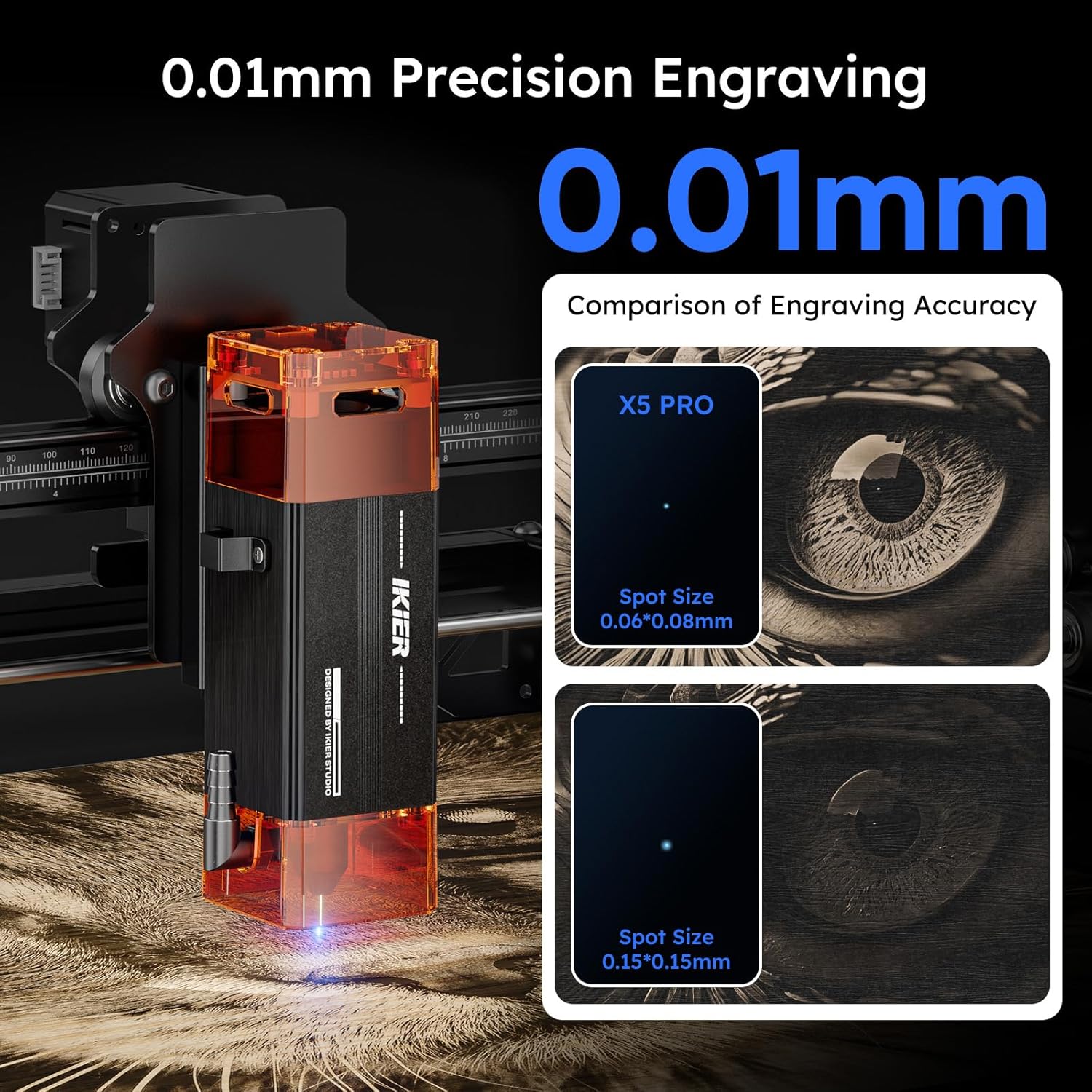
Image: The IKIER X5 Pro offers 0.01mm precision engraving with a fine laser spot size of 0.06*0.06mm.

Image: Demonstrates the 5W laser's ability to cut 5mm Paulownia wood and 3mm black acrylic in a single pass.
5. Materiálová kompatibilita
The IKIER X5 Pro is suitable for engraving and cutting a wide range of materials. Always test on a small, inconspicuous area first to determine optimal settings.
- Gravírovanie: Wood, Glass, Plastic, Leather, Rubber, Paper, Cardboard, Anodized Aluminum, Stainless Steel (with coating), Ceramics (with coating), Stone.
- Rezanie: Wood (up to 5mm Paulownia), Paper, Cardboard, Leather, Non-transparent Acrylic (up to 3mm black acrylic), Fabric.
Poznámka: Transparent materials like clear acrylic or glass may require a dark coating (e.g., paint or marker) on the surface for the laser to interact effectively.
6. Údržba
Regular maintenance ensures the longevity and optimal performance of your IKIER X5 Pro laser engraver.
- Čistý laserový objektív: Pravidelne čistite laserovú šošovku mäkkou handričkou, ktorá nepúšťa vlákna, a roztokom na čistenie šošoviek, aby ste zabezpečili čistý laserový výstup.
- Čistenie koľajníc a kolies: Keep the X and Y axis rails and wheels free from dust and debris. A build-up can affect movement precision.
- Skontrolujte napnutie remeňa: Ensure the timing belts are properly tensioned. Loose belts can lead to inaccurate engraving.
- Aktualizácie firmvéru: Check the official IKIER website or APP for any available firmware updates to ensure your machine has the latest features and bug fixes.
7. Riešenie problémov
This section addresses common issues you might encounter. For more complex problems, refer to the comprehensive manual or contact customer support.
| Problém | Možná príčina | Riešenie |
|---|---|---|
| Stroj sa nezapína. | Power cable loose, power adapter faulty, power switch off. | Check all power connections. Ensure the power switch is in the 'ON' position. Test power adapter if possible. |
| Laser nefunguje alebo je slabý. | Laser lens dirty, focus incorrect, power setting too low, laser module faulty. | Clean the laser lens. Re-focus the laser using shims. Increase laser power in software. Contact support if issue persists. |
| Engraving/cutting is inaccurate or skipped lines. | Loose belts, dirty rails, stepper motor issue, material not secured. | Check and tighten timing belts. Clean X and Y axis rails. Ensure material is firmly secured. Verify all assembly bolts are appropriately tightened, as over-tightening can cause rough movement. |
| Machine stops unexpectedly with alarm. | Flame detected, machine tilted, emergency stop pressed. | Check for flames or smoke. Ensure the machine is on a stable, level surface. Release emergency stop button if pressed. |
| Software/APP not connecting to machine. | Incorrect cable connection, driver issues, software version mismatch. | Verify USB/Type C cable connection. Reinstall drivers from the USB flash drive. Ensure software/APP is the latest version. |
8. Špecifikácie
Key technical specifications for the IKIER X5 Pro Laser Engraver.
| Funkcia | Špecifikácia |
|---|---|
| Model | IKIER X5 Pro |
| Výstupný výkon lasera | 5 000 mW (10 W) |
| Laserová trieda | trieda 4 |
| Laser Spot Area | 0.06*0.06 mm |
| Oblasť gravírovania | 410 x 380 mm (16.14 x 14.96 palca) |
| Rozmery produktu | 22.8 x 22.6 x 7.6 palca |
| Hmotnosť položky | 12.18 libry |
| Materiál | Zliatina hliníka |
| Zdroj napájania | AC/DC |
| Podporovaný OS | Linux, Mac OS, Windows |
| Podporované File Formáty | SVG, PNG, DXF, TIF, BMP, PDF |

Image: The generous 410x380mm working area of the IKIER X5 Pro.
9. Záruka a podpora
For warranty information, please refer to the documentation included with your product or visit the official IKIER website. If you encounter any issues or require technical assistance, please contact IKIER customer support. They are available to help with troubleshooting and provide guidance for optimal use of your laser engraver.
Kontaktné informácie: Refer to the official IKIER website or the contact details provided in your product manual for the most up-to-date support channels.
Online zdroje: Explore online forums, community groups, and official IKIER tutorials for additional tips and project ideas.
Ask a question about this manual
Ask about setup, troubleshooting, compatibility, parts, safety, or missing instructions. Manuals+ will review the question and use this page’s manual context to help answer it.