
Johgee YZD03-T
Johgee 3-zónový časovač vody s mosadzným vstupom - návod na obsluhu (model YZD03-T)
Programmable Garden Hose Timer with Rain Delay, Manual, and Automatic Watering System
1. Úvod
Thank you for choosing the Johgee 3 Zones Water Timer. This device is designed to automate your garden watering, providing flexible and efficient irrigation for lawns, plants, and other areas. It features three independently programmable outlets, rain delay functionality, and manual watering options. Please read this manual thoroughly before installation and operation to ensure proper use and longevity of the product.
2. Bezpečnostné informácie
- This product is intended for outdoor use with cold water only. Do not use with hot water or in freezing conditions.
- Do not immerse the timer in water. The unit is IPX5 waterproof, meaning it is protected against low-pressure water jets, but not submersion.
- Používajte iba 2 alkalické batérie typu AA s napätím 1.5 V. Nemiešajte staré a nové batérie ani rôzne typy batérií.
- Ak časovač nebudete dlhší čas používať, vyberte batérie, aby ste predišli vytečeniu.
- Uchovávajte zariadenie mimo dosahu detí a domácich zvierat, aby ste predišli jeho náhodnej aktivácii alebo poškodeniu.
- Ensure all connections are tight to prevent leaks. Use the provided sealing washer and thread seal tape.
3. Obsah balenia
Prosím, overte si, či sú vo vašom balíku všetky položky:
- Johgee 3 Zones Water Timer Unit
- Používateľská príručka
- Sealing Washers (pre-installed or separate)
- Tesniaca páska závitov
4. Produkt skončilview
Familiarize yourself with the components of your Johgee Water Timer:

Obrázok: Predná strana view of the Johgee 3 Zones Water Timer, showing the LCD display, control buttons, and rotary dial.
- LCD displej: Shows current time, program settings, and battery status.
- Otočný volič: Used to select different programming modes (OFF, AUTO, Set Clock, Start Time, How Long, How Often).
- Tlačidlo zóny: Selects which of the three output zones to program or operate manually.
- Tlačidlo OK: Potvrdzuje výber a nastavenia.
- +/- Delay Buttons: Adjusts values (time, duration, frequency) and activates rain delay.
- Manuálne tlačidlo: Initiates temporary manual watering.
- Mosadzný vstup: Connects to your garden faucet (3/4" external thread). Features a reinforced design and integrated filter.
- Water Outlets (x3): Connect to garden hoses for individual watering zones.
5. Nastavenie
5.1 Inštalácia batérie
- Nájdite priehradku na batérie na zadnej strane časovača.
- Otvorte kryt priehradky.
- Insert two (2) new 1.5V AA alkaline batteries, ensuring correct polarity (+/-).
- Close the battery compartment cover securely to maintain the waterproof seal.
The timer features a low battery warning and an automatic shut-off valve to prevent water waste when battery levels are critically low.
5.2 Connecting the Water Timer
- Ensure your garden faucet is turned off.
- Inspect the brass inlet for the pre-installed sealing washer. If missing, insert one.
- Apply thread seal tape (provided) to the threads of your garden faucet for an extra secure, leak-proof connection.
- Screw the Johgee Water Timer onto your standard 3/4" garden faucet. Hand-tighten firmly. Do not overtighten.
- Connect your garden hoses to the three independent water outlets at the bottom of the timer. Ensure these connections are also tight.

Image: The Johgee Water Timer connected to a garden faucet, with three hoses attached to its outlets, ready for use.

Obrázok: Podrobný view of the reinforced brass inlet, highlighting its robust construction and integrated metal filter for preventing debris from entering the timer.
6. Návod na obsluhu
6.1 Setting the Current Time (Clock)
- Otočte otočný ovládač na NASTAVIŤ HODINY.
- Číslica hodín bude blikať. Použite + or - nastavte hodinu. Stlačte OK potvrdiť.
- The minute digit will flash. Use the + or - nastavte minúty. Stlačte OK potvrdiť.
- Hodiny sú teraz nastavené.
6.2 Programovanie automatického zavlažovania
The timer allows for independent programming of each of its three zones.

Image: The Johgee Water Timer connected to a faucet, with three hoses extending to different garden areas labeled Zone 1, Zone 2, and Zone 3, illustrating its multi-zone capability.
- Otočte otočný ovládač na AUTOMATICKY.
- Stlačte tlačidlo ZONE button to select the desired watering zone (1, 2, or 3) you wish to program.
- Otočte otočný ovládač na ČAS ZAČIATOKU. Použite + or - nastavte požadovaný čas začiatku zavlažovania. Stlačte OK potvrdiť.
- Otočte otočný ovládač na AKO DLHO. Použite + or - to set the watering duration (1 to 360 minutes). Press OK potvrdiť.
- Otočte otočný ovládač na AKO ČASTO. Použite + or - to set the watering frequency (e.g., every 1, 3, 6, 12 hours, or every 1 to 30 days). Press OK potvrdiť.
- Repeat steps 2-5 for each zone you wish to program.
- Once programming is complete, turn the rotary dial back to AUTOMATICKY pre automatickú prevádzku.

Image: The LCD screen displaying options for setting start time, watering duration, and frequency, indicating the timer's programmable capabilities.

Image: An infographic detailing the customizable settings for automatic watering schedules, including setting the clock, start time, watering duration (1-360 minutes), and frequency (1 hour to 30 days).
6.3 Ručné zavlažovanie
Manual watering allows you to water immediately without interrupting your preset automatic schedule.
- Ensure the rotary dial is set to AUTOMATICKY or VYPNUTÉ.
- Stlačte tlačidlo MANUAL tlačidlo.
- Použite + or - tlačidlá na nastavenie požadovaného trvania manuálneho zavlažovania (1 až 360 minút).
- Stlačte tlačidlo OK na spustenie manuálneho zavlažovania.
- Ak chcete zastaviť manuálne zavlažovanie, stlačte MANUAL znova alebo otočte ovládač na VYPNUTÉ.

Image: A person using a hose to manually water a garden, demonstrating the manual watering feature of the Johgee Water Timer. The timer's display shows a manual watering countdown.
6.4 Funkcia oneskorenia dažďa
The rain delay function allows you to temporarily suspend your watering schedule for a specified period, conserving water during rainy weather.
- Ensure the rotary dial is set to AUTOMATICKY.
- Stlačte a podržte ONESKORENIE button (part of the + tlačidlo).
- Použite + or - buttons to select the desired delay duration (1 to 15 days).
- Stlačte tlačidlo OK to activate the rain delay. The display will show the remaining delay time.
- To cancel the rain delay, press and hold the ONESKORENIE button again until the delay is cleared.

Image: The Johgee Water Timer shown during rainfall, with its display indicating an active rain delay. This feature helps conserve water by pausing scheduled watering during wet conditions.
6.5 Child Lock Mode
The child lock feature prevents accidental changes to your watering schedule by children or pets.
- Aktivácia: Stlačte a podržte OK button for 3 seconds until a lock icon appears on the display.
- Deaktivácia: Stlačte a podržte OK button for 3 seconds until the lock icon disappears.

Image: A child's hand interacting with the Johgee Water Timer, illustrating the child lock function designed to prevent unintended changes to settings.
7. Údržba
7.1 Výmena batérie
When the low battery indicator flashes on the display, replace the batteries promptly to ensure continuous operation and prevent the timer from shutting off unexpectedly. Follow the battery installation steps in Section 5.1.
7.2 Čistenie filtra
The brass inlet contains an integrated metal filter to prevent debris from entering the timer. Periodically check and clean this filter to maintain optimal water flow. To clean:
- Turn off the water supply and disconnect the timer from the faucet.
- Carefully remove the filter screen from the brass inlet.
- Filter opláchnite pod tečúcou vodou, aby ste odstránili všetky nahromadené nečistoty.
- Reinsert the clean filter and reconnect the timer to the faucet.
7.3 Zimné skladovanie
Before the first frost, disconnect the water timer from the faucet and hoses. Remove the batteries. Store the timer indoors in a dry, frost-free location to prevent damage from freezing water.
8. Riešenie problémov
| Problém | Možná príčina | Riešenie |
|---|---|---|
| Timer does not turn on / LCD is blank. | Vybité alebo nesprávne vložené batérie. | Vymeňte batérie za nové 1.5 V alkalické batérie typu AA a dbajte na správnu polaritu. |
| Water is leaking from the faucet connection. | Loose connection, missing/damaged washer, or insufficient thread seal tape. | Ensure the timer is tightly screwed onto the faucet. Check that the sealing washer is properly seated. Apply more thread seal tape if necessary. |
| Water is leaking from hose connections. | Loose hose connection or damaged hose washer. | Tighten hose connections. Replace hose washers if they are worn or damaged. |
| Watering does not start at the programmed time. | Timer is in OFF mode, rain delay is active, or program is incorrect. | Ensure the dial is set to AUTO. Check if rain delay is active and cancel if needed. Verify program settings for start time, duration, and frequency. |
| One or more valves run continuously / will not shut off. | Internal valve issue, possibly due to debris or a temporary malfunction. | Remove batteries for 30 seconds to reset the unit, then reinsert. If the problem persists, contact customer support. |
| No water flow from an outlet. | Water supply off, clogged filter, or hose kinked. | Ensure the faucet is fully open. Check and clean the inlet filter (Section 7.2). Inspect hoses for kinks or blockages. |
9. Špecifikácie
- Číslo modelu: YZD03-T
- Pracovná teplota: 4.5 °C – 45 °C (40.1 °F – 113 °F)
- Pracovný tlak: 0.05Mpa - 0.8Mpa (7.25 psi - 116 psi)
- Vodotesné hodnotenie: IPX5
- Napájanie: 2 x 1.5 V AA alkalické batérie (nie sú súčasťou balenia)
- Pripojenie k vodovodnému kohútiku: 3/4" External Thread
- Rozmery produktu: 7 x 15 x 12 cm
- Hmotnosť položky: 600 g
- Materiál: Kov, Plast
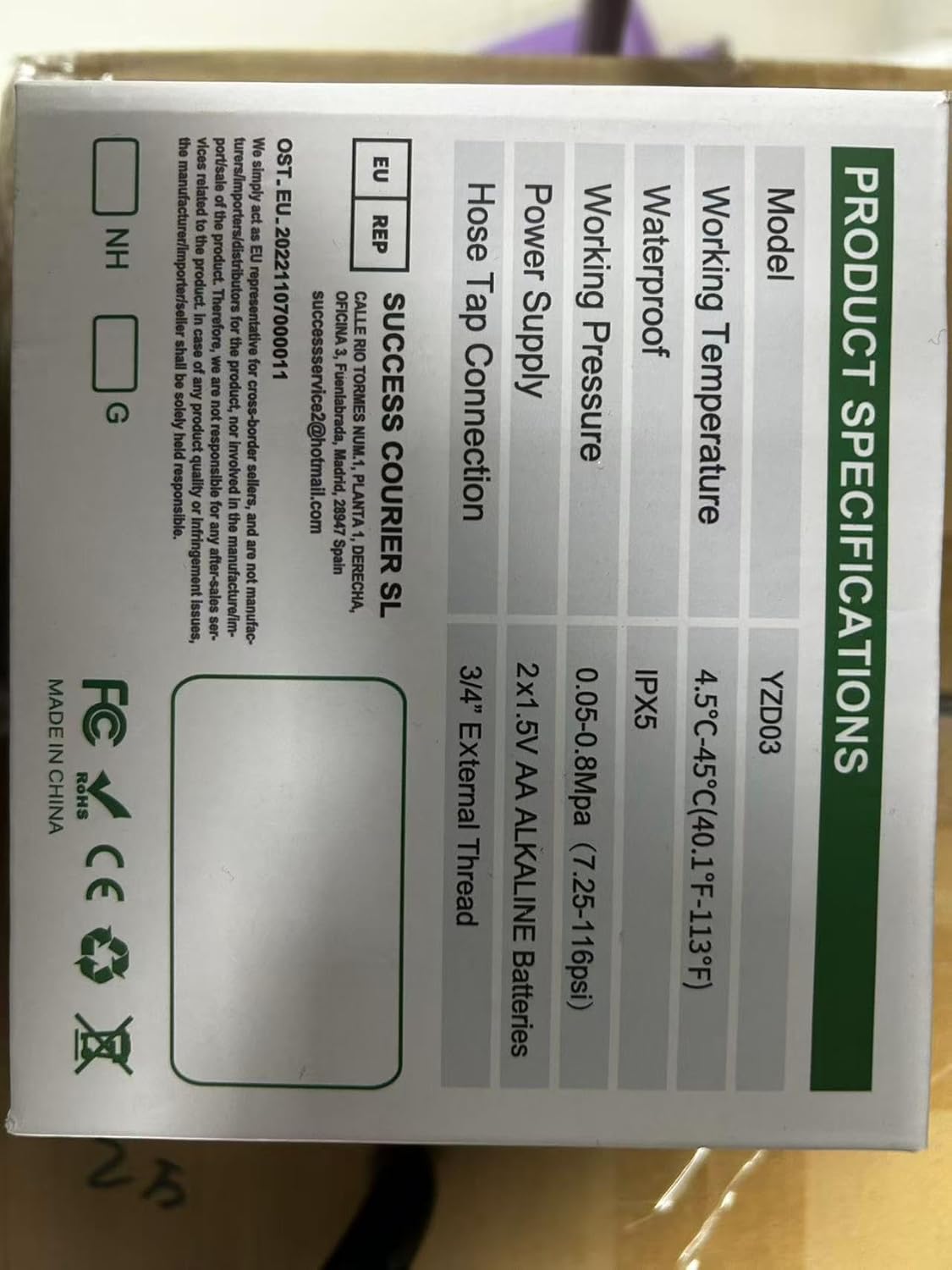
Image: A technical diagram illustrating the dimensions of the Johgee Water Timer, including its height (133mm) and width (155mm).
10. Záruka a podpora
The Johgee 3 Zones Water Timer is backed by a manufacturer's warranty. For specific warranty details, including duration and coverage, please refer to the product packaging or contact the seller directly. If you encounter any issues or require technical assistance, please reach out to Johgee customer support through the retailer's platform or the contact information provided on the product packaging.
For online support and additional resources, you may visit the Johgee Store on Amazon.
Ask a question about this manual
Ask about setup, troubleshooting, compatibility, parts, safety, or missing instructions. Manuals+ will review the question and use this page’s manual context to help answer it.