
1. Úvod
This manual provides detailed instructions for the installation, operation, and maintenance of your ESX Vision VMX900DAB Universal 1-DIN Multimedia Receiver. Please read this manual thoroughly before using the device to ensure proper functionality and to maximize your user experience.
The ESX Vision VMX900DAB is a versatile 1-DIN multimedia receiver featuring a 9-inch multi-angle touchscreen display. It integrates advanced connectivity options including wireless Apple CarPlay and Android Auto, DAB+ digital radio, Bluetooth hands-free calling and audio streaming, and a comprehensive media player. The unit is designed for universal compatibility and offers a removable monitor for enhanced security.
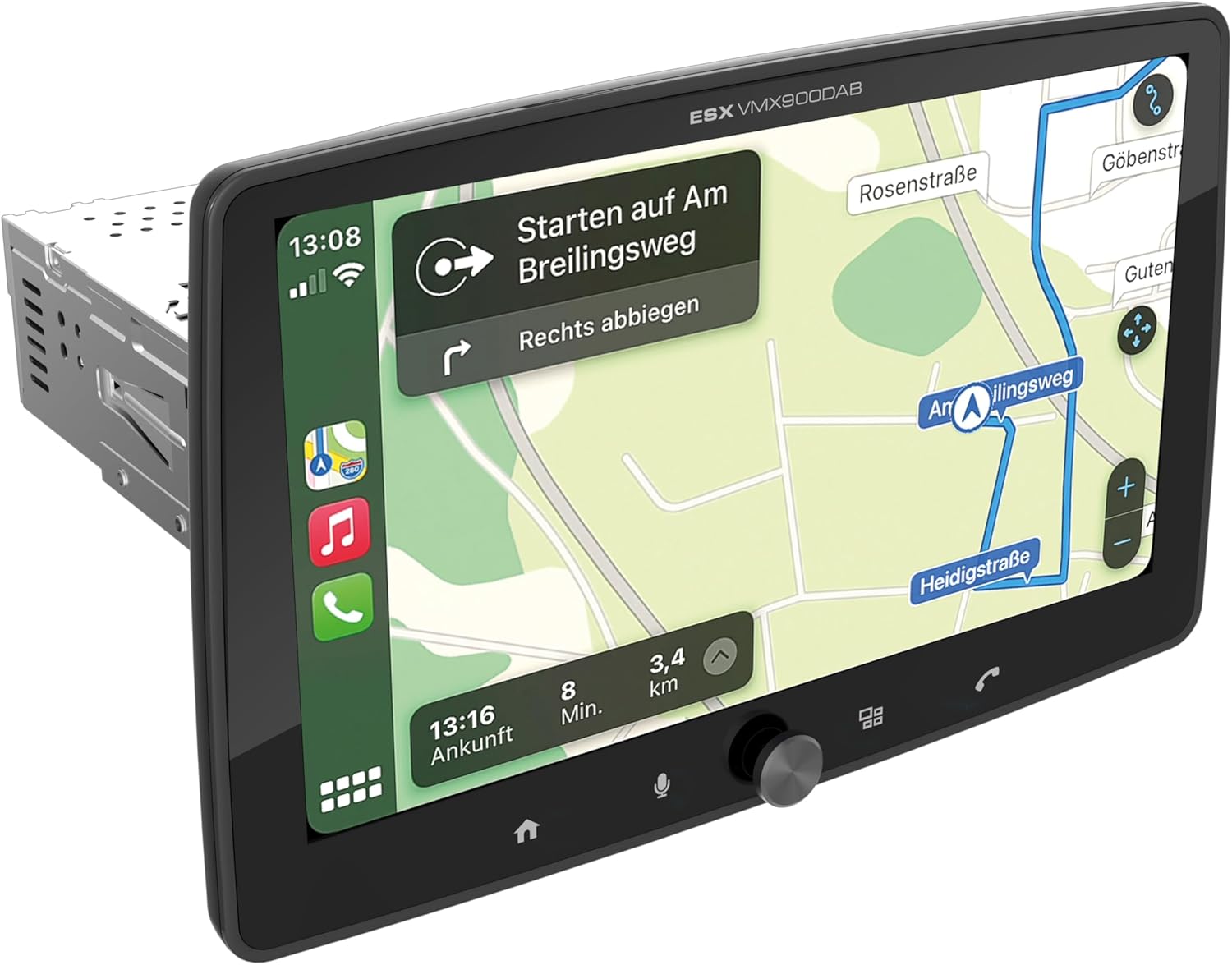
Figure 1.1: ESX Vision VMX900DAB with navigation interface.
2. Nastavenie a inštalácia
2.1 Obsah balenia
Pred inštaláciou skontrolujte, či sú prítomné všetky komponenty:
- ESX Vision VMX900DAB Main Unit
- Detachable 9-inch Touchscreen Monitor
- Káblový zväzok napájania/reproduktora
- Externý mikrofón
- GPS anténa
- Anténa DAB+
- Predlžovacie káble USB
- Montážny materiál (konzoly, skrutky)
- Používateľská príručka (tento dokument)

Obrázok 2.1: Dodávané príslušenstvo a komponenty.
2.2 Montáž hlavnej jednotky
- Pred začatím inštalácie sa uistite, že je batéria vozidla odpojená.
- Insert the 1-DIN main unit into the vehicle's dashboard opening.
- Secure the main unit using the provided mounting brackets and screws.
2.3 Pripojenie monitora
The 9-inch monitor is detachable and connects to the main unit via a click system.
- Align the monitor's connector with the slot on the main unit.
- Gently push the monitor until it clicks securely into place.
- To remove, press the release button (if applicable) and pull the monitor away.

Figure 2.2: Detachable monitor with click system.
2.4 Zapojenie
Refer to the wiring diagram provided with the unit for specific connections. Key connections include:
- Power and Speakers: Connect the main wiring harness to the vehicle's power supply and speakers.
- Externý mikrofón: Plug the external microphone into its dedicated input for optimal hands-free call quality.
- GPS anténa: Pripojte GPS anténu a namontujte ju na miesto s voľným view oblohy pre presné určenie polohy.
- DAB+ anténa: Connect the DAB+ antenna for digital radio reception.
- USB porty: Two USB-A ports are available. One for media playback and charging (1.5A), and another specifically for Apple CarPlay/Android Auto and charging (1.5A).
- RCA Pre-ampzjednotené výstupy: Six 4V RCA outputs (FL/FR/RL/RR/SUB1/SUB2) are available for connecting external ampzáchranári.
- AUX RCA Inputs: Stereo audio and video inputs (L/R/VIDEO) for external audio/video sources.
- Camera RCA Inputs: Vyhradené vstupy pre predné a zadné kamery.
- Ovládanie na volante: Analog steering wheel remote control input (learnable) for integration with vehicle controls.
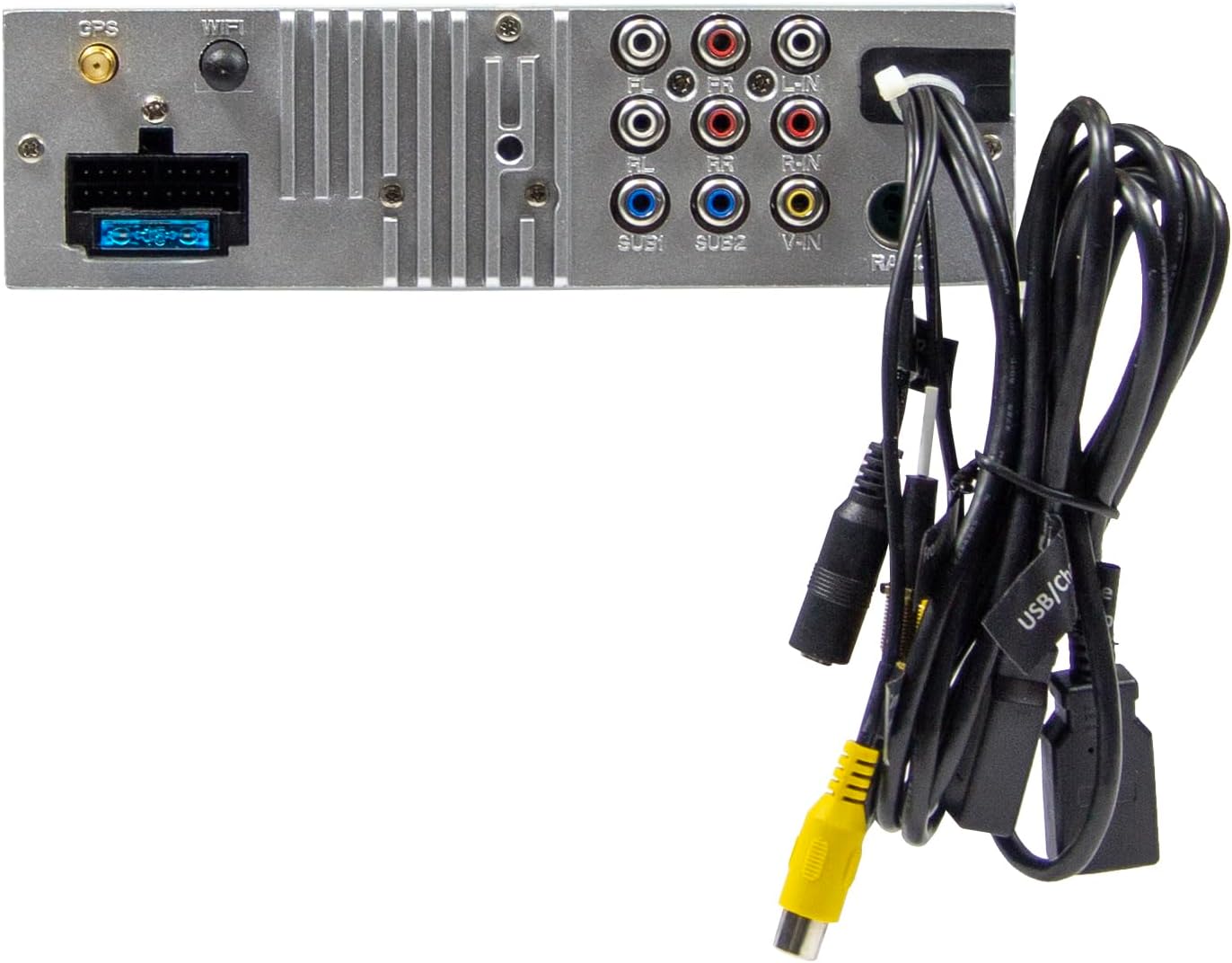
Obrázok 2.3: Zadné pripojenia hlavnej jednotky.
3. Návod na obsluhu
3.1 Zapnutie/vypnutie a základné ovládacie prvky
- Zapnutie: The unit will power on automatically with the vehicle's ignition.
- Vypnúť: The unit will power off automatically with the vehicle's ignition.
- Ovládanie hlasitosti: Use the large rotary knob on the front panel to adjust the volume.
- Funkčné klávesy: Four function keys on the front panel provide quick access to common features.
- Dotykový displej: All primary functions are controlled via the 9-inch touchscreen.
3.2 Domovská obrazovka a navigácia
The home screen provides access to all main functions and applications.

Figure 3.1: Main menu/home screen.
3.3 Apple CarPlay a Android Auto
The VMX900DAB supports both wireless and wired (via USB) Apple CarPlay and Android Auto.
- Bezdrôtové pripojenie: Enable Bluetooth and Wi-Fi on your smartphone and follow the on-screen prompts to connect.
- Káblové pripojenie: Connect your smartphone to the dedicated USB-A port using a compatible USB cable.
- Once connected, your smartphone's compatible apps (navigation, music, calls, messages) will be mirrored on the receiver's display.

Obrázok 3.2: Rozhranie Apple CarPlay.
3.4 Radio Functions (DAB+/FM/AM)
- DAB+ rádio: Select the DAB+ icon from the home screen. The unit will scan for available digital radio stations.
- FM/AM rádio: Select the Radio icon. Use the touchscreen to tune to stations, save presets, and access RDS functions.
3.5 Bluetooth Hands-Free and Audio Streaming
- Párovanie: Enable Bluetooth on your smartphone and search for the VMX900DAB. Select the device and confirm pairing.
- Hands-free telefonovanie: Once paired, you can make and receive calls directly through the receiver. The external microphone ensures clear voice transmission. Your phonebook can be synchronized.
- Streamovanie zvuku: Stream music wirelessly from your smartphone to the receiver.
3.6 Prehrávanie médií
The unit supports various audio, video, and photo formats via USB.
- Podporované File Formáty: AVI, FLV, MOV, MKV, WMV, WMA, MP3, FLAC, JPEG, PNG, BMP.
- Insert a USB drive into the media USB-A port. Select the USB icon from the home screen to browse and play media files.
3.7 Monitor Adjustment
The monitor can be tilted and adjusted in height to achieve the optimal viewing angle and prevent obstruction of vehicle controls.

Figure 3.3: Adjustable monitor mechanism.
NIKDY Prispôsobenie
- Logo startupu: Customize the startup logo in the settings menu.
- RGB Key Illumination: Select from various RGB colors and animation effects for the key illumination.
- Jazyky menu: Supported languages include DEU, ENG, SWE, ITA.
4. Údržba
4.1 Čistenie jednotky
- Use a soft, dry cloth to wipe the display and unit surfaces.
- For stubborn marks on the screen, use a screen cleaner specifically designed for electronic displays and a microfiber cloth.
- Do not use abrasive cleaners, solvents, or harsh chemicals, as these can damage the finish or screen.
4.2 Všeobecná starostlivosť
- Nevystavujte zariadenie extrémnym teplotám, priamemu slnečnému žiareniu po dlhšiu dobu alebo vysokej vlhkosti.
- Zabezpečte správne vetranie okolo jednotky, aby ste predišli prehriatiu.
- When removing the monitor, handle it carefully to avoid damage to the connectors.
5. Riešenie problémov
If you encounter issues with your VMX900DAB, refer to the following common problems and solutions:
| Problém | Možná príčina | Riešenie |
|---|---|---|
| Žiadna sila | Nesprávne zapojenie; Prepálená poistka; Vypnuté zapaľovanie vozidla | Check power connections; Replace fuse; Turn on vehicle ignition |
| Žiadny zvuk | Príliš nízka hlasitosť; Aktivované stlmenie; Problém s kabelážou reproduktora | Increase volume; Deactivate mute; Check speaker connections |
| Bluetooth sa nepripája | Bluetooth off on phone/unit; Incorrect pairing process | Ensure Bluetooth is on; Re-attempt pairing process |
| Apple CarPlay/Android Auto sa nespúšťa | Incorrect USB port; Faulty USB cable; Phone not compatible/configured | Use the dedicated USB port; Try a different USB cable; Check phone settings for CarPlay/Android Auto |
| Slabý príjem rádia | Antenna not connected; Poor antenna placement; Weak signal area | Check antenna connection; Adjust antenna position; Try in a different location |
| Monitor not displaying | Monitor not securely attached; Connector issue | Ensure monitor is fully clicked into place; Check for debris in connector |
If the problem persists after attempting these solutions, please contact ESX customer support or your authorized dealer.
6. Špecifikácie
| Funkcia | Špecifikácia |
|---|---|
| Číslo modelu | VMX900DAB |
| Displej | 9-inch Multi-angle Touchscreen |
| Form Factor | 1-DIN Universal |
| Konektivita | USB, Bluetooth, Auxiliary |
| Špeciálne funkcie | Wireless Apple CarPlay, Wireless Android Auto, Detachable Monitor with Click System |
| Rádiový tuner | DAB+ (Digital Radio), FM/AM with RDS |
| Bluetooth | Hands-free function, Audio Streaming |
| USB porty | 2x USB-A (1.5A charging, one dedicated for CarPlay/Android Auto) |
| Max Music Power | 4 x 80 W |
| Pre-ampvýstupy | 6x RCA (4V) (FL/FR/RL/RR/SUB1/SUB2) |
| AUX vstupy | RCA (L/R/VIDEO) |
| Vstupy pre fotoaparáty | RCA (Front/Rear) |
| Podporované File Formáty | AVI, FLV, MOV, MKV, WMV, WMA, MP3, FLAC, JPEG, PNG, BMP |
| Externý mikrofón | Zahrnuté |
| Ovládanie na volante | Analog (learnable) |
| GPS prijímač | Zahrnuté |
| Jazyky ponuky | DEU, ENG, SWE, ITA |
| Celkový výstupný výkon | 320 wattov |
| Konfigurácia kanálov priestorového zvuku | 4.2 |
| Režim zvukového výstupu | Stereo |
7. Záruka a podpora
For warranty information, please refer to the documentation provided at the time of purchase or contact your authorized ESX dealer. Warranty terms and conditions may vary by region and retailer.
For technical support or further assistance, please contact ESX customer service or visit the official ESX webstránky pre zdroje podpory.