
1. Úvod
Ďakujem za nákupasing the Sofirn HS21 and D25S headlamps. These headlamps are designed for various outdoor activities, offering reliable illumination and convenient features. This manual provides detailed instructions for the safe and effective use, setup, operation, and maintenance of your new headlamps. Please read this manual thoroughly before use and retain it for future reference.
2. Bezpečnostné pokyny
- Do not shine the light directly into eyes. The powerful beam can cause temporary vision impairment or permanent eye damage.
- Uchovávajte mimo dosahu detí.
- Hlavu nerozoberajteamp. This may damage the device and void the warranty.
- Use only the recommended battery types. Improper battery use can lead to fire, explosion, or leakage.
- Vyhnite sa odhaleniu hlavyamp na extrémne teploty alebo dlhodobé priame slnečné žiarenie.
- Keď zariadenie nenabíjate, uistite sa, že je kryt nabíjacieho portu USB-C bezpečne zatvorený, aby sa zachovala vodotesnosť.
3. Obsah balenia
- 1 x Sofirn HS21 Headlamp
- 1 x Sofirn D25S Headlamp
- 2 x čelenky
- 2 x USB-C nabíjací kábel
- 2 x Rechargeable Batteries (pre-installed or separate)
- 1 x Návod na použitie
4. Produkt skončilview
4.1 Sofirn HS21 Headlamp
The Sofirn HS21 is a versatile headlamp featuring a combination of spotlight, floodlight, and red light. It is equipped with a convenient rotary switch for easy mode selection and offers a wide 130° rotation adjustment for optimal illumination angle.

Image 1: Sofirn HS21 Headlamp showing its various light modes including red light, spotlight, and floodlight.

Image 2: The Sofirn HS21 headlamp demonstrating its 130-degree rotation capability for adjustable light direction.
4.2 Sofirn D25S Headlamp
The Sofirn D25S is a compact and powerful headlamp utilizing an SST40 LED, offering multiple brightness levels. It features a hidden USB-C charging port for convenient recharging and a simple user interface with memory mode.

Image 3: Sofirn D25S Headlamp highlighting its comfortable switch and simple user interface.
5. Nastavenie
5.1 Inštalácia batérie
Both HS21 and D25S headlamps typically come with batteries pre-installed. If not, or if replacing batteries:
- Unscrew the tail cap of the headlamp telo.
- Insert the rechargeable battery with the positive (+) terminal facing towards the head of the lamp.
- Pevne naskrutkujte späť zadný kryt, aby ste zabezpečili správny kontakt a vodotesnosť.
5.2 Nabíjanie
Obe hlavyamps feature a built-in USB-C charging port.
For HS21:
- Nájdite nabíjací port USB-C na boku hlavového reproduktoraamp telo.
- Gently lift the protective rubber cover to expose the port.
- Pripojte dodaný kábel USB-C k hlavovej jednotkeamp and to a USB power source (e.g., wall adapter, power bank, computer).
- Počas nabíjania bude kontrolka svietiť na červeno a po úplnom nabití sa rozsvieti na zeleno.
- Once charging is complete, securely close the rubber cover to protect the port from dust and water.
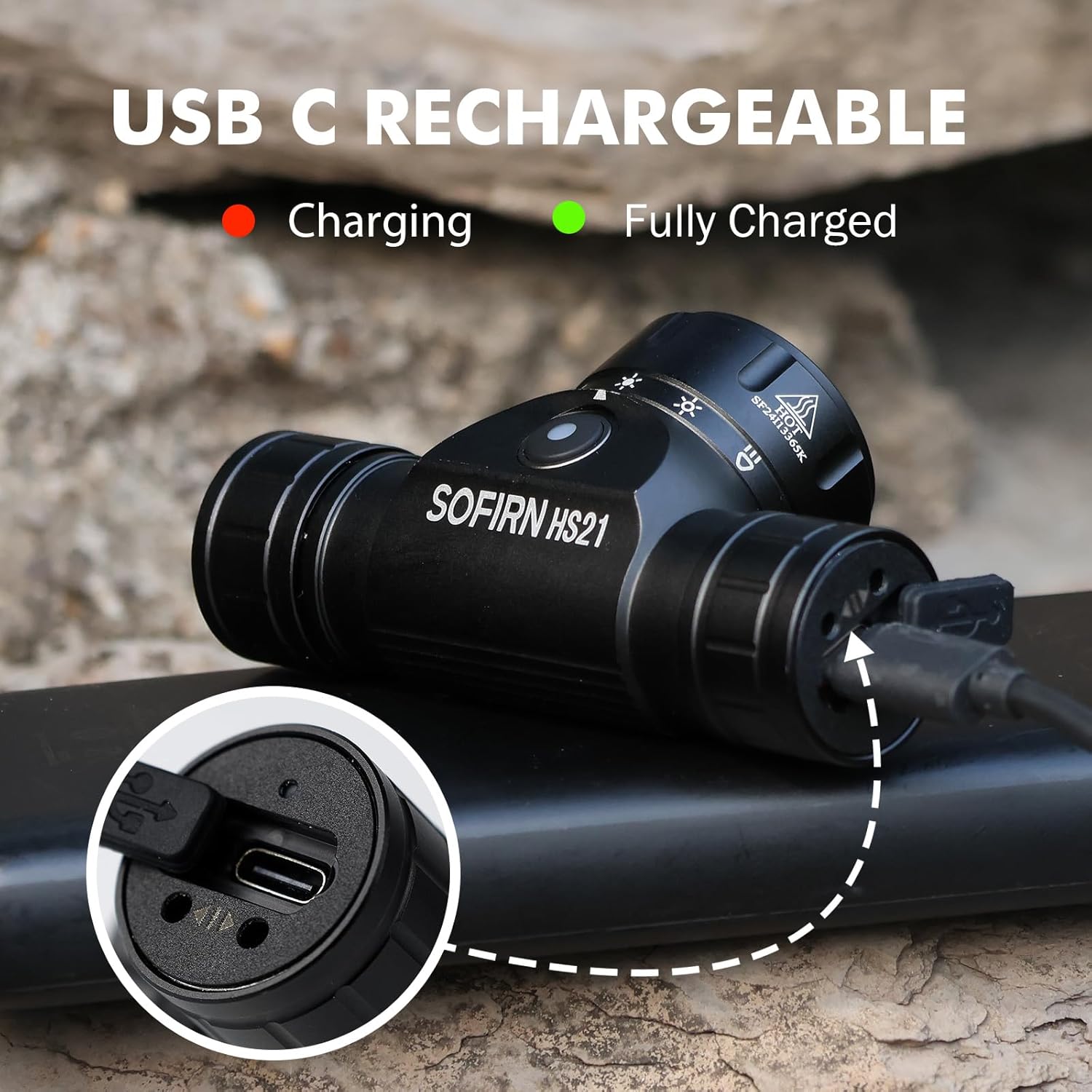
Image 4: Sofirn HS21 Headlamp connected to a USB-C charging cable, showing the charging indicator light.
For D25S:
- Unscrew the head of the D25S headlamp to reveal the hidden USB-C charging port.
- Pripojte dodaný kábel USB-C k hlavovej jednotkeamp and to a USB power source.
- Počas nabíjania bude kontrolka svietiť na červeno a po úplnom nabití sa rozsvieti na zeleno.
- After charging, screw the head back on tightly to ensure water resistance.

Image 5: Sofirn D25S Headlamp with its head unscrewed, revealing the built-in USB-C charging port.
6. Návod na obsluhu
6.1 Sofirn HS21 Headlamp Prevádzka
The HS21 features a rotary switch for easy mode selection and a separate power button.
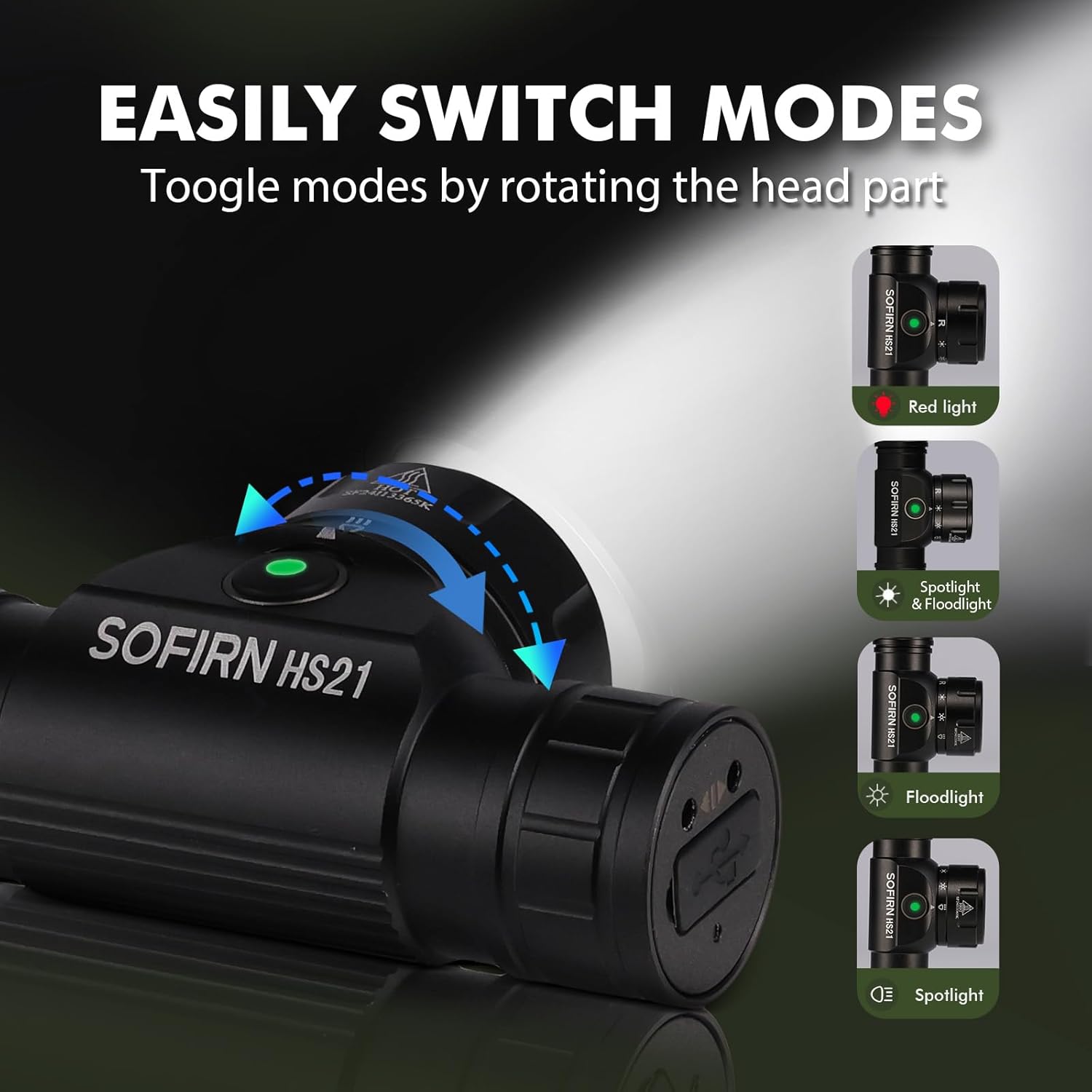
Image 6: Illustration of the Sofirn HS21's rotary switch mechanism for changing light modes.
- Zapnutie/vypnutie: Jedným stlačením tlačidla napájania otočíte hlavicuamp zapnuté alebo vypnuté.
- Výber režimu: Rotate the head part of the headlamp to cycle through the main light modes: Red Light, Spotlight, Floodlight, and Spotlight + Floodlight (combined).
- Nastavenie jasu: While a mode is active, press and hold the power button to cycle through brightness levels (Low, Medium, High). Release the button at your desired brightness.
- Red Light Activation: Rotate to the red light setting. Press and hold the power button for additional red light modes (e.g., red strobe, red beacon).
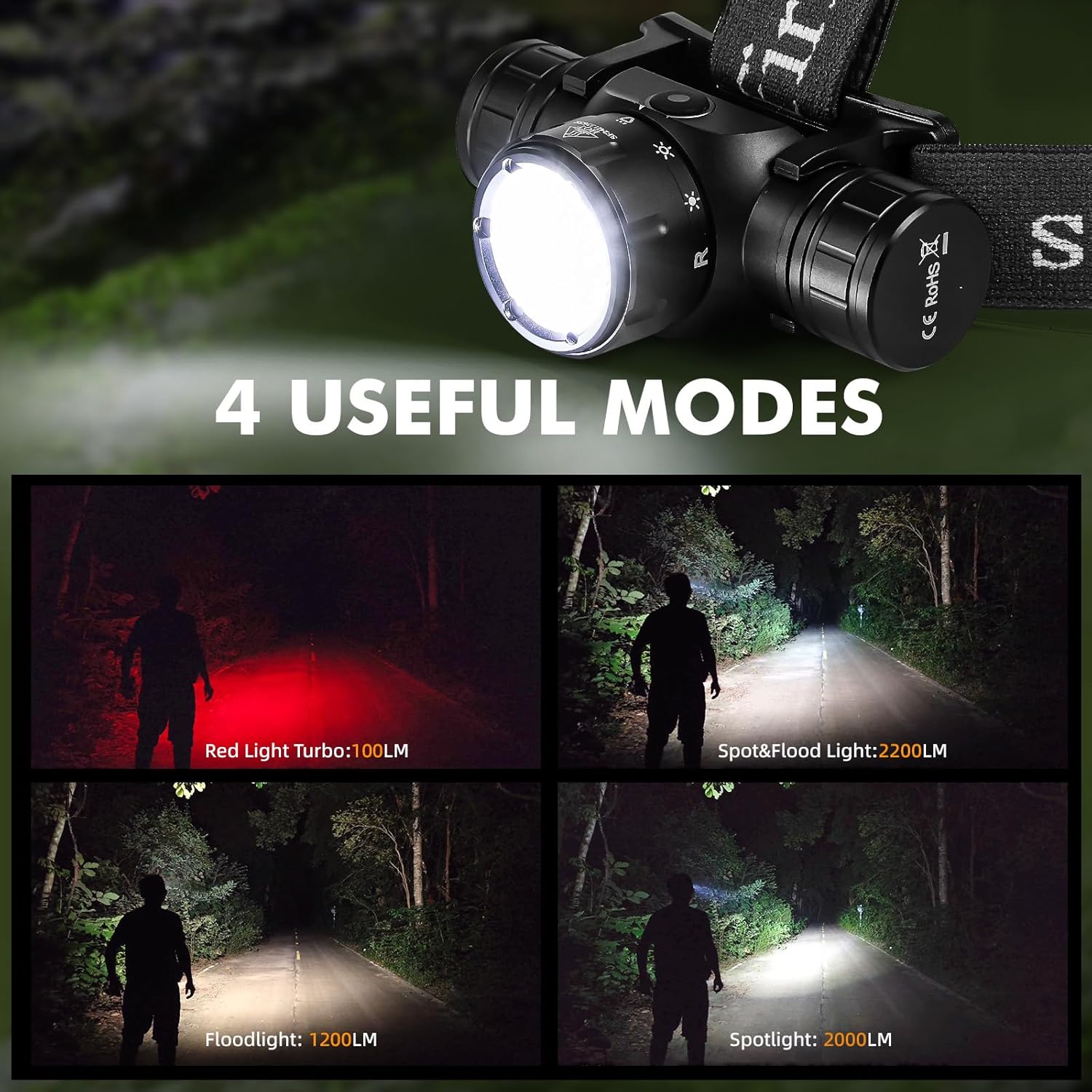
Image 7: The Sofirn HS21 headlamp displaying its four primary light modes: Red Light, Spot & Flood, Floodlight, and Spotlight.
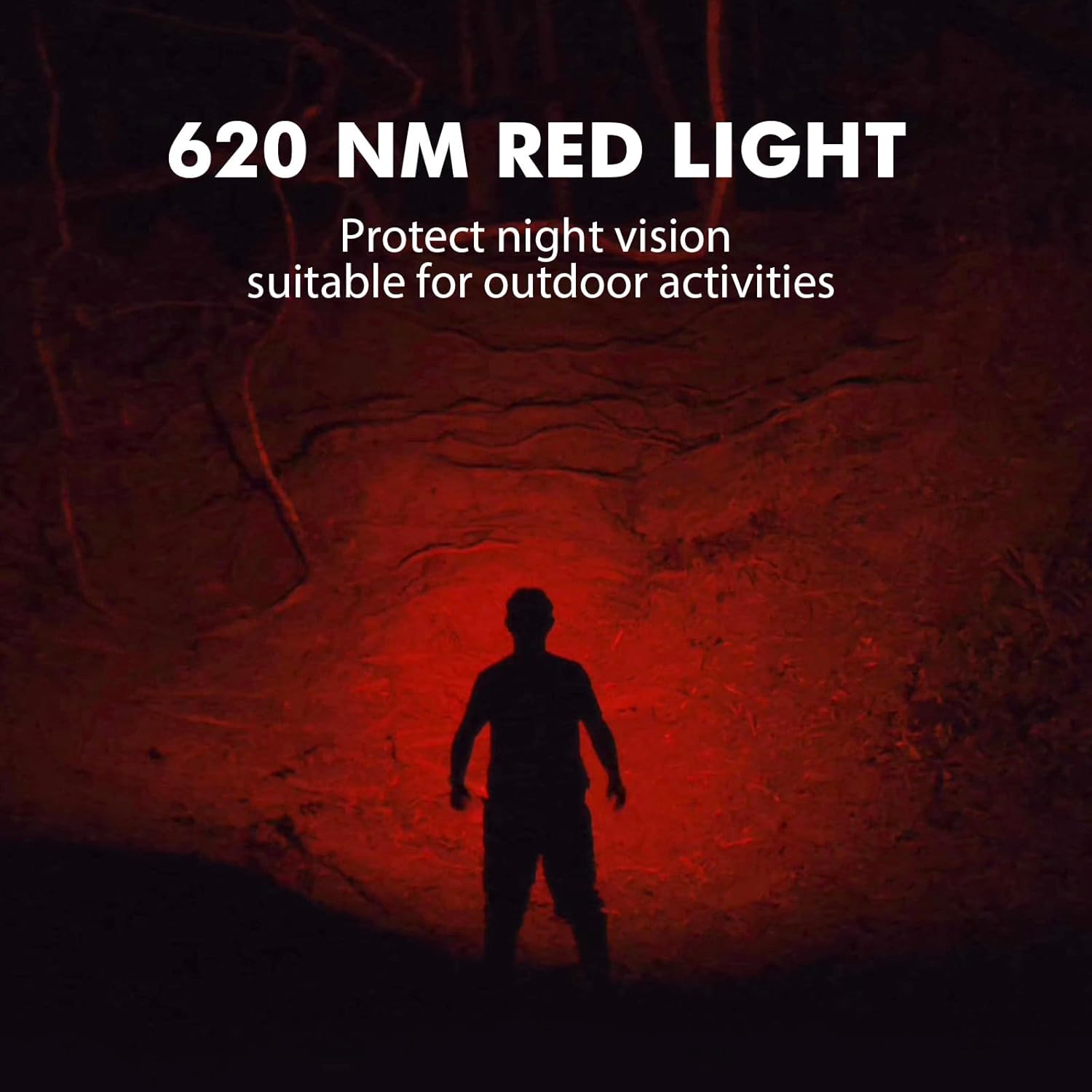
Image 8: The Sofirn HS21 headlamp emitting a 620 NM red light, suitable for preserving night vision.
6.2 Sofirn D25S Headlamp Prevádzka
The D25S operates with a single button interface.
- Zapnutie/vypnutie: Press the button once to turn the headlamp zapnuté alebo vypnuté.
- Cyklus režimov: Zatiaľ čo hlavičkaamp is on, press and hold the button to cycle through brightness modes: Low → Medium 1 → Medium 2 → High. Release the button at your desired mode.
- Turbo režim: From any mode, double-click the button to activate Turbo mode. Double-click again to return to the previous mode.
- Funkcia pamäte: The D25S will remember the last used brightness level (excluding Turbo) and turn on in that mode.
7. Údržba
- Čistenie: Utrite hlavuamp s mäkkým, damp plátno. Nepoužívajte abrazívne čistiace prostriedky ani rozpúšťadlá.
- O-krúžky: Periodically check and lubricate the O-rings with silicone grease to maintain water resistance. Replace damaged O-rings.
- Starostlivosť o batérie: Ak je hlavičkaamp will not be used for an extended period, remove the battery to prevent leakage. Recharge batteries regularly to prolong their lifespan.
- Ukladací priestor: Uložte hlavuamp na chladnom a suchom mieste mimo dosahu priameho slnečného žiarenia.
8. Riešenie problémov
| Problém | Možná príčina | Riešenie |
|---|---|---|
| Headlyamp nezapína sa | Low battery; Battery incorrectly installed; Loose tail cap; Faulty battery. | Charge battery; Reinstall battery with correct polarity; Tighten tail cap; Replace battery. |
| Svetelný výkon je slabý | Low battery; Lens is dirty. | Charge battery; Clean the lens. |
| Nabíjanie nefunguje | Cable not connected properly; Faulty cable or power source; Charging port obstructed. | Ensure secure connection; Try a different cable/power source; Clean charging port. |
| Prenikanie vody | O-rings damaged or missing; Tail cap/charging port cover not sealed properly. | Check and replace O-rings; Ensure all caps are tightly sealed. |
9. Špecifikácie
9.1 Sofirn HS21 Headlamp
| Funkcia | Detail |
|---|---|
| Svetelný zdroj | LED (bodové svetlo, svetlomet, červené svetlo) |
| Maximálny výstup | 2200 Lumens (Spotlight + Floodlight) |
| Vlnová dĺžka červeného svetla | 620 NM |
| Typ prepínača | Rotary Switch + Push Button |
| Nabíjanie | Nabíjateľný USB-C |
| Rotácia | Nastaviteľný 130° |
| Rozmery | 3.4 x 1.8 x 1.4 palca |
| Hmotnosť | 0.3 libry (vrátane batérie) |
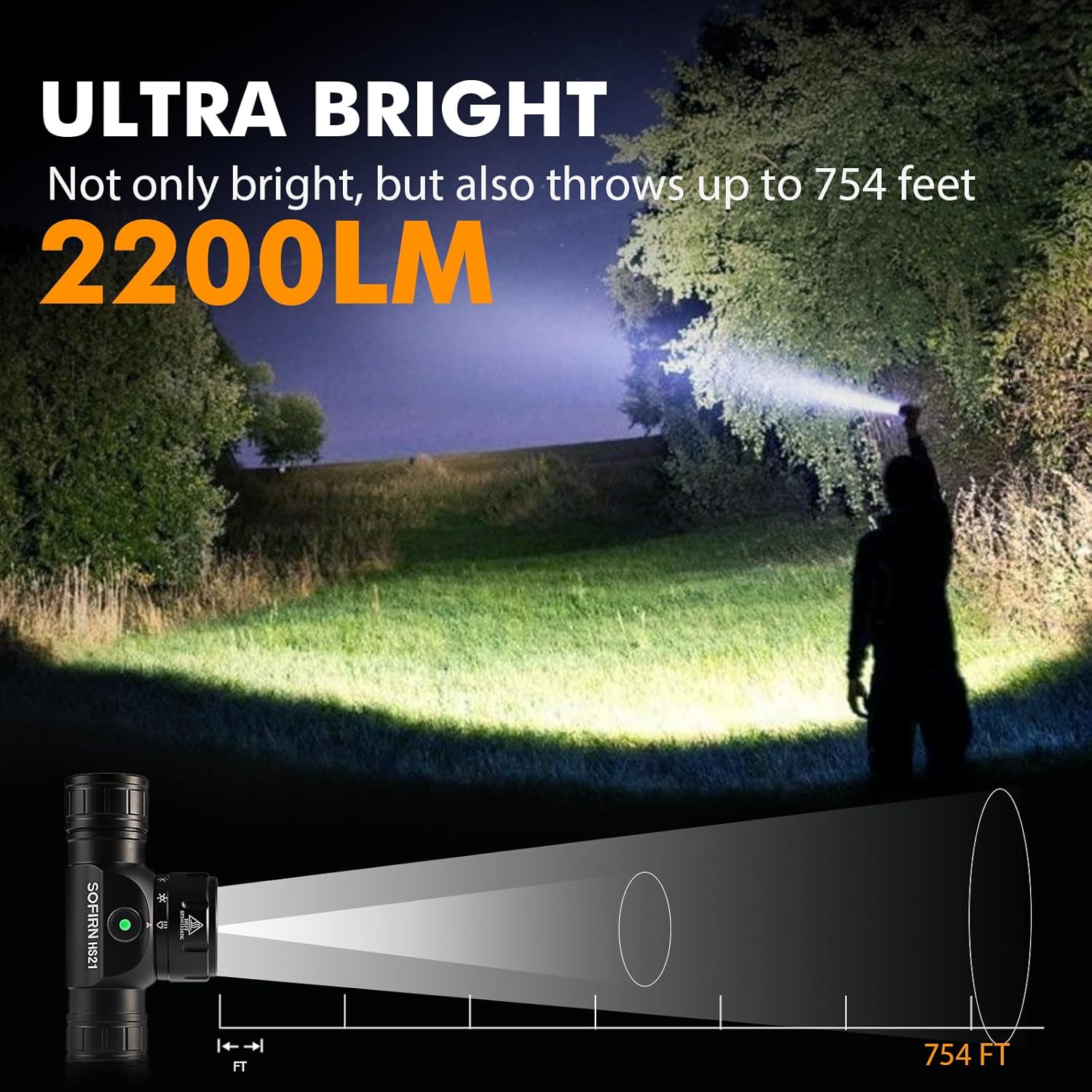
Image 9: The Sofirn HS21 headlamp demonstrating its ultra-bright output and beam distance of up to 754 feet.
9.2 Sofirn D25S Headlamp
| Funkcia | Detail |
|---|---|
| Svetelný zdroj | SST40 LED |
| Maximálny výstup | 1200 XNUMX lúmenov |
| Režimy | Low, Medium 1, Medium 2, High, Turbo |
| Nabíjanie | Hidden USB-C Rechargeable |
| Špeciálne funkcie | Režim pamäte |
10. Záruka a podpora
Sofirn products are covered by a limited warranty. For specific warranty details, please refer to the warranty card included with your product or visit the official Sofirn website. For technical support, troubleshooting assistance, or warranty claims, please contact Sofirn customer service through the retailer where you purchased the product or via the contact information provided on the official Sofirn webstránky.