
1. Úvod
This manual provides detailed instructions for the installation, configuration, and operation of the Intelbras iNVD 5232 32-Channel IP Digital Video Recorder. Please read this manual thoroughly before using the device to ensure proper functionality and to prevent damage.
The Intelbras iNVD 5232 is designed for professional surveillance applications, offering advanced features for recording, monitoring, and managing IP camera feeds.
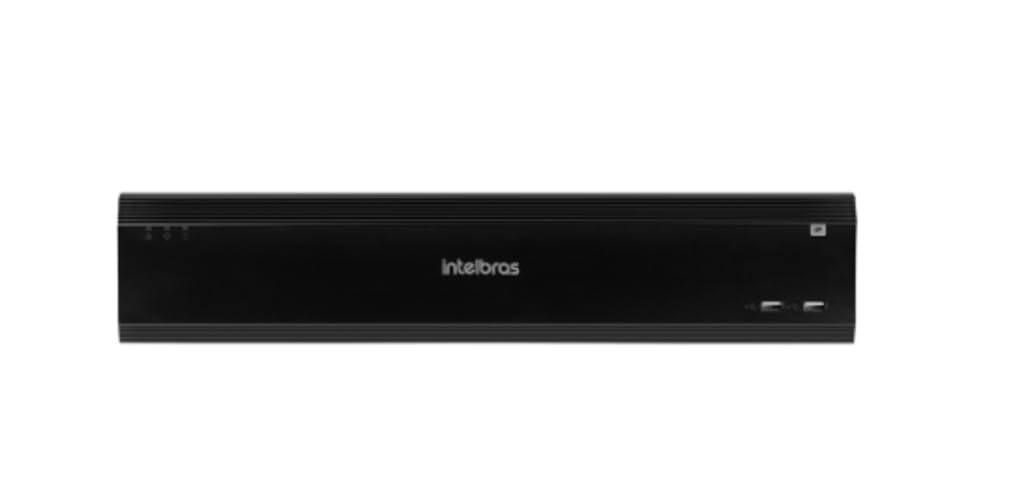
Figure 1: Intelbras iNVD 5232 Digital Video Recorder. This image shows the front panel of the iNVD 5232 unit, featuring a sleek black design with the Intelbras logo and USB ports.
2. Bezpečnostné informácie
Dodržiavajte nasledujúce bezpečnostné opatrenia, aby ste predišli zraneniu a poškodeniu zariadenia:
- Zabezpečte napájanie objtage zodpovedá požiadavkám zariadenia.
- Nevystavujte zariadenie vlhkosti, dažďu ani extrémnym teplotám.
- Neumiestňujte zariadenie na priame slnečné svetlo alebo do blízkosti zdrojov tepla.
- Neotvárajte zariadenie casing. Všetok servis zverte kvalifikovanému personálu.
- Používajte iba príslušenstvo špecifikované výrobcom.
- Properly ground the device to prevent electrical shock.
3. Obsah balenia
Overte, či sú v balení všetky položky:
- Intelbras iNVD 5232 Digital Video Recorder Unit
- Napájací adaptér
- Myš USB
- Skrutky na inštaláciu pevného disku
- Sprievodca rýchlym spustením
- CD-ROM (obsahujúci softvér a kompletný manuál)
4. Produkt skončilview
4.1 Predný panel
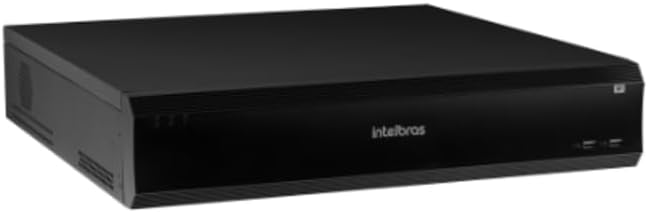
Figure 2: Front Panel of the iNVD 5232. This image displays the front of the DVR, showing LED indicators for power and status, along with two USB ports for peripheral connections.
- LED napájania: Indikuje stav napájania.
- Stavová LED: Indikuje prevádzkový stav systému.
- USB porty: Na pripojenie myši, USB kľúča alebo iných periférnych zariadení.
4.2 Zadný panel

Figure 3: Rear Panel of the iNVD 5232. This image details the rear connections, including power input, network ports, video outputs (HDMI, VGA), audio inputs/outputs, and alarm terminals.
- Príkon: Pripojte dodaný napájací adaptér.
- HDMI výstup: Connect to an HDMI-compatible monitor.
- VGA výstup: Connect to a VGA-compatible monitor.
- Porty LAN: Connect to your network for IP camera communication and remote access.
- Zvukový vstup/výstup: Na pripojenie externých audio zariadení.
- Vstup/výstup alarmu: For connecting external alarm sensors and actuators.
- USB porty: Ďalšie USB porty pre periférie.
5. Nastavenie
5.1 Inštalácia hardvéru
- Inštalácia pevného disku (ak nie je predinštalovaný): Otvorte DVR casing, mount the hard drive using the provided screws, and connect the SATA power and data cables.
- Pripojenie monitora: Pripojte monitor k výstupnému portu HDMI alebo VGA.
- Pripojiť myš: Zapojte USB myš do jedného z USB portov.
- Pripojiť sieť: Connect an Ethernet cable from the LAN port to your network router or switch.
- Pripojenie napájania: Plug the power adapter into the DVR's power input and then into a power outlet. The device will power on automatically.
5.2 Počiatočná konfigurácia
Upon first boot, the system will guide you through an initial setup wizard:
- Výber jazyka: Vyberte požadovaný jazyk.
- Nastavenie hesla: Create a strong administrator password.
- Nastavenia siete: Nakonfigurujte IP adresu, masku podsiete, bránu a DNS. DHCP je zvyčajne predvolene povolený.
- Dátum a čas: Nastavte správny dátum, čas a časové pásmo.
- Inicializácia pevného disku: Format the installed hard drive for recording.
- IP Camera Search and Add: The system will scan for available IP cameras on the network. Select and add your cameras.
6. Prevádzkové
6.1 Naživo View
After initial setup, the system will display the live view pripojených kamier. Môžete prepínať medzi jednotlivými kamerami view, multi-camera grids, and sequence viewpomocou ovládacích prvkov na obrazovke alebo myši.
6.2 Správa záznamov
- Plán nahrávania: Nakonfigurujte plány nepretržitého nahrávania, nahrávania detekciou pohybu alebo nahrávania spúšťaného alarmom pre každú kameru.
- Manuálne nahrávanie: Initiate recording manually from the live view rozhranie.
- Prehrávanie: Prístup zaznamenaný footage by date, time, and event type. Use the playback controls to navigate through recordings.
- zálohovanie: Export recorded video clips to a USB drive or network storage.
6.3 Vzdialený prístup
The iNVD 5232 supports remote access via a web browser or dedicated mobile application. Ensure your network is configured for remote access (e.g., port forwarding or P2P cloud service activation).
- Web Prehliadač: Enter the DVR's IP address into a web prehliadač na počítači pripojenom k rovnakej sieti.
- Mobilná aplikácia: Download the official Intelbras surveillance app from your device's app store. Scan the QR code on the DVR (if available) or manually enter the device ID for connection.
7. Údržba
7.1 Čistenie
Regularly clean the exterior of the DVR with a soft, dry cloth. Do not use liquid cleaners or aerosols. Ensure ventilation openings are free from dust and obstructions.
7.2 aktualizácií firmvéru
Periodically check the Intelbras webstránka s aktualizáciami firmvéru. Aktualizácie firmvéru môžu poskytnúť nové funkcie, vylepšenia výkonu a zabezpečenia. Pozorne dodržiavajte pokyny uvedené v balíku s aktualizáciou firmvéru.
7.3 Správa pevného disku
Monitor the health of your hard drives through the system's HDD management menu. Replace failing drives promptly to avoid data loss. Configure automatic overwriting of old footage na zabezpečenie nepretržitého nahrávania.
8. Riešenie problémov
| Problém | Možná príčina | Riešenie |
|---|---|---|
| Žiadna sila | Power cable disconnected; faulty power adapter; power outlet issue. | Check power connections; test power adapter; try a different outlet. |
| Žiadny video výstup | Monitor off/disconnected; incorrect video output settings; faulty cable. | Ensure monitor is on and connected; check video cable; try a different output port or cable. |
| Cannot connect IP cameras | Network issue; incorrect camera IP address/credentials; camera not powered. | Verify network connectivity; ensure cameras are powered and configured correctly; check camera credentials. |
| Žiadny záznam | HDD not initialized/full; recording schedule not set; camera disconnected. | Initialize HDD; check recording schedule; verify camera connection and status. |
9. Špecifikácie
| Funkcia | Popis |
|---|---|
| Model | iNVD 5232 |
| Video vstup | 32 IP kanály |
| Video výstup | 1 port HDMI, 1 port VGA |
| Audio vstup/výstup | Specific ports (e.g., RCA) |
| Rozlíšenie nahrávania | Up to 8MP (depending on camera) |
| Možnosť prehrávania | Multi-channel synchronous playback |
| Skladovanie | Multiple SATA HDD bays (HDDs not included) |
| Network Interface | Gigabitové ethernetové porty |
| Rozhranie USB | Porty USB 2.0/3.0 |
| Napájanie | DC 12V (adaptér je súčasťou balenia) |
| Prevádzková teplota | 0 °C až 50 °C (32 °F až 122 °F) |
10. Záruka a podpora
For warranty information, please refer to the warranty card included with your product or visit the official Intelbras website. Technical support is available through Intelbras authorized service centers and online resources.
Oficiálny Intelbras Webmiesto: www.intelbras.com.br
Pred kontaktovaním podpory si, prosím, pripravte model produktu a sériové číslo.