
Thundeal TD93 Pro
Používateľská príručka k mini projektoru Thundeal TD93 Pro
Model: TD93 Pro | Brand: Thundeal
1. Úvod
This manual provides detailed instructions for the setup, operation, and maintenance of your Thundeal TD93 Pro Mini Projector. Please read this manual thoroughly before using the product to ensure proper functionality and to extend its lifespan.

Image 1.1: Thundeal TD93 Pro Mini Projector overview.
2. Čo je v krabici
Overte si, či sú vo vašom balení všetky nižšie uvedené položky:
- Thundeal TD93 Pro Projector
- Diaľkové ovládanie
- Napájací kábel
- Používateľská príručka (tento dokument)
- AV kábel
- HDMI kábel
- Kryt objektívu projektora

Image 2.1: Package contents of the TD93 Pro Projector.
3. Product Specifications and Features
3.1. Technické špecifikácie
| Číslo modelu | TD93 Pro (Item Model Number: TD97) |
| Natívne rozlíšenie | 1920 x 1080 (Full HD) |
| Podpora maximálneho rozlíšenia | 2K 4K UHD (from HD Signal) |
| Jas | 12000 XNUMX lúmenov |
| Kontrastný pomer | 15000:1 |
| Pomer strán | 4:3 / 16:9 / Auto |
| Operačný systém | OS Android 9.0 |
| Bezdrôtové pripojenie | 2.4G / 5G WiFi, Bluetooth-compatible |
| pamäť | RAM 1G DDR3 + ROM 8G |
| Korekcia lichobežníka | 6D Keystone (4-point corner +/- 60°, Vertical +/- 60°) |
| Funkcia zväčšenia | 50-100% Proportional Reduction |
| Veľkosť projekcie | 49 to 300 inches (recommended 93-150 inches) |
| Projekčná vzdialenosť | 1.6 to 6.5 meters (recommended 3-5 meters) |
| Lamp Celý život | 50,000 hodín |
| Zvuk | Built-in 5W stereo speakers with SRS sound system |
| Špeciálne funkcie | 3D-Ready (Red-Blue 3D), Auto Horizontal Keystone, Built-In Wi-Fi, Portable, Dust Removal Net |
3.2. Kľúčové vlastnosti
- Vizuály vo vysokom rozlíšení: Native 1080P resolution with support for 2K/4K UHD signals, delivering clear and vibrant images.
- Smart Android OS: Integrated Android 9.0 operating system allows direct app downloads and streaming.
- Dvojpásmové WiFi: 2.4G and 5G WiFi connectivity for stable and fast wireless streaming and screen mirroring.
- Bluetooth pripojenie: Pripojte externé Bluetooth reproduktory alebo slúchadlá pre vylepšený zvuk.
- Advanced Image Correction: 6D Keystone correction (4-point and vertical) for flexible placement and precise image alignment.
- Flexibilná projekcia: Adjustable zoom from 50% to 100% and support for screen sizes up to 300 inches.
- Dlhotrvajúci Lamp: LED lamp designed for up to 50,000 hours of operation.
- Multi-Media Compatibility: Supports various input sources including HDMI, USB, AV, and direct office file prehrávanie cez USB.

Image 3.1: Visual comparison of projector brightness and resolution.
4. Inštalačná príručka
4.1. Umiestnenie projektora
The projector can be placed in various positions to suit your viewprostredie:
- Na stole: Projektor umiestnite na stabilný, rovný povrch.
- Na statíve: Utilize the 6mm screw hole on the bottom for tripod mounting.
- Ceiling Hoisting: Mount the projector to the ceiling using a compatible hanger.
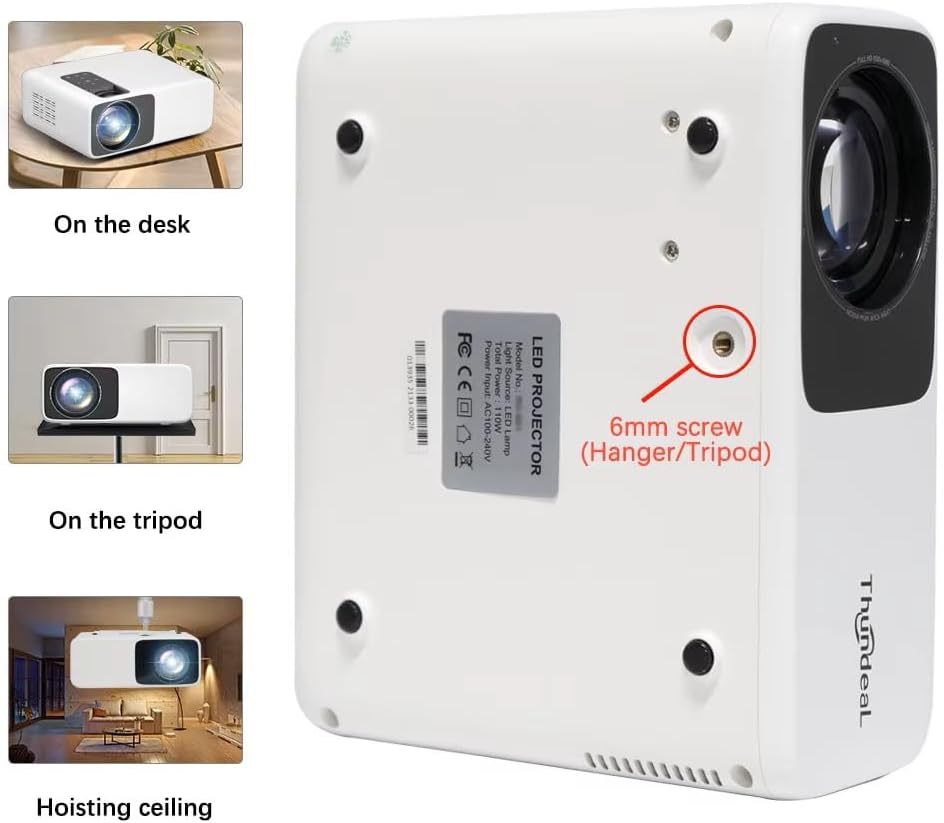
Image 4.1: Projector placement options and mounting point.
Pre optimálne viewing, ensure the projector is positioned perpendicular to the screen or wall. Adjust the projection distance (1.6 to 6.5 meters) to achieve your desired screen size (49 to 300 inches). A distance of 3-5 meters for a 93-150 inch screen is recommended for eye comfort.
4.2. Pripojenie napájania
- Pripojte napájací kábel do vstupného portu napájania projektora.
- Zapojte druhý koniec napájacieho kábla do štandardnej elektrickej zásuvky.
- Stlačením tlačidla napájania na projektore alebo diaľkovom ovládači ho zapnite.
5. Návod na obsluhu
5.1. Multi-Media Connections
The TD93 Pro projector offers various ports for connecting external devices:
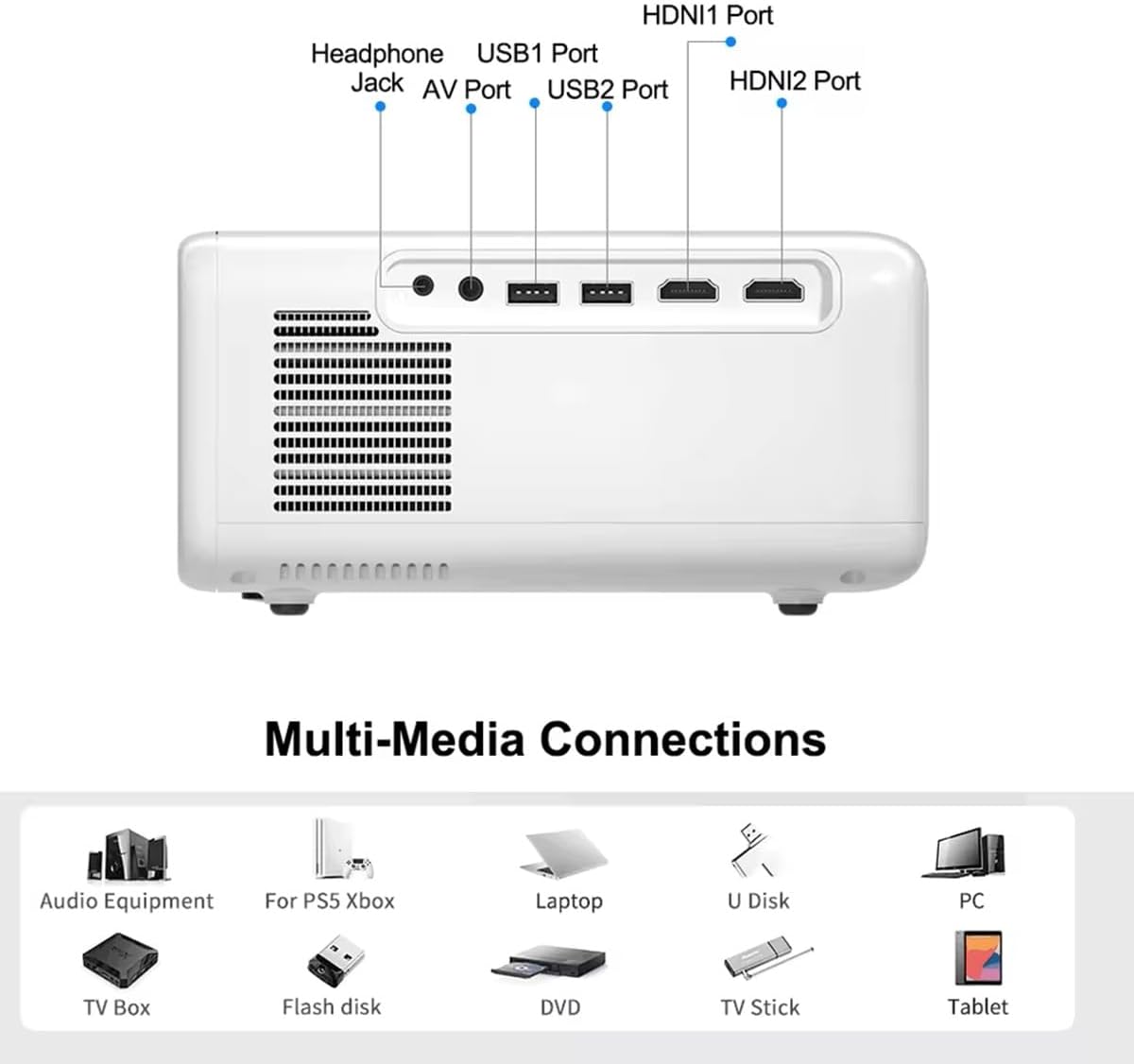
Image 5.1: Available multimedia connection ports.
- HDMI Ports (HDMI1, HDMI2): Connect devices such as TV boxes, gaming consoles (PS5, Xbox), laptops, or Blu-ray players.
- USB porty (USB 1, USB 2): Connect USB flash drives for direct media playback (photos, videos, office documents).
- AV port: Staršie zariadenia pripojte pomocou dodaného AV kábla.
- Jack pre slúchadlá (3.5 mm): Pripojte externé slúchadlá alebo reproduktory.
To switch input sources, use the "Source" button on the remote control or the projector's control panel and select the desired input (HDMI1, HDMI2, AV, USB).
5.2. Bezdrôtové pripojenie
5.2.1. WiFi Connection (2.4G/5G)
The projector supports dual-band WiFi for internet access and network features:
- Navigate to the "Settings" menu on the projector's Android interface.
- Select "Network & Internet" and then "Wi-Fi".
- Zapnite Wi-Fi a vyberte požadovanú sieť zo zoznamu.
- Ak sa zobrazí výzva, zadajte heslo a pripojte sa.
5.2.2. Pripojenie Bluetooth
Connect Bluetooth-compatible audio devices like speakers or headphones:
- Go to "Settings" > "Connected devices" > "Bluetooth".
- Zapnite Bluetooth.
- Prepnite svoje zariadenie Bluetooth do režimu párovania.
- Vyberte svoje zariadenie zo zoznamu dostupných zariadení, ktoré chcete spárovať.
5.3. Screen Mirroring (Airplay/WiFi-Display)
Wirelessly display content from your Android or iOS phone:

Image 5.2: Screen mirroring from iOS and Android devices.
- Uistite sa, že projektor aj mobilné zariadenie sú pripojené k rovnakej sieti Wi-Fi.
- On the projector's main interface, select the "Screen Mirroring" or "Airplay/WiFi-Display" application.
- For iOS devices: Open Control Center, tap "Screen Mirroring" or "AirPlay Mirroring", and select the projector from the list.
- For Android devices: Open the notification panel, find "Cast", "Smart View", "Wireless Display", or similar function, and select the projector.
5.4. Úprava obrazu
5.4.1. Keystone Correction (6D)
The projector features 6D keystone correction to adjust image shape:
- Vertikálne lichobežníkové skreslenie: Adjust +/- 60 degrees vertically using the remote control.
- 4-Point Corner Keystone: Adjust each of the four corners independently by +/- 60 degrees for side projection or irregular surfaces. This allows for precise rectangular image alignment.
Access keystone settings via the projector's menu or dedicated buttons on the remote.
5.4.2. Funkcia Zoom
Adjust the display size from 50% to 100% proportionally without moving the projector. This feature is useful for fine-tuning the image size to fit your screen or wall.
Access the zoom function through the projector's menu settings.
5.5. Android OS and App Usage
The integrated Android 9.0 OS allows you to download and install applications directly from the Play Store. Ensure the projector is connected to Wi-Fi to access online services and apps.
- Obchod Play: Access the Google Play Store to download streaming apps, games, and utilities.
- Prehrávanie médií: Use pre-installed media players or download alternatives (e.g., VLC player for AC3 audio support).
6. Údržba
6.1. Odstraňovanie prachu
The projector is equipped with a built-in dust net for easy cleaning. Regularly clean the dust net to maintain optimal performance and prevent overheating. Press to pop out the dust net for cleaning.
6.2. Chladiaci systém
The advanced cooling system is designed to dissipate heat efficiently and extend the lamp's lifespan. Ensure proper ventilation around the projector and avoid blocking air vents during operation.
6.3. Lamp Celý život
LED lamp has an estimated lifespan of 50,000 hours. No lamp replacement is typically required during the product's operational life under normal usage conditions.
7. Riešenie problémov
7.1. No Image Displayed
- Skontrolujte, či je projektor zapnutý.
- Verify the input source is correctly selected (e.g., HDMI1, USB).
- Uistite sa, že sú všetky káble bezpečne pripojené.
- Upravte zaostrenie a korekciu lichobežníkového skreslenia.
7.2. Žiadny zvuk
- Skontrolujte úroveň hlasitosti na projektore a pripojenom zdrojovom zariadení.
- Ensure external speakers or headphones are properly connected and powered on if used.
- If using an external source, verify its audio output settings.
- For AC3 audio, ensure you are using a compatible player like VLC.
7.3. Connectivity Issues (WiFi/Bluetooth)
- Ensure WiFi is enabled and you are connected to the correct network.
- Reštartujte projektor a smerovač/zariadenie Bluetooth.
- For screen mirroring, confirm both devices are on the same Wi-Fi network.
7.4. Image is Blurry or Distorted
- Nastavte zaostrovací krúžok na objektíve projektora.
- Use the keystone correction features to correct any trapezoidal distortion.
- Uistite sa, že projekčná plocha je rovná a hladká.
8. Záruka a podpora
Informácie o záruke a technickej podpore nájdete v dokumentácii dodanej pri kúpe alebo sa obráťte na svojho predajcu. Uschovajte si doklad o kúpe ako doklad o kúpe.
Ask a question about this manual
Ask about setup, troubleshooting, compatibility, parts, safety, or missing instructions. Manuals+ will review the question and use this page’s manual context to help answer it.