
1. Produkt skončilview
The Attoe AK680 is a wired mechanical gaming keyboard designed for performance and customization. It features a compact 60% layout, RGB backlighting, hot-swappable switches, and durable double-shot PBT keycaps. This manual provides essential information for setting up, operating, and maintaining your keyboard.

Figure 1: Attoe AK680 Mechanical Gaming Keyboard.
2. Obsah balenia
Overte, či sú v balení všetky položky:
- Attoe AK680 Mechanical Gaming Keyboard
- Kábel USB-C
- Sťahovač kľúčov
- Switch Puller (often integrated with keycap puller or separate)
- Používateľská príručka (tento dokument)
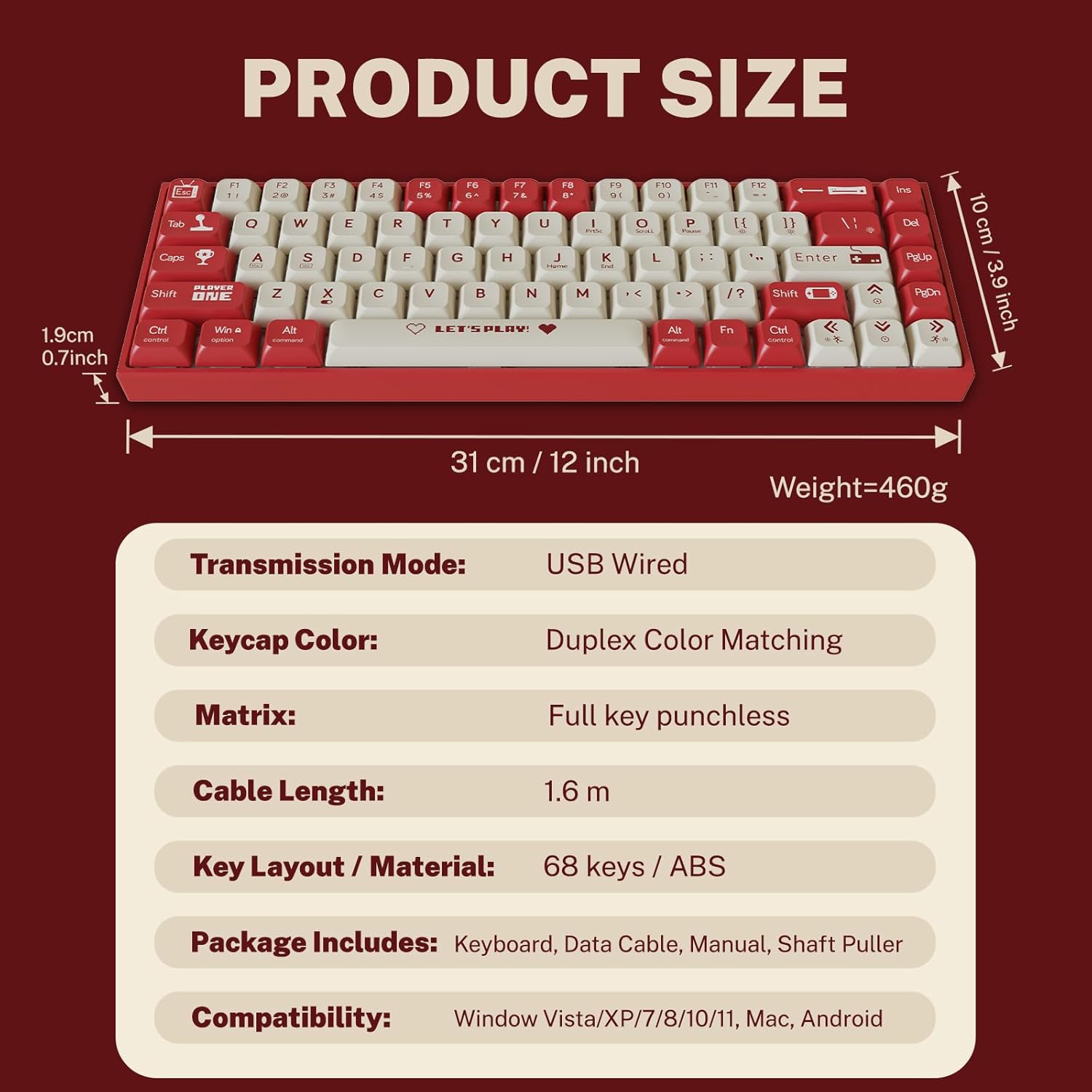
Obrázok 2: Obsah balenia a rozmery produktu.
3. Pokyny na nastavenie
3.1 Pripojenie klávesnice
- Locate the USB-C port on the back or side of the keyboard.
- Pripojte jeden koniec dodaného kábla USB-C k portu USB-C na klávesnici.
- Pripojte druhý koniec konektora USB-A k voľnému portu USB na počítači.
- Klávesnicu automaticky rozpozná váš operačný systém. Pre základné funkcie zvyčajne nie sú potrebné žiadne ďalšie ovládače.
3.2 Kompatibilita systému
The Attoe AK680 keyboard is compatible with the following operating systems:
- Windows Vista / XP / 7 / 8 / 10 / 11
- macOS
- Android

Figure 3: Multi-system compatibility of the keyboard.
4. Návod na obsluhu
4.1 Základné funkcie klávesnice
The AK680 features a 68-key layout, providing essential keys while maintaining a compact form factor. All keys support anti-ghosting, ensuring accurate input even during rapid key presses.

Figure 4: The 68-key layout for efficient use.
4.2 RGB podsvietenie
The keyboard features 16.8 million color RGB backlighting with various effects. Specific key combinations (often involving the Fn key) are used to cycle through lighting modes, adjust brightness, and change colors. Refer to the quick start guide or product page for detailed key combinations for lighting control.

Figure 5: RGB Backlighting in operation.
4.3 Prepínače vymeniteľné za chodu
The AK680 supports hot-swappable 3-pin and 5-pin mechanical switches. This allows you to easily change switches without soldering, customizing the typing feel to your preference. Use the included switch puller for safe removal and installation.
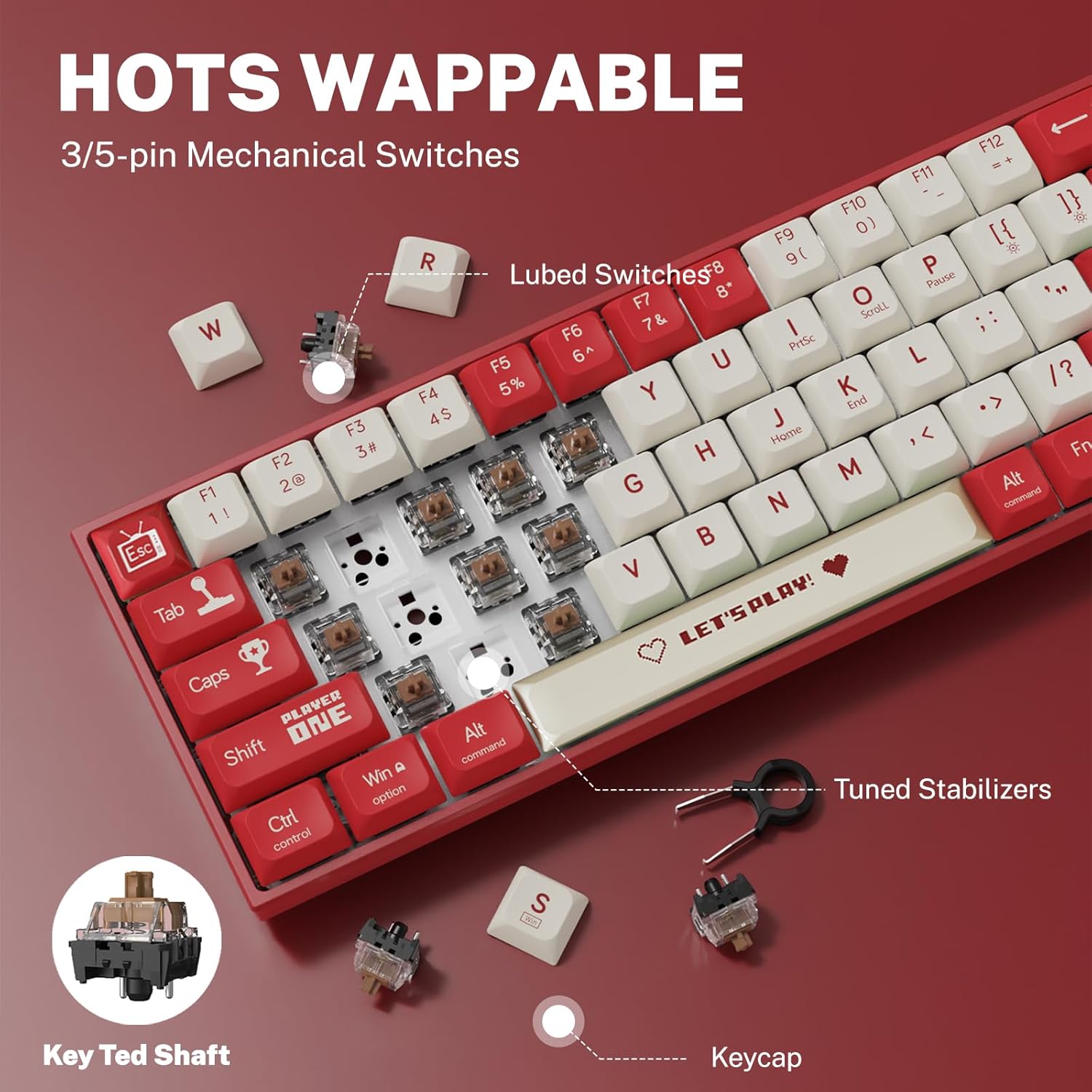
Figure 6: Hot-swappable switch mechanism.
5. Údržba
5.1 Čistenie klávesnice
- Všeobecné upratovanie: Na utieranie povrchu klávesnice použite mäkkú, suchú handričku. V prípade odolnej špiny ju jemne utrite.amphandričku namočte do vody alebo jemného, neabrazívneho čistiaceho prostriedku.
- Medzi klávesmi: Na odstránenie prachu a nečistôt medzi klávesmi použite stlačený vzduch.
- Čistenie klávesov: For thorough cleaning, remove keycaps using the provided keycap puller. Wash keycaps with mild soap and water, rinse thoroughly, and ensure they are completely dry before reattaching.
5.2 Výmena klávesov a spínačov
The AK680's hot-swappable design allows for easy replacement of keycaps and switches.
- Odstránenie klávesov: Use the keycap puller to gently grip and lift keycaps straight up.
- Odstránenie prepínačov: After removing the keycap, use the switch puller to carefully grip the top and bottom clips of the switch and pull it straight out.
- Inštalácia prepínačov: Align the new switch's pins with the holes on the PCB. Press down firmly until the switch clicks into place. Ensure pins are not bent.
- Inštalácia klávesov: Align the keycap with the switch stem and press down gently until it is seated securely.

Figure 7: Components of a mechanical switch and tools for maintenance.
6. Riešenie problémov
- Klávesnica nereaguje:
- Uistite sa, že kábel USB-C je bezpečne pripojený ku klávesnici aj k počítaču.
- Skúste pripojiť klávesnicu k inému USB portu na počítači.
- Otestujte klávesnicu na inom počítači, aby ste vylúčili problémy špecifické pre systém.
- Kľúče sa neregistrujú:
- Remove the keycap and switch for the affected key. Reinstall the switch, ensuring it is properly seated and its pins are not bent.
- Vyčistite všetky nečistoty, ktoré by mohli blokovať mechanizmus spínača.
- RGB Backlighting Not Working:
- Check if the backlighting is turned off or set to minimum brightness using the keyboard's function keys.
- Uistite sa, že klávesnica je dostatočne napájaná z portu USB.
7. Špecifikácie
| Funkcia | Detail |
|---|---|
| Číslo modelu | AK680 |
| Značka | Attoe |
| Typ pripojenia | Káblové (USB-C) |
| Počet kľúčov | 68 kľúčov |
| Kľúčová technológia | Mechanical Shaft (Red/Teal Shaft), Hot-Swappable (3-pin/5-pin) |
| Materiál krytu kľúča | Dvojitý vstrek PBT |
| Podsvietenie | RGB (16.8 milióna farieb) |
| Anti-Ghosting | Full Keys Anti-Ghosting |
| Dĺžka kábla | 1.6 metrov |
| Rozmery produktu | 12 x 3.9 x 0.7 palca (31 x 10 x 1.9 cm) |
| Hmotnosť položky | 1.01 libry (460 g) |
| Kompatibilita | Windows Vista/XP/7/8/10/11, macOS, Android |
| Vodotesná funkcia | IPX4 rated protection (splash resistant) |
8. Záruka a podpora
Attoe provides a 12-mesačná záruka for the AK680 Mechanical Gaming Keyboard from the date of purchase.
If you encounter any problems or have questions regarding your product, please contact Attoe customer service. We are committed to providing the best service and will respond within 24 hours to assist you.
For support, please refer to the contact information provided with your purchase or visit the official Attoe webstránky.