
1. Úvod
Thank you for choosing the Attoe F-18 Wireless Vertical Gaming Mouse. This ergonomic mouse is designed to provide a comfortable user experience, reducing wrist strain during extended use, while offering advanced features for gaming and productivity. It features tri-mode connectivity (2.4GHz wireless, Bluetooth 5.0, and wired USB-C), 12 programmable buttons, a 5-direction rocker, and adjustable DPI up to 24000.

Image 1.1: Attoe F-18 Wireless Vertical Gaming Mouse with USB receiver.
2. Obsah balenia
- Attoe F-18 Vertical Gaming Mouse
- Nabíjací kábel USB-C
- Prijímač USB 2.4 GHz
- Používateľská príručka
3. Nastavenie a pripojenie
3.1 Nabíjanie myši
The Attoe F-18 mouse is equipped with a built-in 800mAh ternary lithium battery. Before first use, or when the low battery warning activates, charge the mouse using the provided USB-C cable.
- Connect the USB-C end of the cable to the mouse and the USB-A end to a power source (e.g., computer USB port, USB wall adapter).
- During charging, the four indicator lights on the mouse will illuminate in sequence.
- All four lights will turn off when the mouse is fully charged.
- A red light flashing quickly indicates the battery level has dropped to 25%, signaling the need for charging.

Image 3.1: Illustration of the 800mAh battery and charging indicators.
3.2 Pripojenie myši
The Attoe F-18 supports three connection modes: 2.4GHz Wireless, Bluetooth 5.0, and Wired USB-C.
3.2.1 Bezdrôtové pripojenie 2.4 GHz
- Zapnite myš pomocou vypínača umiestneného na spodnej strane.
- Press the bottom Bluetooth button briefly to select 2.4G mode (red indicator light).
- Vyberte USB prijímač z jeho úložného slotu na spodnej strane myši.
- Insert the USB receiver into an available USB port on your computer. The mouse will automatically connect.

Image 3.2: Steps for connecting via 2.4GHz USB wireless.
3.2.2 Pripojenie Bluetooth 5.0
- Zapnite myš pomocou vypínača umiestneného na spodnej strane.
- Press the bottom Bluetooth button briefly to select Bluetooth mode (blue indicator light). The mouse can pair with up to two Bluetooth devices.
- V počítači alebo zariadení povoľte Bluetooth a vyhľadajte nové zariadenia.
- Select "F-18" or "Attoe Mouse" from the list of available devices to pair.
3.2.3 Káblové pripojenie USB-C
Connect the mouse directly to your computer using the provided USB-C cable. The mouse will function as a wired device and charge simultaneously.
3.3 Inštalácia softvéru (iba pre systém Windows)
To customize the 12 programmable buttons and macro settings, download the dedicated software driver. This software is compatible with Windows operating systems only; Mac OS lacks programming features.
- Pozrite si obal produktu alebo pokyny výrobcu webstránka s odkazom na stiahnutie softvéru.
- Download and run the installer. If your security program flags the installer, approve the action (e.g., select "Trust") to proceed.
- Dokončite inštaláciu podľa pokynov na obrazovke.
- Once installed, launch the software to customize button functions, lighting, and macros. Programmable data is saved directly to the mouse, so settings persist even when connected to a new computer.

Image 3.3: Screenshot of the custom driver programming software interface.
4. Návod na obsluhu
4.1 Ergonomický dizajn
The vertical design of the Attoe F-18 mouse promotes a natural handshake position, which helps alleviate wrist pain, shoulder fatigue, and tendinitis often associated with traditional horizontal mice. This design is ideal for right-handed users and supports various hand sizes for comfortable extended use.

Image 4.1: Visual comparison of vertical mouse grip versus common horizontal mouse grip.
4.2 Button Functions and 5-Direction Rocker
The mouse features 12 programmable buttons, including a unique 5-direction rocker for enhanced control.
- Tlačidlá vľavo/vpravo: Štandardné kliknutia myšou.
- Rolovacie koliesko: Pre vertikálne rolovanie a funkciu kliknutia stredným tlačidlom myši.
- Tlačidlá Dopredu/Späť: Located on the left side for navigation.
- Tlačidlo DPI: Adjusts sensitivity (see section 4.3).
- 5-Direction Rocker: Located near the thumb, this rocker replaces five traditional keys (W, A, S, D, and Space/Click) for agile in-game navigation. It allows movements forward, backward, left, right, and a central click.
- BT/2.4G Button: For switching between connectivity modes.
All buttons, except the BT/2.4G button, can be customized using the programming software.

Image 4.2: Close-up of the 5-way joystick, curved buttons, and side function keys.

Image 4.3: Keystroke analysis chart detailing button assignments.
4.3 Úprava DPI
The mouse features 5 adjustable DPI presets (1600/2400/3200/4800/24000) powered by a high-precision PMW3325 sensor. Press the DPI button to cycle through the settings. The DPI indicator lights will change to reflect the current setting:
- 1st light: 1600 DPI
- 2nd light: 2400 DPI
- 3rd light: 3200 DPI
- 4th light: 4800 DPI
- All 4 lights: 24000 DPI

Image 4.4: DPI indicators and RGB lighting on the mouse.
4.4 RGB osvetlenie
The side RGB strips feature 5 dynamic effects (Neon, Marquee, Streamer, etc.) to enhance your gaming atmosphere. Lighting modes can be customized via the software.
4.5 Device/Mode Switching
To switch between connected devices or modes:
- Briefly press the Bluetooth button on the bottom of the mouse.
- The indicator light will show red for 2.4GHz mode and blue for Bluetooth mode.
- The mouse can switch between up to two paired Bluetooth devices and one 2.4GHz receiver connection.

Image 4.5: Diagram illustrating the device/mode switching function on the mouse bottom.
5. Údržba
To ensure the longevity and optimal performance of your Attoe F-18 mouse, follow these maintenance guidelines:
- Čistenie: Na utieranie povrchu myši použite mäkkú, suchú handričku. V prípade odolnej špiny ju jemne utrite.amphandričku vodou alebo jemným čistiacim roztokom. Vyhýbajte sa agresívnym chemikáliám alebo abrazívnym materiálom.
- Ukladací priestor: Ak myš dlhší čas nepoužívate, vypnite ju, aby ste šetrili batériu. Skladujte ju na chladnom a suchom mieste mimo dosahu priameho slnečného žiarenia a extrémnych teplôt.
- Protišmykové podložky: Ensure the protective film is removed from the Teflon anti-slip pads on the bottom of the mouse for smooth movement.
6. Riešenie problémov
If you encounter issues with your Attoe F-18 mouse, refer to the following common solutions:
- Myš nereaguje:
- Uistite sa, že je myš zapnutá.
- Skontrolujte úroveň nabitia batérie a v prípade potreby ju nabite.
- Verify the correct connection mode (2.4GHz, Bluetooth, or Wired) is selected.
- For 2.4GHz, ensure the USB receiver is securely plugged into a working USB port. Try a different USB port.
- V prípade rozhrania Bluetooth sa uistite, že je na vašom zariadení povolené rozhranie Bluetooth a myš je správne spárovaná.
- If using wired mode, ensure the USB-C cable is properly connected.
- Cursor lag or erratic movement:
- Uistite sa, že myš je na čistom, nereflexnom povrchu.
- Interference can affect wireless performance. Move the mouse closer to the receiver or try a different USB port for the receiver.
- Check for other wireless devices operating on the same frequency.
- Uistite sa, že je batéria dostatočne nabitá.
- Programovateľné tlačidlá nefungujú:
- Ensure the customization software is installed and running on a Windows PC.
- Verify that the buttons have been correctly programmed and saved within the software.
- Remember that Mac OS does not support programming features for this mouse.
- DPI sa nemení:
- Press the DPI button firmly to cycle through the settings. Observe the indicator lights.
7. Špecifikácie
| Funkcia | Špecifikácia |
|---|---|
| Značka | Attoe |
| Číslo modelu | F-18 |
| Technológia pripojenia | Bezdrôtové pripojenie 2.4 GHz, Bluetooth 5.0, káblové pripojenie USB-C |
| Technológia detekcie pohybu | Optický (senzor PMW3325) |
| Úrovne DPI | 1600 / 2400 / 3200 / 4800 / 24000 |
| Počet tlačidiel | 12 (programovateľných) |
| Kapacita batérie | 800mAh Ternary Lithium Battery |
| Rozmery produktu | 4.3 x 2.8 x 0.04 palca (110 72 x 76.5 x XNUMX mm) |
| Hmotnosť položky | 3.88 unce (105 ± 5 g) |
| Životnosť tlačidla | ≥20 milióny kliknutí |
| Životnosť rolovacieho kolieska | ≥1.2 million rotations |
| Efektívny rozsah | ≥10 m |
| Prevádzkový zvtage/Aktuálne | 3.7V === 15mA |
| 2.4GHz Rolling Rate | 125-1000 Hz |
| Bluetooth Rolling Rate | 133 Hz |
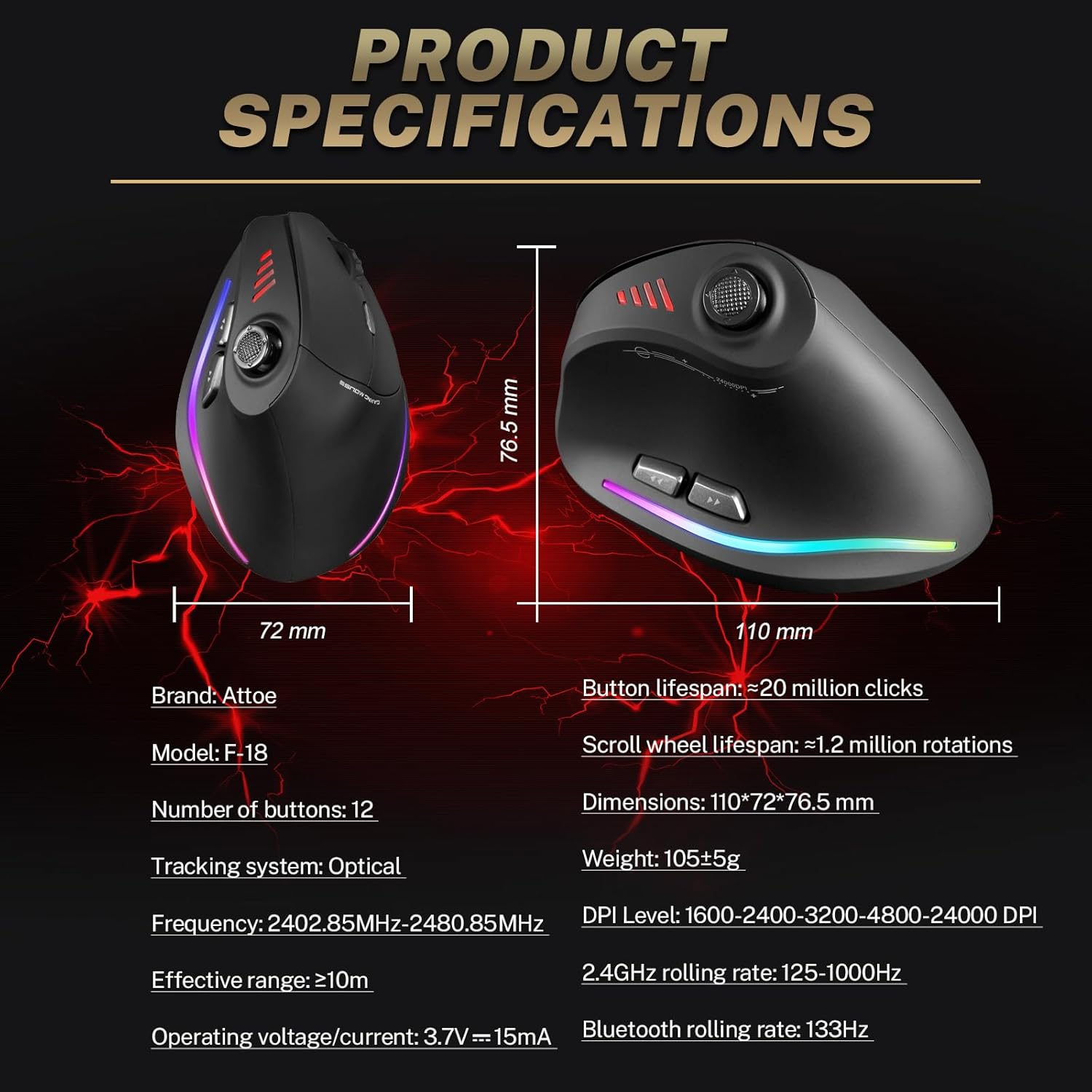
Image 7.1: Diagram showing product dimensions and key specifications.
8. Záruka a podpora
For warranty information or technical support, please refer to the documentation included with your product or visit the official Attoe website. If you require further assistance, contact Attoe customer service.