
1. Úvod
This manual provides instructions for the setup, operation, and maintenance of your Retroid Pocket Classic handheld gaming console. The Retroid Pocket Classic is a portable Android-based gaming device featuring a 3.92-inch OLED touchscreen, designed for a versatile gaming experience.

Image 1.1: Retroid Pocket Classic consoles in white and yellow.
2. Čo je v krabici
Overte, či sú v balení všetky položky:
- Retroid Pocket Classic Gaming Console
- Nabíjací kábel (USB-C)
- Používateľská príručka (tento dokument)
3. Zariadenie sa skončiloview
Familiarize yourself with the physical components and controls of your Retroid Pocket Classic.
3.1 Predné View

Obrázok 3.1: Predná strana view of the Retroid Pocket Classic.
- 3.92-inch OLED Touchscreen: The primary display for all operations and gaming.
- D-Pad: Directional input for navigation and gameplay.
- Akčné tlačidlá: (A, B, X, Y or similar layout) for in-game actions.
- Tlačidlá Štart/Výber: For game and system functions.
- Mriežky reproduktorov: Zvukový výstup.
3.2 Top and Back View

Obrázok 3.2: Hore view showing shoulder buttons and ports.
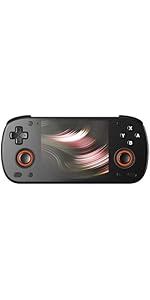
Image 3.3: Curved back design and trigger buttons.
- Ramenné gombíky (L1, R1): Nachádza sa na hornom okraji.
- Spúšťacie tlačidlá (L2, R2): Located on the back, below the shoulder buttons.
- Port USB-C: Na nabíjanie a prenos dát.
- 3.5 mm audio jack: Na pripojenie slúchadiel.
- Slot na kartu Micro SD: Pre rozšírenie úložného priestoru.
- Tlačidlo napájania: Zapnutie/vypnutie zariadenia alebo jeho prepnutie do režimu spánku.
- Tlačidlá hlasitosti: Na nastavenie zvukového výstupu.
3.3 Internal Components (Cooling)

Image 3.4: Integrated active cooling system.
The Retroid Pocket Classic features an integrated active cooling system designed to maintain optimal performance and manage heat during extended use.
4. Nastavenie
4.1 Počiatočné nabíjanie
Before first use, fully charge the device. Connect the provided USB-C charging cable to the console's USB-C port and the other end to a compatible USB power adapter (not included). The device has a 5000mAh battery.
4.2 Zapnutie/vypnutie
- Zapnutie: Stlačte a podržte tlačidlo napájania, kým sa obrazovka nerozsvieti.
- Vypnutie: Stlačte a podržte tlačidlo napájania a potom z možností na obrazovke vyberte možnosť „Vypnúť“.
- Na spanie/prebudenie: Krátko stlačte tlačidlo napájania.
4.3 Wi-Fi pripojenie
To access online features and download applications, connect to a Wi-Fi network:
- Prejsť na Nastavenia.
- Vyberte Sieť a internet.
- Klepnite Wi-Fi a zapnite ho.
- Vyberte požadovanú sieť zo zoznamu a v prípade výzvy zadajte heslo.
4.4 Nastavenie účtu Google
The Retroid Pocket Classic runs Android 14 and supports the Google Play Store. To download apps and games, you will need to sign in with a Google account during the initial setup process or later via the Settings menu.
4.5 Inštalácia karty Micro SD
To expand the device's storage (128GB internal), insert a Micro SD card into the designated slot. Ensure the card is inserted correctly until it clicks into place. The device supports various Micro SD card capacities.
5. Návod na obsluhu
5.1 Navigácia v rozhraní systému Android
The device operates on Android 14. Use the touchscreen for navigation, tapping icons to open applications, swiping to scroll, and using gestures for system controls. The D-pad and action buttons can also be used for navigation within compatible applications and games.
5.2 Downloading and Installing Applications
Applications and games can be downloaded from the Google Play Store. Open the Play Store app, search for your desired content, and follow the on-screen prompts to download and install.
Note: The Retroid Pocket Classic does not come with preloaded games. Users are responsible for acquiring and installing their own game content.
5.3 Správa úložiska
Komu view and manage internal and external storage, go to Nastavenia > Úložisko. Here you can see storage usage and manage files. For optimal performance, ensure sufficient free space is available.
5.4 Pripojenie Bluetooth
The device supports Bluetooth 5.1 for connecting wireless accessories such as headphones or external controllers.
- Prejsť na Nastavenia.
- Vyberte Pripojené zariadenia.
- Klepnite Spárovať nové zariadenie and select your accessory from the list.
6. Údržba
6.1 Čistenie zariadenia
Use a soft, dry, lint-free cloth to clean the device's exterior. For the screen, a screen cleaner specifically designed for electronics can be used. Avoid using harsh chemicals or abrasive materials.
6.2 Starostlivosť o batérie
Ak chcete predĺžiť životnosť batérie:
- Vyhnite sa extrémnym teplotám.
- Batériu často úplne nevybíjajte.
- Ak zariadenie dlhší čas nepoužívate, skladujte ho čiastočne nabité.
6.3 Aktualizácie softvéru
Pravidelne kontrolujte a inštalujte aktualizácie systému, aby ste zabezpečili optimálny výkon a zabezpečenie. Prejdite na Nastavenia > Systém > Aktualizácia systému aby ste skontrolovali dostupné aktualizácie.
7. Riešenie problémov
7.1 Zariadenie sa nezapína
- Uistite sa, že zariadenie je dostatočne nabité. Pripojte ho k zdroju napájania aspoň na 30 minút.
- Skúste podržať tlačidlo napájania 10-15 sekúnd, aby ste vynútili reštart.
7.2 Problémy s pripojením k Wi-Fi
- Overte, či je v Nastaveniach povolená funkcia Wi-Fi.
- Reštartujte svoj Wi-Fi router.
- Forget the network and reconnect, ensuring the password is correct.
7.3 Pády alebo zamŕzanie aplikácií
- Zatvorte a znova otvorte aplikáciu.
- Vymažte vyrovnávaciu pamäť a údaje aplikácie prostredníctvom Nastavenia > Aplikácie > [Názov aplikácie] > Úložisko a vyrovnávacia pamäť.
- Uistite sa, že aplikácia je aktualizovaná na najnovšiu verziu.
- Reštartujte zariadenie.
7.4 Obrazovka nereaguje
- Reštartujte zariadenie podržaním tlačidla napájania.
- Uistite sa, že obrazovka je čistá a bez nečistôt.
8. Špecifikácie

Image 8.1: Retroid Pocket Classic detailed specifications.
| Funkcia | Detail |
|---|---|
| Názov modelu | RP CLASSIC |
| Procesor | G1 Gen2 (8-Core Kryo CPU, 2 Performance Cores, 6 Efficiency Cores) |
| GPU | Adreno A12 |
| RAM | 6GB LPDDR4x @2133M |
| Skladovanie | 128GB EMMC 5.1 (expandable via Micro SD card) |
| Obrazovka | 3.92-inch AMOLED, 1240x1080 @60fps |
| Operačný systém | Android 14 |
| Wi-Fi | Wi-Fi 5 |
| Bluetooth | Bluetooth 5.1 |
| Rozhranie | USB-C / 3.5mm Audio Jack / TF Card Slot |
| Video výstup | N/A |
| Batéria | 5000 mAh |
| Rýchlosť nabíjania | 27 wattov |
| Rozmery | 138 x 89.8 x 26 mm (5.43 x 3.53 x 1 palca) |
| Hmotnosť | 223 g (7.9 uncí) |
9. Záruka a podpora
For warranty information and technical support, please refer to the official Retroid Pocket webalebo kontaktujte ich zákaznícky servis. Uschovajte si doklad o kúpe pre prípad reklamácie.
Online resources and community forums may also provide helpful information and troubleshooting tips.