
1. Dôležité bezpečnostné informácie
Pred použitím projektora si prečítajte všetky bezpečnostné pokyny. Uschovajte si tento návod pre budúce použitie.
- Neblokujte vetracie otvory. Zabezpečte dostatočný priestor okolo projektora pre správne prúdenie vzduchu.
- Zabráňte priamemu vystaveniu sa svetlu z objektívu projektora.
- Neumiestňujte projektor do blízkosti zdrojov tepla ani na priame slnečné svetlo.
- Používajte iba napájací adaptér dodaný so zariadením.
- Nepokúšajte sa projektor otvárať ani opravovať sami. Všetky servisné práce zverte kvalifikovanému personálu.
- Projektor chráňte pred vodou alebo inými tekutinami.
2. Obsah balenia
Overte, či sú v balení všetky položky:
- Aurzen Roku TV Smart Projector (D1R Cube)
- Napájací kábel
- Remote Control (2 AAA Batteries Required, not included)
- Používateľská príručka (tento dokument)
3. Produkt skončilview
The Aurzen D1R Cube is a compact smart projector featuring built-in Roku TV for integrated streaming. It offers 1080P Full HD resolution, Dolby Audio, and a sealed optical engine for enhanced durability and clarity.
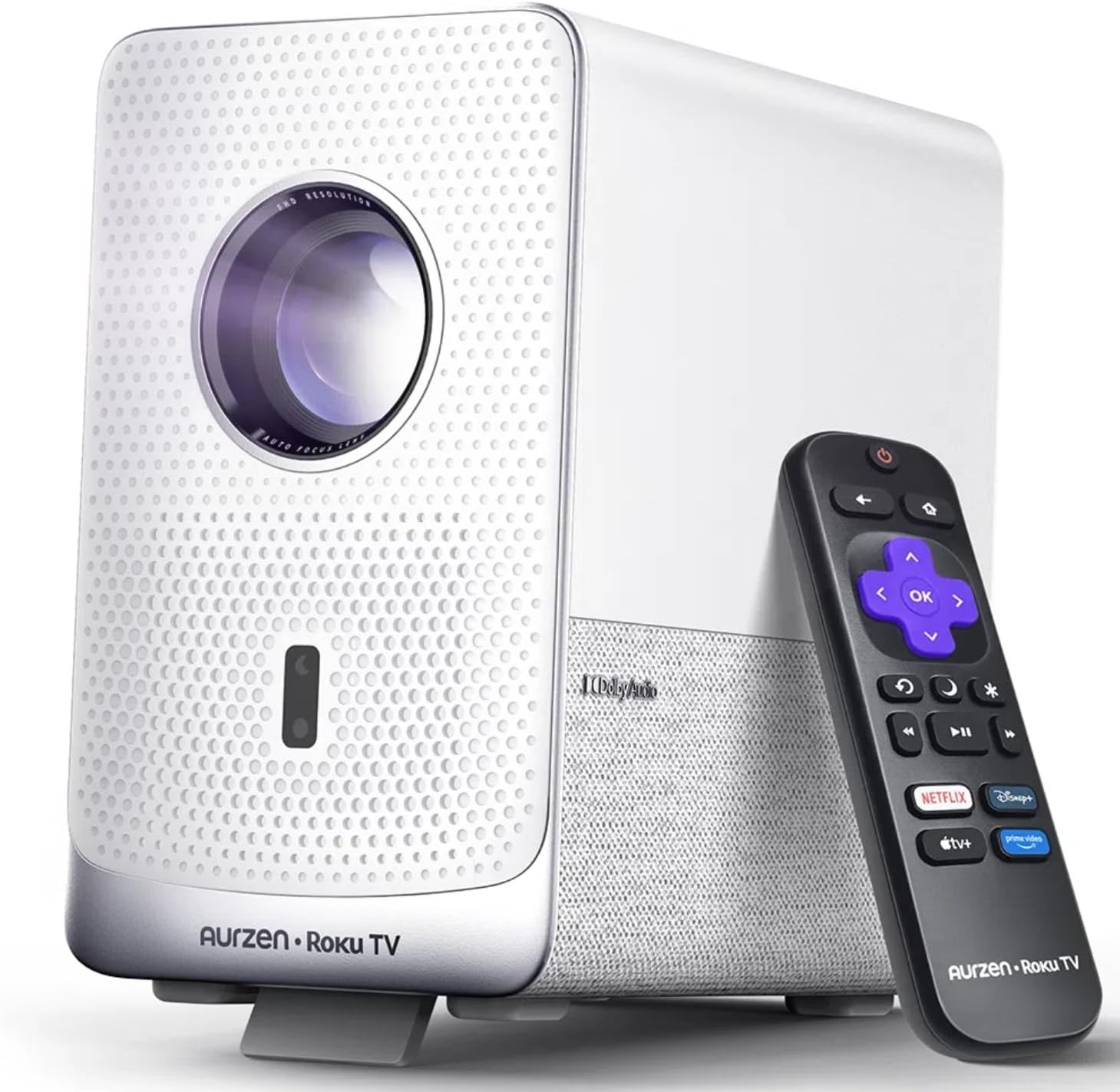
Image: The Aurzen D1R Cube Smart Projector shown with its remote control. The projector is white with a textured front panel and a visible lens.
Kľúčové vlastnosti:
- Roku TV Built-in: Priamy prístup k populárnym streamovacím službám.
- Uzavretý optický motor: Protects against dust, maintaining image quality and extending lifespan.
- 1080P FHD Resolution: Delivers crisp and clear visuals.
- Dolby Audio: Provides enhanced sound experience.
- Automatické zaostrovanie a korekcia lichobežníkového skreslenia: Automatické nastavenie obrazu pre rýchle nastavenie.
- Dual-band WiFi & Bluetooth 5.2: For seamless connectivity.
- Apple AirPlay: Effortless content sharing from Apple devices.
- Kompatibilita inteligentnej domácnosti: Works with Apple HomeKit, Siri, Alexa, and Google Assistant.

Image: An internal diagram illustrating the sealed optical engine of the Aurzen D1R Cube projector, highlighting its dust-proof design.
4. Nastavenie
4.1 Počiatočné umiestnenie
Projektor umiestnite na stabilný, rovný povrch. Pre optimálne viewing, position it directly in front of your projection surface (wall or screen). The projector features automatic focus and keystone correction to adjust the image, but a relatively straight angle is recommended.

Image: A visual representation of the projector's auto-focus and auto-keystone correction features, showing how the image automatically adjusts to create a perfect rectangular display.
4.2 Pripojenie napájania
- Pripojte napájací kábel do vstupného portu napájania projektora.
- Zapojte druhý koniec napájacieho kábla do vhodnej elektrickej zásuvky.
- The projector will power on automatically or can be turned on using the power button on the device or remote.
4.3 Nastavenie diaľkového ovládania
Insert two AAA batteries (not included) into the remote control. Ensure correct polarity. The remote is pre-paired with the projector.
4.4 Počiatočné nastavenie televízora Roku
Upon first power-on, follow the on-screen instructions to set up your Roku TV. This includes:
- Výber jazyka.
- Connecting to a Wi-Fi network (a stable internet connection is required).
- Activating your Roku account. If you do not have one, you will be prompted to create a free account.
- Installing desired streaming channels.
5. Návod na obsluhu
5.1 Zapnutie/vypnutie
Stlačením tlačidla napájania na projektore alebo diaľkovom ovládači zariadenie zapnete alebo vypnete.
5.2 Navigácia na domovskej obrazovke Roku
Use the directional pad and OK button on the remote to navigate the Roku home screen. Access streaming channels, search for content, and adjust settings.

Image: A screenshot of the Roku TV home screen, displaying various streaming app icons and navigation options.
5.3 Streamovacie aplikácie
The Roku TV platform provides access to a wide range of streaming applications such as Netflix, Prime Video, Disney+, Hulu, YouTube, and more. Select an app from the home screen to begin streaming.

Obrázok: Grafická ukážkaasing various popular streaming service logos available on the Roku TV platform, including Netflix, Disney+, and Hulu.
5.4 Pripojenie externých zariadení
The projector includes HDMI and USB ports for connecting external devices.
- HDMI: Connect gaming consoles, Blu-ray players, or other HDMI-enabled devices. Select the corresponding HDMI input from the Roku TV menu.
- USB: Prehrať médiá files (photos, videos, music) from a USB storage device.
5.5 Pripojenie Bluetooth
Connect Bluetooth headphones or speakers for an enhanced audio experience.
- Go to the Roku TV settings menu.
- Select 'Remotes & devices' then 'Bluetooth devices'.
- Prepnite svoje zariadenie Bluetooth do režimu párovania.
- Vyberte zariadenie zo zoznamu na projekčnej ploche, ktoré chcete spárovať.

Image: A diagram illustrating the Bluetooth connectivity of the Aurzen D1R Cube projector, showing it connecting to various external audio devices.
5.6 Apple AirPlay
Effortlessly share content from your Apple devices (iPhone, iPad, Mac) to the projector using Apple AirPlay.
- Ensure your Apple device and the projector are connected to the same Wi-Fi network.
- On your Apple device, open the content you wish to share (e.g., photos, videos).
- Klepnite na ikonu AirPlay (usually a rectangle with an upward-pointing arrow).
- Select your Aurzen D1R Cube projector from the list of available devices.

Image: A family watching content projected from an Apple device onto a large screen via Apple AirPlay using the Aurzen D1R Cube projector.
5.7 Hlasové ovládanie a integrácia inteligentnej domácnosti
The projector supports voice control via the Roku mobile app and is compatible with Apple HomeKit, Siri, Alexa, and Google Assistant for broader smart home integration.
- Mobilná aplikácia Roku: Download the Roku mobile app to use voice commands, type easily, and control your projector from your smartphone.
- Smart Home Assistants: Link your Roku account to your preferred smart home ecosystem (Apple Home, Amazon Alexa, Google Home) to control the projector with voice commands.
6. Údržba
6.1 Sealed Optical Engine
The Aurzen D1R Cube features a sealed optical engine designed to prevent dust accumulation on internal components. This reduces the need for routine internal cleaning and helps maintain consistent image quality over time.

Image: A side-by-side comparison showing the difference in dust accumulation between a sealed optical engine (left) and an open optical engine (right) after a period of use.
6.2 Všeobecné čistenie
- Exteriér: Wipe the exterior of the projector with a soft, dry cloth. Do not use abrasive cleaners or solvents.
- Objektív: Gently clean the projector lens with a lens cleaning cloth or specialized lens cleaning solution. Avoid touching the lens with your fingers.
- Vetranie: Ensure ventilation openings are clear of dust and debris. Use a soft brush or compressed air to gently clean them if necessary.
6.3 Skladovanie
When not in use for extended periods, store the projector in a cool, dry place, away from direct sunlight and extreme temperatures. Consider using a protective cover or case to prevent dust accumulation.
7. Riešenie problémov
If you encounter issues with your Aurzen D1R Cube projector, refer to the following common solutions:
| Problém | Možné riešenie |
|---|---|
| Žiadna sila | Ensure the power cord is securely connected to both the projector and the electrical outlet. Test the outlet with another device. |
| Žiadny obrázok | Check if the projector is powered on. Verify the input source (HDMI, USB) is correctly selected. Ensure the lens cap is removed. |
| Rozmazaný obrázok | The projector has auto-focus. If the image remains blurry, try repositioning the projector or restarting it to trigger auto-focus again. Ensure the lens is clean. |
| Žiadny zvuk | Check the volume level on the projector and any connected external audio devices. Ensure Bluetooth audio is correctly paired or external speakers are properly connected. |
| Problémy s pripojením k Wi-Fi | Ensure your Wi-Fi router is working. Restart the projector and your router. Verify the Wi-Fi password is correct in the Roku TV settings. |
| Diaľkové nereaguje | Replace the AAA batteries in the remote control. Ensure there are no obstructions between the remote and the projector. |
For further assistance, please refer to the online support resources or contact Aurzen customer service.
8. Špecifikácie
Detailed technical specifications for the Aurzen D1R Cube Smart Projector:
| Funkcia | Špecifikácia |
|---|---|
| Značka | Aurzen |
| Model | D1R Cube |
| Maximálne rozlíšenie displeja | 1920 x 1080 (1080P FHD) |
| Technológia pripojenia | WiFi (Dual-band 2.4G/5G), Bluetooth 5.2, HDMI, USB, Audio |
| Špeciálne funkcie | Roku TV Smart Projector, Sealed Optical Engine, Dolby Audio, Apple AirPlay, Smart Home Compatibility |
| Hmotnosť položky | 5.68 libry |
| Rozmery produktu | 7.42 x 7 x 7.83 palca |
| Farba | Biela |
9. Záruka a podpora
9.1 Záruka na výrobok
Aurzen products are covered by a manufacturer's warranty. Please refer to the warranty card included with your product or visit the official Aurzen webkonkrétne záručné podmienky nájdete na stránke.
9.2 Zákaznícka podpora
For technical support, troubleshooting assistance, or warranty claims, please contact Aurzen customer service through their official channels. You can find more information and contact options on the Aurzen Brand Store on Amazon.