
Úvod
Welcome to the user manual for your new HP OMEN 16-ae0002TX Gaming Laptop. This document provides essential information to help you set up, operate, maintain, and troubleshoot your device. Designed for high-performance gaming and demanding tasks, this laptop features a 14th Gen Intel Core i7 processor, NVIDIA GeForce RTX 4060 graphics, 16GB DDR5 RAM, and a 1TB SSD, all presented on a vibrant 16.1-inch FHD 165Hz display.
1. Úvodné nastavenie
1.1 Vybalenie notebooku
Opatrne vyberte všetky komponenty z obalu. Uistite sa, že sú prítomné nasledujúce položky:
- HP OMEN 16-ae0002TX Gaming Laptop
- Napájací adaptér
- Napájací kábel
- Používateľská príručka (tento dokument)
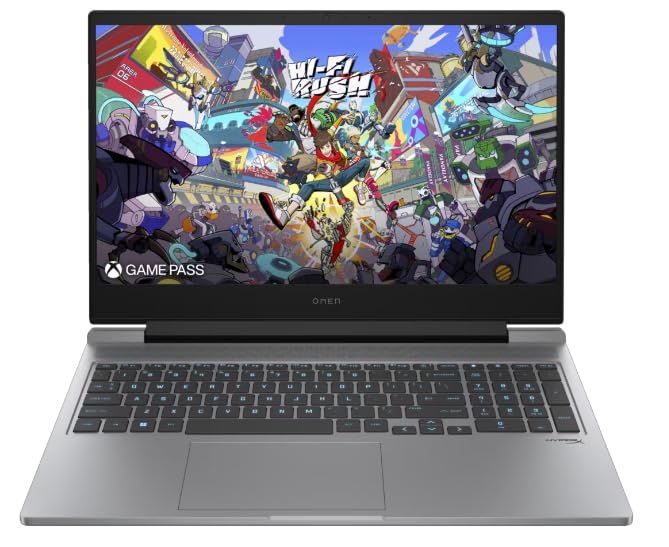
Figure 1: HP OMEN 16-ae0002TX Gaming Laptop overview.
1.2 Pripojenie napájacieho adaptéra
- Pripojte napájací kábel k napájaciemu adaptéru.
- Zapojte napájací adaptér do elektrickej zásuvky.
- Connect the adapter's output plug to the power port on your laptop.
Pred prvým použitím sa odporúča notebook úplne nabiť.
1.3 Prvé spustenie a inštalácia systému Windows
Press the power button located on the laptop chassis. The laptop will boot up, and you will be guided through the Windows 11 Home setup process. Follow the on-screen instructions to configure your operating system, network settings, and user account.
1.4 Pripojenie externých zariadení
Your HP OMEN laptop provides various ports for connecting external devices:
- USB porty: Pre myši, klávesnice, externé úložiská a ďalšie USB zariadenia.
- Port HDMI: Na pripojenie k externým displejom alebo televízorom.
- Zvukový konektor: Pre slúchadlá alebo externé reproduktory.
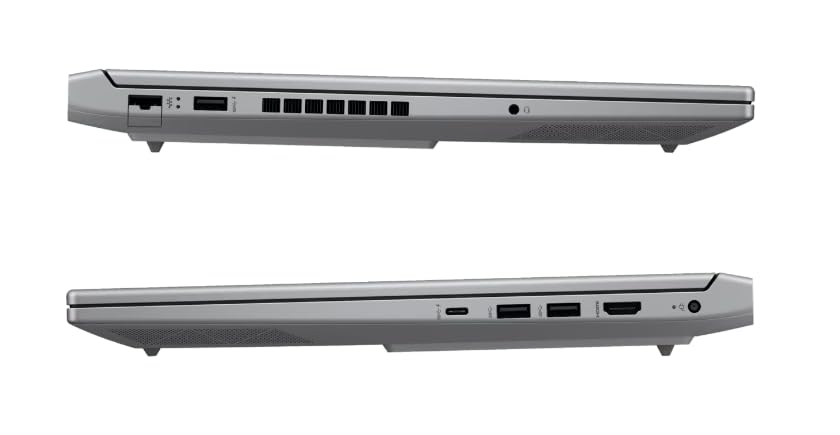
Obrázok 2: Strana view illustrating available ports.
2. Obsluha notebooku
2.1 Zapnutie/vypnutie a režim spánku
- Zapnutie: Stlačte tlačidlo napájania.
- Vypnúť: Kliknite na tlačidlo Štart v systéme Windows a potom vyberte položky Napájanie > Vypnúť.
- Režim spánku: Zatvorte veko alebo v ponuke Štart vyberte položky Napájanie > Spánok.
2.2 Klávesnica a touchpad
The laptop features a 1-zone RGB backlit full-size keyboard with HyperX tactile feedback for an enhanced gaming and typing experience. The integrated touchpad supports multi-touch gestures for navigation.
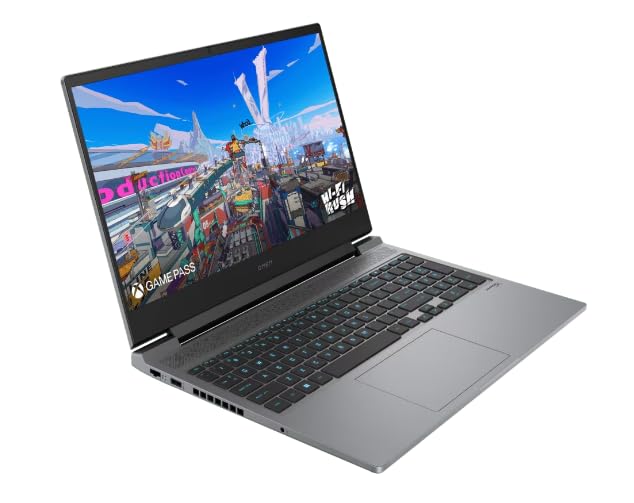
Obrázok 3: Rozloženie klávesnice a touchpadu.
2.3 Funkcie displeja
The 16.1-inch FHD (1920 x 1080) IPS display offers a 165Hz refresh rate and 7ms response time, providing smooth and responsive visuals for gaming and multimedia. Adjust brightness and display settings through Windows display options.
2.4 Sieťové a bezdrôtové pripojenie
- Wi-Fi: Pripojte sa k bezdrôtovým sieťam prostredníctvom sieťových nastavení systému Windows.
- Bluetooth: Pair Bluetooth-enabled devices such as headphones, mice, or game controllers.
2.5 HP True Vision 1080p FHD Camera
The integrated 1080p FHD webcam is suitable for video calls, online meetings, and streaming. Ensure proper lighting for optimal image quality.
3. Údržba a starostlivosť
3.1 Všeobecné čistenie
- Obrazovka: Jemne používajte mäkkú handričku, ktorá nepúšťa vlákna dampvodou alebo čistiacim prostriedkom na obrazovky. Vyhnite sa agresívnym chemikáliám.
- Klávesnica a šasi: Use a soft cloth. For dust, use compressed air.
- Pred čistením sa uistite, že je notebook vypnutý a odpojený od siete.
3.2 Starostlivosť o batérie
The laptop is equipped with a Lithium Ion battery. To maximize battery lifespan:
- Vyhnite sa extrémnym teplotám.
- Nenechávajte batériu často úplne vybiť.
- Ak notebook skladujete dlhší čas, uistite sa, že je batéria nabitá približne na 50 %.
3.3 Aktualizácie softvéru
Regularly update your Windows operating system, drivers, and HP software to ensure optimal performance, security, and compatibility. These updates often include performance enhancements and bug fixes.
4. Riešenie bežných problémov
Táto časť sa zaoberá bežnými problémami, s ktorými sa môžete stretnúť. V prípade zložitejších problémov sa obráťte na podporu spoločnosti HP. webstránky.
4.1 Problémy s napájaním
- Notebook sa nezapína: Ensure the power adapter is securely connected to both the laptop and a working power outlet. Check if the power adapter's indicator light is on.
- Batéria sa nenabíja: Verify the power adapter connection. Try a different outlet.
4.2 Problémy so zobrazením
- Žiadny obraz na obrazovke: Uistite sa, že je notebook zapnutý. Skúste pripojiť externý monitor a skontrolovať, či problém nie je v displeji notebooku.
- Blikajúci alebo skreslený obraz: Aktualizujte ovládače grafickej karty. Upravte obnovovaciu frekvenciu displeja v nastaveniach systému Windows.
4.3 Problémy s pripojením
- Nepripája sa k sieti Wi-Fi: Skontrolujte, či je v nastaveniach systému Windows povolená sieť Wi-Fi. Reštartujte smerovač a notebook.
- Zariadenie Bluetooth sa nespáruje: Uistite sa, že zariadenie Bluetooth je v režime párovania a v dosahu. Skontrolujte nastavenia Bluetooth na vašom notebooku.
5. Špecifikácie produktu
| Funkcia | Špecifikácia |
|---|---|
| Značka | HP |
| Názov modelu | HP laptopOMEN (ae0002tx) |
| Procesor | 14th Gen Intel® Core™ i7-14650HX (up to 5.2 GHz) |
| Pamäť RAM | 16 GB DDR5 (Max 32 GB) |
| Skladovanie | 1 TB SSD (jednotka SSD) |
| Grafická karta | NVIDIA GeForce RTX 4060 (8 GB vyhradenej pamäte GDDR6) |
| Displej | 16.1-inch FHD (1920 x 1080) IPS, 165Hz, 7ms, 300 nits |
| Operačný systém | Windows 11 Home |
| Klávesnica | 1-zone RGB Backlit, HyperX tactile feedback |
| Webvačka | HP True Vision 1080p FHD |
| Konektivita | Wi-Fi, Bluetooth |
| Porty | USB (Total: 1), HDMI (Total: 1) |
| Dimensions (L x W x Thickness) | 30D x 25Š x 6 centimetrov |
| Hmotnosť položky | 1.9 kg |
| Typ batérie | Lithium Ion (2.6 Watt Hours) |
6. Informácie o záruke
Your HP OMEN 16-ae0002TX Gaming Laptop comes with an onsite warranty. Please retain your proof of purchase for warranty claims. For detailed terms and conditions, refer to the warranty card included with your product or visit the official HP support webstránky.
7. Zákaznícka podpora
For technical assistance, service, or further inquiries, please contact HP customer support:
- Výrobca / dovozca: HP India Sales Pvt. Ltd., 24 Salarpuria Arena, Hosur Main Road, Adugodi, Bangalore-560030
- Online podpora: Navštívte úradníka Podpora HP Webstránky pre ovládače, manuály a príručky na riešenie problémov.