
Úvod
Thank you for choosing the SuperRC M23 Mini RC Drone. This manual provides essential information for the safe operation, setup, maintenance, and troubleshooting of your drone. Please read this manual thoroughly before operating the drone to ensure proper function and to avoid damage or injury. This drone is designed for adult beginners and features a lightweight, portable design with an HD camera and intelligent flight functions.
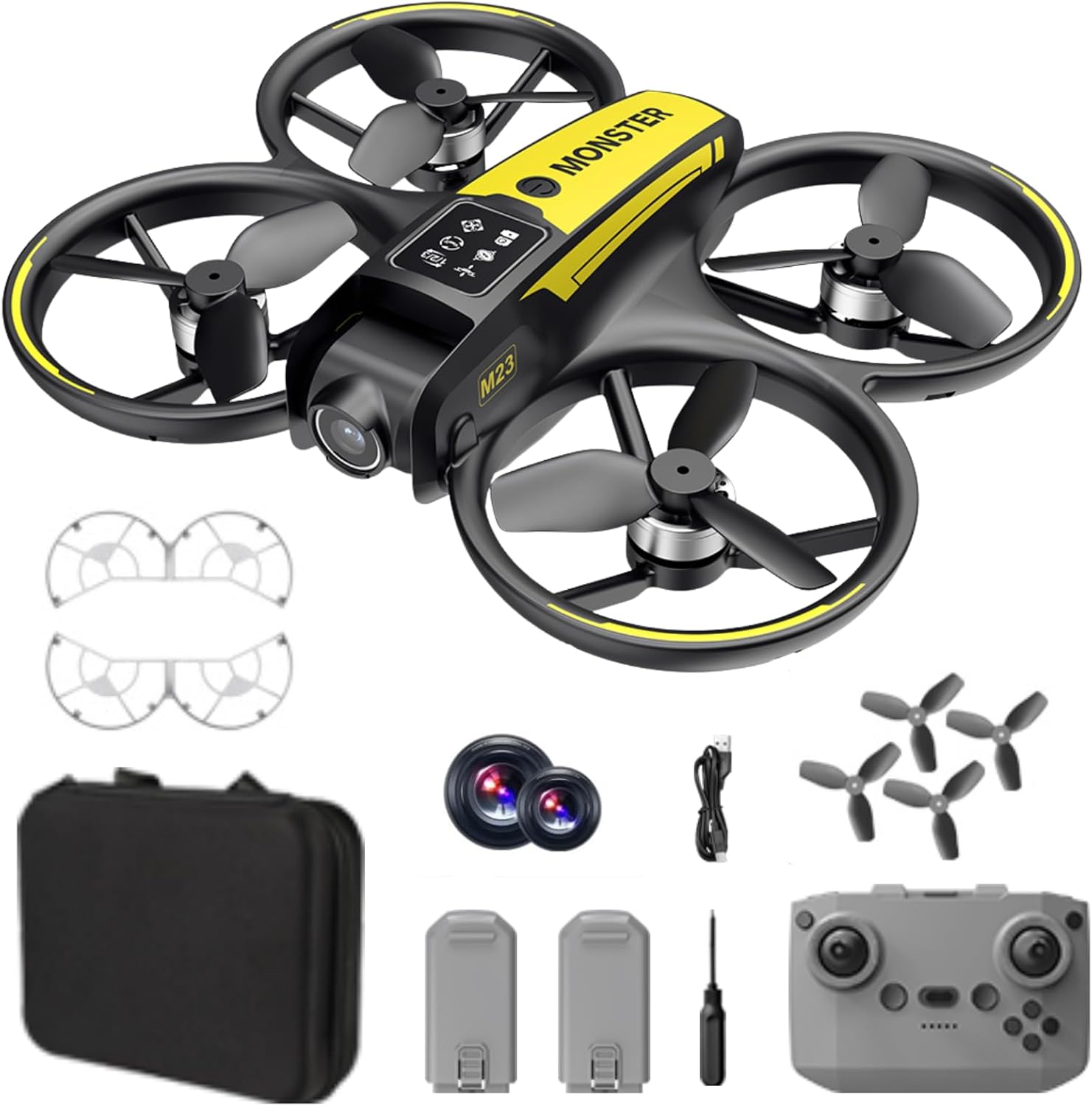
Čo je v krabici
The SuperRC M23 drone package includes the following components:
- Drone M23
- Diaľkový ovládač
- 2 x 3.7 V 1050 mAh nabíjateľné batérie
- 4 x náhradné vrtule
- 2 x Ochranné kryty vrtule
- Pamäťová karta
- Čítačka kariet
- Skrutkovač
- USB nabíjací kábel
- Skladovacie vrecko
- Používateľská príručka (tento dokument)

Koniec produktuview
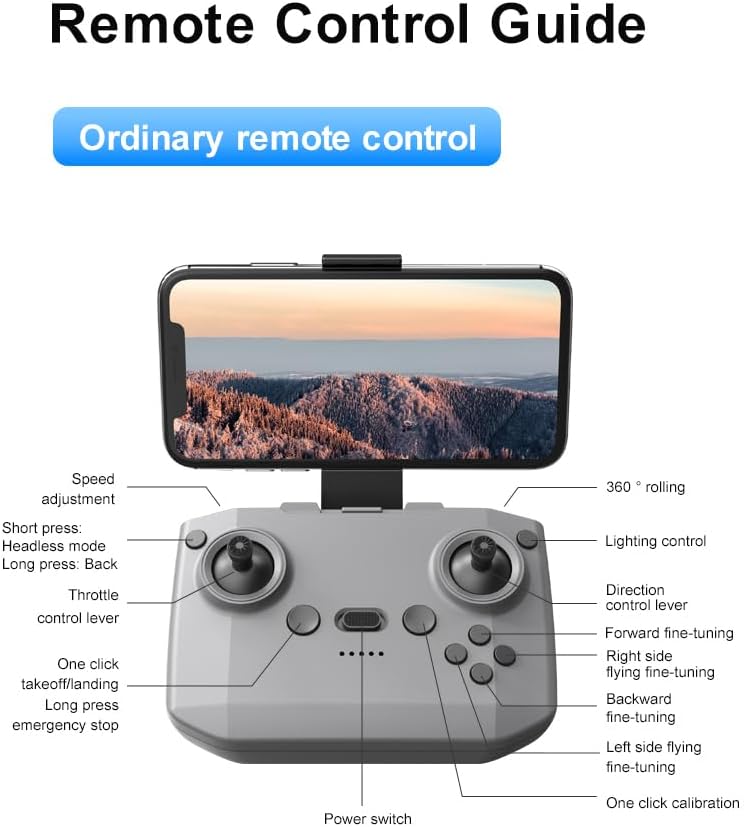
Rozloženie diaľkového ovládača
Familiarize yourself with the remote control buttons and their functions before flight.
Nastavenie
1. Inštalácia batérie
- Uistite sa, že dron a diaľkové ovládanie sú vypnuté.
- Nájdite priehradku na batérie na drone.
- Insert a charged 3.7V 1050mAh battery into the compartment until it clicks securely into place.
- For the remote control, open the battery cover and insert the required batteries (not specified in product data, assume standard AA/AAA, user should refer to physical manual for exact type).
2. Inštalácia vrtule
Dron sa dodáva s predinštalovanými vrtuľami. Ak je potrebná výmena:
- Identify the 'A' and 'B' markings on the propellers and the corresponding motor arms.
- Attach 'A' propellers to 'A' motor shafts and 'B' propellers to 'B' motor shafts. Ensure they are firmly secured.
3. Inštalácia krytu vrtule
For added safety, attach the propeller guards:
- Align each propeller guard with the designated slots on the drone's motor arms.
- Gently push until they snap into place.
4. Nabíjanie
Charge the drone batteries using the provided USB charging cable.
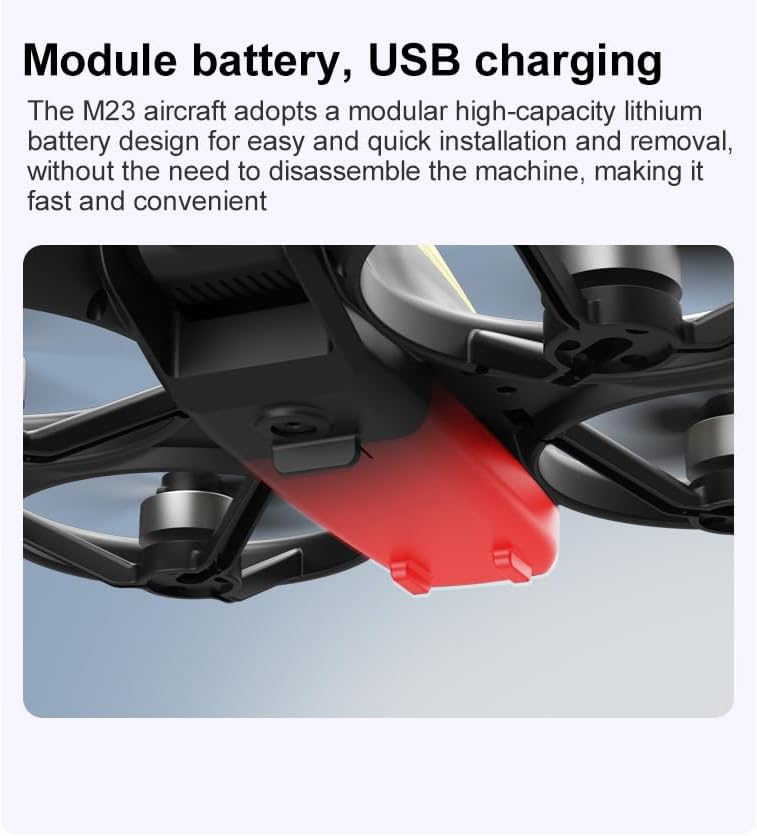
- Pripojte nabíjací kábel USB k batérii dronu.
- Plug the other end into a USB power source (e.g., computer, USB wall adapter).
- The indicator light on the cable will show charging status (refer to physical manual for specific light indications).
- Charging time is approximately 60-90 minutes for a full charge.
Návod na obsluhu
Predletový kontrolný zoznam
- Uistite sa, že batérie dronu a diaľkového ovládača sú úplne nabité.
- Vrtule sú správne nainštalované a zaistené.
- Propeller guards are attached (recommended for beginners).
- Vyberte si otvorený a čistý priestor bez prekážok, ľudí a zvierat.
- Check local drone regulations before flying.
Základné letové operácie
The following video demonstrates key flight features including one-key takeoff, optical flow positioning, 360-degree roll, and speed switching.
One-Key Takeoff and Landing
- Vzlet: Place the drone on a flat surface. Press the One-Key Takeoff button on the remote control. The drone will automatically ascend and hover at a stable altitude.
- Pristátie: Press the One-Key Landing button. The drone will slowly descend and land automatically.
Flight Modes and Features
- Bezhlavý režim: Press the Headless Mode button. In this mode, the drone's orientation is relative to the pilot, making it easier to control without worrying about the drone's front direction.
- Nastavenie rýchlosti: Use the speed adjustment button (or switch) on the remote control to cycle through low, medium, and high speeds. This allows for adaptable flight control based on skill level and environment.
- Uhol 360°: Press the 360° Roll button and then move the right joystick in any direction to perform an aerial flip. Ensure sufficient altitude before attempting.
- Optické polohovanie toku: The drone utilizes a bottom camera for optical flow positioning, which helps maintain stable hovering, especially indoors or in areas with good ground texture. This feature assists in precise altitude hold.
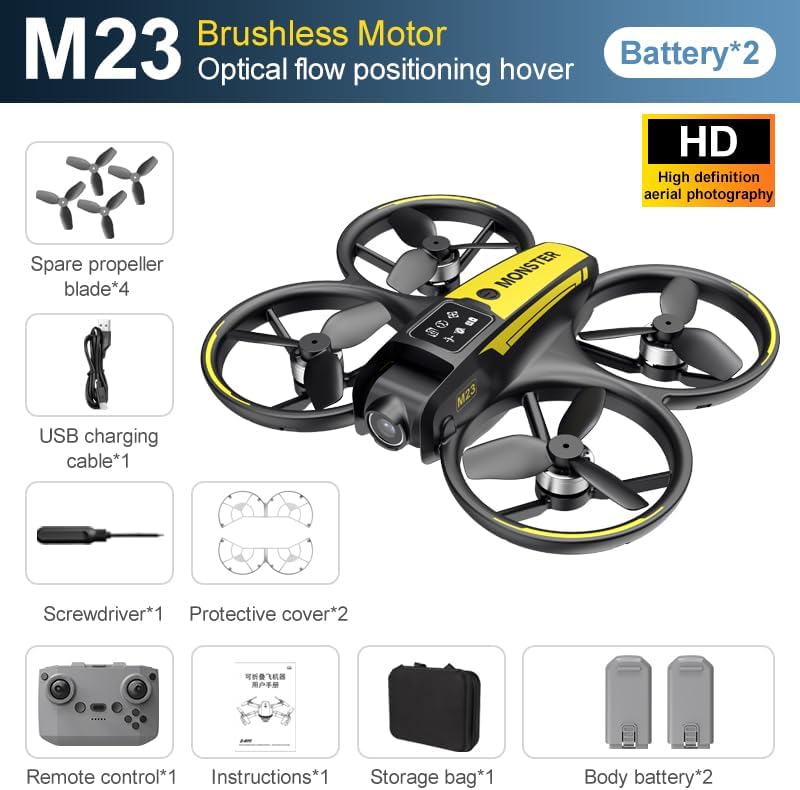
- Trajektória letu: Through the mobile application, you can draw a desired flight path on your screen. The drone will then follow this trajectory automatically.

Prevádzka fotoaparátu
The M23 drone is equipped with an HD camera with a 90-degree adjustable lens for capturing photos and videos.

- Nahrávanie fotografií/videí: Use the dedicated buttons on the remote control or the mobile app to start/stop video recording or take photos.
- Prenos obrazu v reálnom čase: Pripojte svoj smartfón k Wi-Fi sieti dronu, aby ste view foo v reálnom časetage from the drone's camera on your device.
Údržba
Upratovanie
- Telo dronu pravidelne čistite mäkkou, suchou handričkou.
- Ensure propellers are free from dust, dirt, or debris.
- Clean the camera lens gently with a microfiber cloth to maintain image quality.
Skladovanie
- Store the drone and its components in the provided storage bag to protect them from dust and physical damage.
- Keep the drone in a cool, dry place, away from direct sunlight and extreme temperatures.
Starostlivosť o batérie
- Batérie neprebíjajte ani nevybíjajte.
- Ak batérie skladujete dlhší čas, nabite ich približne na 50 – 60 % ich kapacity.
- Avoid exposing batteries to high temperatures or direct sunlight.
Riešenie problémov
If you encounter issues with your SuperRC M23 drone, refer to the following common problems and solutions:
| Problém | Možná príčina | Riešenie |
|---|---|---|
| Dron nereaguje na diaľkové ovládanie | Low battery on drone or remote; Not paired correctly; Interference | Charge batteries; Re-pair drone and remote (refer to physical manual for pairing steps); Move to an area with less interference |
| Dron sa počas letu unáša | Nie je kalibrované; Rušenie vetrom; Poškodená vrtuľa | Perform calibration (refer to physical manual); Fly in calm conditions; Replace damaged propellers |
| Slabá kvalita obrazu z fotoaparátu | Dirty lens; Low light conditions; Wi-Fi interference | Clean camera lens; Fly in well-lit areas; Ensure strong Wi-Fi connection |
| Krátky čas letu | Batéria nie je úplne nabitá; Stará batéria; Agresívny let | Ensure battery is fully charged; Consider replacing old batteries; Practice smoother flight maneuvers |
Špecifikácie
Key technical specifications for the SuperRC M23 Mini RC Drone:
| Funkcia | Detail |
|---|---|
| Názov modelu | M23-Drone |
| Značka | SuperRC |
| Hmotnosť položky | 0.2 Kilograms (Under 250g) |
| Rozmery položky (D x Š x V) | 18 x 15 x 5 cm (približne 15,2 x 15,8 cm) |
| Materiál | Plastové |
| Úroveň zručností | Začiatočník |
| Vekový rozsah (popis) | Dospelý |
| Fotoaparát | HD Camera with 90° Adjustable Lens |
| Rozlíšenie snímania videa | 720p |
| Rozlíšenie výstupného videa | 720 XNUMX XNUMX pixelov |
| Formát snímania videa | MP4 |
| Podporovaný formát obrázka | JPEG |
| Technológia optických senzorov | CMOS |
| Technológia pripojenia | Wi-Fi, RF |
| Typ ovládania | Diaľkové ovládanie |
| Kapacita batérie | 1050 mAh (na batériu) |
| Zloženie článkov batérie | Lítium-ión |
| Špeciálne funkcie | Adjustable, One Button Return, One Key Rotation, Rechargeable, Speed Adjustment, Headless Mode, Optical Flow Positioning |
Záruka a podpora
SuperRC provides a standard warranty for the M23 Mini RC Drone against manufacturing defects. Please retain your proof of purchase for warranty claims.
Informácie o záruke
- The warranty period typically covers defects in materials and workmanship under normal use.
- Damage resulting from misuse, accidents, unauthorized modifications, or improper maintenance is not covered.
- For specific warranty terms and conditions, please refer to the warranty card included in your product packaging or contact SuperRC customer service.
Zákaznícka podpora
If you require further assistance, have questions, or need to report an issue, please contact SuperRC customer support through the following channels:
- Online podpora: Visit the official SuperRC webstránka s často kladenými otázkami, zdrojmi podpory a kontaktnými formulármi.
- E-mailová podpora: Refer to your product packaging or the SuperRC webstránku s e-mailovou adresou zákazníckeho servisu.
- Podpora predajcov: If purchased from a retailer, you may also contact their customer service for assistance.
When contacting support, please provide your product model (M23) and a detailed description of the issue.