
GUSTARD R30
Používateľská príručka pre plne diskrétny sieťový streamer R2R GUSTARD R30
Model: R30
Úvod
This manual provides detailed instructions for the setup, operation, and maintenance of your GUSTARD R30 Fully-Discrete R2R Network Streamer DAC. Please read this manual thoroughly before using the device to ensure optimal performance and longevity.
Zoznam balenia
Po otvorení balenia sa, prosím, uistite, že sú v ňom obsiahnuté všetky nasledujúce položky:
- GUSTARD R30 Mainframe
- Napájací kábel
- USB kábel
- Diaľkové ovládanie
- Záručný list

Predný panel je ukončenýview
The front panel of the GUSTARD R30 features essential controls and a display for real-time status and operations.
- Tlačidlo napájania: Toggles between standby and active states. The R30 can remain in standby mode when the rear power switch is ON.
- Oblasť zobrazenia: Shows the current input channel, encoding format, and sampling rate. Displays menu items when in the setup menu.
- Displej hlasitosti: Indicates the current volume level, ranging from -63.5dB to 0dB. 'FIXED' indicates bypass mode. Displays menu options during configuration.
- Tlačidlo „-“: Normally decreases volume. Cycles through options in the menu.
- Tlačidlo ozubeného kolieska: Short press switches inputs. Long press enters/exits the menu. Short press navigates items in the menu.
- Tlačidlo „+“: Normally increases volume. Cycles through options in the menu.

Nad zadným panelomview
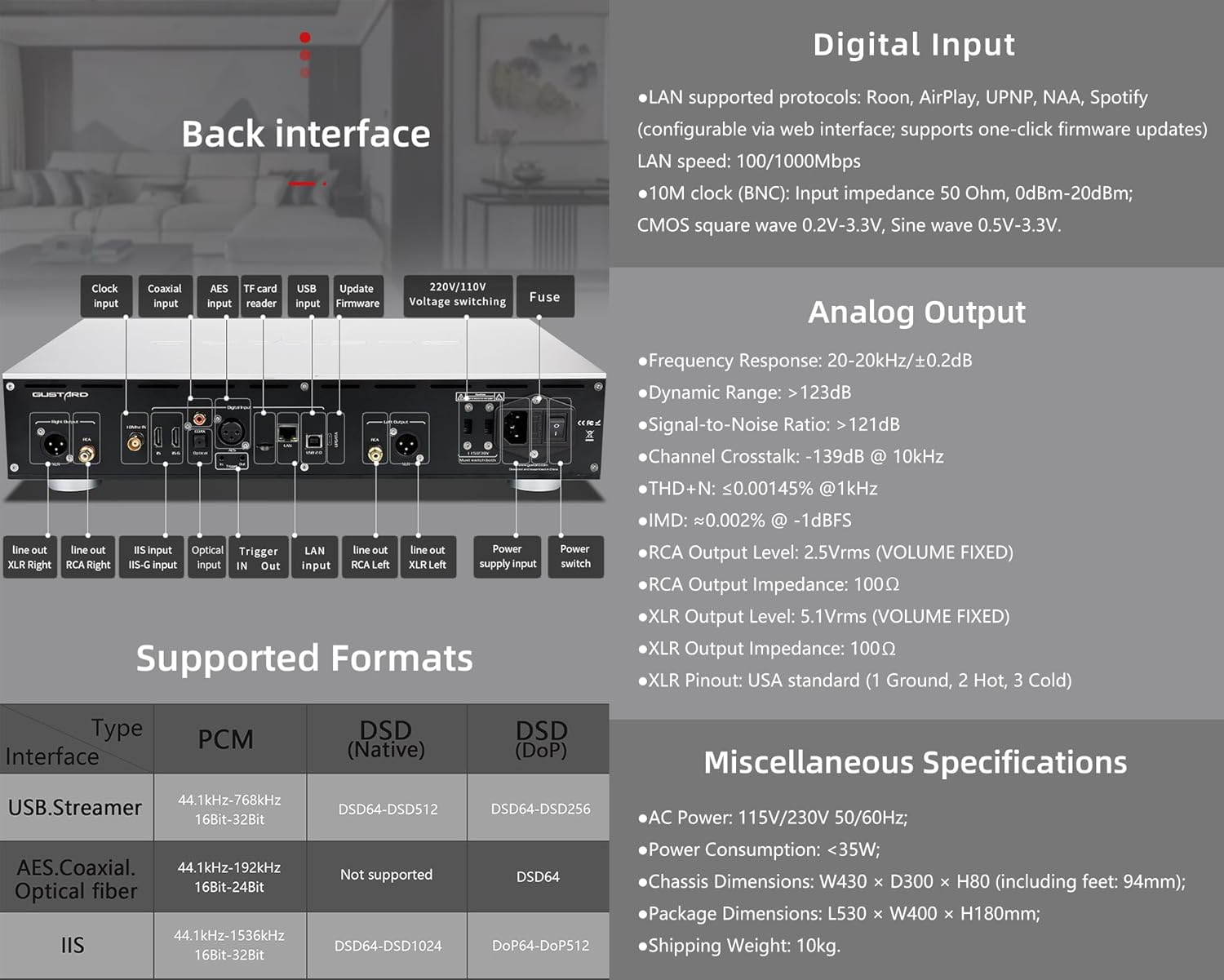
The rear panel provides various input and output connections for the GUSTARD R30.
- Vstup hodín: For external 10MHz clock synchronization.
- Koaxiálny vstup: Digitálny audio vstup.
- Vstup AES: Digitálny audio vstup.
- Vstup USB: Na pripojenie k počítaču alebo inému zdroju zvuku cez USB.
- LAN Input: For network streaming functionality.
- Čítačka kariet TF: Pre aktualizácie firmvéru.
- Aktualizácia firmvéru: USB port pre aktualizácie firmvéru.
- Vol. 220V/110V Voltage Prepínanie: Selector for power voltage.
- poistka: Napájacia poistka.
- Line Out XLR Right/Left: Balanced analog audio outputs.
- Line Out RCA Right/Left: Unbalanced analog audio outputs.
- IIS Input (IIS-G): Digital audio input with Gustard pinout.
- Optický vstup: Digitálny audio vstup.
- Spustiť vstup/výstup: For 12V trigger control.
- Vstup napájania: Pripojenie striedavého prúdu.
- Vypínač: Hlavný vypínač.
Important: Ensure both voltagprepínače sú nastavené na rovnakú hlasitosťtagpri prevádzke zariadenia s napätím 220 V/110 Vtage switch, otherwise, it may damage the internal transformer upon powering on.
Ovládacie prvky displeja a panela
The R30 utilizes a large OLED display for real-time status monitoring and functional operations. The diagram below illustrates the main interface display states.
1. OLED displej
The display shows the input channel, external clock indication, encoding format, samprýchlosť lingu a objem.
2. Input Channel Selection
R30 má 7 vstupných kanálov. Na hlavnom rozhraní každé stlačenie tlačidla Gear prepína medzi dostupnými kanálmi v tomto poradí: COAX → AES → OPT → USB → STREAMER → IIS(G) → IIS(M*).
***Note: IIS(G) is for fixed Gustard pinout configuration and cannot be adjusted. IIS(M*) supports adjustable pinout configuration.
3. Nastavenie hlasitosti
- When the main interface is displayed, pressing the "+" or "-" buttons directly adjusts the analog volume attenuation function of the passive preampživotník. Útlm sa pohybuje od 0 dB do -63.5 dB (celkový útlm 63.5 dB).
- Pressing "+" at 0dB activates Fixed Output mode (bypassing attenuation circuit), displaying 'FIXED' indicator.
- When 'FIXED' is displayed, pressing "-" first exits bypass mode before controlling the attenuation level.

Ponuka nastavenia
On the main screen, long press the Gear Button to enter the settings menu (hereinafter referred to as the menu button). In this state, the menu button can sequentially switch the menu items to be modified. "+" and "-" buttons are used to adjust the currently selected menu options. When the screen is in the settings menu, long press the menu button again to return to the main screen.
Štruktúra menu:
- FILTER PCM
- FILTER DSD
- REŽIM NOS
- REF CLOCK
- IIS MODE
- FÁZA
- TRIGGER CH.
- TRIGGER VOL.
- ZOBRAZIŤ

Funkcie ponuky
Do menu sa dostanete stlačením tlačidla Menu v hlavnom rozhraní. Každá možnosť menu je podrobne popísaná nižšie.
1. PCM FILTER (PCM Digital Filter Adjustment)
R30 využíva vlastnoručne vyvinutý vysokovýkonný systém PCM.ampdigitálny filtračný modul Ling s tromi typmi filtrov:
- VIVID (Default): Similar to the FAST roll-off type of traditional digital filter, but with better ringing characteristics, very small pre-ringing, and fast convergence post-ringing. It aims for a broad soundstage and sound restoration. Recommended for most music styles.
- GENTLE: Similar to the SLOW roll-off type of traditional digital filter, offering a soft listening experience.
- KOMPOZITNÝ: A hybrid digital filter, balancing characteristics between Vivid and Gentle for a good listening experience.
2. DSD FILTER (DSD Digital Filter Adjustment)
Filter DSD má 4 vstavané možnosti šírky pásma: 47K (Default), 50K, 60K, 70K.
3. REŽIM NOS (Žiadne overy)ampling Filter Mode)
When enabled, the PCM signal bypasses the oversampling filter entirely, decoded straight through the R-2R decoder module. This preserves micro-details and timing integrity. When enabled, there may be a slight clicking sound when the playback data format switches between PCM and DSD.
- DISABLE (Default)
- POVOLIŤ
4. REF CLOCK (Reference Clock Selection)
The GUSTARD-K2, low-noise clock synthesizer, achieves ultra-low jitter performance. The R30 offers two clock options:
- INTERNAL (Default): Uses the built-in OCXO internal reference.
- EXT. 10MHz: Selects an external 10MHz reference source. It is recommended to connect to GUSTARD C16 or C18 reference 10M master clocks.
If the external clock is lost, powered off, or its frequency deviation is greater than +/-150ppm, "EXT ERR" will be displayed and flash.
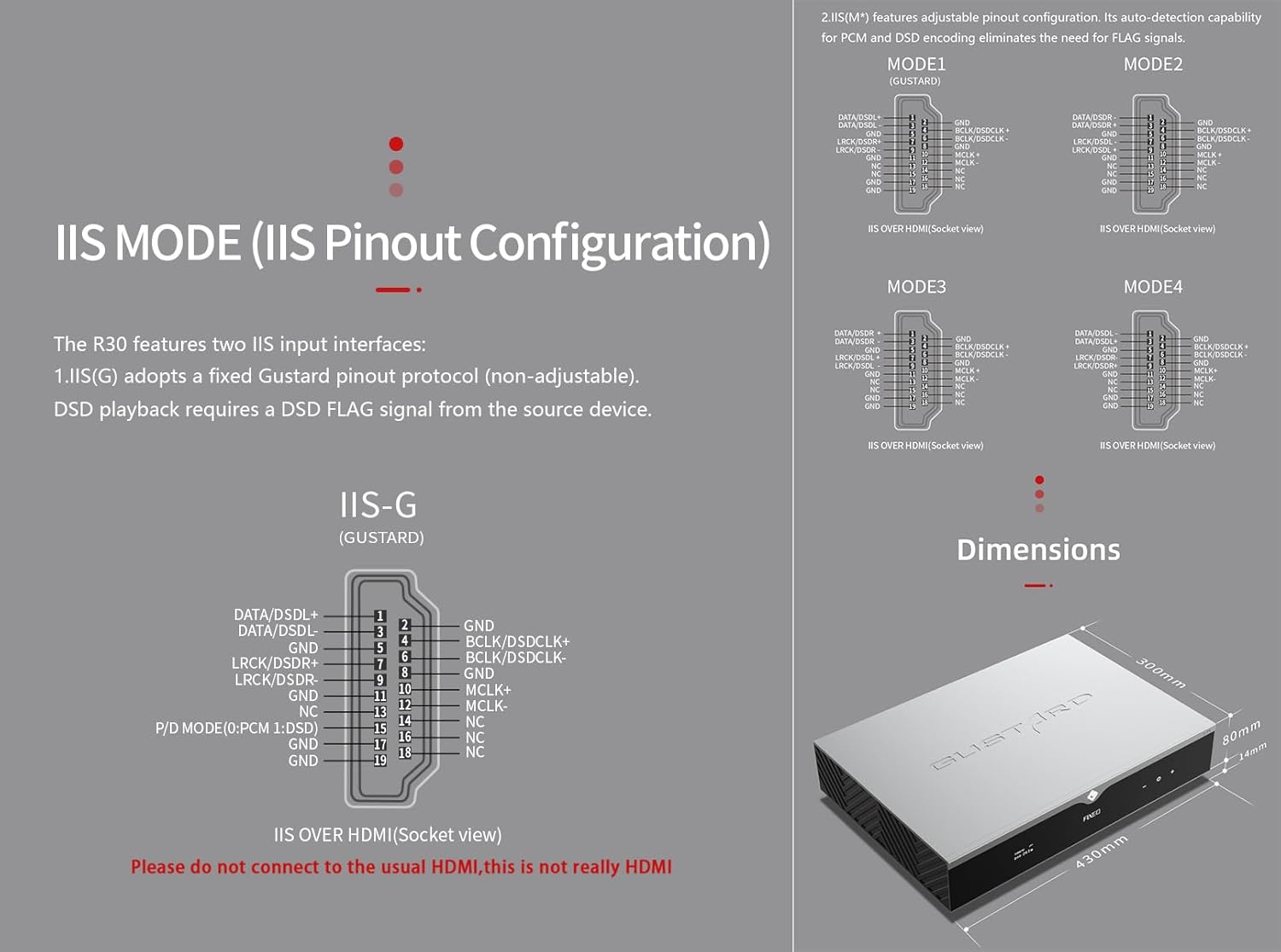
5. IIS MODE (IIS Pinout Mode Selection)
R30 má dve vstupné rozhrania IIS:
- IIS(G): Fixed Gustard pinout protocol (non-adjustable). DSD playback requires a DSD FLAG signal from the source device.
- IIS(M*): Features adjustable pinout configuration. Its auto-detection capability for PCM and DSD encoding eliminates the need for FLAG signals.
IIS(M*) adjustable Pinout mode IIS input has four Pinouts: MODE1 (Default), MODE2, MODE3, MODE4. MODE1 is compatible with the GUSTARD mode. If you are connecting to a GUSTARD front end such as U12, U16, U18, S16, S26, etc., you can match them with MODE1, which is the former works in the Gustard output mode.
Please do not connect to the usual HDMI, this is not really HDMI.
6. PHASE (Phase Setting)
Táto funkcia ponúka dve možnosti:
- NON-inverted (Default): When non-inverted, the RCA output of R30 is normal phase, and the XLR balanced output is American standard polarity output (1 ground, 2 hot, 3 cold).
- Invertované: When inverted, only the RCA output is reverse phase, and the XLR balanced output is Japanese/European standard polarity output (1 ground, 2 cold, 3 hot).
7. TRIGGER CH. (Linkage Trigger Start Channel Selection)
The R30 can be triggered by an external 12V linkage signal and automatically turn on from standby mode. When the 12V trigger signal ceases or drops to 0V, automatic standby activation occurs. When the R30 is working, it is switched to the input channel of this setting by the 12V trigger linkage signal.
- LAST (Default): The input channel that was in use before entering standby last time.
- Other options include COAX, AES, OPT, USB, STREAMER, IIS(G), IIS. Selecting any channel activates it upon receiving a 12V trigger signal.
8. TRIGGER VOL. (Link Trigger Boot Volume Selection)
R30 je možné zapnúť z pohotovostného režimu pomocou externého 12V spúšťacieho signálu a automaticky nastaviť hlasitosť na zvolenú úroveň. Prípadne, počas prevádzky, 12V spúšťací signál prepne výstup na prednastavenú hlasitosť. Táto možnosť konfiguruje výstupnú hlasitosť po aktivácii spúšťača.
- LAST (Default): The volume used before entering standby.
- OPRAVENÉ: Fixed full-scale output bypassing attenuation.
- -20 dB: Output at a volume attenuated to -20dB.
- -30 dB: Output at a volume attenuated to -30dB.
- -40 dB: Output at a volume attenuated to -40dB.
9. DISPLAY (Screen Brightness Settings)
Long-term high-brightness use of OLED screens can cause screen burn-in or ghosting. Therefore, the R30 is designed to always select automatic screen off, or manually select automatic screen off, which can also reduce interference.
- AUTO (Default): Automatically reduce brightness.
- AUTOMATICKÉ VYPNUTIE: Automatically turn off the screen.
Infračervené diaľkové ovládanie
Pri obsluhe produktov DAC stlačte a podržte tlačidlo DAC dlhšie ako 3 sekundy, čím prepnete do režimu ovládania DAC. AMPRežimy /STREAM ovládajú ostatné produkty Gustard.
- Pohotovostný režim: Press once to activate R30 from standby. Press once during operation to enter standby.
- Menu: Press to access R30's setup menu.
- Podložka so 4 smerovými tlačidlami: Up/Down navigates menu items. Left/Right adjusts selected options. Center press activates/deactivates mute.
- Späť: Returns to main interface.
- Zväzok: Decreases output volume on main interface.
- Zväzok+: Increases output volume on main interface.
Poznámky:
- Operational range varies with angle.
- Obstructions between remote and sensor may cause malfunction.
- Remove batteries if unused for more than 1 month.
- Thoroughly clean battery compartment if leakage occurs.
- May accidentally trigger other IR-controlled devices.

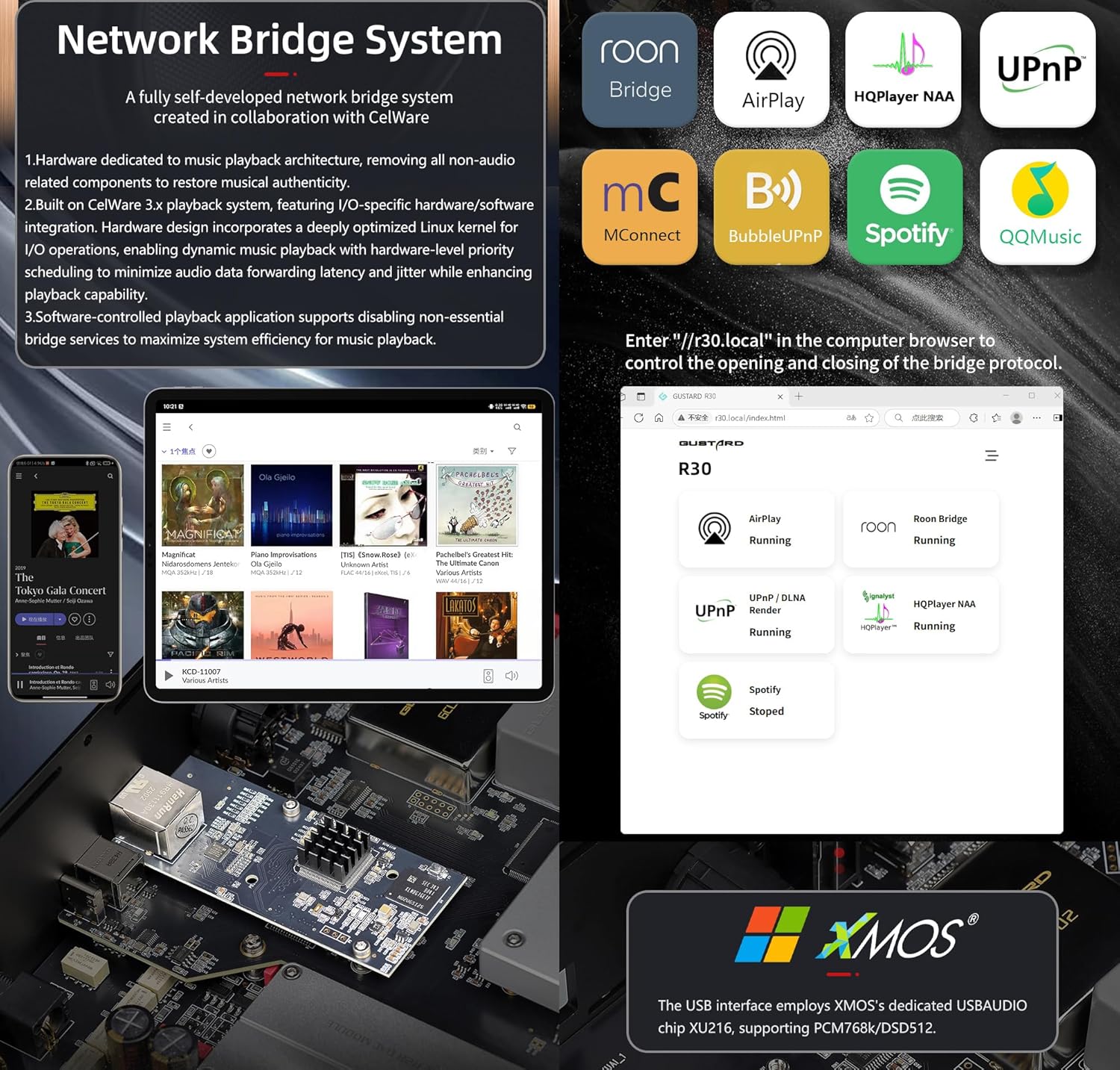
Rýchly štart do Network Bridge Streamer
After connecting R30's RJ45 port to your local network:
- Select the STREAMER channel and await system boot (approximately 1 minute, until "DSD 24.5MHz" appears).
- Access R30's configuration page via: http://R30.local (as shown below). Disable unused streaming protocols on the web rozhranie pre maximalizáciu efektivity systému. Tu sa vykonávajú aj aktualizácie firmvéru.
(Prevádzka mobilných zariadení/tabletov čaká na vydanie špeciálnej aplikácie)
You can turn off streaming protocols that are not frequently used through the web page to maximize system music playback performance. At the same time, the online upgrade of the Streamer is also operated on the web stránku.
(Po spustení špecializovanej aplikácie Streamer je možné vyššie uvedené operácie vykonať v aplikácii)
Official Product Video: GUSTARD R30 - User Manual
Špecifikácie produktu
Digital Input Support Formats:
| Typ | PCM | DSD (natívne) | DSD (DoP) |
|---|---|---|---|
| USB.Streamer | 44.1kHz-768kHz 16Bit-32Bit | DSD64-DSD512 | DSD64-DSD256 |
| AES.Coaxial.Optical fiber | 44.1kHz-192kHz 16Bit-24Bit | Nie je podporované | DSD64 |
| IIS | 44.1kHz-1536kHz 16Bit-32Bit | DSD64-DSD1024 | DoP64-DoP512 |
Analógový výstup:
- Frekvenčná odozva: 20-20kHz/±0.2dB
- Dynamický rozsah:> 123 dB
- Pomer signálu k šumu:> 121 dB
- Presluch kanálov: -139dB pri 10kHz
- THD+N: ≤ 0.00145 % pri 1 kHz
- IMD: ≈0.002 % pri -1 dBFS
- Výstupná úroveň RCA: 2.5 Vrms (pevná hlasitosť)
- Výstupná impedancia RCA: 100Ω
- Výstupná úroveň XLR: 5.1 Vrms (pevná hlasitosť)
- Výstupná impedancia XLR: 100Ω
- XLR konektory: štandard USA (1 uzemnenie, 2 zapnuté, 3 zapnuté)
Ďalšie špecifikácie:
- AC Power: 115V/230V 50/60Hz
- Spotreba energie: <35W
- Chassis Dimensions: W430 × D300 × H80 (including feet: 92mm)
- Package Dimensions: L530 × W400 × H180mm
- Shipping Weight: 10kg (with package)
- 10MHz BNC Input: Input impedance 50 Ohm, 0dBm-20dBm; CMOS square wave 0.2V-3.3V, Sine wave 0.5V-3.3V.
- Trigger: IN- 12V Typ. OUT- 12V Typ.
Záručné podmienky
Thank you for choosing GUSTARD HIFI products. To safeguard your rights and interests, please read the following warranty terms carefully. You can promptly obtain comprehensive after-sales service provided by GUSTARD.
Záruka na produkt
You will enjoy a 2-year free warranty and lifetime maintenance after the date of purchasing GUSTARD's HIFI product.
* Výrobca znáša iba náklady z čínskej pevniny. Časť dopravného a dane zo zámoria vyrieši používateľ rokovaním s predajcom.
Bezplatný záručný servis
GUSTARD R30 from the purchasindátum g v rámci bezplatnej záručnej doby, používateľ používa produkt bežným spôsobom a produkt zlyhá z dôvodu kvality komponentov alebo výrobných problémov.
Nad rámec záručného servisu
Belonging to one of the following circumstances, products are no longer provided warranty service:
- Produkty od dátumu nákupu prekročili vopred stanovenú záručnú dobu.
- Model, čiarové kódy a dátum nákupu sa nezhodujú so skutočným produktom a záručným listom.
- Without GUSTARD technician permission, unauthorized modifications to the circuit, components or self-repaired product.
- Škody spôsobené neodolateľnými prírodnými silami.
- Nad rámec povoleného používania poškodenia životného prostredia.
- Poškodenie v dôsledku nesprávneho použitia alebo nesprávneho skladovania. Vrátane, ale nie výlučne: objtage je príliš vysoké na spálenie obvodov alebo komponentov; Narážanie a následné poškodenie škrupiny alebo vnútornej časti; poškodenie spôsobené vodou, olejom, kvapalinou a nadmerným prachom; oxidácia alebo korózia produktu atď.
- Po uplynutí záručnej doby, ako je poškodenie jednotlivých komponentov, vzhľad spôsobený ľudským poškodením, úpravy firmvéru vedú k neschopnosti neoprávnených používateľov pracovať. GUSTARD sa zaväzuje znášať primerané poplatky za údržbu (okrem veľkoplošných komponentov alebo dosky plošných spojov spálených tak, že sa nedá opraviť). Náklady na dopravu a údržbu, materiálové náklady musí znášať používateľ.
Kontaktné informácie
Výrobca: Shenzhen Goshide Technology Co., LTD
Adresa: Room 302, Building 1, No. 28, Huimin 1st Road, Guanlan Sub-district, Longhua District, Shenzhen City, Guangdong Province
Tel: +86-18682080102
Webmiesto: http://www.gustard.com
Email: service@gustard.com
Ask a question about this manual
Ask about setup, troubleshooting, compatibility, parts, safety, or missing instructions. Manuals+ will review the question and use this page’s manual context to help answer it.