
1. Úvod
This manual provides detailed instructions for the FULODE X1-16C 16-Channel Audio Mixer. Please read this manual thoroughly before operating the device to ensure proper usage and to maximize its performance and longevity. This professional audio console is designed for various applications including studio recording, live performances, DJ events, and karaoke.

2. Bezpečnostné informácie
To prevent electric shock, fire, or damage to the device, please observe the following safety precautions:
- Neotvárajte zariadenie casing. Všetok servis zverte kvalifikovanému personálu.
- Zabezpečte napájanie objtage zodpovedá požiadavkám špecifikovaným na zariadení.
- Chráňte zariadenie pred vodou, vlhkosťou a nadmerným teplom.
- Nepoužívajte zariadenie, ak je napájací kábel poškodený alebo rozstrapkaný.
- Pred čistením alebo údržbou vždy odpojte napájanie.
- Používajte iba doplnky/príslušenstvo špecifikované výrobcom.
3. Obsah balenia
Overte, či sú v balení všetky položky:
- FULODE X1-16C 16-Channel Audio Mixer
- Power Adapter (AC 90-240V, 50-60Hz)
- Používateľská príručka
4. Produkt skončilview: Ovládanie a pripojenia
The FULODE X1-16C mixer features a comprehensive layout for intuitive control over your audio. Familiarize yourself with the various inputs, outputs, and control elements.

4.1 Ovládacie prvky na prednom paneli
- Composite Interface: Combination XLR/TRS input for microphones and line-level signals.
- Fantómový prepínač: Activates +48V phantom power for condenser microphones.
- Úprava zisku: Controls the input sensitivity of each channel.
- Treble/Midrange/Bass Adjustment (3-Band EQ): Equalization controls for high, mid, and low frequencies on each channel.
- AUX Adjustment: Controls the auxiliary send level for external effects or monitor mixes.
- Adjustment of Effect: Controls the amount of internal DSP effect applied to the channel.
- Pan Balance: Upravuje stereo pozíciu signálu kanála.
- Channel Mute Switch: Mutes or unmutes the individual channel.
- Channel Volume Pusher: Fader to control the output level of each channel.
- Reverberation Effect Selection: Knob to select from 99 built-in DSP effects.
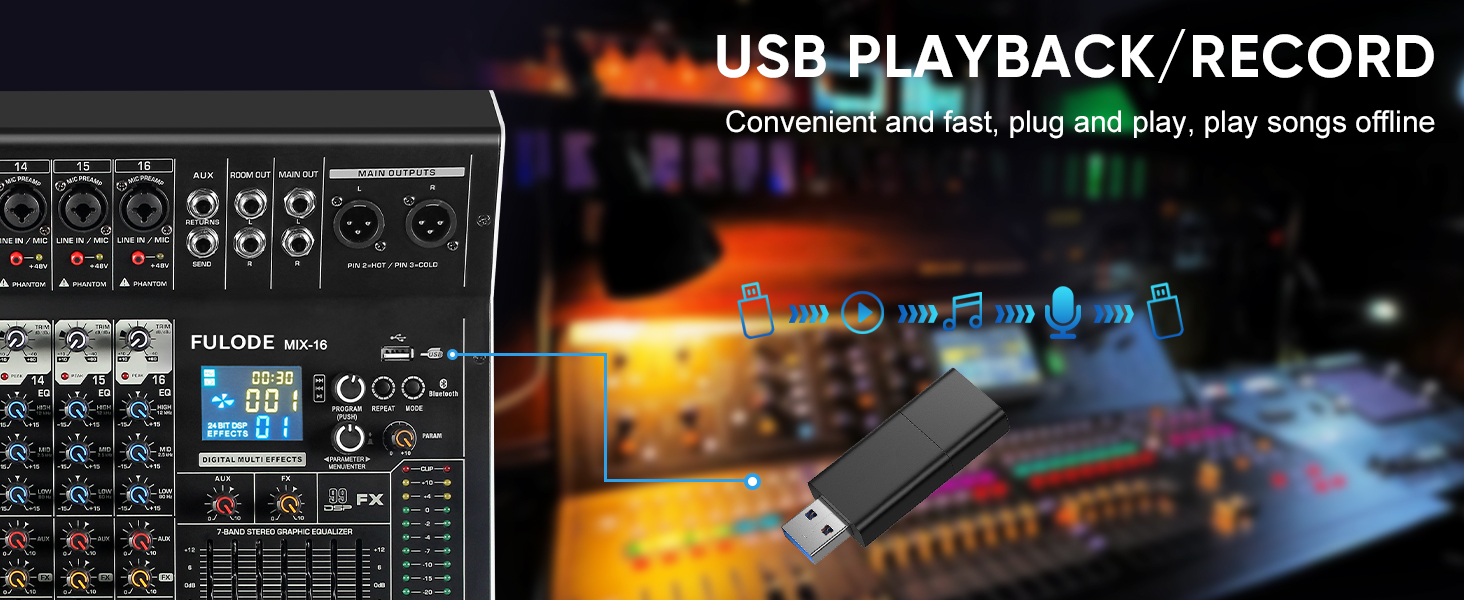
- Prehrávanie USB/MP3: Section for USB drive and Bluetooth audio input, with transport controls and digital display.
- Svetelný indikátor úrovne: Visual display of output levels.
- Main Channel Seven Segment Balance: Graphic equalizer for the main stereo output.
- Nastavenie hlasitosti monitora: Ovláda hlasitosť výstupu pre slúchadlá.
- Effect Main Volume Adjustment: Controls the overall level of the selected DSP effect.
- Left/Right Main Volume Adjustment: Faders for the main stereo output.
- Earphone Monitoring Interface: 1/4" jack for headphone monitoring.
- MP3 Main Volume Adjustment: Controls the output level of the USB/MP3/Bluetooth section.
4.2 Pripojenia zadného panela
- Vypínač: Zapína alebo vypína mixér.
- Rozhranie napájania: Pripája sa k dodanému napájaciemu adaptéru.
5. Nastavenie
Follow these steps for initial setup of your FULODE X1-16C Audio Mixer.
5.1 Pripojenie napájania
- Uistite sa, že hlavný vypínač mixéra je v polohe VYPNUTÉ.
- Connect the power adapter to the Power Interface on the rear panel of the mixer.
- Plug the power adapter into a suitable AC power outlet (110V).
- Turn the mixer's power switch to the ON position. The digital display should illuminate.
5.2 Pripojenie mikrofónov a nástrojov
- For microphones or line-level instruments, connect them to the Composite Interface (XLR or 1/4" TRS) on the desired channel.
- If using a condenser microphone, press the Fantómový spínač (+48V) for that specific channel. An indicator light will confirm activation.
- Upravte Úprava zisku knob for each input channel to achieve an optimal signal level without clipping.

5.3 Pripojenie výstupných zariadení
- Pripojte hlavné reproduktory alebo ampživšie k Main Output Interface (XLR or 1/4" TRS) on the top right of the mixer.
- For monitoring, connect headphones to the Earphone Monitoring Interface.
6. Návod na obsluhu
6.1 Ovládanie kanálov
- zisk: Adjust the input gain for each channel to prevent clipping (indicated by the PEAK LED) and ensure a strong signal.
- 3-pásmový EQ: Use the HI, MID, and LOW knobs to shape the tone of each input.
- AUX: Control the amount of signal sent to the auxiliary output for external effects or monitor mixes.
- FX: Adjust the level of the internal DSP effect applied to the channel.
- PAN: Position the channel's signal in the stereo field (left to right).
- Stlmiť: Press the MUTE button to instantly silence a channel.
- Fader kanála: Use the fader to control the overall volume of the channel in the main mix.
6.2 DSP efektov
The mixer includes 99 built-in 24-bit DSP effects for enhancing your sound.
- Použite Reverberation Effect Selection knob to browse through the 99 available effects (e.g., Warm Room, Bright Room, Hall, Plate, Chorus, Delay). The digital display will show the selected effect number.
- Stlačením gombíka potvrďte svoj výber.
- Upravte Effect Main Volume Adjustment to control the overall wet/dry mix of the effects.
- Use the individual channel's FX knob to send more or less of that channel's signal to the effects processor.

6.3 USB/MP3/Bluetooth Playback
The mixer supports audio playback from USB drives and Bluetooth-enabled devices.
- Prehrávanie USB: Vložte USB disk s MP3 files into the USB port. Use the transport controls (Play/Pause, Skip) and the MP3 Main Volume Adjustment na ovládanie prehrávania.
- Bluetooth pripojenie: Press the MODE button on the USB/MP3 section until 'BT' appears on the digital display. On your smart device, search for 'MIX-BT' (or similar) and pair. Once connected, you can stream audio wirelessly to the mixer.


6.4 Hlavný výstup a monitorovanie
- Použite Left/Right Main Volume Adjustment faders to control the overall output level of the mix.
- The Kontrolka úrovne provides visual feedback on the main output levels. Adjust faders to keep levels within the optimal range (avoiding red/clipping).
- The Main Channel Seven Segment Balance (graphic EQ) allows for fine-tuning the overall frequency response of your main mix.
- Upravte Nastavenie hlasitosti monitora for comfortable listening through headphones.

6.5 Official Product Video Demonstration
Watch this video for a visual demonstration of the FULODE mixer's features and operation. Note: The video features a MIX-12 model, which shares many similar functionalities with the X1-16C.
7. Údržba
Správna údržba zaisťuje dlhú životnosť a optimálny výkon vášho mixéra.
- Čistenie: Use a soft, dry cloth to wipe the surface of the mixer. Do not use liquid cleaners or solvents, as they may damage the finish or internal components.
- Ukladací priestor: Store the mixer in a cool, dry place away from direct sunlight and extreme temperatures. If storing for extended periods, cover the unit to protect it from dust.
- Vetranie: Zabezpečte dostatočné vetranie okolo mixéra, aby ste predišli prehriatiu. Neblokujte vetracie otvory.
8. Riešenie problémov
If you encounter issues with your FULODE X1-16C mixer, refer to the following common problems and solutions:
| Problém | Možná príčina | Riešenie |
|---|---|---|
| Žiadna sila | Power cable not connected; Power switch off; Faulty power adapter/outlet | Check power cable connection; Ensure power switch is ON; Try a different power outlet or adapter. |
| Z kanála nie je žiadny zvuk | Channel muted; Gain too low; Cable issue; Phantom power not activated (for condenser mics) | Check MUTE button; Increase Gain; Verify cable connections; Activate +48V phantom power if needed. |
| Žiadny zvuk z hlavného výstupu | Hlavné fadery spustené; Výstupné káble odpojené; Amplifier/speakers off | Raise Main Volume faders; Check output cable connections; Ensure amplifier/speakers are powered on and connected. |
| Bluetooth sa nepripája | Mixer not in Bluetooth mode; Device too far; Already connected to another device | Press MODE until 'BT' appears; Ensure device is within 33 ft; Disconnect from other devices. |
| Skreslený zvuk | Gain too high (clipping); EQ settings extreme; Faulty cable/microphone | Reduce Gain (ensure PEAK LED is not constantly lit); Adjust EQ to neutral or moderate settings; Test with different cables/microphones. |
9. Špecifikácie
Technical specifications for the FULODE X1-16C 16-Channel Audio Mixer:
- Model: X1-16C
- Počet kanálov: 16
- DSP efekty: 99 built-in 24-bit effects
- Vyrovnanie: 3-band EQ per channel, 7-band graphic EQ on main output
- Fantómová sila: +48V (prepínateľné pre každý kanál)
- Pripojenie: USB (playback/recording), Bluetooth, XLR, 1/4" TRS
- Zdroj napájania: Káblové elektrické
- Voltage: 110 voltov (AC)
- Rozmery produktu: 15.55"H x 18.9"Š x 4.13"V (39.5 cm H x 48 cm Š x 10.5 cm V)
- Hmotnosť položky: 18.16 libry (8.24 kg)
10. Záruka a podpora
For warranty information and technical support, please refer to the documentation included with your purchase or contact FULODE customer service through their official channels. Keep your proof of purchase for any warranty claims.