
Úvod
This manual provides essential instructions for the safe and efficient operation of your Generic Portable Bluetooth Speaker with Solar Charging, Model B0FVMB2F8H. Please read this manual thoroughly before using the product and retain it for future reference.
Bezpečnostné informácie
- Do not expose the speaker to extreme temperatures or direct sunlight for prolonged periods when not in use, especially the solar panel.
- Zabráňte pádu reproduktora alebo jeho vystaveniu silným nárazom.
- Reproduktor nerozoberajte, neopravujte ani neupravujte sami. V prípade akýchkoľvek opráv kontaktujte kvalifikovaný servisný personál.
- Keep the speaker away from water and liquids, despite its waterproof design, to prevent damage to internal components.
- Používajte iba určené nabíjacie káble a napájacie adaptéry.
- Uchovávajte mimo dosahu detí.
Obsah balenia
Skontrolujte, prosím, balenie, či neobsahuje nasledujúce položky:
- Portable Bluetooth Speaker (Model B0FVMB2F8H)
- USB nabíjací kábel
- Sprievodca rýchlym spustením
Koniec produktuview
Familiarize yourself with the components of your speaker:
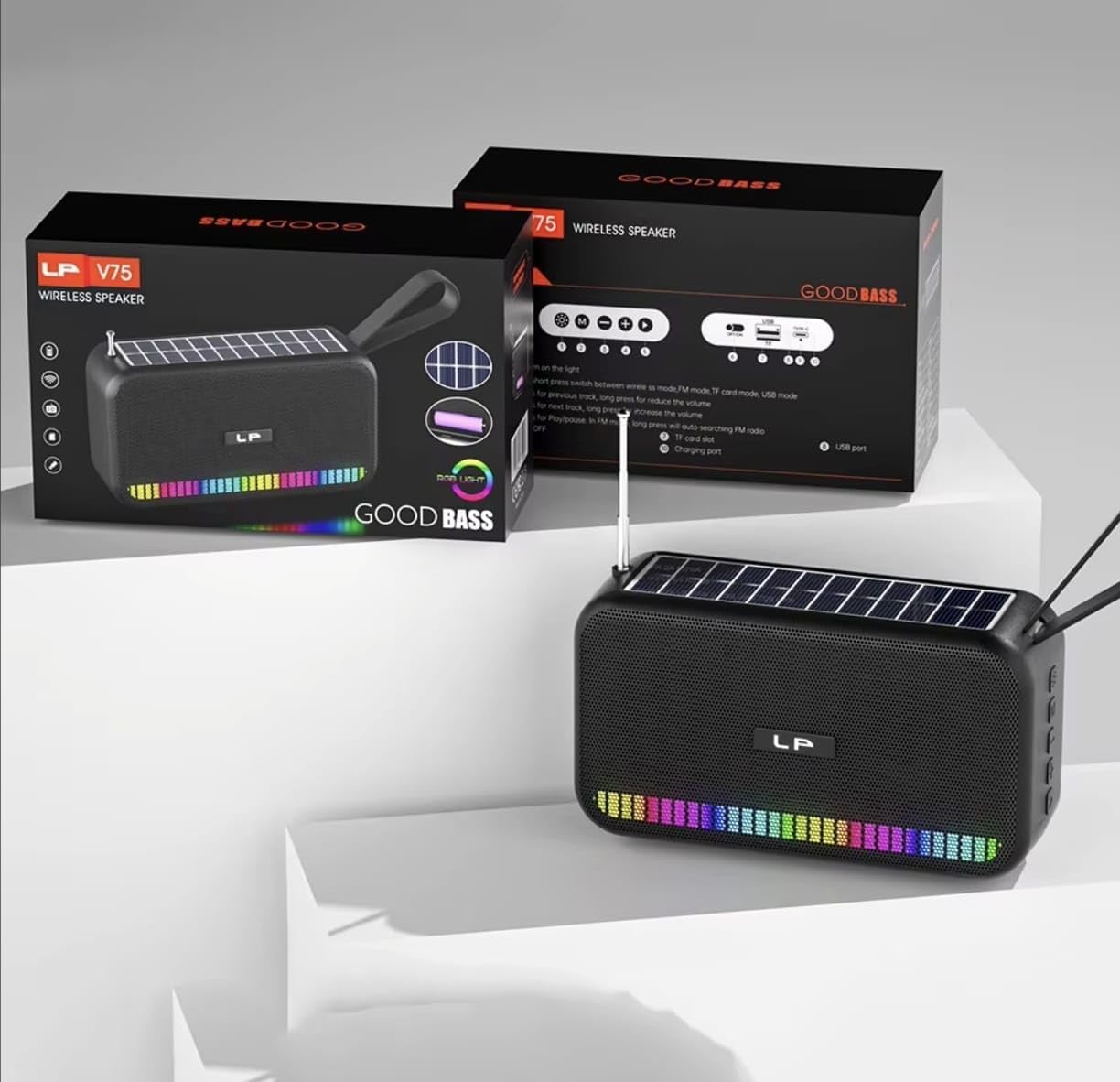
Obrázok: Predné view of the portable Bluetooth speaker, highlighting its solar panel, LED light display, and overall dimensions (approximately 170.5mm length, 95mm height, 60mm width).
- Solárny panel: Located on the top surface for solar charging.
- LED svetelný displej: Front-facing lights that synchronize with music.
- Ovládacie tlačidlá: (Details not provided, assuming standard buttons for power, volume, mode, play/pause).
- USB port: For charging and USB drive playback.
- Slot pre kartu TF: Pre prehrávanie z TF karty.
- Nabíjací port: For USB cable charging.
- Anténa: Extendable for FM radio reception.
- Popruh na prenášanie: Pre prenosnosť.

Obrázok: Zadné view of the portable Bluetooth speaker, showing the battery compartment open with a rechargeable battery inserted. Also visible are the USB and charging ports.
Nastavenie
1. Nabíjanie reproduktora
Your speaker offers two charging methods:
- Solárne nabíjanie: Place the speaker with the solar panel facing direct sunlight. The charging indicator light will illuminate. Solar charging is ideal for maintaining battery life outdoors but may be slower than USB charging.
- Nabíjanie cez USB: Connect the provided USB charging cable to the speaker's charging port and the other end to a USB power adapter (not included) or a computer's USB port. The charging indicator light will show charging status. A full charge typically takes several hours.
Pred prvým použitím sa uistite, že je reproduktor úplne nabitý, aby ste zaistili optimálny výkon batérie.
2. Zapnutie/vypnutie
- Zapnutie: Stlačte a podržte tlačidlo napájania (zvyčajne označené ⏻ or ON/OFF) for approximately 3 seconds until you hear an audible prompt or see the LED lights activate.
- Vypnutie: Press and hold the Power button again for approximately 3 seconds until the speaker powers down.
Návod na obsluhu
1. Režim Bluetooth
- Vstup do režimu Bluetooth: Upon powering on, the speaker typically defaults to Bluetooth mode. If not, press the "M" (Mode) button until you hear the "Bluetooth Mode" prompt. The LED indicator will flash, indicating it's ready for pairing.
- Párovanie:
- Povoľte Bluetooth na vašom zariadení (smartfón, tablet atď.).
- Hľadať available Bluetooth devices. The speaker will appear as "B0FVMB2F8H" or a similar name.
- Select the speaker from the list to connect. Once paired, you will hear a confirmation sound, and the LED indicator will stop flashing.
- Ovládanie prehrávania:
- Prehrať/pozastaviť: Stlačte tlačidlo Prehrať / Pozastaviť (⏸).
- Ďalšia skladba: Press the "Next" button (⏭).
- Predchádzajúca skladba: Press the "Previous" button (⏮).
- Zvýšiť hlasitosť: Long press the "Next" button or use a dedicated Volume Up button.
- Znížiť hlasitosť: Long press the "Previous" button or use a dedicated Volume Down button.
2. Režim FM rádia
- Vstup do režimu FM: Press the "M" (Mode) button repeatedly until you hear the "FM Radio" prompt.
- Rozšírenie antény: Pre lepší príjem úplne vytiahnite teleskopickú anténu.
- Automatické skenovanie: Stlačte a podržte tlačidlo Prehrať/Pozastaviť (⏸) to automatically scan and save available FM stations. The speaker will cycle through frequencies and store them.
- Prepínacie stanice: Use the "Next" (⏭) and "Previous" (⏮) tlačidlá na navigáciu medzi uloženými stanicami.
3. USB / TF Card Playback
- Vložiť médium: Insert a USB flash drive into the USB port or a TF (MicroSD) card into the TF card slot. The speaker will automatically detect the media and switch to the corresponding playback mode.
- Ovládanie prehrávania: Use the Play/Pause, Next, and Previous buttons for controlling playback, similar to Bluetooth mode.
4. LED Light Display
The speaker features dynamic RGB LED lights that can synchronize with your music. Specific controls for the LED lights (e.g., changing patterns, turning off) are not detailed in the product information, but they typically activate automatically with audio playback. If there is a dedicated light button, press it to cycle through modes or turn off the lights.
5. Hands-free telefonovanie
Po pripojení k smartfónu cez Bluetooth je možné reproduktor používať na handsfree hovory.
- Prijať hovor: Stlačte tlačidlo Prehrať / Pozastaviť (⏸) raz pre prijatie prichádzajúceho hovoru.
- Ukončiť hovor: Stlačte tlačidlo Prehrať / Pozastaviť (⏸) once to end an ongoing call.
- Odmietnuť hovor: Stlačte a podržte tlačidlo Prehrať/Pozastaviť (⏸) na odmietnutie prichádzajúceho hovoru.
Údržba
- Čistenie: Na čistenie povrchu reproduktora použite mäkkú, suchú handričku. Nepoužívajte abrazívne čistiace prostriedky, alkohol ani chemické rozpúšťadlá.
- Solárny panel: Pre zabezpečenie efektívneho nabíjania udržiavajte solárny panel čistý a bez prachu alebo nečistôt.
- Ukladací priestor: When not in use for extended periods, store the speaker in a cool, dry place. It is recommended to fully charge the battery every 3 months to prolong its lifespan.
Riešenie problémov
| Problém | Možná príčina | Riešenie |
|---|---|---|
| Reproduktor sa nezapne. | Slabá batéria. | Charge the speaker using the USB cable or place it in direct sunlight. |
| Nie je možné spárovať cez Bluetooth. | Bluetooth nie je na zariadení povolený; reproduktor nie je v režime párovania; príliš ďaleko od zariadenia. | Ensure Bluetooth is on and the speaker is in pairing mode. Move device closer to speaker (within 10 meters). Forget previous pairings on your device and try again. |
| Žiadny zvuk alebo nízka hlasitosť. | Volume too low on speaker or connected device; incorrect mode selected. | Increase volume on both the speaker and your connected device. Ensure the correct mode (Bluetooth, FM, USB, TF) is selected. |
| Príjem FM rádia je slabý. | Anténa nie je vysunutá; slabý signál. | Fully extend the telescopic antenna. Try repositioning the speaker for better signal reception. |
| USB/TF karta neprehráva. | Nesprávne file formát; karta/mechanika nie je správne vložená; poškodené médium. | Zabezpečte zvuk fileSúbory sú v kompatibilnom formáte (napr. MP3). Znova vložte USB disk alebo TF kartu. Skúste iný USB disk alebo TF kartu. |
Špecifikácie
| Číslo modelu: | B0FVMB2F8H |
| Technológia pripojenia: | Bluetooth |
| Zdroj napájania: | Solárne, USB |
| Podporované rádiové pásma: | FM (87.5 – 108 MHz) |
| Špeciálne vlastnosti: | Solar charging, LED light display, Multi-playback options (Bluetooth, FM Radio, USB, TF card) |
| Kompatibilné zariadenia: | Bluetooth devices, USB devices, TF cards, FM radio signals |
| Typ zobrazenia: | LED |
| Farba: | Čierna |
| Výrobca: | Čína |
Záruka a podpora
Tento produkt je dodávaný s a 15-dňová záruka od dátumu nákupu. Táto záruka sa vzťahuje na výrobné chyby. Nevzťahuje sa na škody spôsobené nesprávnym použitím, nehodami, neoprávnenými úpravami alebo bežným opotrebením.
For warranty claims or technical support, please refer to the contact information provided by your retailer or the seller "CLASSYSA" on Amazon. Please retain your proof of purchase for warranty validation.