
Úvod
Welcome to the HP OmniDesk M03 AI Desktop PC. This manual provides essential information for setting up, operating, maintaining, and troubleshooting your new computer. The HP OmniDesk M03 is designed for performance and efficiency, featuring an Intel Core Ultra 7 265 processor with dedicated AI cores, 16GB DDR5 RAM, and a 2TB NVMe SSD, running on Windows 11 Home.
Čo je v krabici
Skontrolujte, či sú v balení všetky komponenty:
- HP OmniDesk Desktop PC
- Bezdrôtová klávesnica
- Myška
- Stručný návod na obsluhu
- Napájací kábel

Image: The HP OmniDesk M03 desktop PC, wireless keyboard, mouse, and power cable, illustrating the contents of the product box.
Nastavenie
1. Pripojenie periférií
Before powering on your PC, connect your monitor, keyboard, and mouse.
- Monitor: Connect your monitor to the PC using an HDMI or DisplayPort cable. The ports are located on the rear of the PC.
- Klávesnica a myš: The included keyboard and mouse are wireless. Insert batteries (if not pre-installed) and connect their USB receiver to an available USB port on the PC.
- Výkon: Connect the power cable to the PC's power input on the rear and then to a wall outlet.
- Sieť (voliteľné): For a wired internet connection, connect an Ethernet cable from your router to the RJ45 port on the rear of the PC.

Image: Rear panel of the HP OmniDesk M03, highlighting the DisplayPort, HDMI, USB, and Ethernet ports for connecting external devices.

Obrázok: Bočný view of the HP OmniDesk M03 AI Desktop PC, showing its compact tower design.
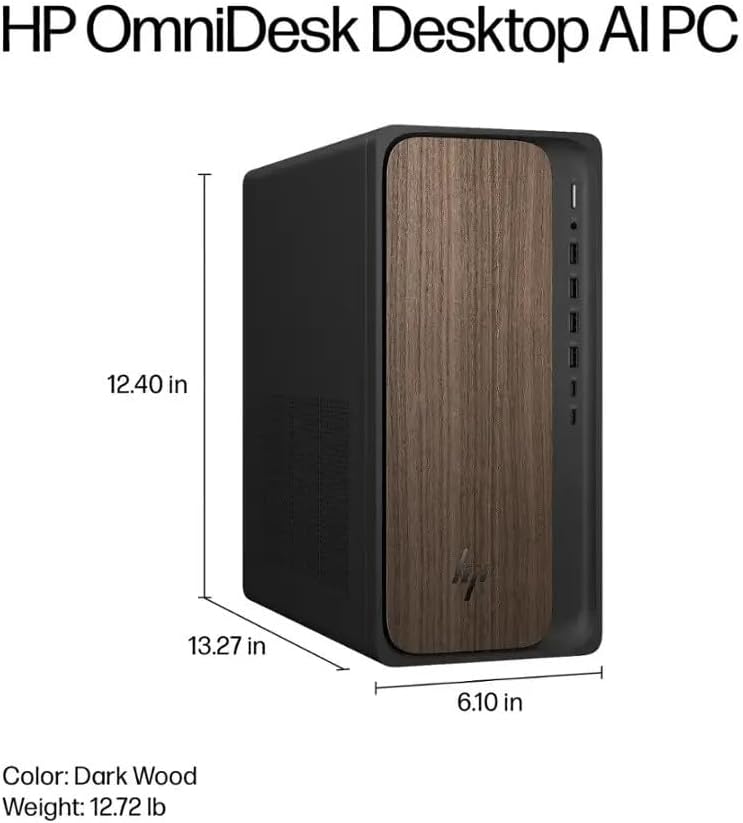
Image: Diagram illustrating the location and type of front and rear ports on the HP OmniDesk M03, including USB-A, USB-C, HDMI, DisplayPort, and audio jacks.
2. Zapnutie a počiatočné nastavenie
Once all peripherals are connected:
- Stlačte tlačidlo napájania umiestnené na prednej strane počítača.
- Follow the on-screen instructions to complete the Windows 11 Home initial setup, including language selection, network connection (if not wired), account creation, and privacy settings.

Obrázok: Predná strana view of the HP OmniDesk M03, showing the power button at the top right and various USB ports below it.
Ovládanie počítača
Windows 11 Home
Your HP OmniDesk M03 comes pre-installed with Windows 11 Home. Familiarize yourself with the operating system's interface, Start menu, and settings. Microsoft provides extensive online resources for Windows 11 usage.
Funkcie AI
The Intel Core Ultra 7 265 processor includes dedicated AI cores and Intel AI Boost, enhancing performance for AI-driven applications and features within Windows 11, such as AI Copilot. These features can assist with tasks, content creation, and system optimization.
Konektivita
- Wi-Fi 6 (802.11ax): Pripojte sa k bezdrôtovým sieťam a získajte prístup na internet. Spravujte nastavenia Wi-Fi prostredníctvom nastavení siete vo Windowse 11.
- Bluetooth 5.4: Pair wireless devices such as headphones, speakers, or additional input devices. Access Bluetooth settings via the Windows 11 settings menu.
- Ethernet: For a stable, high-speed wired connection, ensure an Ethernet cable is connected to the RJ45 port.
Údržba
Čistenie počítača
- Exteriér: Použite mäkkú handričku, ktorá nepúšťa vlákna dampVonkajší povrch utrite vodou alebo jemným čistiacim roztokom. Vyhnite sa agresívnym chemikáliám.
- otvory: Pravidelne čistite prach z vetracích mriežok pomocou stlačeného vzduchu, aby ste zabezpečili správne prúdenie vzduchu a predišli prehriatiu.
- Porty: Udržujte porty bez prachu a nečistôt.
Aktualizácie softvéru
Regularly update Windows 11 and device drivers to ensure optimal performance, security, and compatibility. Access Windows Update through the Settings menu.
Zálohovanie dát
Odporúča sa pravidelne zálohovať dôležité údaje na externý disk alebo cloudové úložisko, aby ste predišli ich strate.
Riešenie problémov
Táto časť sa zaoberá bežnými problémami, s ktorými sa môžete stretnúť.
- Bez napájania:
- Uistite sa, že napájací kábel je bezpečne pripojený k počítaču aj k elektrickej zásuvke.
- Overte funkčnosť zásuvky pripojením iného zariadenia.
- Bez zobrazenia:
- Check that the monitor is powered on and correctly connected to the PC via HDMI or DisplayPort.
- Uistite sa, že na monitore je vybratý správny vstupný zdroj.
- Žiadne internetové pripojenie:
- For Wi-Fi, check if the Wi-Fi adapter is enabled and if you are connected to the correct network with the right password.
- For wired connection, ensure the Ethernet cable is properly connected and your router is working.
- Klávesnica/myš nereaguje:
- Check battery levels for wireless devices.
- Ensure the USB receiver is plugged into a functional USB port.
- Try restarting the PC.
V prípade zložitejších problémov sa obráťte na podporu spoločnosti HP webalebo kontaktujte zákaznícky servis.
Špecifikácie
Detailed technical specifications for the HP OmniDesk M03 AI Desktop PC:
| Komponent | Špecifikácia |
| Procesor | Intel Core Ultra 7 265 (20-Core, up to 5.3 GHz, Intel AI Boost) |
| Operačný systém | Windows 11 Home (64-bit) |
| Pamäť (RAM) | 16 GB DDR5 5600 MHz |
| Skladovanie | 2TB PCIe NVMe M.2 SSD disk |
| Grafika | Intel Integrated Graphics |
| Video výstup | 1x HDMI 2.1, 1x DisplayPort 1.4a |
| USB porty (predné) | 2x USB-A 5Gbps, 2x USB-A 10Gbps, 1x USB-C 5Gbps, 1x USB-C 10Gbps |
| USB porty (zadné) | 4x USB 2.0 Type-A |
| Audio porty | 1x Headphone/Microphone Combo, 1x Line Input, 1x Line Output |
| sieť | Wi-Fi 6 (802.11ax), Bluetooth 5.4, Gigabitový Ethernet (RJ45) |
| Rozmery (V x Š x H) | 13.3" x 6.1" x 12.4" (33.8 cm x 15.5 cm x 31.5 cm) |
| Hmotnosť | 11.77 lb (5.34 kg) |

Image: Diagram showing the height (13.27 inches), width (6.10 inches), and depth (12.40 inches) of the HP OmniDesk M03 desktop PC.
Záruka a podpora
Informácie o záruke
Your HP OmniDesk M03 AI Desktop PC comes with a 90-dňová obmedzená záruka. This warranty covers defects in materials and workmanship under normal use. For detailed terms and conditions, please refer to the warranty documentation included with your product or visit the official HP support webstránky.
Zákaznícka podpora
For technical assistance, troubleshooting, or warranty claims, please contact HP Customer Support:
- Online podpora: Navštívte úradníka Podpora HP Webstránky pre ovládače, manuály a príručky na riešenie problémov.
- Telefonická podpora: Refer to the Quick Setup Guide or HP's webmiesto pre regionálne kontaktné čísla.
When contacting support, please have your product model (M03) and serial number ready.