
SmallRig RF20C
SmallRig RF20C RGB Portable LED Photo Torch User Manual
Model: RF20C (5335)
Značka: SmallRig
1. Úvod
The SmallRig RF20C RGB Portable LED Photo Torch is a versatile and powerful lighting tool designed for photographers, videographers, and content creators. It features 5-color LED beads, adjustable beam angle, and supports creative lighting effects with included gobos. This manual provides essential information for the safe and effective use of your device.
2. Bezpečnostné informácie
- Nevystavujte zariadenie vode ani nadmernej vlhkosti.
- Zabráňte priamemu vystaveniu očí LED svetlu.
- Zariadenie nerozoberajte ani neupravujte. Opravy by mal vykonávať iba autorizovaný personál.
- Uchovávajte mimo dosahu detí.
- Ensure proper ventilation during extended use, as the device may become warm.
- Používajte iba určený nabíjací kábel a napájací adaptér.
3. Obsah balenia
Overte si, či sú v balení všetky položky:
- RF20C Portable Focusable LED Video Light x 1
- Gobos x 20
- Silicone Gobo Holder x 1
- Skladovacia taška x 1
- Používateľská príručka x 1 (Tento dokument)
- Nabíjací kábel x 1
4. Nastavenie
4.1 Počiatočné nabíjanie
Before first use, fully charge the RF20C. Connect the provided USB-C charging cable to the device's charging port and to a compatible USB power adapter (PD 36W recommended). The device can be used while charging.

Figure 4.1: Internal battery illustration and runtime information.

Figure 4.2: Portable design, mounting options, cooling fan, and charging capability.
4.2 Attaching Gobos
To use the creative pattern gobos, first remove the plano-convex lens from the front of the light. Then, attach the silicone gobo holder and insert the desired gobo. This ensures optimal projection effects.

Figure 4.3: Gobo projection examples and installation tip.
5. Návod na obsluhu
5.1 Zapnutie/vypnutie a základné ovládacie prvky
The RF20C features a single multi-function button for control. To prevent accidental activation during transport, the device requires a specific action to turn on.
- Zapnutie: Rotate the control button to turn on the device.
- Vypnúť: Stlačte a podržte ovládacie tlačidlo 3 sekundy.
- Zmeniť farbu: Short press the control button to cycle through the available colors (Red, 5600K White, Purple, Orange, Cyan).
- Upraviť jas: Rotate the control button to increase or decrease the light brightness.
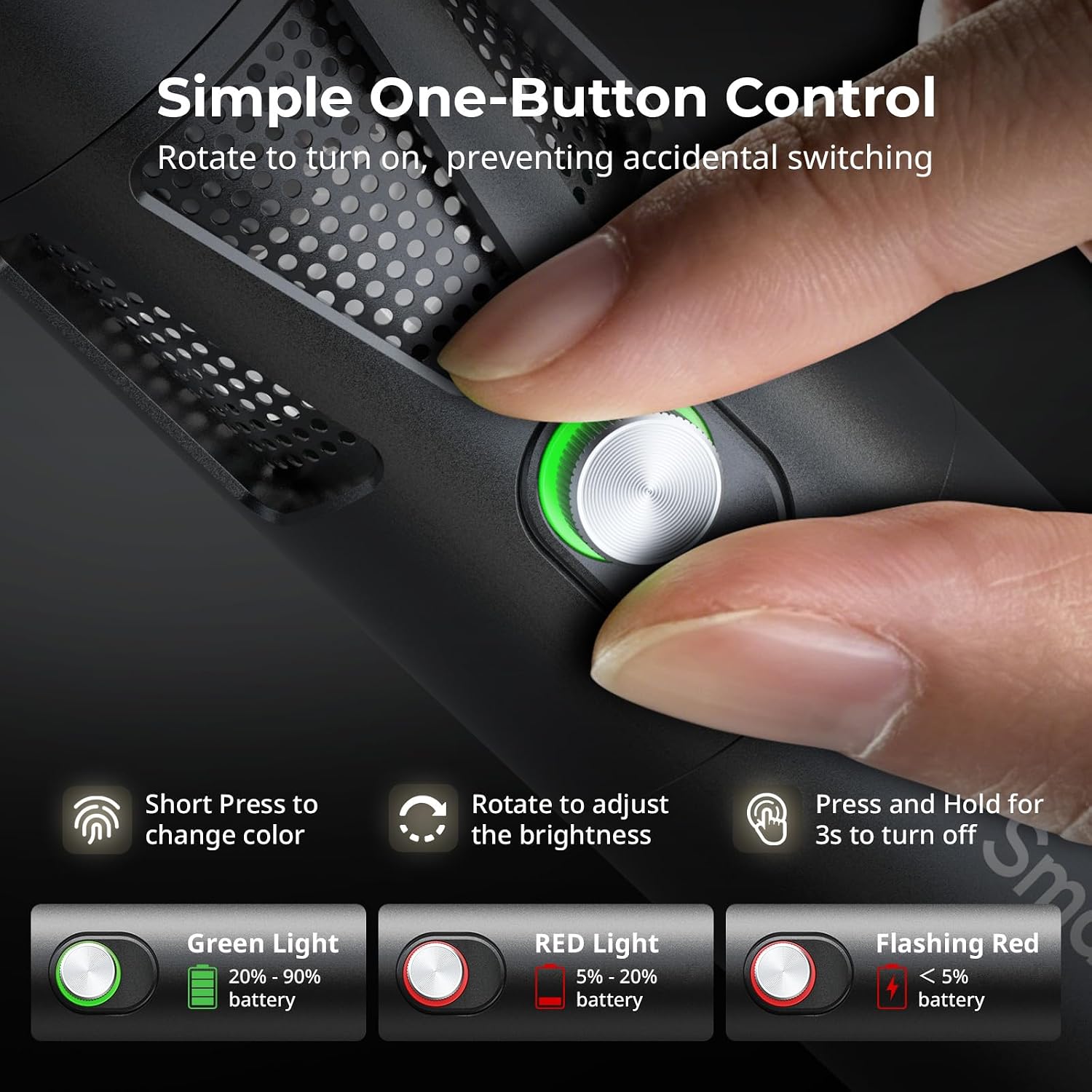
Figure 5.1: One-button control and battery indicator.

Figure 5.2: Available LED colors.
5.2 Nastavenie uhla lúča
The front plano-convex lens allows for adjustment of the beam angle. Push or pull the lens to change the focus of the light from a narrow 24° beam to a wider 60° diffusion.
- Extend the lens: Narrows the beam (e.g., 24°).
- Retract the lens: Diffuses the beam (e.g., 60°).

Figure 5.3: Beam angle adjustment mechanism.
5.3 Indikátor batérie
The control button's LED indicates the battery status:
- Zelené svetlo: Zostáva 20 % – 90 % nabitia batérie.
- Červené svetlo: Zostáva 5 % – 20 % nabitia batérie.
- Blikajúce červené svetlo: Zostáva menej ako 5 % batérie.

Figure 5.4: Brightness comparison of RF20C.
6. Údržba
- Clean the device regularly with a soft, dry cloth. Do not use harsh chemicals or abrasive materials.
- Zariadenie skladujte na chladnom a suchom mieste, mimo dosahu priameho slnečného žiarenia a extrémnych teplôt.
- When not in use for extended periods, charge the battery to approximately 50% every three months to prolong battery life.
- Keep the lens and LED surface free from dust and fingerprints for optimal light output.
7. Riešenie problémov
| Problém | Možná príčina | Riešenie |
|---|---|---|
| Zariadenie sa nezapne. | Slabá batéria; nesprávny postup pri zapnutí. | Charge the device. Ensure you rotate the control button to power on. |
| Svetelný výkon je slabý. | Low battery; brightness set too low; dirty lens. | Charge the device. Rotate the control button to increase brightness. Clean the lens. |
| Gobo projection is blurry. | Plano-convex lens not removed; gobo not seated correctly. | Remove the plano-convex lens before attaching the silicone gobo holder. Ensure gobo is properly inserted. |
| Device becomes warm during use. | Normal operation, especially at high power; fan obstruction. | This is normal. Ensure the fan vents are not obstructed for proper heat dissipation. If excessively hot, reduce brightness or allow to cool. |
| Hluk ventilátora je badateľný. | Normálna prevádzka chladenia. | The device uses a high-speed fan for efficient heat dissipation. This noise is part of normal operation. Consider distance from audio recording equipment. |
8. Špecifikácie
| Funkcia | Detail |
|---|---|
| Model | RF20C (5335) |
| Sila | 20 W |
| Vstup | 20 V / 1.8 A (max. 36 W) |
| Farby LED | Red, 5600K White, Purple, Orange, Cyan |
| Index podania farieb (CRI) | ≥ 97 |
| Index konzistencie osvetlenia televízora (TLCI) | ≥ 99 (at 5600 K) |
| Svetelnosť | 5400 Lux @ 1m / 5600K |
| Kapacita batérie | 10000mAh (2 x 5000mAh / 7.4V / 37Wh) |
| Runtime (Full Power) | Až 1.5 hodín |
| Nabíjanie | USB-C PD 36W Fast Charging, supports charging while operating |
| Nastavenie uhla lúča | 24° až 60° |
| Materiál | Zliatina hliníka, ABS |
| Rozmery produktu | φ49.0 x 200.0 mm / φ1.9 x 7.9 inches |
| Hmotnosť produktu | 520.0 ± 20.0 g / 18.3 ± 0.7 oz |
| Technológia pripojenia | USB |
| Krajina pôvodu | Čína |
9. Záruka a podpora
SmallRig products are designed and manufactured to the highest quality standards. This product is covered by a limited warranty from the date of purchase. For detailed warranty terms, technical support, or service inquiries, please refer to the official SmallRig webstránku alebo kontaktujte svojho miestneho distribútora.
Uschovajte si doklad o kúpe pre uplatnenie záruky.
10. Scenáre použitia
The SmallRig RF20C is suitable for various applications, including:
- Fotografovanie
- Nahrávanie videa
- Živé vysielanie
- Creative Accent Lighting
- Macro Work and Close-ups

Obrázok 10.1: Pramples of RF20C usage scenarios.
Ask a question about this manual
Ask about setup, troubleshooting, compatibility, parts, safety, or missing instructions. Manuals+ will review the question and use this page’s manual context to help answer it.