1. Úvod
Thank you for choosing the AOAS K10 Gaming Mouse. This manual provides essential information for setting up, operating, and maintaining your new gaming mouse. Please read these instructions carefully to ensure optimal performance and longevity of your device.
2. Produkt skončilview
The AOAS K10 is an ergonomic gaming mouse designed for comfort and precision. It features adjustable DPI settings, vibrant RGB lighting, and a durable USB connection.

Image 1: The AOAS K10 Gaming Mouse presented in its retail packaging.
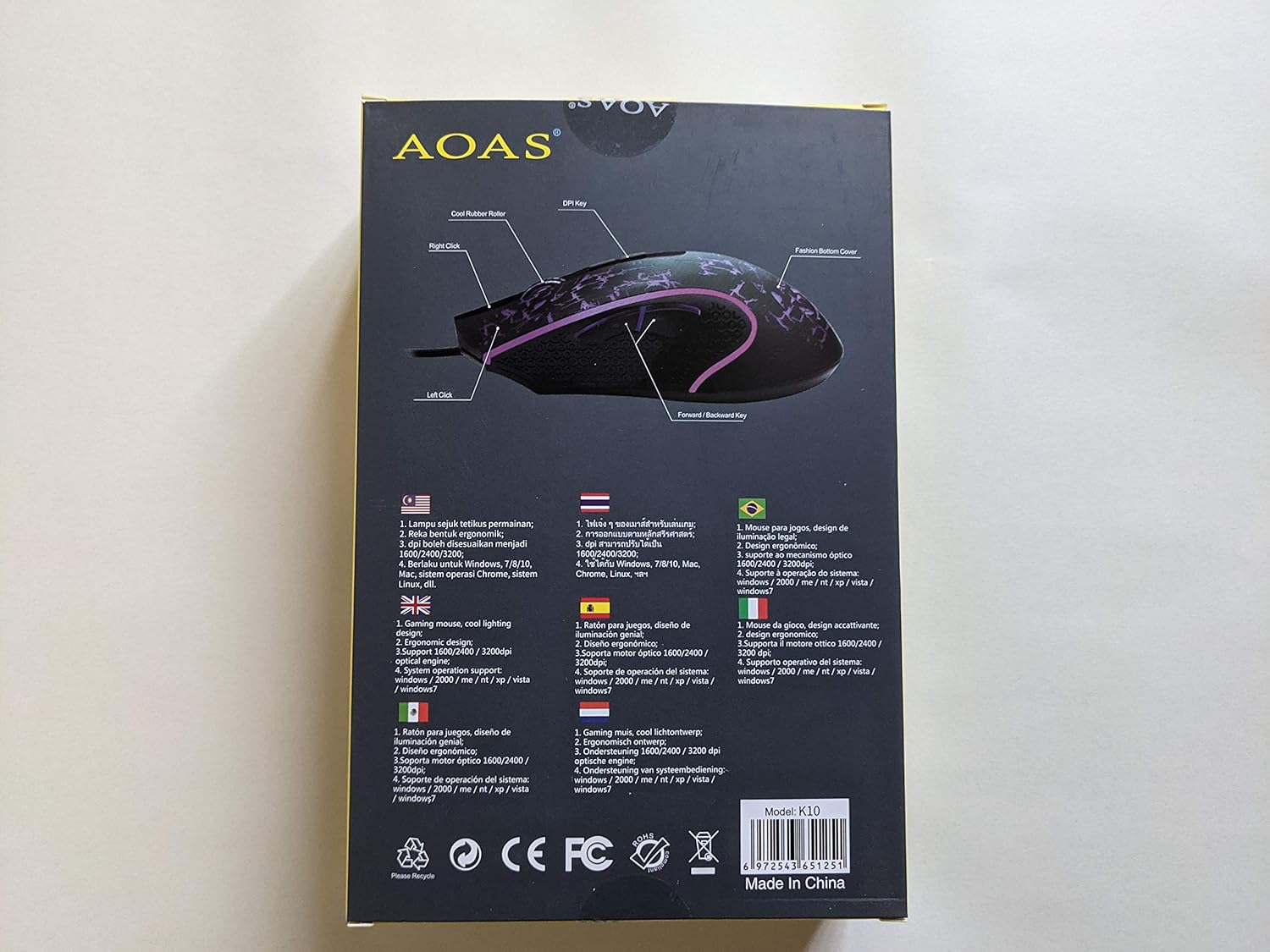
Image 2: This diagram illustrates the key components of the AOAS K10 Gaming Mouse, including the Left Click, Right Click, DPI Key, Forward/Backward Key, and Bottom Cover.
3. Vlastnosti
- RGB osvetlenie: Dynamic and cool RGB lighting design enhances the gaming atmosphere.
- Ergonomický dizajn: Crafted for comfortable use during extended gaming sessions.
- Nastaviteľné DPI: Three adjustable DPI settings (1600/2400/3200) for precision control.
- Optický motor: High-performance optical engine for accurate tracking.
- USB pripojenie: Reliable wired connection via a 1.8m (6 ft.) USB cable.
- Obojručný dizajn: Vhodné pre ľavákov aj pravákov.
- Odolné gombíky: Navrhnuté pre dlhotrvajúci výkon.
4. Nastavenie
Setting up your AOAS K10 Gaming Mouse is a simple plug-and-play process.
- Nájdite na svojom počítači voľný port USB.
- Plug the USB connector of the AOAS K10 Gaming Mouse into the USB port.
- Váš operačný systém automaticky zistí a nainštaluje potrebné ovládače. Môže to chvíľu trvať.
- Once installation is complete, the mouse is ready for use.
5. Návod na obsluhu
Základná prevádzka
- Ľavý klik: Primary action, selection, and activation.
- Kliknite pravým tlačidlom myši: Accesses contextual menus and secondary functions.
- Rolovacie koliesko: Prechádza dokumentmi a web stránky. Môže fungovať aj ako prostredné tlačidlo.
- Forward/Backward Keys: Navigate forward or backward in web prehliadačov a file prieskumníkov.
Úprava DPI
The AOAS K10 Gaming Mouse features a dedicated DPI button to switch between sensitivity levels.
- Stlačte tlačidlo Kľúč DPI (located on the top of the mouse, usually behind the scroll wheel) to cycle through the available DPI settings.
- The mouse supports 1600, 2400, and 3200 DPI. Each press will switch to the next level.
- Observe the cursor speed on your screen to select the DPI setting that best suits your preference and current task.
6. Údržba
To ensure the longevity and optimal performance of your AOAS K10 Gaming Mouse, follow these maintenance guidelines:
- Čistenie: Na utretie povrchu myši použite mäkkú, suchú handričku. V prípade odolnej špiny ju jemne utrite.amphandričku vodou alebo jemným čistiacim roztokom. Vyhnite sa agresívnym chemikáliám.
- Starostlivosť o snímač: Optický senzor na spodnej strane myši udržiavajte čistý a bez prachu alebo nečistôt. V prípade potreby použite vatový tampón.
- Správa káblov: Aby ste predišli poškodeniu, vyhnite sa ostrým ohybom alebo nadmernému ťahaniu USB kábla.
- Ukladací priestor: Keď myš nepoužívate, skladujte ju v čistom a suchom prostredí mimo dosahu extrémnych teplôt.
7. Riešenie problémov
If you encounter issues with your AOAS K10 Gaming Mouse, try the following steps:
- Myš nereaguje:
- Uistite sa, že kábel USB je bezpečne zapojený do funkčného portu USB na počítači.
- Skúste zapojiť myš do iného USB portu.
- Reštartujte počítač.
- Test the mouse on another computer to determine if the issue is with the mouse or your computer's setup.
- Pohyb kurzora je nepravidelný alebo trhaný:
- Vyčistite optický senzor na spodnej strane myši.
- Uistite sa, že myš používate na čistom, nereflexnom a rovnomernom povrchu (napr. podložka pod myš).
- Nefunguje RGB osvetlenie:
- Skontrolujte, či je myš správne pripojená k počítaču.
- Some operating systems or software may interfere with lighting controls; check your system settings.
8. Špecifikácie
| Funkcia | Špecifikácia |
|---|---|
| Číslo modelu | K10 |
| Značka | AOAS |
| Technológia pripojenia | USB (káblové) |
| Dĺžka kábla | 1.8 6 metrov (XNUMX XNUMX stôp) |
| Technológia detekcie pohybu | Optické |
| Nastavenia DPI | 1600 / 2400 / 3200 |
| Počet tlačidiel | 3 (Left, Right, Scroll Wheel/Middle Click) + DPI Key + Forward/Backward Keys |
| Orientácia rúk | Obojručný |
| Špeciálne funkcie | Ergonomický dizajn, RGB osvetlenie |
| Odporúčané použitie | Hranie |
| Kompatibilné operačné systémy | Windows XP, Windows 7, Linux, Personal Computer |
9. Záruka a podpora
Informácie o záruke a technickej podpore nájdete v dokumentácii dodanej s vaším nákupom alebo sa obráťte na svojho predajcu. Uschovajte si doklad o kúpe pre prípadné reklamácie.


