1. Úvod
This manual provides essential information for setting up, operating, maintaining, and troubleshooting your HP EliteOne 800 G5 24-inch All-in-One Touchscreen PC. Please read this guide thoroughly before using your device to ensure proper functionality and longevity.

Figure 1: HP EliteOne 800 G5 All-in-One PC with included keyboard and mouse.
2. Obsah balenia
Overte, či sú v balení všetky položky:
- HP EliteOne 800 G5 All-in-One PC
- HP USB Keyboard
- HP USB Mouse
- Napájací kábel
- Dokumentácia (táto príručka, bezpečnostné informácie)
3. Produkt skončilview
3.1 Predné View

Obrázok 2: Predná strana view of the HP EliteOne 800 G5, showing the 24-inch touchscreen display and integrated speakers.
- 23.8-inch FHD IPS WLED-backlit Touchscreen Display: Main interactive display area.
- 2 MP FHD Pop-up Webkamera: Located at the top center, retracts when not in use.
- Integrated Dual Array Digital Microphone: For clear audio input during calls or recordings.
- Bang & Olufsen Speakers: Located below the screen for high-quality audio output.
3.2 Strana View (vpravo)

Obrázok 3: Pravá strana view illustrating the optical disk drive and audio ports.
- Optical Disk Drive: Na čítanie a zápis CD/DVD diskov.
- Disc drive eject button: To open the optical disk drive tray.
- Standard lock slot (10 mm): Pre bezpečnostné káble.
- Universal Audio Jack with CTIA headset support: For connecting headsets with a microphone.
- Konektor pre slúchadlá: Na pripojenie slúchadiel.
3.3 Vzadu View a prístavy
Obrázok 4: Detailná zadná časť view showing all available ports and connections.
- USB 3.1 Gen 2 Type-A port: High-speed USB connection.
- USB 3.1 Gen 2 Type-A port (charge support up to 5V/1.5A): High-speed USB with charging capability.
- Audio line-out connector: Na pripojenie externých reproduktorov alebo audio systémov.
- USB 3.1 Gen 1 Type-A ports (2): Standard USB connections.
- RJ-45 (network) jack: Pre káblové ethernetové pripojenie.
- Napájací konektor: Na pripojenie napájacieho kábla.
- USB 3.1 Gen 2 Type-A ports (2) wake capable: High-speed USB ports that can wake the system.
- Dual-Mode DisplayPort™ 1.2 (DP++): Na pripojenie externých displejov.
- HDMI 2.0a connector: Na pripojenie externých displejov.
- SD card reader 4.0 (NOT INCLUDED on all models): Na čítanie pamäťových kariet SD.
- USB 3.1 Type-C™ Gen 2 port (charge support up to 5V/3A): Reversible USB-C port with charging capability.
- Dual-state power button: To power on/off or put the system to sleep.
- Jasné View Button (optional): Activates HP Sure View integrated privacy screen.

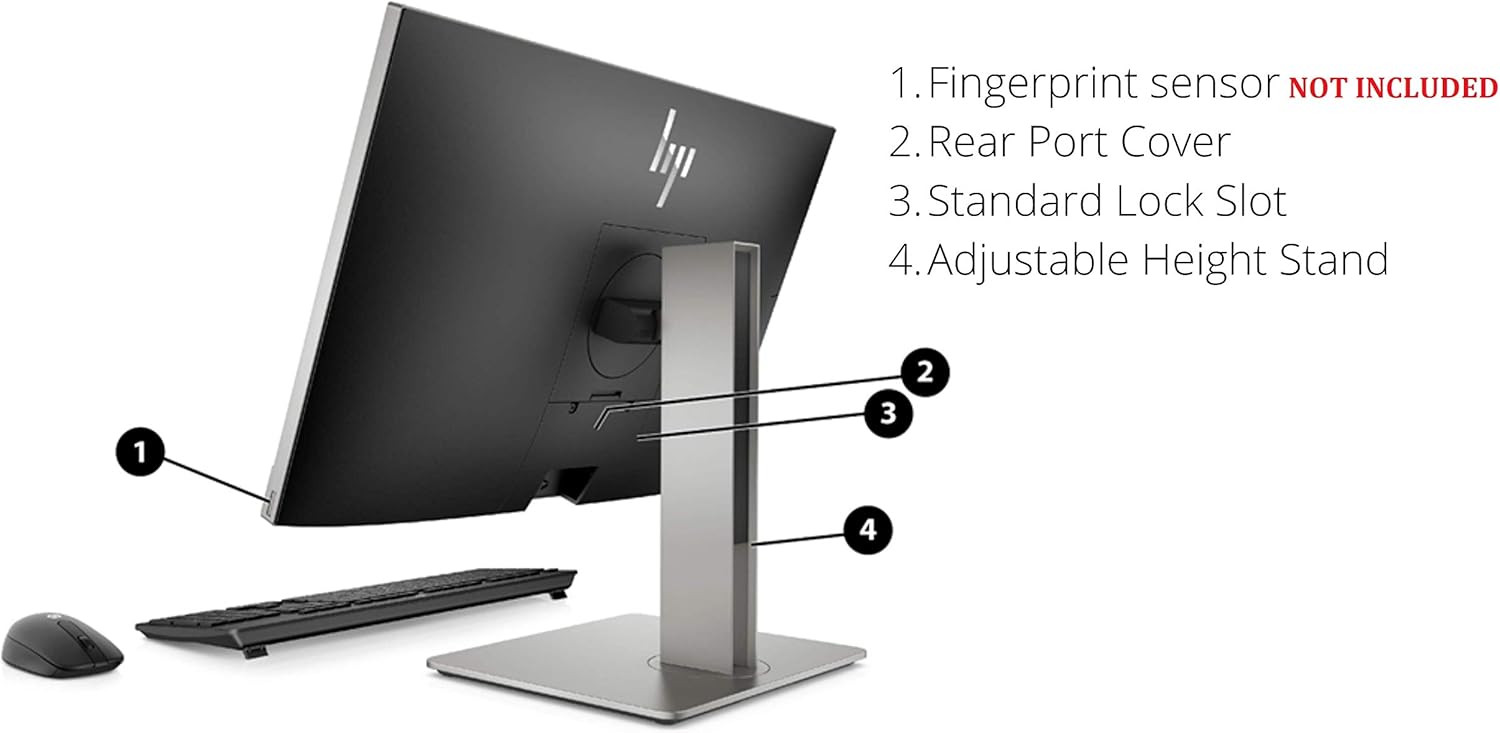
Obrázok 5: Zadná časť view highlighting the adjustable height stand and other features.
- Fingerprint sensor (NOT INCLUDED on all models): Pre biometrické overenie.
- Rear Port Cover: Conceals and protects rear ports.
- Standard Lock Slot: Pre bezpečnostné káble.
- Výškovo nastaviteľný stojan: Allows for ergonomic positioning of the display.
4. Nastavenie
Follow these steps to set up your HP EliteOne 800 G5 PC:
- Rozbaľte počítač: Opatrne vyberte všetky komponenty z obalu.
- Umiestnenie počítača: Place the All-in-One PC on a stable, flat surface. Ensure adequate ventilation around the device.
- Pripojenie klávesnice a myši: Plug the USB keyboard and mouse into any available USB Type-A ports on the rear of the PC.
- Pripojenie napájania: Connect the power cord to the power connector on the rear of the PC, then plug the other end into a grounded electrical outlet.
- Pripojenie k sieti (voliteľné): For a wired internet connection, connect an Ethernet cable from your router or modem to the RJ-45 (network) jack on the rear of the PC.
- Zapnutie: Press the dual-state power button, located on the rear of the PC, to turn on the system.
- Pôvodné nastavenie: Postupujte podľa pokynov na obrazovke a dokončite nastavenie systému Windows 10 Pro vrátane jazyka, regiónu, sieťového pripojenia (ak nie je káblové) a vytvorenia používateľského účtu.
5. Návod na obsluhu
5.1 Správa napájania
- Zapnutie: Press the power button on the rear of the PC.
- Režim spánku: Briefly press the power button or select 'Sleep' from the Windows Start menu.
- Vypnúť: V ponuke Štart systému Windows vyberte možnosť „Vypnúť“.
- Reštartovať: V ponuke Štart systému Windows vyberte možnosť „Reštartovať“.
5.2 Používanie dotykovej obrazovky
The 24-inch display supports multi-touch gestures. Common gestures include:
- Klepnite na: Ekvivalent kliknutia myšou.
- Dvakrát ťuknite: Equivalent to a double-click.
- Stlačte a podržte: Ekvivalent kliknutia pravým tlačidlom myši.
- Zovretie/Natiahnutie: Priblíženie alebo oddialenie.
- Potiahnutie prstom: Prechádzajte obsahom alebo navigujte.
5.3 Webkamera a zvuk
- Webkamera: The 2 MP FHD pop-up webcam automatically extends when an application requires it (e.g., video calls). Gently push it down to retract when not in use for privacy.
- Mikrofón: The integrated dual array digital microphone is active when the webcam is in use or when voice input is required.
- Rečníci: The Bang & Olufsen speakers provide audio output. Volume can be adjusted via Windows settings or keyboard shortcuts.
5.4 Optical Disk Drive
To use the DVD+/-RW SM DL 9.5mm slim tray:
- Press the eject button on the right side of the PC.
- Place a CD or DVD onto the tray, ensuring it is seated correctly.
- Gently push the tray back into the PC until it clicks shut.
6. Údržba
6.1 Čistenie
- Obrazovka: Použite mäkkú handričku, ktorá nepúšťa vlákna dampvodou alebo roztokom na čistenie obrazovky. Nestriekajte tekutinu priamo na obrazovku.
- Podvozok: Utrite mäkkou, suchou handričkou. Nepoužívajte abrazívne čistiace prostriedky.
- Vetranie: Uistite sa, že vetracie otvory sú bez prachu a prekážok, aby ste predišli prehriatiu.
6.2 Aktualizácie softvéru
Pravidelne aktualizujte operačný systém a ovládače, aby ste zaistili optimálny výkon a bezpečnosť:
- Aktualizácie systému Windows: Prejsť na Nastavenia > Aktualizácia a zabezpečenie > Windows Update skontrolovať a nainštalovať aktualizácie.
- Asistent podpory HP: Use the pre-installed HP Support Assistant software to check for driver and firmware updates specific to your HP EliteOne PC.
7. Riešenie problémov
| Problém | Možná príčina | Riešenie |
|---|---|---|
| Počítač sa nezapne | Žiadne napájanie, uvoľnené pripojenie | Check power cord connection to PC and outlet. Ensure outlet is functional. |
| Žiadny displej na obrazovke | PC in sleep mode, display settings issue | Press any key or move mouse to wake. If connected to external display, check display input source. |
| Dotykový displej nereaguje | Software glitch, dirty screen | Restart the PC. Clean the screen with a soft, lint-free cloth. |
| Z reproduktorov nie je žiadny zvuk | Volume muted, incorrect audio output device | Check volume levels in Windows. Ensure 'Speakers (Bang & Olufsen)' is selected as the default playback device. |
| Webkamera nefunguje | Webcam retracted, privacy settings, driver issue | Zaistite webcam is extended. Check Windows privacy settings for camera access. Update webcam drivers via HP Support Assistant. |
8. Špecifikácie
Key technical specifications for the HP EliteOne 800 G5 24-inch All-in-One PC:
| Funkcia | Detail |
|---|---|
| Číslo modelu | 2D9S5UW#ABA |
| Displej | 23.8" diagonal FHD IPS widescreen WLED-backlit touch screen (1920 x 1080) |
| Procesor | Intel Core i5-9500 (9M Cache, up to 4.40 GHz) |
| Grafika | Grafická karta Intel UHD 630 (integrovaná) |
| RAM | 8 GB DDR4-2666 SDRAM |
| Skladovanie | 256 GB M.2 2280 PCIe NVMe TLC SSD |
| Operačný systém | Windows 10 Pro |
| Webvačka | 2 MP FHD pop-up webvačka |
| Zvuk | Bang & Olufsen Speakers, Integrated Dual Array Digital Microphone |
| Optická mechanika | DVD+/-RW SM DL 9.5mm slim tray |
| Porty (zadné) | USB 3.1 Gen 2 Type-A (x3), USB 3.1 Gen 1 Type-A (x2), USB 3.1 Type-C Gen 2 (x1), DisplayPort 1.2 (x1), HDMI 2.0a (x1), RJ-45 (x1), Audio line-out (x1), Power connector (x1) |
| Ports (Side) | Universal Audio Jack (x1), Headphone connector (x1) |
| Rozmery (DxŠxV) | 18.4 x 7.1 x 21.2 palca |
| Hmotnosť | 19.24 libry |
9. Záruka a podpora
Your HP EliteOne 800 G5 PC comes with a standard manufacturer's warranty. Please refer to the warranty card included in your package for specific terms and conditions, including coverage duration and service options.
Technickú podporu, ovládače na stiahnutie a ďalšie informácie o produkte získate na oficiálnej stránke podpory spoločnosti HP. webmiesto:
Oficiálna podpora spoločnosti HP
When contacting support, have your product model number (2D9S5UW#ABA) and serial number ready.