Úvod
Welcome to the user manual for your Tibuta Smartpad A40 tablet. This guide provides essential information on setting up, operating, maintaining, and troubleshooting your device. The Smartpad A40 is designed for versatile use, featuring a large 10.1-inch display, a powerful quad-core processor, and the Android 14 operating system.

Image: The Tibuta Smartpad A40 tablet, shown with its protective case, highlighting its Android 14 operating system and 6GB RAM + 64GB ROM configuration.
Sprievodca nastavením
1. Rozbalenie a počiatočná kontrola
Carefully remove all components from the packaging. Ensure the tablet, protective case, charging cable, and power adapter are present. Inspect the tablet for any physical damage.

Image: The Tibuta Smartpad A40 tablet with its included case and headphones, illustrating its core features such as Android 14, IPS display, memory, battery capacity, and camera specifications.
2. Nabíjanie tabletu
Before first use, fully charge the tablet. Connect the Type-C charging cable to the tablet's charging port and the other end to the power adapter. Plug the adapter into a wall outlet. The charging indicator will show the charging status.

Image: The Tibuta Smartpad A40 tablet connected to a Type-C charger, emphasizing its 5000mAh battery capacity and estimated usage times for video playback and overall endurance.
3. Zapnutie/vypnutie
- Zapnutie: Press and hold the Power button located on the side of the tablet until the Tibuta logo appears.
- Vypnutie: Stlačte a podržte tlačidlo napájania, kým sa nezobrazí ponuka možností napájania. Vyberte možnosť „Vypnúť“ a potvrďte.
- Ak chcete reštartovať: V ponuke možností napájania vyberte možnosť „Reštartovať“ a potvrďte výber.
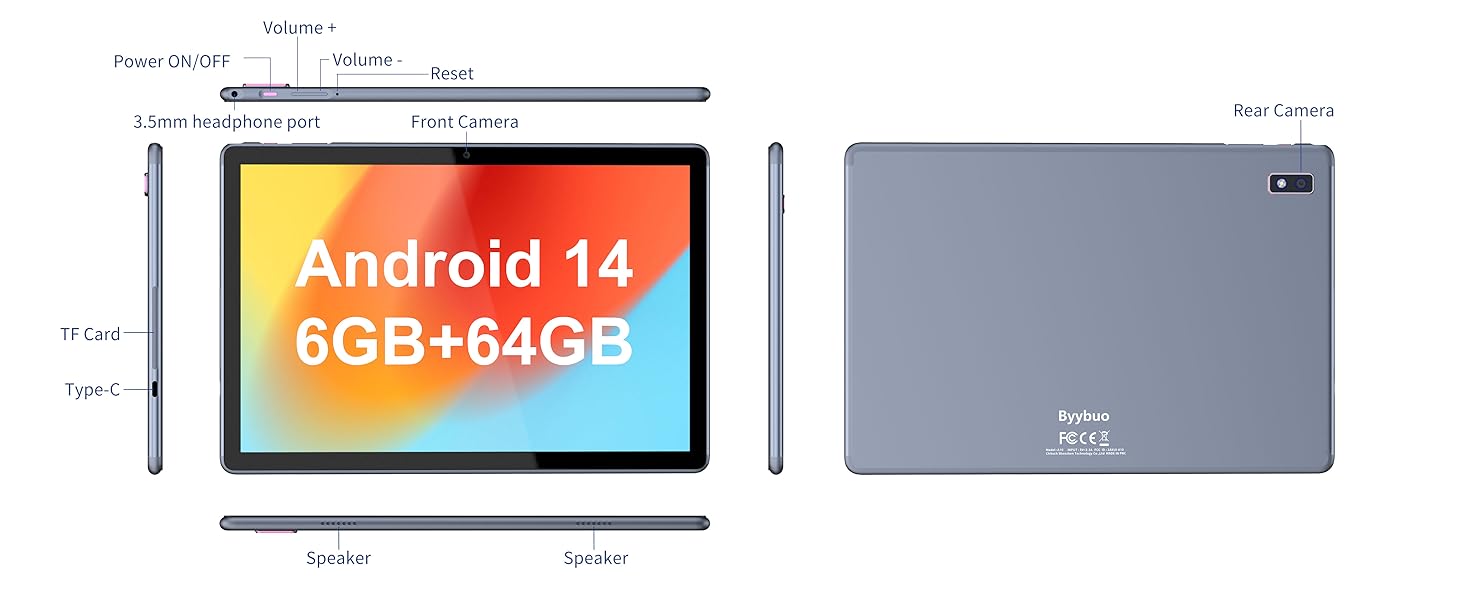
Image: A detailed diagram illustrating the physical layout of the Tibuta Smartpad A40, including the positions of its buttons, ports, and cameras for easy identification.
4. Sprievodca úvodným nastavením
Po prvom zapnutí vás tablet prevedie procesom úvodného nastavenia. Postupujte podľa pokynov na obrazovke:
- Vyberte svoj jazyk.
- Pripojte sa k sieti Wi-Fi.
- Prihláste sa pomocou svojho účtu Google alebo si vytvorte nový.
- Nastavenie zámku obrazovky (PIN, vzor, heslo).
- Review a akceptujte zmluvné podmienky.
Operating Your Tibuta Smartpad A40
1. Navigation and Touchscreen Gestures
The Smartpad A40 features a responsive multi-touch display. Common gestures include:
- Klepnite na: Výber položky alebo otvorenie aplikácie.
- Klepnite a podržte: Na prístup ku kontextovým ponukám alebo presunutie ikon.
- Potiahnutie prstom: To scroll through pages or navigate between screens.
- Priblíženie štipnutím prstov: Priblíženie alebo oddialenie obrázkov a web stránky.
2. Displej a zvuk
Experience vibrant visuals on the 10.1-inch IPS HD display with a resolution of 1280 x 800 pixels. The tablet also features an eye protection mode to reduce strain during prolonged use. Enjoy clear audio through the integrated dual high-fidelity speakers.

Image: The Tibuta Smartpad A40 tablet showcasing its IPS Full HD display and dual speakers, emphasizing its 10.1-inch screen size, 1280x800 IPS resolution, eye protection mode, and high-fidelity audio output.
3. Výkon a operačný systém
Powered by a robust Quad-Core processor and running on Android 14, the Smartpad A40 delivers smooth performance for multitasking, gaming, and streaming. The Android 14 system ensures access to the latest features and security updates.

Image: The Tibuta Smartpad A40 tablet showcasing its Android 14 operating system and GMS certification, with various application icons visible on the screen.
4. Úložisko a pamäť
The tablet comes with 6GB of RAM (2GB + 4GB virtual) and 64GB of internal storage, providing ample space for your applications, photos, videos, and documents. Storage can be expanded up to 128GB using a microSD card (not included).

Image: The Tibuta Smartpad A40 tablet highlighting its 6GB RAM and 64GB internal storage, along with the option to expand storage up to 128GB via a microSD card.
5. Fotoaparáty
Capture moments with the tablet's dual cameras: a 5 MP front camera for video calls and selfies, and an 8 MP rear camera for photos and videos.

Image: Demonstrates the Tibuta Smartpad A40's camera capabilities, featuring a 5.0 MP front camera for HD video and an 8.0 MP rear camera with autofocus for capturing photos.
6. Konektivita
The Smartpad A40 supports Wi-Fi (802.11ac) for fast internet access and Bluetooth for connecting to wireless peripherals like headphones and speakers.
7. Versatile Use Cases
The Tibuta Smartpad A40 is designed for a wide range of activities, from entertainment to productivity. Its portability makes it ideal for on-the-go use, while its features support various daily needs.

Image: Illustrates the diverse applications of the Tibuta Smartpad A40, including watching videos, assisting with daily tasks, and serving as a tablet for both children and seniors.
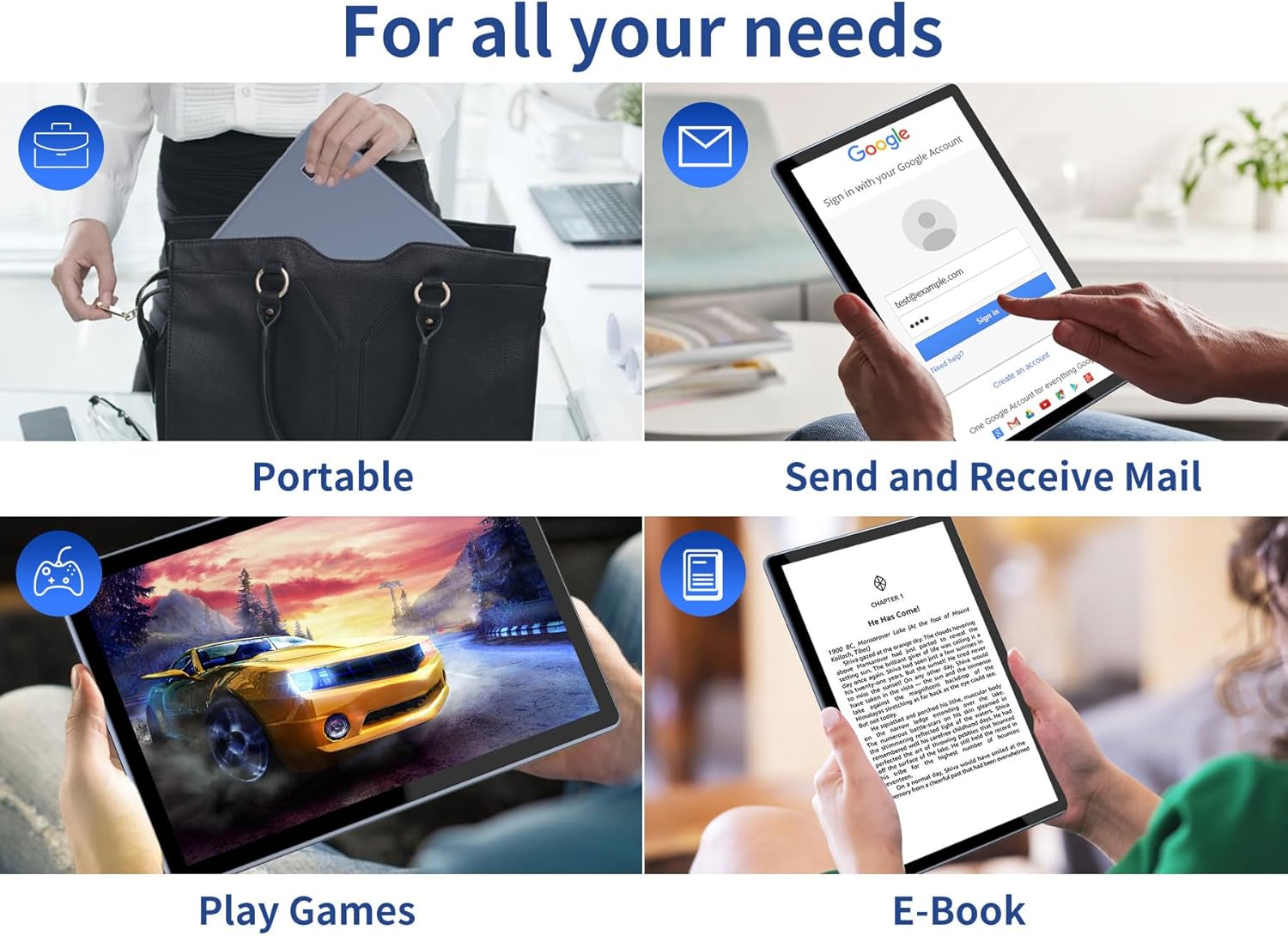
Image: Depicts the versatility of the Tibuta Smartpad A40 for various user needs, including portability, email communication, gaming, and e-book reading.
Údržba
1. Čistenie tabletu
Na čistenie obrazovky a tela tabletu použite mäkkú handričku, ktorá nepúšťa vlákna. V prípade odolných škvŕn jemneamphandričku vodou alebo čistiacim prostriedkom na obrazovky. Nepoužívajte agresívne chemikálie ani abrazívne materiály.
2. Aktualizácie softvéru
Pravidelne kontrolujte a inštalujte aktualizácie systému, aby ste zabezpečili, že váš tablet má najnovšie funkcie, bezpečnostné záplaty a vylepšenia výkonu. Prejdite na Nastavenia > Systém > Aktualizácia systému skontrolovať aktualizácie.
3. Starostlivosť o batérie
Ak chcete predĺžiť životnosť batérie:
- Vyhnite sa extrémnym teplotám.
- Pred častým nabíjaním nenechajte batériu úplne vybiť.
- Po nabití batérie odpojte nabíjačku.
4. Správa úložiska
Pravidelne znovaview your installed applications and files. Odinštalujte nepoužívané aplikácie a vymažte nepotrebné files to free up storage space and maintain optimal performance. Utilize the microSD card slot for additional storage if needed.
Riešenie problémov
| Problém | Možná príčina | Riešenie |
|---|---|---|
| Tablet sa nezapne. | Slabá batéria; zlyhanie systému. | Charge the tablet for at least 30 minutes. Press and hold the Power button for 10-15 seconds to force restart. If unresponsive, locate the small reset pinhole (refer to diagram in Setup Guide) and gently press it with a paperclip. |
| Problémy s pripojením k Wi-Fi. | Nesprávne heslo; problém s routerom; Wi-Fi tabletu vypnuté. | Ensure Wi-Fi is enabled in Settings. Re-enter Wi-Fi password. Restart your Wi-Fi router. Forget the network and reconnect. |
| Pomalý výkon. | Príliš veľa spustených aplikácií; málo úložiska; zastaraný softvér. | Close background apps. Clear cache. Uninstall unused apps. Check for system updates. Restart the tablet. |
| Aplikácie padajú alebo zamrzajú. | App bug; insufficient resources. | Force close the app (Settings > Apps > [App Name] > Force Stop). Clear app cache/data. Reinstall the app. Ensure system is updated. |
Špecifikácie
| Funkcia | Detail |
|---|---|
| Značka | Tibuta |
| Číslo modelu | A40 |
| Operačný systém | Android 14 (Android 13 listed in some specs, but product title indicates 14) |
| Veľkosť obrazovky | 10.1 palca |
| Rozlíšenie obrazovky | 1280 x 800 pixelov (IPS HD) |
| Značka procesora | Allwinner (Quad-Core) |
| Veľkosť nainštalovanej pamäte RAM | 6 GB (2 + 4 GB) |
| Kapacita pamäte | 64 GB |
| Rozšíriteľné úložisko | Micro SD (až 128 GB) |
| Predná kamera | 5 MP |
| Zadná kamera | 8 MP |
| Kapacita batérie | 5000 XNUMX mAh |
| Konektivita | Wi-Fi (802.11ac), Bluetooth |
| Nabíjací port | Typ-C |
| Rozmery položky (D x Š x V) | 25.8 x 15.8 x 2 cm |
| Hmotnosť položky | 1.16 kilogramov |
Záruka a podpora
Informácie o záruke
Specific warranty details for the Tibuta Smartpad A40 are typically provided with your purchase documentation or on the product packaging. Please refer to these resources for information regarding warranty period, coverage, and terms. In general, manufacturer warranties cover defects in materials and workmanship under normal use.
Zákaznícka podpora
For technical assistance, troubleshooting beyond this manual, or warranty claims, please contact Tibuta customer support through the following channels:
- Pozrite si kontaktné informácie uvedené na obale produktu.
- Visit the official Tibuta website for support resources, FAQs, and contact forms.
- If purchased through an online retailer, their customer service portal may also offer support or direct you to the manufacturer.


