Úvod
This manual provides essential information for setting up, operating, maintaining, and troubleshooting your HP Elite Mini 800 G9 Desktop Computer. This compact and powerful mini PC is designed for business environments, offering high performance in a small form factor.
The HP Elite Mini 800 G9 features an Intel Core i5-12500T processor, 16 GB DDR5 RAM, and a 256 GB SSD, running on Windows 11 Pro. Its small size allows for flexible deployment options, including mounting behind a monitor or discreet placement on a desk.
Čo je v krabici
Overte, či sú v balení všetky položky:
- Stolný počítač HP Elite Mini 800 G9
- AC adaptér
- Klávesnica
- Myška
Nastavenie
Pri nastavovaní stolného počítača HP Elite Mini 800 G9 postupujte podľa týchto krokov:
1. Vybalenie a umiestnenie
Carefully remove the mini PC and all accessories from the packaging. Place the mini PC on a stable, flat surface with adequate ventilation. Ensure no vents are obstructed.
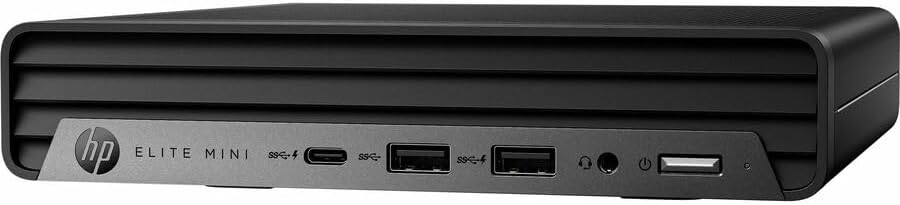
Obrázok: Predná strana view of the HP Elite Mini 800 G9 Desktop PC, highlighting the accessible front ports including USB-C, USB-A, and a headphone jack.
2. Pripojenie periférií
- Pripojenie monitora: Connect your monitor to one of the available video output ports (e.g., DisplayPort, HDMI) on the rear of the mini PC.
- Pripojenie klávesnice a myši: Plug the included keyboard and mouse into the USB ports on the mini PC.
- Pripojenie k sieti (voliteľné): For a wired internet connection, connect an Ethernet cable from your router or network switch to the Ethernet port on the mini PC. Wireless connectivity (Wi-Fi 6) is also available.
- Pripojenie napájania: Connect the AC adapter to the power input port on the mini PC, then plug the power cord into a wall outlet.
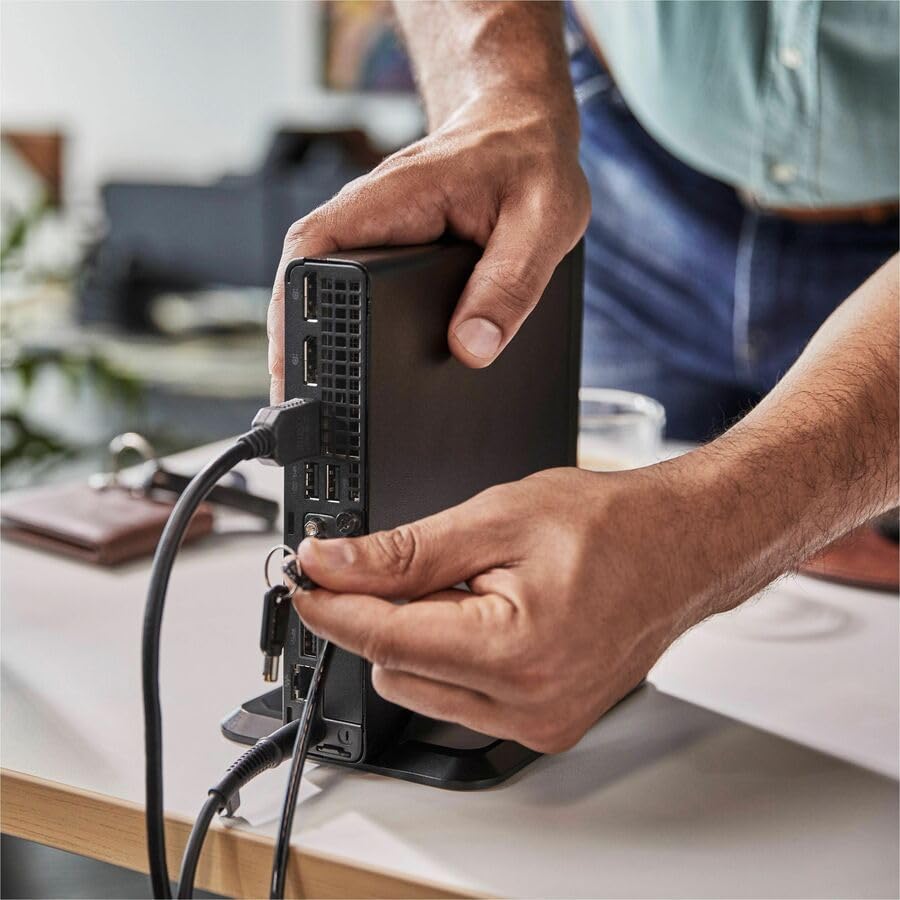
Image: A user connecting various cables, including power and display, to the rear ports of the HP Elite Mini 800 G9. This illustrates the typical connection process for peripherals.
Návod na obsluhu
Once your HP Elite Mini 800 G9 is set up, follow these steps for basic operation:
1. Zapnutie
Press the power button located on the front of the mini PC. The power indicator light will illuminate, and the system will begin to boot up. The operating system (Windows 11 Pro) will load automatically.
2. Počiatočné nastavenie (prvé použitie)
Upon first boot, you will be guided through the Windows 11 Pro setup process. This includes selecting your region, language, accepting terms, and setting up a user account. Follow the on-screen prompts to complete this process.
3. Vypnutie
To properly shut down the computer, click the Štart tlačidlo v systéme Windows a potom vyberte Sila > Vypnúť. Avoid powering off the system by holding the power button, as this can lead to data loss or system corruption.

Image: A professional working at a desk, demonstrating the compact integration of the HP Elite Mini 800 G9, which is mounted discreetly behind a monitor.
Údržba
Regular maintenance helps ensure the longevity and optimal performance of your HP Elite Mini 800 G9 Desktop Computer.
1. Aktualizácie softvéru
Keep your operating system and drivers updated. Windows Update automatically handles OS updates. For driver updates, visit the official HP support webstránka pre váš model.
2. Upratovanie
- Exteriér: Použite mäkkú handričku, ktorá nepúšťa vlákna dampVonkajšie povrchy opláchnite vodou alebo jemným čistiacim roztokom.
- otvory: Periodically use compressed air to clear dust from the ventilation grilles to prevent overheating. Ensure the system is powered off before cleaning vents.
3. Zálohovanie údajov
Regularly back up important data to an external drive or cloud storage to prevent data loss in case of hardware failure or other issues.
Riešenie problémov
Táto časť sa zaoberá bežnými problémami, s ktorými sa môžete stretnúť pri používaní počítača HP Elite Mini 800 G9.
Žiadna sila
- Ensure the AC adapter is securely connected to both the mini PC and a working power outlet.
- Overte funkčnosť elektrickej zásuvky pripojením iného zariadenia.
- Skontrolujte tlačidlo napájania, či nie je poškodené alebo prekážajúce.
Žiadne zobrazenie na monitore
- Confirm the monitor is powered on and correctly connected to the mini PC's video output port.
- Uistite sa, že na monitore je vybratý správny vstupný zdroj.
- Try connecting the mini PC to a different monitor or using a different video cable if available.
Pomalý výkon
- Zatvorte nepotrebné aplikácie bežiace na pozadí.
- Skontrolujte a nainštalujte všetky čakajúce aktualizácie systému Windows alebo aktualizácie ovládačov.
- Run a disk cleanup and defragmentation (for HDDs, not typically needed for SSDs).
- Scan for malware or viruses using reputable antivirus software.
Špecifikácie
Detailed technical specifications for the HP Elite Mini 800 G9 Desktop Computer:
| Funkcia | Detail |
|---|---|
| Číslo modelu | AS1F8AT#ABA |
| Procesor | Intel Core i5-12500T (12th Gen, Hexa-core, 2 GHz) |
| RAM | 16 GB DDR5 RAM |
| Skladovanie | 256 GB SSD |
| Grafika | Grafická karta Intel UHD 770 (integrovaná) |
| Operačný systém | Windows 11 Pro |
| Bezdrôtové pripojenie | Wi-Fi 6 (802.11ax), Bluetooth |
| Rozmery (DxŠxV) | 6.9 x 7 x 1.4 palca |
| Hmotnosť | 3.13 libry |
| Porty (predné) | USB-C, USB-A, Headphone/Microphone Combo |
| Porty (zadné) | Multiple USB-A, Video Outputs (e.g., DisplayPort, HDMI), Ethernet, Power Input |
Záruka a podpora
Your HP Elite Mini 800 G9 Desktop Computer comes with a standard manufacturer's warranty. For specific warranty terms and conditions, please refer to the documentation included with your product or visit the official HP support webstránky.
Pre technickú pomoc, stiahnutie ovládačov alebo ďalšiu podporu navštívte stránku podpory HP webmiesto: